print((2).__add__(3), 'ab'.__add__('cd'), [1, 2].__add__([3]))
print(len([55, 65]), [55, 65].__len__())
5 abcd [1, 2, 3]
2 2__repr__, __eq__ and __add__ so that Vector(1, 2) + Vector(3, 4) == Vector(4, 6) is True, then let dataclass write such methods for a Student.
Before this lesson
After this lesson you can
__repr__, __eq__, __add__ and __len__ for a class of your own.__eq__.__init__, __repr__ and __eq__ for a record.In review. The maths and code on this page are checked by automated tests on every change, but an independent reader has not signed it off yet. Spot a mistake or a confusing step? Tell us.
2 + 3 adds, 'Ama' + 'Ben' joins text, and [55] + [65] joins lists: one sign, three meanings, picked by the type of the values. But for an object of your own, print shows a line such as <__main__.Vector object at 0x10f3a2b90>, two objects with the same numbers are not ==, and + stops with TypeError. How does + know what to do with each type, and how can your class take part?
From the last lesson
1. Rewrite b.add(80) without the short form.
RunningMean.add(b, 80).
2. Why do all instances share a list written in the class body?
The class body runs once, so it makes one list, stored in the class. Instances have no values of their own, so self.values finds the class’s list.
Python turns each of these operations into a call of a method with a fixed name, written with two underscores on each side. v + w becomes v.__add__(w), v == w becomes v.__eq__(w), and so on. These are special methods; people often call them “dunder” methods, for “double underscore”.
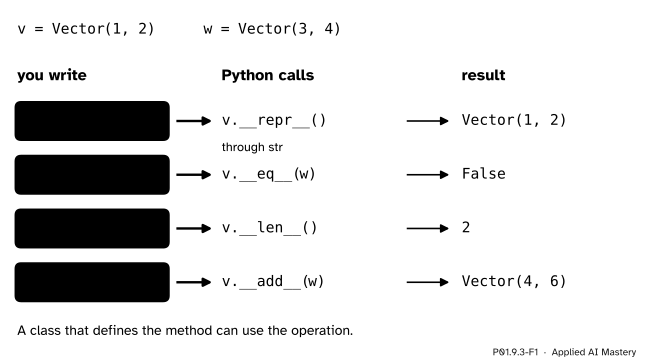
Each operation is a method call in disguise. A class that defines the method can use the operation.
So the meaning of + is asked first of the type of the value on its left: int has an __add__ that adds, str and list have ones that join. Your class gets an + by defining __add__.
Step 1. The built-in types already work this way. Call the methods by name and you get what the operations give.
print((2).__add__(3), 'ab'.__add__('cd'), [1, 2].__add__([3]))
print(len([55, 65]), [55, 65].__len__())5 abcd [1, 2, 3]
2 2(The brackets around 2 keep Python from reading 2. as the start of a float.)
Step 2. A class without special methods. A vector of two numbers, an arrow in the plane, with only __init__:
class Vector:
    def __init__(self, x, y):
        self.x = x
        self.y = y


v = Vector(1, 2)
print(v)                       # <__main__.Vector object at 0x10f3a2b90>
print(v == Vector(1, 2))       # False
v + Vector(3, 4)               # TypeError: unsupported operand type(s) for +: 'Vector' and 'Vector'
The number after at is where the object sits in memory, and it changes from run to run. The error message was copied from Python 3.15; the wording varies a little between versions.
Step 3. __repr__: how the object is written. It must return a string. The convention is to write the object the way you would type it.
Step 4. __eq__: when two objects are equal. Two vectors are equal when their x parts are equal and their y parts are equal.
Step 5. __add__ and __len__. __add__ builds and returns a new vector from the two it is given, without changing either; __len__ says how many numbers a vector holds.
class Vector:
    def __init__(self, x, y):
        self.x = x
        self.y = y

    def __repr__(self):
        return f'Vector({self.x}, {self.y})'

    def __eq__(self, other):
        return self.x == other.x and self.y == other.y

    def __add__(self, other):
        return Vector(self.x + other.x, self.y + other.y)

    def __len__(self):
        return 2


v = Vector(1, 2)
w = Vector(3, 4)
print(v, w)
print(v == w, v == Vector(1, 2))
print(len(v), v + w)
Vector(1, 2) Vector(3, 4)
False True
2 Vector(4, 6)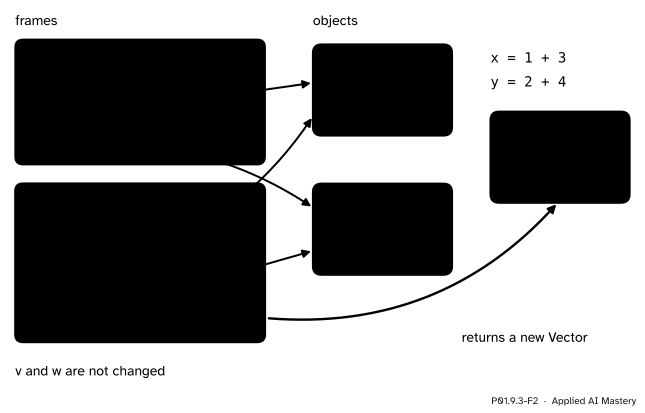
During v + w, self is v and other is w, as in any method call. __add__ makes a third object and returns it; v and w are not changed.
The operations of this lesson, for objects v and w, with what happens when the class does not define the method:
print(v) calls v.__str__(); without it, __repr__ is used.repr(v) calls v.__repr__(); without it, you get <... at 0x...>.v == w calls v.__eq__(w); without it, == is the same as is.len(v) calls v.__len__(); without it, TypeError.v + w calls v.__add__(w); without it, TypeError.Some fine print, all from the Python Language Reference:
print turns its value into text with str, which calls __str__. The default __str__ “calls object.__repr__()” (3.3.1), so defining __repr__ alone serves both.__eq__, “the default behavior for equality comparison (== and !=) is based on the identity of the objects” (6.10.1): v == w is True only when v is w. With an __eq__, v != w is its opposite unless you define __ne__ too.x + y, “type(x).__add__(x, y) is called” (3.3.8). That is the long form of the last lesson, RunningMean.add(a, 55), with __add__ in place of add. The lookup starts in the class, not in the instance.__repr__ must return a string, and __len__ a whole number that is not negative. __add__ should return a new object, as 2 + 3 does not change 2.Evaluate Vector(1, 2) + Vector(3, 4) == Vector(4, 6) by hand, as an expression tree (P01.2.3). + binds more tightly than ==, so the sum is worked out first.
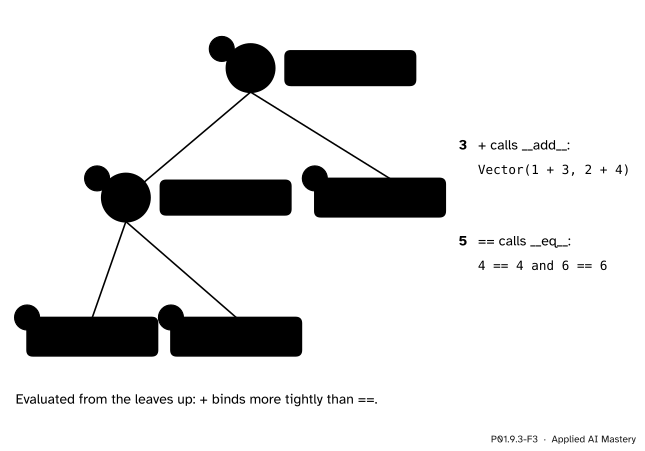
The tree, evaluated from the leaves. Each operator node is a method call on the value of its left child.
Vector(1, 2) makes the first vector.Vector(3, 4) makes the second.+ calls Vector(1, 2).__add__(Vector(3, 4)), which returns Vector(1 + 3, 2 + 4), a new vector with x 4 and y 6.Vector(4, 6) on the right makes a fourth object.== calls __eq__ on the sum with the fourth object as other: \({4 = 4}\) and \({6 = 6}\), so the answer is True.The sum and the right-hand vector are two separate objects that are equal, so is would say False while == says True, just as for two equal lists in P01.6.4.
total = Vector(1, 2) + Vector(3, 4)
right = Vector(4, 6)
print(total, total == right, total is right)
print(Vector(1, 2) + Vector(3, 4) == Vector(4, 6))
Vector(4, 6) True False
TrueA record class such as Student of P01.9.1 needs the same three methods every time: an __init__ that stores each field, a __repr__ that shows them, and an __eq__ that compares them. The standard library writes them for you. @dataclass above a class is a decorator: a function that takes the class just made and gives it back with the methods added. The fields are listed with type hints, the notes of P01.4.2 that Python does not enforce.
from dataclasses import dataclass


@dataclass
class Student:
    name: str
    hours: int
    score: int


ama = Student('Ama', 2, 55)
print(ama)
print(ama == Student('Ama', 2, 55), ama == Student('Ama', 2, 60))
print(ama.score, vars(ama))
Student(name='Ama', hours=2, score=55)
True False
55 {'name': 'Ama', 'hours': 2, 'score': 55}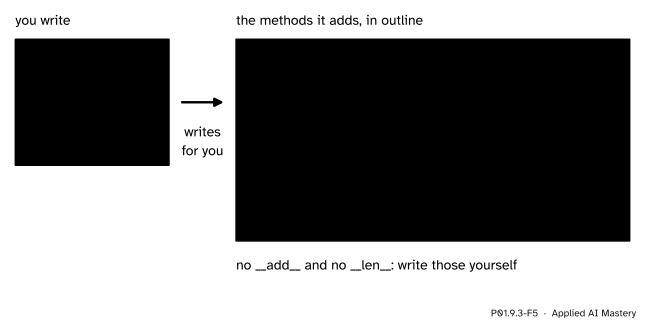
What @dataclass writes for a record, in outline. The fields, in order, decide the arguments of __init__, the text of __repr__ and what __eq__ compares.
The dataclasses documentation lists init, repr and eq among the methods made by default. It does not make __add__ or __len__, because it cannot guess what adding two students would mean. That is the general rule: a type decides what its operations mean. A NumPy array (P02.2) has an __add__ that adds two arrays slot by slot, which is why a + b on arrays adds, while on lists it joins.
This module’s interactive, the instance workbench, lives in P01.9.2. Each call it makes, such as a.add(55), is one lookup in the class followed by one function call; here every + and == you write is the same thing in disguise.
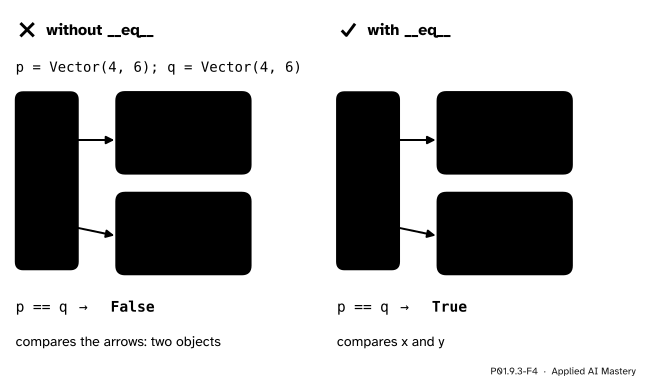
Wrong beside right. Without __eq__, == asks whether the two arrows point to one object. With __eq__, it compares what the objects hold.
“Two objects with the same attributes are ==.”
Only if the class says so. Without __eq__, == falls back to identity, and two separate objects are never equal. This trips up tests (P01.8.4): assert result == Vector(4, 6) fails on a class without __eq__ even when the numbers are right.
“__repr__ should print the object.”
It must return a string; Python does the printing. A __repr__ that calls print returns None, and print(v) then stops with a TypeError saying that a string was expected.
“__add__ can add the other vector into self and return it.”
Then v + w changes v, and a sum written to look harmless quietly changes a value you meant to keep. 2 + 3 does not change 2; build and return a new object instead.
“v == (1, 2) will just be False.”
Our __eq__ reads other.x, and a tuple has no x, so it stops with AttributeError. Exercise 3 shows the fix: check the type of other first.
Vector1. Which method does v + w call, and on which object?
__add__, on v, the value on the left, with w as the argument: v.__add__(w).
2. What does print(v) show for a class with __repr__ but no __str__?
The string that __repr__ returns, because the default __str__ calls __repr__.
3. Without __eq__, when is v == w True?
Only when v and w are the same object, that is when v is w.
4. Why should __add__ return a new object?
So that v + w leaves v and w unchanged, as 2 + 3 leaves 2 unchanged.
5. Which three methods does @dataclass write by default?
__init__, __repr__ and __eq__.
1. ★ Give Vector a method __sub__, so that Vector(3, 4) - Vector(1, 2) is Vector(2, 2).
    def __sub__(self, other):
        return Vector(self.x - other.x, self.y - other.y)
Inside the class. - calls __sub__ in the same way that + calls __add__, and \({3 - 1} = 2\), \({4 - 2} = 2\).
2. ★★ Write __mul__(self, k) so that Vector(1, 2) * 3 is Vector(3, 6). Then predict what 3 * Vector(1, 2) does, and explain why.
    def __mul__(self, k):
        return Vector(self.x * k, self.y * k)
3 * Vector(1, 2) puts the int on the left, so Python first asks int.__mul__, which does not know vectors and answers NotImplemented. Python then tries the reflected method __rmul__ on the right operand; Vector has none, so it stops with TypeError. Adding __rmul__ = __mul__ in the class body makes both orders work.
3. ★★★ Vector(1, 2) == (1, 2) stops with AttributeError. Change __eq__ so that it gives False for anything that is not a Vector, and say what Python does with the value your method returns.
    def __eq__(self, other):
        if not isinstance(other, Vector):
            return NotImplemented
        return self.x == other.x and self.y == other.y
NotImplemented is a special value that means “I do not know how to compare with this”. Python then tries the other side, tuple.__eq__, which also returns NotImplemented, and falls back to identity. The two are different objects, so the answer is False. Returning False directly would also work here, but NotImplemented lets the other type have its say, which is what the built-in types do.
Operators and built-ins call special methods on your objects.
Each operation is a method call.
print(v) → __repr__, v == w → __eq__, len(v) → __len__, v + w → __add__.x + y calls type(x).__add__(x, y).==: identity, the same as is.@dataclass writes __init__, __repr__ and __eq__ from the fields.Sources. Each was opened and checked against this lesson on 12 November 2026.
__repr__ “should look like a valid Python expression”, that the default __str__ “calls object.__repr__()”, and that “x==y calls x.__eq__(y)”; 3.3.7, that __len__ is “called to implement the built-in function len()”; 3.3.8, that to evaluate x + y, “type(x).__add__(x, y) is called”. And 6.10.1 Value comparisons: “The default behavior for equality comparison (== and !=) is based on the identity of the objects.”__init__() and __repr__(); init, repr and eq are true by default; the generated repr has “the class name and the name and repr of each field”.__add__ for self + other, __eq__ for self == other and __len__ for len(self), and the uninformative default print of an object.Next. P01.9.4 lets one class build on another, and shows why scikit-learn’s models can all be used in the same way.
This lesson unlocks
P01.9.4 Inheritance and shared interfaces