import tempfile
from pathlib import Path

# a new, empty folder of our own
tmp = tempfile.TemporaryDirectory()
folder = Path(tmp.name)
# the folder's path, then the file's name
path = folder / "requirements.txt"
print(path.name)requirements.txtBefore this lesson
P01.7.2 Splitting, joining and formatting
After this lesson you can
In review. The maths and code on this page are checked by automated tests on every change, but an independent reader has not signed it off yet. Spot a mistake or a confusing step? Tell us.
P01.5.3 showed three lines of this site’s requirements.txt and read them by eye: numpy==2.5.4, pandas==3.1.1 and pytest==9.2.0. A program can read them too. Where does that text live while no program is running, and how does a program bring it in, or send new text out?
From the last lesson
1. What does "Chen,5,80\n".split(",") return, and what is wrong with its last piece?
['Chen', '5', '80\n']. The last piece keeps the new line; strip the line before splitting it.
2. What string does f"{60:>6.1f}" give?
' 60.0': six characters, the number at the right with one decimal, two spaces in front.
Everything a program holds in memory disappears when it stops. A file is what stays: a run of bytes kept on storage, such as a disk, under a name. Files sit in folders, and the path of a file says which folders to go through and then gives the file’s name, as in project/requirements.txt.
A program cannot use those bytes directly. It asks for the file with open, and gets back a file object: a connection through which it reads text in, or writes text out.
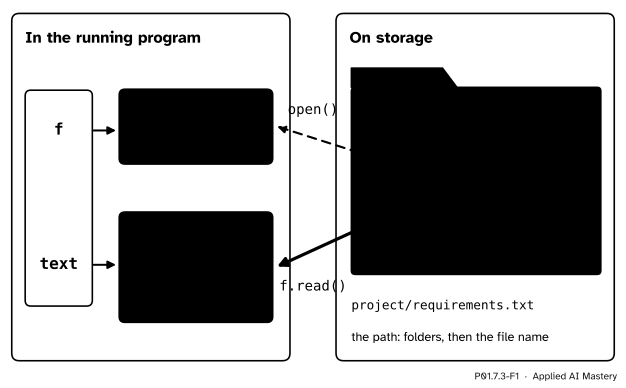
The file stays on storage under its path. open gives the program a file object joined to it, and f.read() copies the file’s text into an ordinary string.
So reading a file is two steps. open makes the connection, and a method of the file object such as read copies text across. The result is an ordinary str, so everything from the last two lessons works on it. Writing is the same in the other direction.
Data for machine learning arrives this way. Training data, settings and results are kept in files, and a list of pinned versions like this one is how a result is repeated on another machine.
Step 1. A path. The code below works inside a new, empty folder that it makes and deletes itself, so it never touches your own files. Path from pathlib joins a folder and a file name with /, which works on every system: folder / "requirements.txt".
Step 2. Write. open(path, "w", encoding="utf-8") opens the file for writing. The method f.write sends a string to it, and does not add a new line, so each line ends with its own "\n". The with block closes the file when the block ends.
Step 3. Read it whole. open(path, encoding="utf-8") opens it for reading, and f.read() returns the whole text as one string, 'numpy==2.5.4\npandas==3.1.1\npytest==9.2.0\n'.
Step 4. Read one line at a time. f.readline() returns the next line with the \n that ends it. At the end of the file it returns '', the empty string. An empty line inside a file would come back as '\n', so the two cannot be confused.
Step 5. Loop over the lines. A for loop over a file object gives one line per pass. Strip the \n, split at == (P01.7.2), and the line falls into a name and a version.
Step 6. Choose a mode. "r" reads and is the default. "w" writes, and empties the file first. "a" appends: what you write goes on the end.
Step 7. Text and bytes. Storage holds bytes, numbers from 0 to 255 (P01.1.4). Text is characters. An encoding is the rule that turns one into the other, and the rule used almost everywhere is UTF-8.
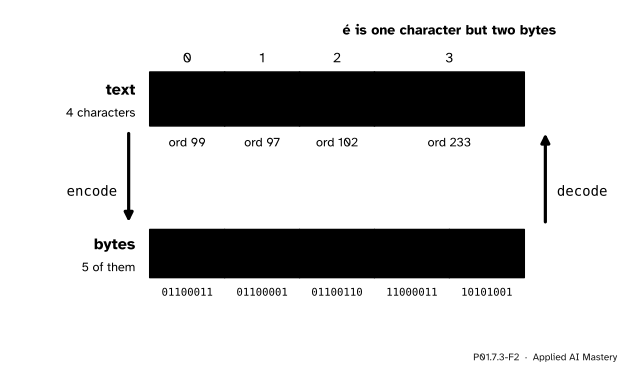
Encoding turns characters into bytes. In UTF-8, c, a and f take one byte each, and é takes two.
Step 8. Shortcuts. path.read_text(encoding="utf-8") opens, reads and closes in one call, and path.write_text(text, encoding="utf-8") opens, writes and closes; like mode "w", it replaces a file that is already there.
Fact 1: the size of the file. The three lines hold 13, 14 and 14 characters, new lines included, so the file holds 13 + 14 + 14 = 41 characters. Each of them is numbered below 128, so in UTF-8 each takes one byte: on macOS and Linux the file is 41 bytes. On Windows, Python writes each new line as the two characters \r\n, so the file is 44 bytes there, and it turns them back into \n when it reads in text mode, so the program sees the same 41 characters.
Fact 2: why encoding is always written out. If encoding is left out, Python 3.12 to 3.14 use a default that depends on the system, and Python 3.15 made UTF-8 the default. A file read with a different encoding from the one it was written in comes back garbled, without any error. Writing encoding="utf-8" makes a program do the same thing on every system and every version.
UTF-8 writes a character numbered from 128 to 2047 as two bytes, 110xxxxx and 10xxxxxx. The eleven places marked x hold the character’s number in binary, its lowest bit in the last place.
ord("é") is 233. In binary, 233 is 128 + 64 + 32 + 8 + 1, which is 11101001 (P01.1.4). As eleven bits that is 00011101001. The first five bits, 00011, go into the first byte and the last six, 101001, into the second:
110 then 00011, so 11000011, which is 128 + 64 + 2 + 1 = 195;10 then 101001, so 10101001, which is 128 + 32 + 8 + 1 = 169.These are the two yellow bytes of the figure, and bytes([195, 169]).decode("utf-8") turns them back into 'é'.
Read requirements.txt into a dictionary that maps each package to its pinned version.
The plan has three moves: open the file, loop over its lines, and for each line strip the new line, split at ==, and store the two parts in a dictionary (P01.6.3).
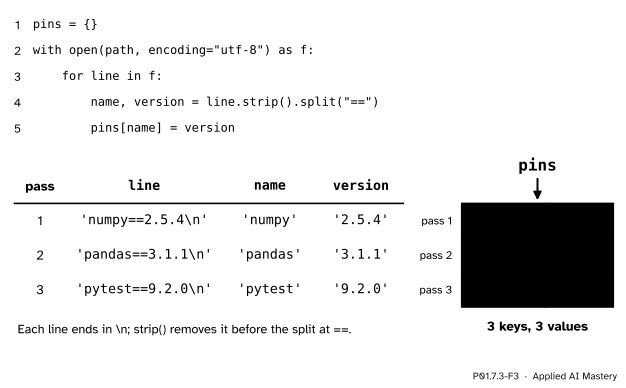
The trace of the loop over the file, one row per line, and the dictionary it builds.
Pass 1 binds line to 'numpy==2.5.4\n'. strip() removes the new line, giving 'numpy==2.5.4', and split("==") cuts it into ['numpy', '2.5.4'], which unpacks into name and version (P01.6.2). The dictionary gets the entry 'numpy' to '2.5.4'. Passes 2 and 3 add pandas and pytest in the same way. When the lines run out, the loop ends, the with block ends, and the file is closed.
The versions are still text, but they are now easy to take further. pins["numpy"].split(".") is ['2', '5', '4'], and converting each piece with int gives the three whole numbers that P01.5.3 compared one at a time.
A folder of our own, made fresh and deleted at the end. Its path changes from machine to machine, so the code prints only the file’s name.
import tempfile
from pathlib import Path
# a new, empty folder of our own
tmp = tempfile.TemporaryDirectory()
folder = Path(tmp.name)
# the folder's path, then the file's name
path = folder / "requirements.txt"
print(path.name)requirements.txtWrite the three pinned lines, then read them back whole.
with open(path, "w", encoding="utf-8") as f:
    f.write("numpy==2.5.4\n")
    f.write("pandas==3.1.1\n")
    f.write("pytest==9.2.0\n")
print(f.closed)

with open(path, encoding="utf-8") as f:
    text = f.read()
print(repr(text))
print(len(text), text.count("\n"))
True
'numpy==2.5.4\npandas==3.1.1\npytest==9.2.0\n'
41 3Line by line, and then in a loop that builds the dictionary of the worked example.
with open(path, encoding="utf-8") as f:
    print(repr(f.readline()))
    print(repr(f.readline()))
    print(repr(f.readline()))
    # the fourth call starts at the end
    print(repr(f.readline()))

pins = {}
with open(path, encoding="utf-8") as f:
    for line in f:
        name, version = line.strip().split("==")
        pins[name] = version
print(pins)
print(pins["numpy"].split("."))
'numpy==2.5.4\n'
'pandas==3.1.1\n'
'pytest==9.2.0\n'
''
{'numpy': '2.5.4', 'pandas': '3.1.1', 'pytest': '9.2.0'}
['2', '5', '4']Append a fourth pin, then use the pathlib shortcuts to read the file and to write a copy.
with open(path, "a", encoding="utf-8") as f:
    f.write("scipy==1.18.1\n")

# open, read and close in one call
text = path.read_text(encoding="utf-8")
print(text.strip().split("\n"))

# open, write and close in one call
backup = folder / "backup.txt"
backup.write_text(text, encoding="utf-8")
copied = backup.read_text(encoding="utf-8")
print(copied == text)
['numpy==2.5.4', 'pandas==3.1.1', 'pytest==9.2.0', 'scipy==1.18.1']
TrueText and bytes. encode turns a string into bytes, decode turns bytes back into a string, and decoding with the wrong encoding garbles the text without raising an error.
word = "café"
data = word.encode("utf-8")
print(len(word), len(data))
print(list(data))
print(data.decode("utf-8"))
# the wrong encoding
print(data.decode("cp1252"))
4 5
[99, 97, 102, 195, 169]
café
caféLast, delete the folder and everything in it.
tmp.cleanup()
print(folder.exists())FalseThis module’s interactive, the string slicer, lives in P01.7.1. Choose the line numpy==2.5.4 there, switch to Split, and cut it at == and then at .: these are the two splits that turn a pinned line into a name and three version numbers.
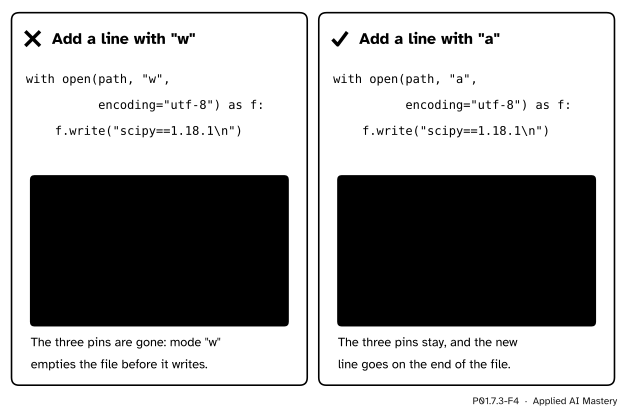
Wrong beside right. Mode "w" empties the file before it writes; mode "a" keeps what is there and adds to the end.
“Mode "w" adds what I write to the file.”
It empties the file first, so the old lines are lost, and nothing warns you. Use "a" to add to the end, and keep "w" for writing a file from scratch.
“I can leave out encoding=; it works on my machine.”
The default depends on the system before Python 3.15. A file written in UTF-8 and read with a different encoding comes back garbled: the bytes of café read as cp1252, a common Windows encoding, give 'café', and no error is raised. Write encoding="utf-8" every time.
“The file is next to my script, so open will find it.”
A path that does not start at the top of the storage is looked up from the working folder, the folder you were in when you ran python, not from the script’s folder. A wrong folder, or a misspelt name, gives this:
with open("requirments.txt", encoding="utf-8") as f:
    text = f.read()
Traceback (most recent call last):
File "read_pins.py", line 1, in <module>
with open("requirments.txt", encoding="utf-8") as f:
^^^^^^^^^^^^^^^^^^^^^^^^^^^^^^^^^^^^^^^^^
FileNotFoundError: [Errno 2] No such file or directory: 'requirments.txt'This message was copied from a run on Python 3.12; the marks under the code vary between versions. Read it from the bottom: the kind of error, then the name Python looked for, here spelt requirments.
“Lines come out of a file without their new line.”
readline and a for loop both keep the \n at the end of each line, which is why every line was stripped before it was split.
1. What does mode "w" do to a file that already exists?
It empties the file before writing, so the old contents are lost.
2. What does f.readline() return once the end of the file is reached?
'', the empty string. An empty line inside the file would come back as '\n'.
3. In UTF-8, how many characters and how many bytes does "café" take?
4 characters and 5 bytes: one byte each for c, a and f, and two for é.
4. Why open a file in a with block?
The block closes the file when it ends, even when an error stops it early.
5. What does folder / "requirements.txt" make, when folder is a Path?
A new Path: the folder’s path followed by the file’s name.
1. ★ The file holds the three pinned lines. Inside one with block you call f.readline() four times. What does each call return?
'numpy==2.5.4\n', 'pandas==3.1.1\n', 'pytest==9.2.0\n' and then '', because the fourth call starts at the end of the file.
2. ★★ Write count_lines_and_chars(path), which returns the number of lines and the number of characters in a text file, reading it with a for loop. What does it return for the file of three pinned lines?
def count_lines_and_chars(path):
    lines = 0
    chars = 0
    with open(path, encoding="utf-8") as f:
        for line in f:
            lines += 1
            chars += len(line)
    return lines, chars
Each line keeps its \n, so the new lines are counted as characters. For the three pins it returns (3, 41): 13 + 14 + 14 characters.
3. ★★★ ord("ï") is 239. Use the rule of the deeper block to find the two UTF-8 bytes of ï, then say how many bytes "naïve" takes, and check with encode.
239 is 128 + 64 + 32 + 8 + 4 + 2 + 1, which is 11101111; as eleven bits, 00011101111. The first five bits, 00011, give the byte 11000011, which is 195. The last six, 101111, give 10101111, which is 128 + 32 + 8 + 4 + 2 + 1 = 175. So ï is the two bytes 195 and 175. "naïve" has five characters: n, a, v and e take one byte each and ï takes two, so it takes 6 bytes. list("naïve".encode("utf-8")) is [110, 97, 195, 175, 118, 101].
A file is bytes on storage; open gives a file object to read and write text through.
Storage keeps bytes; a program reads text.
with open(path, mode, encoding="utf-8") as f: and the file is closed when the block ends."r" reads, "w" empties then writes, "a" adds to the end.f.read() gives all the text, f.readline() one line, for line in f every line, each with its \n.é (233) is two, 195 and 169. Path.read_text and write_text are the shortcuts.Sources. Each was opened and checked against this lesson on 12 November 2026.
'r', 'w' (an existing file is erased) and 'a'; the with keyword, which closes the file even if an exception is raised; readline leaving the \n at the end of a line and returning '' at the end of the file; looping over a file object. The Python 3.12 version says that the default encoding is platform dependent and recommends encoding="utf-8", and that text mode turns \r\n on Windows into \n when reading.'\n' written as the system’s line separator when writing in text mode.read_text, and write_text, which overwrites an existing file of the same name.str.encode and bytes.decode.110xxxxx 10xxxxxx for the numbers 0080 to 07FF, filled from the lowest bit of the last byte.readline, the new line at the end, and strip) and 13.1 (Filenames and paths).Next. P01.7.4 Tables in files: CSV and JSON reads the study table from study.csv, by hand and with the csv module, and saves results as JSON.
This lesson unlocks
P01.7.4 Tables in files: CSV and JSON