scores = [55, 65, 80, 40, 60]
print(scores[0], scores[2], scores[4], len(scores))
55 80 60 5Before this lesson
P01.3 Control flow P01.4 Functions and scope P01.5.1 Modules and import
After this lesson you can
In review. The maths and code on this page are checked by automated tests on every change, but an independent reader has not signed it off yet. Spot a mistake or a confusing step? Tell us.
The study table’s five quiz scores sit in one list, scores = [55, 65, 80, 40, 60]. How do you ask for Chen’s score, the last score or the middle three, and how do you add a sixth score or put right a mistyped one, without inventing a new name for every number?
Since P01.3.3 you have written lists in square brackets and looped over them. A list is one object that holds a row of other objects, in order. Picture it as a row of slots, each numbered. A slot’s number is its position, also called its index, and Python counts positions from 0.
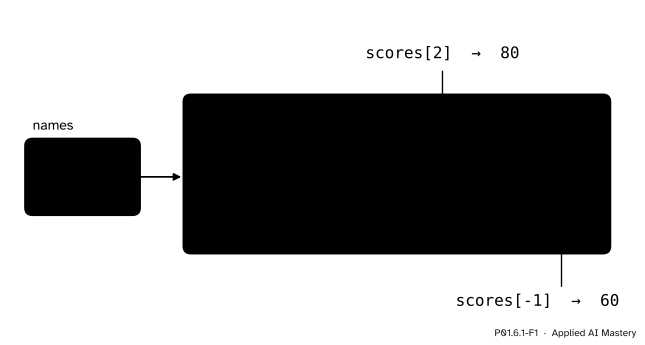
The box diagram of a list. The name scores points to one list object, a row of five slots. Positions count from 0 at the front (above the slots) and from −1 at the back (below them), so scores[2] is 80 and scores[-1] is 60.
The name scores sits in the frame of names you met in P01.2.2, and its arrow points to one list object of five slots. Position 0 holds 55, Ama’s score, and position 2 holds 80, Chen’s. Below the slots a second numbering counts from the back, from −1 for the last slot to −5 for the first.
Why start at 0? A position says how many slots to step over from the front. To reach the first slot you step over none, so its position is 0. To reach Chen’s you step over two. So the last of five slots is at position 4, not 5.
Two words in the title matter. Ordered: a list remembers which item came first. Changeable: a slot can be overwritten, added or removed while the list stays the same object. The tuple of the next lesson is ordered but not changeable.
This box diagram is the course’s picture of every container from now on. Small numbers are written inside their slots; strictly, a slot holds an arrow to an object, and lesson P01.6.4 draws those arrows when they matter.
Almost every program in machine learning starts by walking along a row like this one: a dataset is a list of examples, and an example is a row of numbers.
Step 1. One item by position. Square brackets after a list ask for the item at a position.
scores = [55, 65, 80, 40, 60]
print(scores[0], scores[2], scores[4], len(scores))55 80 60 5len(scores) is 5, so the positions run from 0 to 4, and position 5 does not exist. Run as a file, these two lines stop with an IndexError:
scores = [55, 65, 80, 40, 60]
print(scores[5])
Traceback (most recent call last):
File "positions.py", line 2, in <module>
print(scores[5])
~~~~~~^^^
IndexError: list index out of rangeThis message, like every one in this module, was copied from a run of Python 3.15. The wording of error messages varies a little between versions, but the last line always names the kind of error first.
Step 2. Counting from the back. A negative position counts from the end, so scores[-1] is 60 and scores[-2] is 40. The rule behind it: in a list of length \(n\), position \({-k}\) is the same slot as position \({n - k}\). For the scores, scores[-1] is scores[5 - 1], which is scores[4].
Step 3. A slice. Two positions with a colon between them cut out a run of slots: scores[1:4] is [65, 80, 40]. To see why it stops before position 4, picture the numbers as cuts between the slots: cut 1 is the left edge of slot 1, and cut 4 is the left edge of slot 4. A slice takes everything between its two cuts.
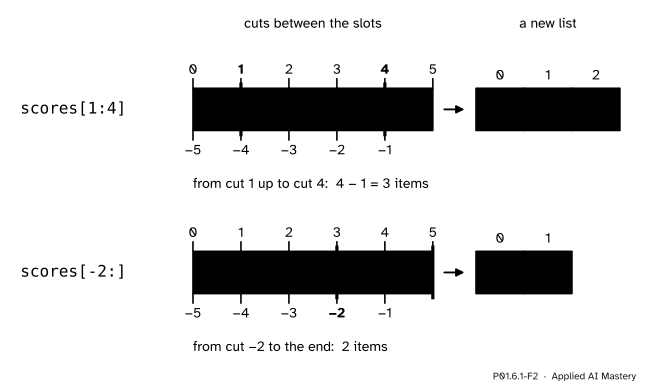
A slice copies what lies between two cuts into a new list, numbered from 0 again. Top: scores[1:4] holds \({4 - 1 = 3}\) items. Bottom: scores[-2:] runs from cut −2 to the end.
Leave out the start to begin at the front and the stop to run to the end: scores[:2] is [55, 65] and scores[-2:] is [40, 60]. A slice never raises IndexError: a stop past the end just stops at the end, so scores[3:100] is [40, 60].
Step 4. Is it in there? 80 in scores is True and 100 in scores is False. The in operator compares the value with each item in turn, from position 0, until one is equal: the search loop of P01.3.4, built in.
Step 5. Changing the list. Five ways to change a list where it stands:
scores[3] = 45 puts 45 in slot 3, replacing what was there.scores.append(70) adds a new slot at the end, holding 70.scores.insert(1, 50) puts 50 at position 1 and moves every later item one place to the right.scores.pop() removes the last slot and gives back its item. scores.pop(0) removes the first.scores.remove(60) removes the first item equal to 60.A call written after a dot, such as scores.append(70), is a method: a function that belongs to the object before the dot and works on it, reached with the dot of P01.5.1. None of the five makes a new list: scores still points to the same list object, and that object has changed. Python’s word for changeable is mutable, and lesson P01.6.4 shows why it matters.
Step 6. Sorting. scores.sort() puts the items in increasing order, in place, and returns None. sorted(scores) leaves scores alone and returns a new list, [40, 55, 60, 65, 80], whose first item is the lowest score, 40, and whose last is the highest, 80.
How many items a slice holds. When \({0 \le i \le j \le n}\), the slice a[i:j] holds the positions from \(i\) up to \({j - 1}\). A run of whole numbers has “last minus first, plus one” members, so
\[ (j - 1) - i + 1 \;=\; j - i . \]
So a[:k] holds the first \(k\) items, a[k:] the other \({n - k}\), and a[-k:], which runs from position \({n - k}\) to \(n\), the last \(k\).
What each operation does and gives back.
a[i] = x puts x in slot \(i\) (a statement: nothing comes back).a.append(x) adds x at the end; gives back None.a.insert(i, x) puts x at position \(i\), later items move right; gives back None.a.pop() removes the last item and gives it back; a.pop(i) does so at position \(i\).a.remove(x) removes the first item equal to x; gives back None.a.sort() sorts the items in place; gives back None.sorted(a) gives back a new sorted list.a.index(x) gives back the position of the first x.So a method that changes a list gives back None, except pop, whose job is to hand an item over. Two errors complete the list: pop on an empty list or outside the list raises IndexError, and remove or index of a missing value raises ValueError.
CPython, the usual Python, stores a list as one block of references laid side by side. To reach position \(i\) it starts at the beginning of the block and steps over \(i\) references in one jump, whatever the length of the list. The first slot is the one reached by stepping over nothing, which is why it is position 0. x in a has no such shortcut: it compares x with the items one by one, so a missing value costs a million comparisons in a list of a million. The sets of lesson P01.6.3 answer in without that walk.
A mistyped list, put right. The scores were typed in a hurry. Ben’s 65 came out as 56, Eli’s 60 was typed twice, and Dina’s 40 was left out. Four lines repair the list. Trace each line before reading on.
scores = [55, 56, 80, 60, 60]
scores[1] = 65
extra = scores.pop()
scores.insert(3, 40)
print(scores, extra)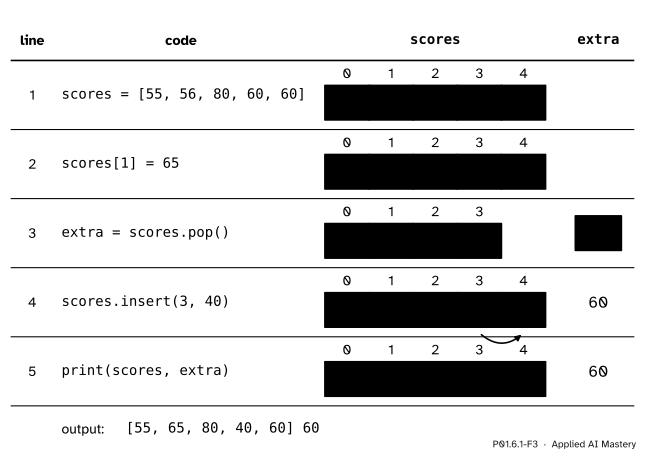
The worked example as a trace table: one row per line, with the list and the name extra after that line. A yellow slot is the one the line just changed.
Line 1 makes a list of five slots. Two are wrong: position 1 holds 56, and positions 3 and 4 both hold Eli’s 60.
Line 2 is an item assignment. The slot at position 1 now holds 65, and nothing else moves.
Line 3 calls pop with no position, so it removes the last slot and returns its item, which the name extra now names: 60. The list has four slots, so len(scores) is 4.
Line 4 calls insert(3, 40). The 40 goes into position 3, and Eli’s 60, which was there, moves one place right to position 4. Insert never overwrites: it makes room.
Line 5 prints [55, 65, 80, 40, 60] 60: exactly the study table’s scores, in order.
scores.remove(60) in line 3 would leave the same list, as the two 60s are equal, but it returns None, so the removed value could not be kept.
From scratch first: a loop that finds the position of a value. It walks the positions with range(len(values)) and returns the first one whose item is equal to the target.
def position(values, target):
    """Return the first position of target in values, or None if it is not there."""
    for i in range(len(values)):
        if values[i] == target:
            return i
    return None

scores = [55, 65, 80, 40, 60]
print(position(scores, 40), position(scores, 60), position(scores, 100))
3 4 NonePython’s own version is the method index. It agrees wherever the value is present:
print(scores.index(40), scores.index(60))3 4For a missing value the two part company. Our function returns None, while scores.index(100) stops the program:
ValueError: list.index(x): x not in list(Python 3.12 words the same error as 100 is not in list.) So test with in first when a value may be missing.
The facts of Build it up, checked in one cell:
scores = [55, 65, 80, 40, 60]
print(scores[-1], scores[-2], scores[1:4], scores[:2], scores[-2:], scores[3:100])
print(80 in scores, 100 in scores)

ranked = sorted(scores)
print(ranked, scores)
result = scores.sort()
print(result, scores)
60 40 [65, 80, 40] [55, 65] [40, 60] [40, 60]
True False
[40, 55, 60, 65, 80] [55, 65, 80, 40, 60]
None [40, 55, 60, 65, 80]And the worked example, run:
scores = [55, 56, 80, 60, 60]
scores[1] = 65
extra = scores.pop()
scores.insert(3, 40)
print(scores, extra)
[55, 65, 80, 40, 60] 60NumPy arrays, the tables of numbers that P02 is built on, are indexed and sliced with the same square brackets (P02.3).
This module’s interactive, the box-diagram workbench, lives in lesson P01.6.4, because its subject is two names sharing one list. Its first buttons are this lesson’s append, pop, insert and item assignment: try those now and watch the slots and their positions move.
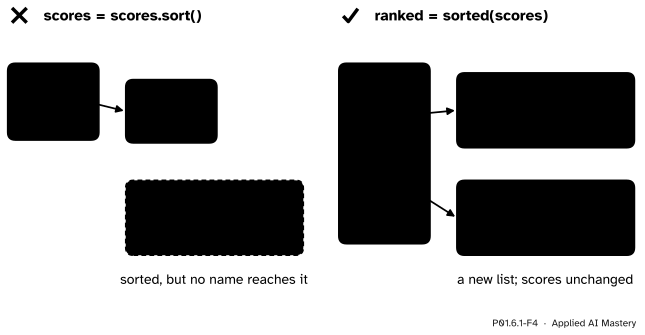
Wrong beside right. Left: sort sorts in place and returns None, so assigning its result throws the list away. Right: sorted returns a new list and leaves scores as it was.
“The first score is scores[1].”
Positions count from 0, so scores[1] is 65, the second score, and the first is scores[0]. The same slip at the other end asks for scores[5] in a list of five and stops with IndexError. Write the last item as scores[-1], which stays right however long the list grows.
“scores[1:3] gives the items at positions 1, 2 and 3.”
The stop position is left out: scores[1:3] is [65, 80], two items, because \({3 - 1 = 2}\). In machine learning this slip is silent: from a list of 100 examples, examples[0:99] takes only 99, and the last one never reaches the model.
“scores = scores.sort() gives me the sorted list.”
sort works in place and returns None, so this line sorts the list and then binds scores to None, and the sorted list is lost: the left side of the figure. Call scores.sort() on a line of its own, or keep the original and write ranked = sorted(scores). The same goes for append: scores = scores.append(70) leaves scores naming None.
“scores.remove(3) removes the item at position 3.”
remove takes a value, not a position, and removes the first item equal to it. No score is 3, so the call stops with ValueError: list.remove(x): x not in list. To remove by position, use scores.pop(3), which also hands the item back.
1. For scores = [55, 65, 80, 40, 60], what are scores[0], scores[4] and scores[-2]?
55, 60 and 40. Position 4 is the last of five, and position −2 is position \({5 - 2 = 3}\).
2. Which items does scores[1:4] hold, and how many?
[65, 80, 40], the items at positions 1, 2 and 3: \({4 - 1 = 3}\) items. The stop position, 4, is left out.
3. What does scores.append(70) do, and what does the call itself give back?
It adds a slot holding 70 at the end of the same list, which now has 6 items. The call gives back None.
4. What is the difference between pop and remove?
pop takes a position (the last one if none is given), removes that slot and returns its item. remove takes a value, removes the first item equal to it and returns None.
5. What does sorted(scores) give, and what happens to scores?
A new list, [40, 55, 60, 65, 80]. The list scores is not changed.
1. ★ Take hours = [2, 4, 5, 1, 3], the hours column of the study table. Predict hours[1], hours[-1], hours[1:3], hours[:2] and len(hours[2:]), then check in Python.
hours[1] is 4 and hours[-1] is 3. hours[1:3] is [4, 5], positions 1 and 2. hours[:2] is [2, 4], the first two. hours[2:] is [5, 1, 3], so its length is 3, which is \({5 - 2}\).
2. ★★ Trace this program. Give the list after every line and the output.
a = [55, 65, 80]
a.insert(1, 40)
x = a.pop(0)
a.append(x)
a[1] = a[1] + 5
print(a, len(a))Line 1 gives [55, 65, 80]. Line 2 puts 40 at position 1 and moves 65 and 80 right: [55, 40, 65, 80]. Line 3 removes position 0 and binds x to 55: [40, 65, 80]. Line 4 gives [40, 65, 80, 55]. Line 5 reads 65 at position 1 and stores 70 there: [40, 70, 80, 55]. The output is [40, 70, 80, 55] 4.
3. ★★★ Write a function middle(values) that returns the middle three items of a list whose length is odd and at least 3, using one slice. Check that middle(scores) is [65, 80, 40] and that it works for a list of seven.
In a list of odd length \(n\) the middle item is at position n // 2 (2 for five items, 3 for seven). The middle three start one place earlier, and a slice of 3 items stops 3 cuts later.
def middle(values):
    start = len(values) // 2 - 1
    return values[start:start + 3]
For the scores start is 1 and the slice scores[1:4] is [65, 80, 40]. For [1, 2, 3, 4, 5, 6, 7], start is 2 and the slice is [3, 4, 5], with 4 in the middle.
A list is a numbered row of slots that can change.
Positions from 0, and from −1 at the back.
a[0] is the first item and a[-1] the last; a[-k] is a[n - k].a[i:j] hold positions \(i\) to \({j - 1}\), which is \({j - i}\) items, in a new list.append, insert, pop, remove and sort change the list, and only pop hands an item back.sorted(a) and every slice.Sources. Each was opened and checked against this lesson on 12 November 2026.
append, insert, remove (ValueError if absent), pop (returns the last item by default), index, sort, and methods that only change a list return None.len(s) + i; the slice s[i:j] holds the items with index \(k\) such that \({i \le k < j}\), and how bounds are clipped) and the entry for list.sort (sorts in place, does not return the sorted sequence).sorted returns a new list and leaves the original unchanged). Free under CC BY-NC-SA 4.0.L = L.append(5) leaves L naming None) and 19 (sorted returns a new list; sort returns None).Next. P01.6.2 Tuples, unpacking and looping in pairs meets a row of values that cannot change, and walks two lists side by side.
This lesson unlocks
P01.6.2 Tuples, unpacking and looping in pairs