scores = [55, 65, 80, 40, 60]
hours = [2, 4, 5, 1, 3]

it = iter(scores)
print(type(it).__name__)list_iteratorBefore this lesson
P01.10.1 Comprehensions P01.9.3 Special methods: objects that act like built-ins
After this lesson you can
In review. The maths and code on this page are checked by automated tests on every change, but an independent reader has not signed it off yet. Spot a mistake or a confusing step? Tell us.
You loop over the pairs of zip(hours, scores) to add up the squared errors, then loop over the same pairs again to count them. The first loop works. The second one finds nothing at all, and the mean squared error divides by zero. A list never does this. What is different about a zip?
From the last lesson
1. What are the three parts of [s for s in scores if s >= 50]?
The output expression s, the for clause for s in scores, and the if clause if s >= 50.
2. What is the difference between {band_of(s) for s in scores} and [band_of(s) for s in scores]?
The first is a set, with each band once (three items, no positions); the second is a list with one band per score (five items, in order).
A for loop does not walk over a list by itself. It asks the list for a helper, an object whose only job is to hand over the items one at a time and to remember where it has got to. That helper is an iterator. Think of it as a bookmark in the list.
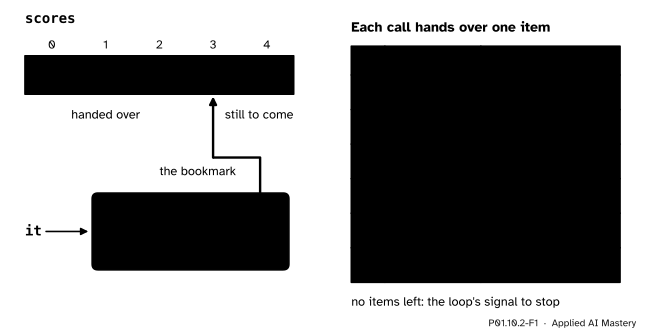
An iterator is a bookmark. Each call to next hands over the item at the bookmark and moves it on by one; after the last item, it raises StopIteration.
Two things are needed, and they have two names. The list is iterable: it can hand out bookmarks. The bookmark is the iterator: it hands out items. A list can make as many bookmarks as you like, each starting at position 0. A bookmark only moves forward.
Step 1. Ask for an iterator. The built-in iter takes an iterable and returns a new iterator.
scores = [55, 65, 80, 40, 60]
hours = [2, 4, 5, 1, 3]
it = iter(scores)
print(type(it).__name__)list_iteratorStep 2. Take items with next. Each call to next(it) hands over one item and moves the bookmark on.
print(next(it))
print(next(it))
print(next(it), next(it), next(it))
55
65
80 40 60Step 3. Run off the end. All five items have been handed over. One more call raises StopIteration, the exception that means “no items are left”. The try and except of P01.8.2 catch it.
try:
    next(it)
except StopIteration:
    print('StopIteration: no items are left')
StopIteration: no items are leftStep 4. Put the three together. That is all a for loop does: iter once, then next again and again until StopIteration, which it catches quietly and takes as the signal to stop.
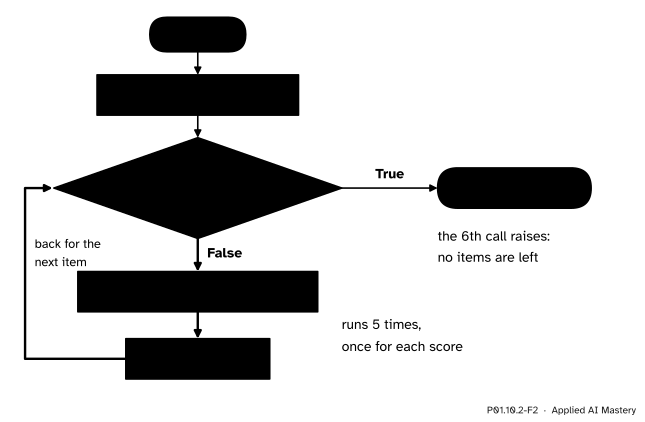
What for s in scores: print(s) does. The loop asks for one iterator, then calls next until it raises StopIteration.
Here is the same loop written out by hand, with while True and break from P01.3.4.
it = iter(scores)
while True:
    try:
        s = next(it)
    except StopIteration:
        break
    print(s)
55
65
80
40
60It prints the five scores, exactly as for s in scores: print(s) does.
The Python Tutorial (section 9.8) says it in one breath: “the for statement calls iter() on the container object”, and when there are no more elements, __next__() “raises a StopIteration exception which tells the for loop to terminate”.
These are special methods with fixed names, like the __eq__ and __add__ of P01.9.3: you write next(it) and Python calls it.__next__().
Fresh or used up. Every iterator is iterable, because iter(it) returns it itself. The difference between them is what happens on a second pass. The Python glossary says that a list “produces a fresh new iterator each time you pass it to the iter() function or use it in a for loop”, while an iterator passed to iter again just returns “the same exhausted iterator object”, which makes it look like an empty container.
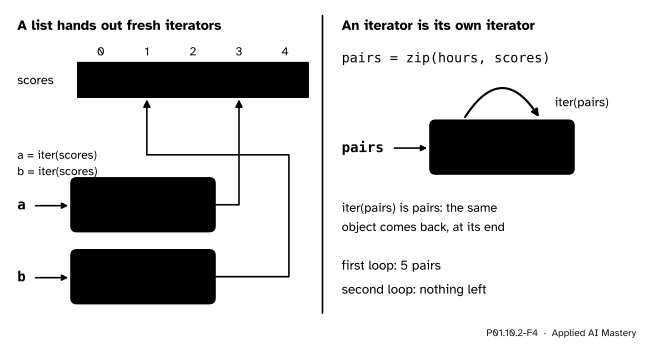
A list makes a new bookmark for each loop. A zip is a bookmark already, so a second loop gets the same one, at the end.
zip, enumerate, files and the generators of the next lesson are all iterators. Each can be looped over once.
An iterator of your own needs a class with both special methods. Countdown(3) should hand over 3, 2 and 1, the same numbers as range(3, 0, -1), which counts down by steps of -1 and stops before 0.
class Countdown:
    def __init__(self, start):
        self.current = start

    def __iter__(self):
        return self

    def __next__(self):
        if self.current == 0:
            raise StopIteration
        value = self.current
        self.current -= 1
        return value
Trace next on Countdown(3) by hand. The object holds one attribute, current, which starts at 3.
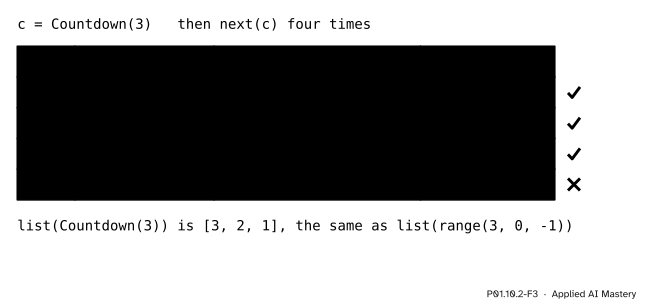
The trace of Countdown(3). Each call hands over the current value and lowers it by one; at 0 it raises StopIteration.
current is 3, not 0, so value is 3, current becomes 2, and 3 is returned.current at 1 and then 0.current is 0, so __next__ raises StopIteration. A for loop would stop here.So a loop over Countdown(3) sees 3, 2 and 1, and so does list, which loops in the same way.
The class against range, and the proof that the object is its own iterator.
print(list(Countdown(3)))
print(list(range(3, 0, -1)))

c = Countdown(3)
print(iter(c) is c)
print(list(c), list(c))
[3, 2, 1]
[3, 2, 1]
True
[3, 2, 1] []The second list(c) is empty: the first one used the iterator up. A range, like a list, hands out a fresh iterator every time, so list(r) twice gives the numbers twice.
Now the bug of the question. Both loops below walk over the same zip.
def predict(hours):
    return 9 * hours + 33


pairs = zip(hours, scores)
total = 0
for h, s in pairs:
    total += (s - predict(h)) ** 2
count = 0
for h, s in pairs:
    count += 1
print(total, count)
40 0The squared errors add up to 40, the right total. The count is 0, because the first loop left the zip at its end. Dividing would raise ZeroDivisionError. The repair is to make a list once, which can be looped over as often as you like.
pairs = list(zip(hours, scores))
total = 0
for h, s in pairs:
    total += (s - predict(h)) ** 2
count = 0
for h, s in pairs:
    count += 1
print(total, count, total / count)
40 5 8.0A file behaves the same way: a file object is its own iterator, and its bookmark is the position in the file. Here is study.csv, written to a temporary folder as in P01.7.3, and looped over twice.
import pathlib
import tempfile

lines = ['name,hours,score', 'Ama,2,55', 'Ben,4,65', 'Chen,5,80', 'Dina,1,40', 'Eli,3,60']

with tempfile.TemporaryDirectory() as folder:
    path = pathlib.Path(folder) / 'study.csv'
    path.write_text('\n'.join(lines) + '\n', encoding='utf-8')
    with open(path, encoding='utf-8') as f:
        first = 0
        for line in f:
            first += 1
        second = 0
        for line in f:
            second += 1
print(first, second)
6 0Six lines the first time (the header and five students), none the second.
This module’s interactive, the lazy and eager pipeline, lives in P01.10.3. In its lazy mode, each press of the step button reads one number and pulls it as far through the stages as it gets. Watch how next on the last stage asks the stage before it for an item, which asks the stage before that, all the way back to the source.
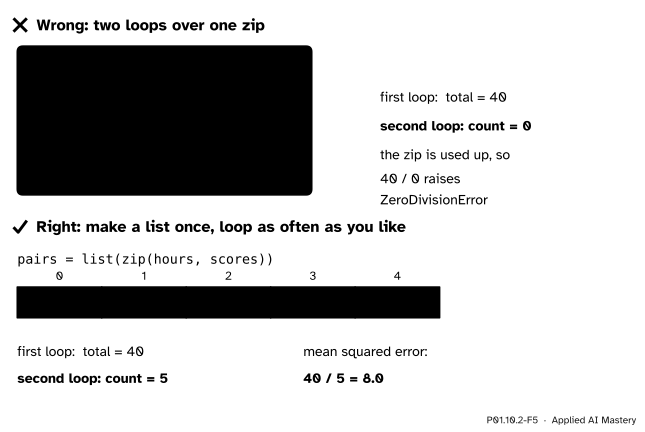
Wrong beside right. A zip is used up by the first loop; a list made from it can be looped over twice.
“I can loop over anything as often as I like.”
Only over an iterable that hands out fresh iterators, such as a list, a tuple, a string, a dictionary or a range. A zip, an enumerate, a file object or a generator is an iterator: the second loop starts where the first one stopped, at the end, and sees nothing. No error is raised, so the bug shows up later, as a count of 0 or an empty result. When you need two passes, make a list once.
“StopIteration is an error, so my loop crashed.”
Inside a for loop, StopIteration is the normal way to end, and the loop catches it for you. It only shows up as an error when you call next yourself after the items have run out, and then a try is the way to handle it, as in step 3.
“print(zip(hours, scores)) should show me the pairs.”
It shows something like <zip object at 0x10a2b3c40>, a description of the iterator with a memory address that changes from run to run. The pairs are not made until something asks for them. Write list(zip(hours, scores)) to see them, and remember that this uses the zip up.
1. Which two built-in functions does a for loop use, and which exception ends it?
iter, once, to get an iterator, and next, once per item. StopIteration ends it.
2. What is the difference between an iterable and an iterator?
An iterable can hand out iterators (iter(x)); an iterator hands out items (next(it)) and remembers where it has got to. Every iterator is iterable, because iter(it) returns it itself.
3. Why does a second loop over a list see every item again?
Because each loop calls iter on the list, and a list hands out a fresh iterator that starts at position 0 every time.
4. Which two methods must an iterator class define, and what does each one return?
__iter__, which returns the object itself, and __next__, which returns the next item or raises StopIteration.
5. After c = Countdown(3), what are list(c) and then list(c) again?
[3, 2, 1] and then []: the first call used the iterator up.
1. ★ Predict the output, then explain it.
e = enumerate(['Ama', 'Ben', 'Chen'])
print(next(e))
print(list(e))(0, 'Ama'), then [(1, 'Ben'), (2, 'Chen')]. An enumerate is an iterator: the first next takes the first pair, and list takes the pairs that are left, starting from where the bookmark is.
2. ★★ Rewrite this loop with iter, next, while True, try and break, and say what it prints.
total = 0
for h in hours:
    total += h
print(total)total = 0
it = iter(hours)
while True:
try:
h = next(it)
except StopIteration:
break
total += h
print(total)Both print 15, the sum of 2, 4, 5, 1 and 3.
3. ★★★ Write an iterator class Every(items, step) that hands over items[0], items[step], items[2 * step] and so on, and check it on the scores with step 2 against the slice scores[::2], whose step works as in P01.7.1.
class Every:
    def __init__(self, items, step):
        self.items = items
        self.step = step
        self.position = 0

    def __iter__(self):
        return self

    def __next__(self):
        if self.position >= len(self.items):
            raise StopIteration
        value = self.items[self.position]
        self.position += self.step
        return value
With step 2 the positions are 0, 2 and 4, then 6 is past the end. So list(Every(scores, 2)) is [55, 80, 60], the same as scores[::2].
A for loop gets an iterator with iter and calls next until StopIteration.
An iterator is a bookmark.
iter(x) gives an iterator. A list gives a fresh one each time.next(it) gives the next item or raises StopIteration; iter(it) is it.__iter__ returning self and __next__.Sources. Each was opened and checked against this lesson on 12 November 2026.
for statement calls iter(), and __next__() raises StopIteration to end the loop; the class Reverse, whose __iter__ returns self, is the model for Countdown.iter, next (which raises StopIteration when no default is given), enumerate, and zip, which “is lazy: The elements won’t be processed until the iterable is iterated on”.Next. P01.10.3 Generators writes Countdown again in four lines, as a function that pauses.
This lesson unlocks