A module is a file of Python code with names of its own. See the three things import does, the three forms of import and the one name that each binds, and the standard library’s math, statistics and random set beside the versions you wrote by hand.
Describe the three things that import does: find the module, run its file once from top to bottom, and bind a name to the module object.
Use import math, import statistics as st and from statistics import mean, and say which name each line binds.
Reach a name inside a module with the dot, and explain the NameError that appears when the prefix is left off.
Use math.sqrt, math.isclose, statistics.mean and random from the standard library, and say where each differs from the version written by hand.
Make a random result repeatable by setting a seed.
In review. The maths and code on this page are checked by automated tests on every change, but an independent reader has not signed it off yet. Spot a mistake or a confusing step? Tell us.
The question
At a fresh Python prompt, ask for the mean of the five quiz scores with Python’s own function, statistics.mean([55, 65, 80, 40, 60]), and Python stops with a NameError: the name statistics is not defined, and it asks whether you forgot to import it. Type one line first, import statistics, and the same call gives 60. What did that line do, where did the name come from, and why does it say 60 when your own mean of P01.4.1 says 60.0?
Intuition
So far every program has used only what Python starts with: print, len, sum, the operators, and the functions you wrote yourself. Python comes with much more, such as square roots, statistics, random numbers, dates and files. It is kept in pieces called modules, and a piece is loaded only when a program asks for it.
A module is a file of Python code with names of its own. The standard library’s statistics is one: a file called statistics.py that defines mean, median and many more functions with def, just as you defined mean in P01.4.1. Those names are the global names of that file (P01.4.4), not of yours.
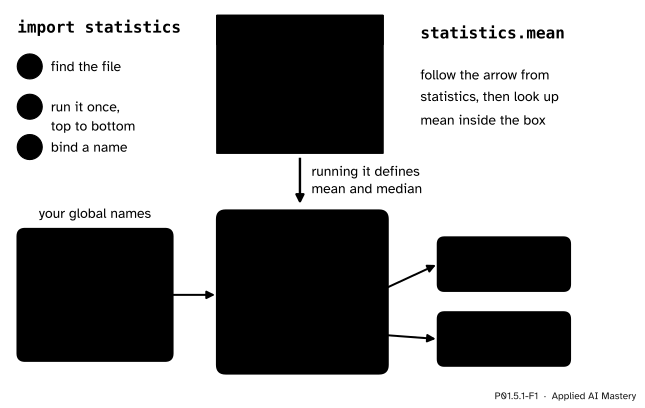
The line import statistics does three things:
It finds the module: a file named statistics.py in one of the folders where Python keeps modules. Lesson P01.5.2 shows which folders, and in what order.
It runs the file once, from top to bottom. Its def lines create the functions and bind their names, inside the module.
It binds one name in your program, statistics, to the module object: a single object that holds every name the file defined.
P01.5.1-F1
What import statistics does. The file runs once and fills a module object with the names it defines; your program gets one name, statistics, that refers to that object.
Now statistics.mean reads in two steps: follow the name statistics to the module, then look up mean among the names inside it. The dot means “the name on the right, looked up inside the object on the left”. A module is an object like any other value, with a type of its own: type(statistics) is <class 'module'>.
Not every module is a .py file. math is written in C, the language that Python itself is written in, and stored as compiled code. It is imported in the same three steps and used in the same way, as in math.sqrt.
Build it up
Step 1. Import, then use the dot. After import math, the module’s names are reached through math:
import mathprint(math.sqrt(16))print(math.pi)
This prints 4.0 and 3.141592653589793. math.sqrt is the square root, and math.pi is not a function at all: it is a float that the module defines, the number π.
Step 2. Another name for the module: import ... as.import statistics as st imports the same module, but binds the name st instead of statistics. Now st.mean(scores) works, and the name statistics is not defined at all. A short name saves typing for a module you use on every line; import numpy as np (P01.5.3) is the one that every later course uses.
Step 3. One name from inside the module: from ... import.from statistics import mean also imports the module, but then binds your name mean straight to the function inside it. You write mean(scores) with no prefix. This form does not bind the name statistics.
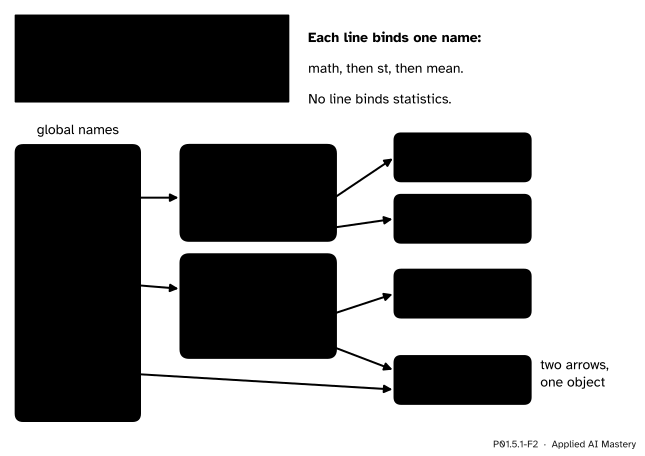
Step 4. One line, one name. Each of these three lines binds exactly one name in your program, and the figure shows which.
P01.5.1-F2
The three forms in one memory diagram. Line 3 does not copy the function: your name mean and the module’s name mean are two arrows to one object.
The module itself is made only once. Line 3 needs statistics, which line 2 has already imported, so Python reuses that module object instead of running the file a second time. Lesson P01.5.2 makes this visible with a module that prints a line when it runs.
The formal statement
NoteDefinition: module, import
A module is a file of Python definitions and statements; its name is the file name without .py. The standard library is the large collection of modules that comes with Python, already installed.
The import statement searches for the named module, then binds the result to a name in the program that asked. If the module has not been imported before in this run, the search ends by running the module’s file once, from top to bottom, in a new module object that holds the file’s global names.
The three forms, and the one name that each binds:
import math binds math to the module math;
import statistics as st binds st to the module statistics;
from statistics import mean binds mean to the function mean inside statistics.
Three rules follow, and the rest of the module leans on all of them.
The dot looks inside.module.name finds name among the module’s own names. Writing name alone looks only among yours, which is why sqrt(16) fails after import math.
A module runs once per run of your program. A second import of the same module binds the name again, to the same object, without running the file.
from ... import can replace a name of yours. If your program already has a mean, then from statistics import mean moves the name to the module’s function, and your function loses that name, with no warning.
Go deeper: where Python keeps the modules it has imported
Python records every module imported so far in sys.modules, a dictionary (P01.6.3) from module names to module objects. The Language Reference, section 5.3.1, says it is the first place an import looks: if the name is there, the import is over and only the binding step is left. That is how the second import statistics knows not to run the file again. Because the record lasts for the whole run, a notebook keeps an old version of your own module after you edit its file; P01.5.2 returns to this.
Worked example
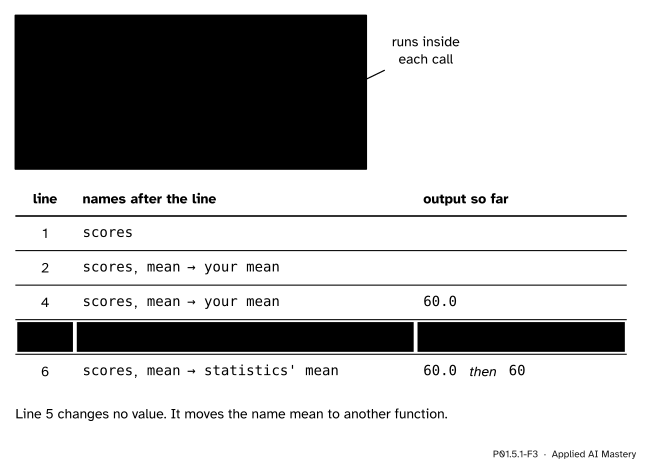
Trace this program by hand, one executed line at a time.
Line 1 binds scores to the list. Line 2 is a definition, so it binds mean to your function and stores line 3 for later.
Line 4 calls your mean. Inside the call, line 3 works out sum(values), which is 55 + 65 + 80 + 40 + 60 = 300, and len(values), which is 5. Then 300 / 5 is 60.0, a float, because / always gives a float (P01.2.3). The line prints 60.0.
Line 5 imports the module statistics (found, run once) and binds the name mean to the function inside it. Your own function has lost its only name.
Line 6 is the same text as line 4, but mean now refers to statistics.mean, which gives 60.
P01.5.1-F3
The trace. The same call, mean(scores), gives two answers, because line 5 moved the name mean from one function to another.
Why 60 and not 60.0? statistics.mean keeps whole numbers whole when it can: the scores are all ints and their mean comes out whole, so it gives back the int 60. For [1, 2] it gives the float 1.5. The two answers are the same number in two types, and 60 == 60.0 is True.
Code
Each tool of the standard library beside the version written by hand. First, square roots and the tolerance test of P01.2.4.
import mathprint('by hand: ', 16**0.5)print('math.sqrt: ', math.sqrt(16))print('a module is a', type(math))a =0.1+0.2b =0.3print('a == b: ', a == b)print('by hand: ', abs(a - b) <1e-9)print('math.isclose:', math.isclose(a, b))
by hand:      4.0
math.sqrt:    4.0
a module is a <class 'module'>
a == b:       False
by hand:      True
math.isclose: True
Then the mean, by hand and from statistics.
import statisticsdef mean(values):"""Return the mean of a list of numbers."""returnsum(values) /len(values)scores = [55, 65, 80, 40, 60]print('by hand: ', mean(scores))print('statistics.mean:', statistics.mean(scores))print('the same number:', mean(scores) == statistics.mean(scores))print('mean of [1, 2]: ', statistics.mean([1, 2]))
by hand:         60.0
statistics.mean: 60
the same number: True
mean of [1, 2]:  1.5
Last, random. random.randint(1, 6) gives a whole number from 1 to 6, both ends included, like a roll of a die. Without a seed the numbers change on every run. random.seed(7) starts the generator from a fixed point, so the same numbers come out every time.
The two lines match. The documentation of random promises this for one version of Python, not across versions, so write the version down beside a result that you want others to repeat. Machine learning uses seeds the same way: to shuffle data, to split it into training and test sets (ML01.2) and to start a model’s weights, so that a run can be repeated exactly (P02.9).
Explore
This module’s interactive, the import resolver, lives in lesson P01.5.4, where all its parts have been explained. You can try it now: choose statistics or random and step the search until it finds the module.
Pitfalls
P01.5.1-F4
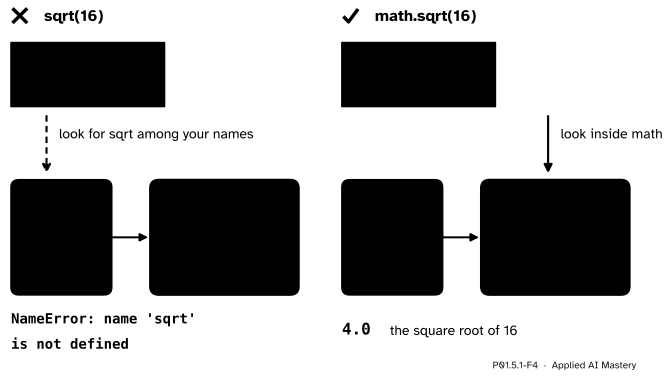
Wrong beside right. import math binds the one name math; sqrt lives inside the module, so it is reached only through math..
“I imported math, so sqrt works.”
The import bound one name, math. Saved as roots.py and run, the two lines of the figure stop on line 2. The message below was copied from a run of Python 3.15.2, as are the other messages in this module; the wording varies a little between versions.
Traceback (most recent call last): File "roots.py", line 2, in <module> print(sqrt(16)) ^^^^NameError: name 'sqrt' is not defined
Write math.sqrt(16), or import the function by name with from math import sqrt.
“from statistics import mean is just a shorter way to write it.”
It also rebinds mean, silently, as the worked example showed. The star form, from statistics import *, is worse: it binds every public name of the module at once, and the Python Tutorial warns that this brings in an unknown set of names, “possibly hiding some things you have already defined”. When a name could clash with one of yours, write import statistics and statistics.mean, so that both survive.
“math.isclose is the tolerance test of P01.2.4 with a longer name.”
By default math.isclose(a, b) allows a difference of one part in a thousand million of the larger of the two numbers. That is a relative tolerance, so it shrinks near zero and grows for large numbers (1e10 is 10 000 000 000):
To compare with zero, also give an absolute tolerance, abs_tol=1e-9. This matters when a later course checks that a gradient has reached zero (ML01.5).
“Seeding before every roll makes it safer.”
Seeding starts the sequence again, so a seed inside a loop gives the same number on every pass:
for roll inrange(3): random.seed(7)print(random.randint(1, 6))
3
3
3
Seed once, at the start of the program.
Check yourself
Recall
1. What three things does import statistics do?
Show answer
It finds the module, runs its file once from top to bottom (which defines its names), and binds the name statistics in your program to the module object.
2. After import statistics as st, which name refers to the module? Can you still write statistics.mean?
Show answer
st. No: the name statistics was never bound, so it gives a NameError.
3. After from statistics import mean, what does mean refer to, and what has happened to a mean you defined earlier?
Show answer
The function mean inside the module statistics. Your own function has lost the name mean; it was replaced without a warning.
4. Why does statistics.mean([55, 65, 80, 40, 60]) give 60 while your own mean gives 60.0?
Show answer
Your mean divides with /, which always gives a float. statistics.mean keeps whole-number data whole when the mean comes out whole. The two are equal: 60 == 60.0 is True.
5. What does random.seed(7) make possible?
Show answer
The same sequence of random numbers on every run (with the same version of Python), so a result that uses randomness can be repeated.
Exercises
1.★ Which name does each line bind, and what does it refer to? import math, then import math as m, then from math import sqrt. After all three, do math.sqrt(16), m.sqrt(16) and sqrt(16) give the same answer?
Show solution
import math binds math to the module math. import math as m binds m to the same module object; the file is not run again, because the module was already imported. from math import sqrt binds sqrt to the function sqrt inside the module. All three calls reach one function object, so all three give 4.0.
2.★★ Without running it, write down what this program prints.
Line 1 binds st to the module. Line 2 binds mean to the int 0. Line 3 asks the module for the mean of 1, 2, 3 and 4, which is 10 / 4 = 2.5. Line 4 moves the name mean to the module’s function, so line 5 also prints 2.5. Line 6 moves your name mean to 5, but the name meaninside the module still refers to the function, so line 7 works: the mean of 2 and 4 is 6 / 2 = 3, and because the data and the answer are whole, it is the int 3.
3.★★★ For each pair, work out by hand what abs(a - b) < 1e-9 and math.isclose(a, b) give, using the rule that math.isclose allows a difference of at most 1e-9 times the larger size: first 0.1 + 0.2 and 0.3; then 1e-12 and 0.0; then 1e10 and 1e10 + 1. Then write a call of math.isclose that treats 1e-12 and 0.0 as close.
Show solution
First pair: the difference is about 5.6e-17. The hand test gives True. The allowed difference is 1e-9 × 0.3 = 3e-10, much larger, so math.isclose gives True too.
Second pair: the difference is 1e-12, smaller than 1e-9, so the hand test gives True. The larger size is 1e-12, so the allowed difference is 1e-9 × 1e-12 = 1e-21, and 1e-12 is far bigger: math.isclose gives False.
Third pair: the difference is 1, so the hand test gives False. The allowed difference is about 1e-9 × 1e10 = 10, and 1 is within it: math.isclose gives True.
math.isclose(1e-12, 0.0, abs_tol=1e-9) gives True, because the absolute tolerance allows any difference up to 1e-9.
Summary card
import finds a module, runs it once, and binds one name to it.
P01.5.1-F1
Find, run once, bind a name.
import math binds math; import statistics as st binds st; from statistics import mean binds mean, replacing any mean of yours.
The dot looks inside:math.sqrt is sqrt looked up in the module math.
By hand and from the library:16 ** 0.5 and math.sqrt(16) give 4.0; your mean gives 60.0 and statistics.mean gives 60.
math.isclose uses a relative tolerance; add abs_tol to compare with zero.
random.seed once at the start makes random results repeatable.
Sources and next steps
Sources. Each was opened and checked against this lesson on 12 November 2026.
Python Software Foundation, The Python Tutorial, chapter 6, Modules. Section 6 defines a module as a file of definitions and statements, named by its file name without .py. Section 6.1 says that a module’s statements run only the first time its name is met in an import, and once per session; that from ... import does not bind the module’s name; that as binds the name after it; and that importing * brings in an unknown set of names, “possibly hiding some things you have already defined”, and is frowned upon in general.
Python Software Foundation, The Python Language Reference, chapter 5, The import system: the import statement searches for the named module and then binds the result of that search to a name; section 5.3.1 makes sys.modules the first place an import looks.
Python Software Foundation, math.isclose: the defaults rel_tol=1e-09 and abs_tol=0.0, the test abs(a-b) <= max(rel_tol * max(abs(a), abs(b)), abs_tol), and the advice to give a positive abs_tol when comparing with zero.
Python Software Foundation, statistics.mean, the sum of the data divided by the number of data points, and random: notes on reproducibility: reusing a seed reproduces the sequence; across versions only random() is guaranteed. The same page defines randint(a, b) as a whole number from a to b, both included.