line = "Chen,5,80"
print(len(line))
print(line[0], line[5], line[-4], line[-1])
print(line[0:4], line[-2:], line[::2], line[::-1])
9
C 5 5 0
Chen 80 Ce,,0 08,5,nehCBefore this lesson
P01.3 Control flow P01.6 Lists, tuples, dictionaries and sets
After this lesson you can
In review. The maths and code on this page are checked by automated tests on every change, but an independent reader has not signed it off yet. Spot a mistake or a confusing step? Tell us.
Every data file reaches a program as text. The line Chen,5,80 holds a name, the hours Chen studied and a quiz score, but to Python it is one string of nine characters. How do you pick out the name, or the score, without breaking the line?
A string is a value of type str (P01.2.1): a row of characters. Picture each character in a box of its own. As with a list (P01.6.1), the boxes are numbered from 0 at the front. They are also numbered from -1 at the end, counting backwards.
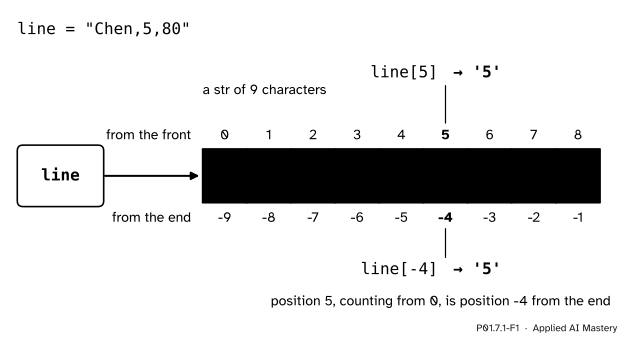
The string "Chen,5,80" as a row of nine numbered boxes. Each box has two numbers: its position counted from 0 at the front, and its position counted from -1 at the end.
Three things in the picture matter.
line holds nine characters, so len(line) is 9.len(line) - 1.This is where machine learning meets text. A program that loads a data file reads it as lines of characters and cuts each field out of a line before any number reaches a model, and a language model starts by cutting text into pieces. Both jobs are string work.
Step 1. Index one character. Square brackets after a string give the character at a position: line[0] is 'C' and line[5] is '5'. The answer is itself a string, of length 1. Python has no separate type for a single character.
Step 2. Count from the end. A negative index counts back from the end: line[-1] is '0', the last character, and line[-4] is '5'. In general line[-k] is the same box as line[len(line) - k].
Step 3. Slice. line[start:stop] builds a new string from the characters at position start up to, but not including, position stop, exactly as for lists. So line[0:4] is 'Chen'. Leave out start to begin at the front, and leave out stop to run to the end: line[:4] is also 'Chen', and line[-2:] is '80'.
Step 4. Step. A third number, the step, takes every second or every third character: line[::2] is 'Ce,,0'. A negative step walks backwards, so line[::-1] is the whole string reversed.
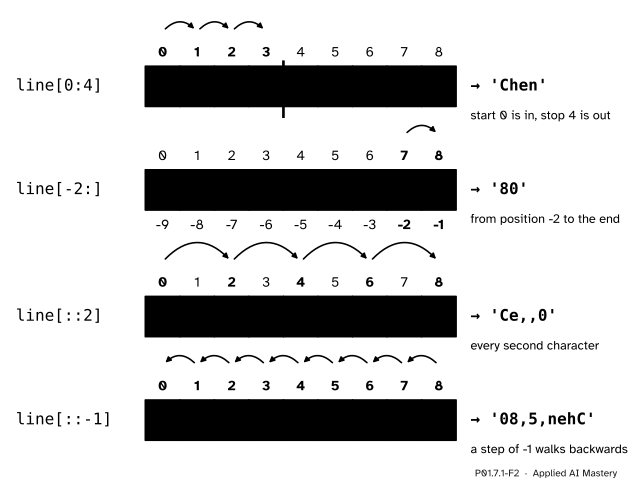
Four slices of the same string. Yellow boxes are taken, the green hops show the order, and the result on the right is the yellow characters in that order.
Step 5. Loop and search. A for loop over a string binds its name to each character in turn (P01.3.3). The operator in asks whether a piece occurs anywhere: "Chen" in line is True.
Step 6. Never change, always make new. You cannot change a character in place. Methods such as lower, upper, strip (which removes spaces, tabs and new lines from both ends) and replace build a new string and return it. The old string stays exactly as it was.
Two facts follow from the definition, and later lessons lean on both.
Fact 1: the slice s[i:j] holds j - i characters. Take 0 <= i <= j <= n. The slice takes the positions i, i + 1 and so on up to j - 1. Counting from i to j - 1 gives (j - 1) - i + 1 positions, and that simplifies to j - i. So len(line[0:4]) is 4 and len(line[7:9]) is 2.
Fact 2: cutting and gluing gives the string back. For any whole number i, s[:i] + s[i:] equals s. The first slice takes every position below the cut and the second takes the cut and everything after it. Each position lands in exactly one of the two, in order, so joining them restores the string. This is why the stop is left out of a slice: two neighbouring slices meet with no gap and no overlap.
Escape sequences. Inside quotes, a backslash starts an escape sequence: two characters in the code that stand for one character in the string.
| You write | The string holds |
|---|---|
\n |
a new line |
\t |
a tab |
\' or \" |
a quote |
\\ |
one backslash |
So "Ama\t2\t55\n" holds 9 characters: A, m, a, a tab, 2, a tab, 5, 5 and a new line. A quote of the other kind needs no backslash at all: 'He said "done"' and "Chen's line" both work.
Characters are numbers. Memory holds only numbers (P01.1.4), so every character is stored as one. ord(ch) gives the number of a character and chr(n) gives the character back: ord("C") is 67, ord(",") is 44, ord("\t") is 9, ord("\n") is 10, and chr(67) is 'C'.
How many commas does "Ama,2,55" hold, and where is the first one?
The method is the counting pattern of P01.3.4: set a count to 0, look at each character in turn, and add 1 whenever it is the character we want.
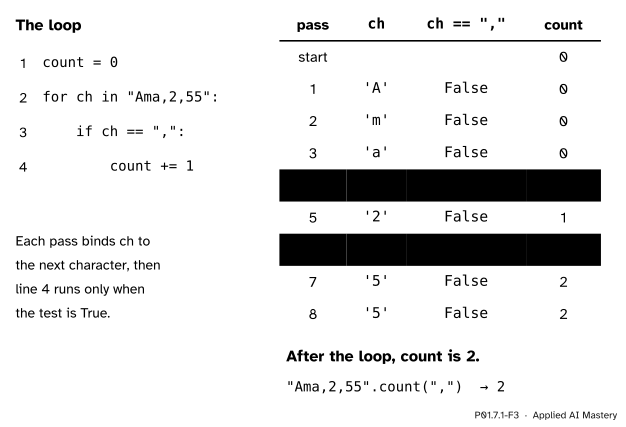
The trace of the counting loop, one row per pass. Line 4 runs only on the two passes where the test is True.
Passes 1 to 3 see 'A', 'm' and 'a'. None is a comma, so count stays 0. Pass 4 sees ',', the test is True, line 4 runs, and count becomes 1. Pass 5 sees '2'. Pass 6 sees the second comma, and count becomes 2. Passes 7 and 8 see the two fives. After eight passes, one per character, the loop ends with count equal to 2.
Two commas mean three fields, one more than the number of commas. That rule comes back in the next lesson, where a line is cut at its commas.
For the first comma, walk from the front and stop at the first match. Positions 0, 1 and 2 hold letters, and position 3, counting from 0, holds the comma. So the slice in front of it, "Ama,2,55"[0:3], is 'Ama': the name, cut out of the line.
First the string from the picture: its length, four indexes and four slices.
line = "Chen,5,80"
print(len(line))
print(line[0], line[5], line[-4], line[-1])
print(line[0:4], line[-2:], line[::2], line[::-1])9
C 5 5 0
Chen 80 Ce,,0 08,5,nehCNow the count from scratch, as a function, beside the library’s versions. str.count counts a piece, and str.find returns the first position of a piece, or -1 when the piece is not there.
def count_char(text, target):
    """Count the times target occurs in text."""
    count = 0
    for ch in text:
        if ch == target:
            count += 1
    return count

row = "Ama,2,55"
print(count_char(row, ","), row.count(","))
print(row.find(","), row.find(";"))
print(row[0:row.find(",")])
2 2
3 -1
AmaMethods hand back new strings. The built-in repr writes a value the way the prompt shows it (P01.1.3), quotes and escapes included, which makes a hidden space or new line visible.
raw = "  CHEN,5,80\n"
clean = raw.strip().lower()
print(repr(raw), len(raw))
print(repr(clean), len(clean))
print(clean.replace(",", ";"))
# the old string has not changed
print(raw == "  CHEN,5,80\n")
' CHEN,5,80\n' 12
'chen,5,80' 9
chen;5;80
TrueLast, escape sequences and the numbers behind characters.
tabbed = "Ama\t2\t55\n"
print(len(tabbed), repr(tabbed))
print(ord("C"), ord(","), ord("\t"), ord("\n"))
print(chr(67), chr(44))
print('He said "done"', "Chen's line")
9 'Ama\t2\t55\n'
67 44 9 10
C ,
He said "done" Chen's lineString slicer
Set start, stop and step with the sliders, or switch an end off to leave it out, and press Step to watch the slice take its characters one at a time. Try a negative step, a stop that comes before the start, and a step of 0; then switch to Split and cut the same line at a separator.
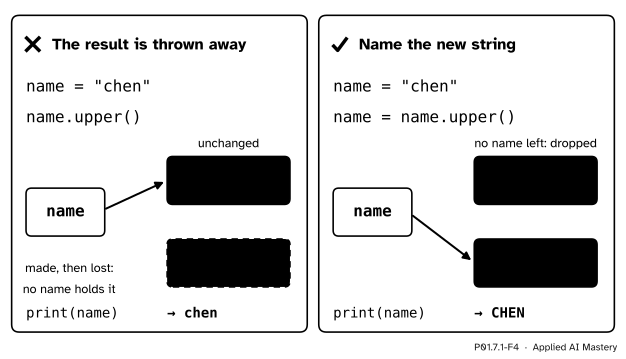
Wrong beside right. upper never changes a string. It returns a new one, and only a name keeps the new one.
“name.upper() changes name.”
It cannot, because strings are immutable. upper builds a new string and returns it. If nothing keeps that new string, it is thrown away, and name still points to 'chen'. Keep it with a name: name = name.upper().
“I can fix one character in place.”
name = "chen"
name[0] = "C"
Traceback (most recent call last):
File "capital.py", line 2, in <module>
name[0] = "C"
~~~~^^^
TypeError: 'str' object does not support item assignmentThis message was copied from a run of the file capital.py on Python 3.12. The wording of error messages, and the marks under the code, vary a little between versions of Python. The fix is to build a new string from slices: name = "C" + name[1:].
“The last character is at position len(line).”
Positions start at 0, so the last one is len(line) - 1, which is 8 for "Chen,5,80". line[9] raises IndexError: string index out of range. Write line[-1] instead. A slice is gentler: line[7:100] is just '80', because a slice cuts its ends back to the string.
“\n is two characters.”
It takes two keys to type, but the string holds one character, number 10. len("a\nb") is 3.
1. For line = "Chen,5,80", what are line[0], line[-1] and line[5]?
'C', '0' and '5'.
2. Which positions does line[2:6] take, and what string does it give?
Positions 2, 3, 4 and 5; the stop, 6, is left out. They hold e, n, a comma and 5, so the slice is 'en,5'.
3. After name = "chen" and then name.upper() on a line of its own, what is name?
Still 'chen'. upper returned a new string, 'CHEN', and nothing kept it.
4. How many characters does "a\tb\n" hold?
Four: a, a tab, b and a new line. Each escape sequence stands for one character.
5. What does "Ama,2,55".find(";") return, and why?
-1. find returns -1 when the piece does not occur anywhere in the string.
1. ★ For pin = "numpy==2.5.4", predict len(pin), pin[:5], pin[-5:] and pin[7], then check your answers in Python.
pin has 12 characters: five letters, two equals signs and the five characters of 2.5.4. pin[:5] takes positions 0 to 4, 'numpy'. pin[-5:] is the last five characters, '2.5.4'. The equals signs sit at positions 5 and 6, so position 7, counting from 0, holds '2'.
2. ★★ Write last_position(text, target), which returns the position of the last occurrence of the character target in text, counting from 0, or -1 if there is none. Use a loop, not a string method. What does it return for "Ama,2,55" and ","?
Walk through the string with enumerate (P01.6.2) and remember the latest match, starting from -1.
def last_position(text, target):
    found = -1
    for position, ch in enumerate(text):
        if ch == target:
            found = position
    return found
The commas of "Ama,2,55" are at positions 3 and 5, so it returns 5. The library method that does the same job is str.rfind: "Ama,2,55".rfind(",") is also 5.
3. ★★★ A shift cipher replaces each lowercase letter by the letter k places later in the alphabet, wrapping round from z to a. Using ord, chr and %, write shift(word, k) for words of lowercase letters and find shift("chen", 3). Why must the function build a new string rather than change word?
The letters a to z are the numbers 97 to 122. For a letter ch, ord(ch) - 97 is its place in the alphabet, from 0 to 25. Add k, wrap round with % 26 (P01.2.3), and add 97 back.
def shift(word, k):
    result = ""
    for ch in word:
        place = (ord(ch) - 97 + k) % 26
        result = result + chr(place + 97)
    return result
For "chen" and k = 3: c is place 2 and becomes 5, f; h is 7 and becomes 10, k; e is 4 and becomes 7, h; n is 13 and becomes 16, q. So shift("chen", 3) is 'fkhq', and shift("fkhq", -3) gives 'chen' back, because % wraps a negative number round to 0 to 25. The function grows result one character at a time because a string cannot be changed: word[0] = "f" would raise TypeError.
A string is a numbered row of characters that never changes.
Two numbers for every box.
s[i] is one character, and s[-k] is s[len(s) - k].s[i:j] takes positions i to j - 1; s[i:j:k] steps by k; s[::-1] reverses.lower, upper, strip and replace return new strings. Keep the result with a name.\n, \t, \', \" and \\ are one character each; ord and chr convert to and from numbers.Sources. Each was opened and checked against this lesson on 12 November 2026.
s[:i] + s[i:] always equal to s; strings are immutable, and assigning to a position raises TypeError; too large an index raises IndexError, while out-of-range slice indexes are handled gracefully.len(s) added to it, the slice from i to j, and the slice with step k, which cannot be zero) and String Methods (count, find returning -1, and lower, upper, strip and replace, each returning a copy).\\, \', \", \n and \t.[start:stop:step] (with s[::-1]), and immutable strings.Next. P01.7.2 Splitting, joining and formatting cuts a line into its fields and puts values back into text.
This lesson unlocks
P01.7.2 Splitting, joining and formatting