Cut a line of text into its fields and glue the pieces back together: split written from scratch as a loop, then str.split, strip and join. Then put values into text with f-strings, widths and one decimal, and print the study table in straight columns.
Write a split function from scratch with a loop, and predict what str.split returns, empty pieces included.
Use strip, split with no argument and join to clean a line, cut a sentence into words and glue pieces back together.
Explain why k separators always make k + 1 pieces, and why joining the pieces with the same separator gives the line back.
Put values into text with f-strings, using .1f for one decimal and widths with < and > to print a table in straight columns.
In review. The maths and code on this page are checked by automated tests on every change, but an independent reader has not signed it off yet. Spot a mistake or a confusing step? Tell us.
The question
The line Chen,5,80 holds three values, but to Python it is a single string. How do you cut it into 'Chen', '5' and '80'? And going the other way, how do you print all five students of the study table so that their numbers line up in straight columns?
From the last lesson
1. What is "Chen,5,80"[-2:]?
Show answer
'80': the slice from position -2 to the end.
2. Why does name.upper() on a line of its own leave name unchanged?
Show answer
Strings are immutable. upper returns a new string, and nothing keeps it unless you write name = name.upper().
Intuition
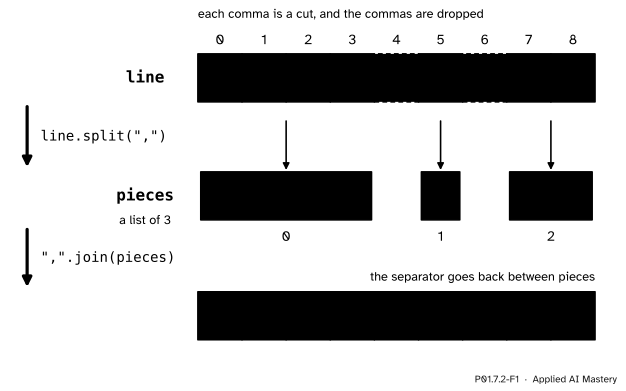
Think of the commas in "Chen,5,80" as places to cut. Splitting cuts the string at every separator and keeps the pieces in between, in order, as a list of strings. The separators themselves are dropped. Joining goes the other way: it glues a list of strings into one, putting the separator back between neighbouring pieces.
P01.7.2-F1
split cuts at every comma and drops it; join puts one comma back between each pair of neighbouring pieces, which rebuilds the line.
Read the middle row: two commas made three pieces, and each piece sits under the characters it came from. Read the bottom row: join put back two commas, one between each pair of neighbours, and none at the ends. That is why the two operations undo each other.
Cutting text into pieces is also the first step of the models that read text. Before a language model can learn anything from a sentence, the sentence is cut into pieces called tokens. Modern tokenizers cut words into smaller parts, but the simplest way to cut a sentence is to split it at the spaces.
Build it up
Step 1. Split by hand. Walk along the line one character at a time and grow a piece. When the character is the separator, the piece is finished: append it to the list pieces and start an empty piece. Otherwise add the character to the end of the piece. When the line runs out, append the last piece, because no separator came to finish it.
Step 2. The library version.str.split(sep) does exactly this: "Chen,5,80".split(",") is ['Chen', '5', '80']. Every piece is still text: '5' is a string, and P01.2.1 showed that int('5') turns it into the number 5.
Step 3. Strip first. A line read from a file ends with a new line (P01.7.3), so "Chen,5,80\n".split(",") gives ['Chen', '5', '80\n'], whose last piece keeps the \n. strip removes the spaces, tabs and new lines at both ends, so line.strip().split(",") gives clean pieces.
Step 4. Words. With no argument, split() cuts at every run of spaces, tabs and new lines, and keeps no empty pieces. "the model reads the text\n".split() is the list of five words ['the', 'model', 'reads', 'the', 'text'].
Step 5. Join.",".join(['Chen', '5', '80']) is 'Chen,5,80', and "-".join(["2026", "11", "12"]) is '2026-11-12'. The separator is the string in front of the dot, and every piece must be a string.
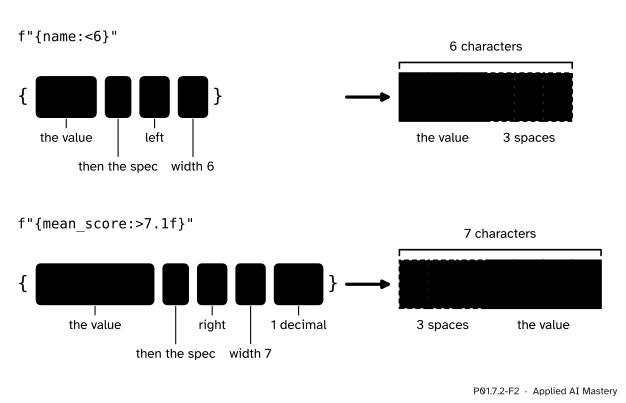
Step 6. Put values into text. An f-string is a string with the letter f before its opening quote. Each pair of braces in it is a replacement field: Python works out the expression inside and writes its value there. f"{name} scored {score}" with name = "Chen" and score = 80 is 'Chen scored 80'. After a colon, a format spec says how to write the value.
P01.7.2-F2
The parts of a format field. The width is a number of characters; < puts the value at the left of them and > at the right, and the spaces fill the rest.
The formal statement
NoteDefinition: split, join and f-strings
s.split(sep) returns the list of the pieces of s that lie between the occurrences of the string sep, in order. The separators are dropped. Two separators side by side, or a separator at either end, give an empty piece, ''.
s.split(), with no argument, cuts at every run of whitespace (spaces, tabs, new lines) and never returns an empty piece.
sep.join(pieces) returns one string: the pieces in order, with sep between each neighbouring pair. Every piece must be a string.
s.strip() returns s without the whitespace at either end.
In an f-string, a field {expression:spec} is replaced by the value of the expression, written as the spec says. The specs used here have up to three parts, in this order, and any of them may be left out: an alignment (< left, > right, ^ centre), a width (the least number of characters), and .1f, which writes a number with exactly one digit after the decimal point. With no alignment, numbers go to the right and text to the left.
Fact 1: k separators make k + 1 pieces. Follow the hand-made split. Before any separator there is one piece being grown. Each separator finishes the current piece and starts a new one, which adds exactly one piece. After the k separators, the count is 1 + k. A cut stick works the same way: three cuts make four pieces. This counts empty pieces too, so "a,,b" has two separators and three pieces, 'a', '' and 'b'.
Fact 2: joining with the same separator gives the line back. Split s at its k separators into k + 1 pieces. The pieces are the parts between the separators, in order, with nothing else removed. Join them with sep: there are (k + 1) - 1 = k neighbouring pairs, so join writes exactly k separators, one in each gap. Each gap is where a separator stood, so sep.join(s.split(sep)) equals s. The same argument fails for split() with no argument, which throws away whole runs of spaces: " ".join(" a b ".split()) is 'a b', not the original.
Fact 3: the length of a join. Joining m pieces writes m - 1 separators, so the length is the total length of the pieces plus (m - 1) times len(sep). For ",".join(['Chen', '5', '80']) that is 4 + 1 + 2 + 2 * 1 = 9, the length of 'Chen,5,80'.
Worked example
Split "Ama,2,55" at its commas by hand, and check the result two ways.
P01.7.2-F3
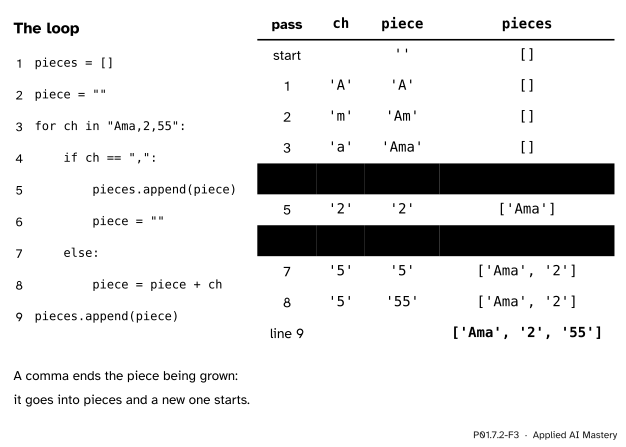
The trace of the hand-made split, one row per pass. A comma finishes the piece being grown.
Passes 1 to 3 add A, m and a to piece, which grows to 'Ama'. Pass 4 meets a comma: 'Ama' is appended, so pieces is ['Ama'], and piece starts again as ''. Pass 5 grows it to '2'. Pass 6 meets the second comma: pieces becomes ['Ama', '2']. Passes 7 and 8 grow '55'. The loop ends, and line 9 appends the last piece: ['Ama', '2', '55'].
Check one: the line has 2 commas and the list has 2 + 1 = 3 pieces, as Fact 1 says. Check two: ",".join(['Ama', '2', '55']) puts a comma in each of the 2 gaps and gives 'Ama,2,55', the line we started from, as Fact 2 says. Its length is 3 + 1 + 2 + 2 = 8, which is len("Ama,2,55").
Code
The hand-made split as a function, beside str.split, on lines with and without empty pieces.
def split_on(text, sep):"""Split text at every sep, as text.split(sep) does.""" pieces = [] piece =""for ch in text:if ch == sep: pieces.append(piece) piece =""else: piece = piece + ch pieces.append(piece)return piecesfor line in ["Ama,2,55", "a,,b", ",x", "no comma"]:print(split_on(line, ","), line.split(","))
line ="Chen,5,80\n"print(line.split(","))print(line.strip().split(","))sentence ="the model reads the text\n"words = sentence.split()print(words, len(words))print(" ".join(words))print("-".join(["2026", "11", "12"]))
['Chen', '5', '80\n']
['Chen', '5', '80']
['the', 'model', 'reads', 'the', 'text'] 5
the model reads the text
2026-11-12
Values in text. A field may hold any expression, and the spec after the colon sets the width, the side and the number of decimals.
The study table in straight columns. The rows go into a list of tuples first, with the header and the two means as text. Then one f-string with the same three fields prints every line, so each column starts and ends in the same place.
name   hours  score
Ama        2     55
Ben        4     65
Chen       5     80
Dina       1     40
Eli        3     60
mean     3.0   60.0
Training loops report their progress in the same way: a line per step, with the step number in a fixed width and the loss to four decimals, so that a long log can be read down its columns.
Explore
This module’s interactive, the string slicer, lives in the previous lesson. Switch it to Split mode, choose a separator, and watch the pieces form under the characters they came from; try the line with two spaces in it with " " and with no separator at all.
Pitfalls
P01.7.2-F4
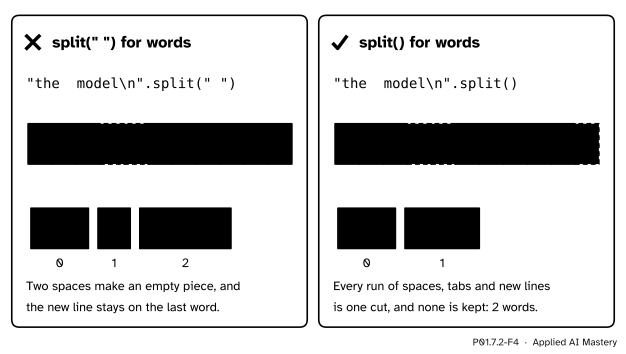
Wrong beside right. split(" ") cuts at every single space; split() cuts at runs of whitespace and keeps nothing empty.
“split(" ") and split() do the same job.”
They differ whenever there are two spaces in a row, a space at an end, or a new line. "the model\n".split(" ") gives ['the', '', 'model\n'], with an empty piece and a stray \n; "the model\n".split() gives ['the', 'model']. Use split() for words, and split(",") for a format that uses commas.
“The last field of a line is clean.”
A line from a file keeps its new line, so the header "name,hours,score\n" splits into ['name', 'hours', 'score\n'], and 'score\n' == 'score' is False. Strip the line before you split it.
“join will glue numbers together.”
hours = [2, 4, 5, 1, 3]print(",".join(hours))
Traceback (most recent call last):
  File "glue.py", line 2, in <module>
    print(",".join(hours))
          ^^^^^^^^^^^^^^^
TypeError: sequence item 0: expected str instance, int found
This message was copied from a run on Python 3.12; the marks under the code, and sometimes the wording, vary between versions. Every piece must be a string: build a list of str(h) with a loop first, then join it.
“Text that looks like a number can take .1f.”
score ="60"print(f"{score:.1f}")
Traceback (most recent call last):
  File "columns.py", line 2, in <module>
    print(f"{score:.1f}")
            ^^^^^^^^^^^
ValueError: Unknown format code 'f' for object of type 'str'
Also from Python 3.12. The spec .1f is for numbers, and "60" is text, which is exactly what a field read from a file is. Convert first: f"{float(score):.1f}" gives '60.0'.
Check yourself
Recall
1. What does "a,,b".split(",") return?
Show answer
['a', '', 'b']. The two commas side by side have an empty piece between them.
2. A line holds four commas. Into how many pieces does split(",") cut it?
Show answer
Five. Each separator adds one piece to the one there was at the start: 4 + 1 = 5.
3. What is "-".join(["2026", "11", "12"])?
Show answer
'2026-11-12': the separator goes between neighbours, never at the ends.
4. What string does f"{3:>4}" give?
Show answer
' 3': three spaces and then the digit, four characters in all, with the number at the right.
5. What string does f"{60:.1f}" give?
Show answer
'60.0': the number written with exactly one digit after the decimal point.
Exercises
1.★ Predict, then check: "numpy==2.5.4".split("=="), "2.5.4".split("."), and ".".join(["2", "5", "4"]).
Show solution
['numpy', '2.5.4']: the separator may be longer than one character, and it is dropped whole. ['2', '5', '4']: three pieces for two dots. '2.5.4': join puts the two dots back, which is Fact 2 at work.
2.★★ The course’s rule predict(hours) = 9 * hours + 33 gives each student a predicted score. Print a table with the columns name, pred and error, where the error is the score minus the prediction, in straight columns. Then print the mean of the squared errors with one decimal.
Show solution
table = [("name", "pred", "error")]total =0for name, h, s inzip(names, hours, scores): pred =9* h +33 table.append((name, pred, s - pred)) total += (s - pred) **2for a, b, c in table:print(f"{a:<6}{b:>6}{c:>7}")print(f"mean squared error {total /5:.1f}")
The predictions are 51, 69, 78, 42 and 60, so the errors are 4, -4, 2, -2 and 0. The squares are 16, 16, 4, 4 and 0, which add up to 40, and 40 / 5 is the mean squared error, printed as 8.0. A minus sign takes one character of a field’s width, and a width of 7 leaves room for it.
3.★★★ Extend split_on to a separator of any length, such as "==". Walk through text with a position i; when the slice starting at i with the length of sep equals sep, finish the piece and jump over the separator. Check it against str.split on "numpy==2.5.4" and on "a===b".
Show solution
def split_on(text, sep): pieces = [] piece ="" i =0while i <len(text):if text[i:i +len(sep)] == sep: pieces.append(piece) piece ="" i +=len(sep)else: piece = piece + text[i] i +=1 pieces.append(piece)return pieces
For "numpy==2.5.4" it returns ['numpy', '2.5.4']. For "a===b" it finds == at position 1, jumps to position 3, and grows '=b' from what is left, so it returns ['a', '=b']. That is exactly what "a===b".split("==") gives: the search starts again after each separator, so the three equals signs hold only one separator.
Summary card
Split cuts at separators; join puts them back; f-strings put values into text.
P01.7.2-F1
Cut at the separators, glue them back.
s.split(sep): k separators give k + 1 pieces, empty ones included.
s.split() cuts at runs of whitespace; s.strip() cleans both ends.
sep.join(pieces) writes sep between neighbours, so it undoes split(sep).
f"{x:>7.1f}": right side, 7 characters, one decimal; < puts it at the left.
Sources and next steps
Sources. Each was opened and checked against this lesson on 12 November 2026.
Python Software Foundation, Built-in Types: String Methods. str.split with a separator does not group consecutive separators, which delimit empty strings, so '1,,2'.split(',') returns ['1', '', '2']; with no separator, runs of whitespace count as one and there are no empty strings at either end. str.strip returns a copy without the leading and trailing whitespace, and str.join raises TypeError for any piece that is not a string.
Python Software Foundation, The Python Tutorial, section 7.1.1 Formatted String Literals: an expression in braces inside a string prefixed with f, a precision such as .3f, and an integer after the colon that makes a field a minimum number of characters wide so that columns line up.
Python Software Foundation, string: Format Specification Mini-Language: the alignment options (< is the default for most objects, > for numbers, ^ centres), the width as the minimum total field width, and the precision as the number of digits after the decimal point for the type f.
Daniel Jurafsky and James H. Martin, Speech and Language Processing, 3rd edition draft, chapter 2 (Words and Tokens): tokenization, separating words and word parts out of running text, is called there the first step in modern natural language processing.