print(bin(13))
print(int("1101", 2))
print(0b1101)
0b1101
13
13Before this lesson
P01.1.3 Running Python yourself
After this lesson you can
In review. The maths and code on this page are checked by automated tests on every change, but an independent reader has not signed it off yet. Spot a mistake or a confusing step? Tell us.
A computer’s memory can hold only two kinds of thing: 0 and 1. Yet it holds the number 13, the letter A, this sentence and every pixel of a photograph. How can patterns of 0s and 1s be all of these, and what does a model actually receive when it is shown a photograph?
From the last lesson
1. The line 9 * 2 + 33 is typed at the prompt, and the same line is put on its own in a script. What appears in each case?
At the prompt, 51. In the script, nothing: the value is worked out and dropped, because only print sends things to the screen.
2. In which order should you read an error message?
From the bottom up: the kind of error and what went wrong, then the line with its marker, then the file and line number.
Memory is built from billions of tiny switches, each either off or on. Call off 0 and on 1. One such switch holds one bit, short for binary digit. A single bit can say only yes or no, but a row of bits can say much more, as a row of ordinary digits can.
Bits are grouped in eights, and a group of eight bits is a byte. Memory is a long row of cells, one byte in each. Every cell has a number of its own, its address, so that the processor can find it again: cell 100, cell 101, and so on.
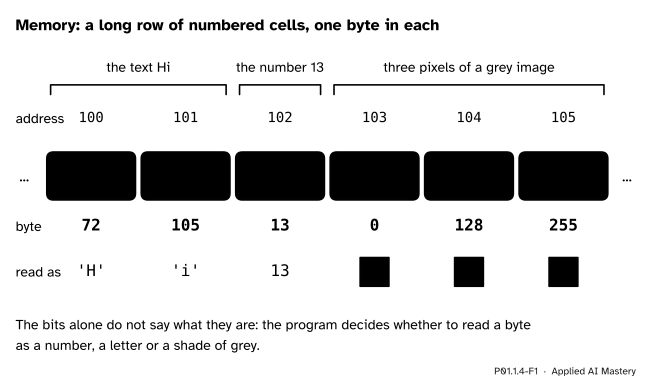
Memory as a long row of numbered cells, one byte in each. Text, a number and three pixels of a grey image all look alike: bytes.
A byte does not say what it means. The same eight bits can be a number, a letter or a shade of grey; the program decides how to read them. This is the first sign of an idea the next module builds on: every value in a program has a type, which says how its bits are to be read (P01.2.1). P01.2.2 then draws memory one level up, as names that point to values.
Step 1. Place value, the way you know it. In 1507, the 7 counts ones, the 0 counts tens, the 5 counts hundreds and the 1 counts thousands. Each place is worth ten times the place to its right.
Step 2. The same idea with 2. In binary, also called base 2, each place is worth twice the place to its right: 1, 2, 4, 8, 16 and so on, starting from the right. Only two digits are needed, 0 and 1. To read a binary number, add the place values that sit under a 1. For 1101 that is \({8 + 4 + 0 + 1 = 13}\).
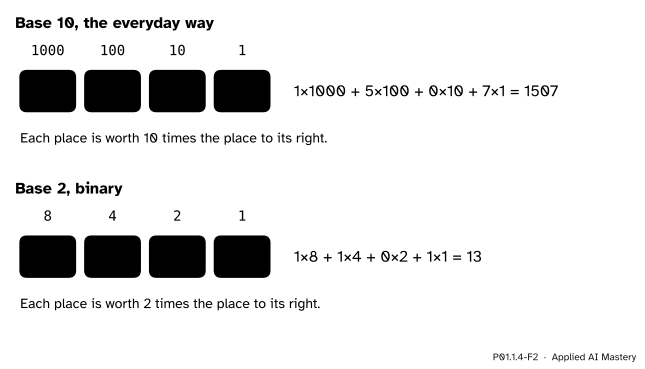
Place value in base 10 and in base 2: the same idea, with 10 or with 2.
Step 3. From a number to binary. To go the other way, work down the place values from the largest that fits, and ask of each one: does it fit into what is left? If it does, write 1 and take it away; if not, write 0. The worked example does this for 13.
Step 4. A byte. A byte has eight places, worth 128, 64, 32, 16, 8, 4, 2 and 1. The smallest byte is 00000000, which is 0, and the largest is 11111111, which is 255. So one byte holds the whole numbers from 0 to 255. Larger numbers take several bytes side by side.
Step 5. Text as numbers. Every character has a number of its own, its code: A is 65, B is 66 and a is 97; the digit 7 is 55 and a space is 32. The codes come from Unicode, the standard for text in every language. In a text file saved in UTF-8, the usual form, each of these characters takes one byte that holds its code. So the word Hi is the two bytes 72 and 105.
Step 6. Images as numbers. A grey picture is a grid of small squares, its pixels, and each pixel is stored as one byte: 0 for black, 255 for white, and the numbers in between for greys. A 5 by 5 picture of the digit 1 is 25 numbers.
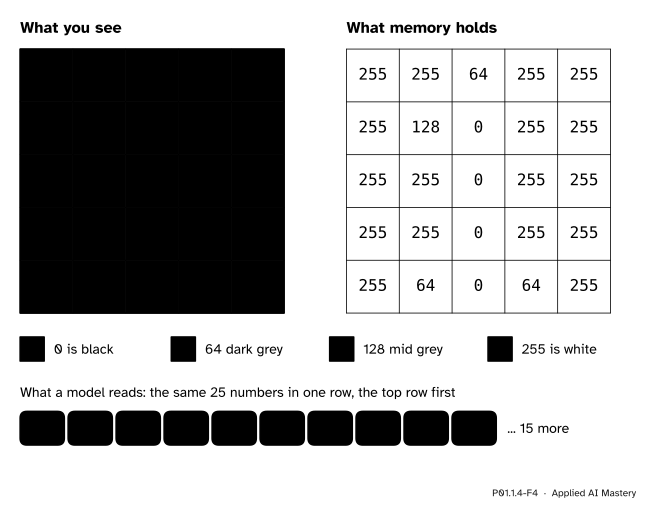
A grey image is a grid of numbers from 0 (black) to 255 (white). A model reads the same numbers as one long row.
This is how a model sees a picture: as numbers, never as a shape. In scikit-learn’s handwritten-digits example, each picture is an 8 by 8 grid of grey values, and the model reads it as one row of \({8 \times 8 = 64}\) numbers. The long row matches memory too: the rows of the picture sit one after another in a run of numbered cells.
The value of a binary number. Add each bit times its place value. A small 2 after a number marks it as binary:
\[ \begin{aligned} 1101_2 &= 1 \times 8 + 1 \times 4 \\ &\quad + 0 \times 2 + 1 \times 1 \\ &= 8 + 4 + 0 + 1 \\ &= 13. \end{aligned} \]
The place values are the powers of 2. Starting from the right, they are 1, then \({2 = 2^1}\), \({4 = 2^2}\), \({8 = 2^3}\) and so on, where \(2^3\) means \({2 \times 2 \times 2}\).
How many patterns do 8 bits have? One bit has two patterns, 0 and 1. Each extra bit doubles the count, because every pattern so far can be followed by a 0 or by a 1. So two bits have \({2 \times 2 = 4}\) patterns, three bits have 8, and eight bits have
\[ \begin{aligned} 2^8 &= 2 \times 2 \times 2 \times 2 \times 2 \times 2 \times 2 \times 2 \\ &= 256. \end{aligned} \]
Why the largest byte is 255, not 256. The 256 patterns stand for the 256 whole numbers counted from 0, which are 0 to 255. To see it from the bits, add 1 to 11111111. Every 1 turns into 0 and carries, as when \({999 + 1 = 1000}\), which leaves a 1 followed by eight 0s:
\[ \begin{aligned} 11111111_2 + 1 &= 100000000_2 \\ &= 2^8 = 256. \end{aligned} \]
So \(11111111_2\) is \({256 - 1 = 255}\), which is also the sum of the eight place values:
\[ \begin{aligned} &128 + 64 + 32 + 16 \\ &\quad + 8 + 4 + 2 + 1 = 255. \end{aligned} \]
Write 13 in binary, and back again.
13 is less than 16, so the largest place value needed is 8. Work down from 8.
Place 8. Does 8 fit into 13? Yes. Write 1, and \({13 - 8 = 5}\) is left.
Place 4. Does 4 fit into 5? Yes. Write 1, and \({5 - 4 = 1}\) is left.
Place 2. Does 2 fit into 1? No. Write 0, and 1 is still left.
Place 1. Does 1 fit into 1? Yes. Write 1, and nothing is left.
Read the bits from the top: 13 is 1101 in binary, or 00001101 as a full byte. Back again: \({8 + 4 + 0 + 1 = 13}\).
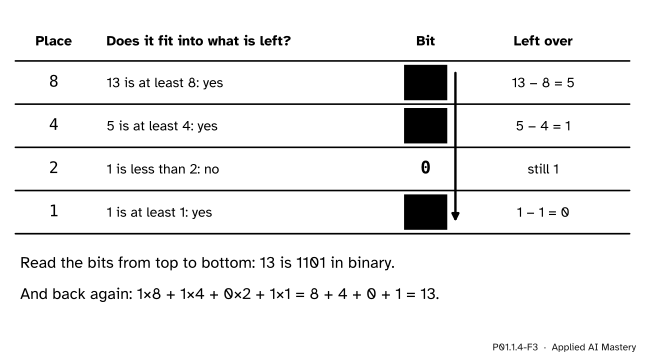
The trace of 13 written in binary. Each row asks whether a place value fits into what is left.
A second one: the letter A. Its code is 65. The largest place value that fits is 64, and \({65 - 64 = 1}\) is left, which is place 1. So 65 has a 1 at place 64 and at place 1 and 0s everywhere else, and the byte that stores A is 01000001.
Python does these conversions for you, and each result below agrees with the hand calculation. bin gives the binary digits of a number as text, with 0b in front to mark them as binary. int with a second argument of 2 reads text as a binary number. A number written in code with 0b in front is read as binary too.
print(bin(13))
print(int("1101", 2))
print(0b1101)0b1101
13
13The largest byte, and the number just past it:
print(bin(255), bin(256))
print(int("11111111", 2), int("100000000", 2))
0b11111111 0b100000000
255 256Characters and their codes: ord gives the code of a character, chr the character with a code. bin leaves off leading zeros, as we write 13 rather than 0013, so the code of A shows seven digits.
print(ord("A"), ord("B"), ord("a"))
print(ord("7"), ord(" "))
print(chr(72), chr(105))
print(bin(ord("A")))
65 66 97
55 32
H i
0b1000001This module’s interactive, the line-by-line stepper, lives in lesson P01.1.2. It shows a program one line at a time; this lesson went one level down, to the bytes those lines and their values are stored in. To explore that level, try bin, int, ord and chr at your own prompt (P01.1.3): the codes of the letters of your name, or the binary form of your age.
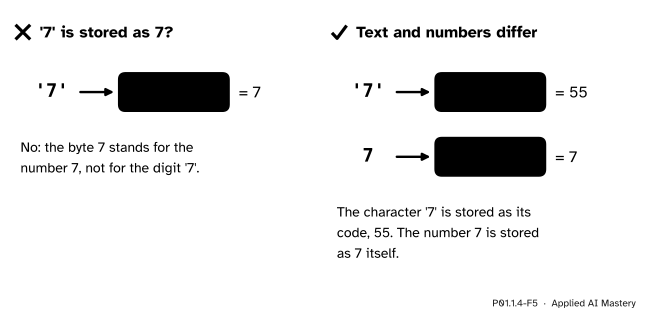
Wrong beside right. The character ‘7’ is stored as its code, 55; only the number 7 is stored as 7.
“The character ‘7’ is stored as the number 7.”
It is stored as its code, 55, which is 00110111. The number 7 is 00000111. Text that looks like a number is still text, which is why numbers read from a file arrive as text and must be converted before any arithmetic (P01.2.1).
“1101 is one thousand one hundred and one.”
Only in base 10. In binary it is 13. Always know which base you are reading: in Python, 1101 is the ordinary number, while 0b1101 is binary and equals 13.
“A byte counts from 1 to 256.”
A byte has 256 patterns, and counting starts at 0, so it runs from 0 to 255. Starting from 0 rather than 1 comes back all through programming, and so does the off-by-one mistake of forgetting it (P01.3.2).
“bin(13) gives me a number.”
It gives text, the characters 0b1101, for you to read. To compute with a binary number, write it as 0b1101 or convert the text with int("1101", 2).
1. How many bits make a byte, and what range of whole numbers can one byte hold?
Eight bits make a byte. One byte holds the whole numbers from 0 to 255, which is 256 patterns.
2. What is the binary number 1101 as an ordinary number?
13, because \({8 + 4 + 0 + 1 = 13}\).
3. What is the code of the character A, and what does chr(65) give?
The code of A is 65, and chr(65) gives back the character A.
4. In a grey image stored one byte per pixel, what does each pixel’s number mean?
How light the pixel is: 0 is black, 255 is white, and the numbers in between are greys.
5. What is an address in memory?
The number of a cell. Memory is a long row of cells, one byte in each, and each cell’s number lets the processor find it again.
1. ★ Convert 1010, 11111 and 10000000 from binary to ordinary numbers. Then convert 6, 19 and 100 to binary. Check your answers with int and bin.
Add the place values under each 1. For 1010: \({8 + 2 = 10}\). For 11111: \({16 + 8 + 4 + 2 + 1 = 31}\). For 10000000: the 1 sits at place 128, so it is 128.
For 6: 4 fits, leaving 2, and 2 fits, so 6 is 110. For 19: 16 fits, leaving 3; 8 and 4 do not fit; 2 fits, leaving 1; 1 fits. So 19 is 10011. For 100: 64 fits, leaving 36; 32 fits, leaving 4; 16 and 8 do not fit; 4 fits, leaving 0; 2 and 1 do not fit. So 100 is 1100100. bin(100) gives 0b1100100.
2. ★★ The word Hi is stored as two bytes. Write both in binary. A grey image 28 pixels wide and 28 pixels high is stored one byte per pixel: how many bytes is that?
H has code 72. 64 fits, leaving 8, which is place 8, so 72 is 01001000. The letter i has code 105. 64 fits, leaving 41; 32 fits, leaving 9; 16 does not fit; 8 fits, leaving 1; 4 and 2 do not fit; 1 fits. So 105 is 01101001.
The image has \({28 \times 28 = 784}\) pixels, so it takes 784 bytes.
3. ★★★ Show that the largest number \(k\) bits can hold is \({2^k - 1}\). How many bits does the total score of the study table, 300, need, and does it fit in one byte?
The largest \(k\)-bit pattern has a 1 in every place. Add 1 to it: every 1 turns into 0 and carries, which leaves a 1 followed by \(k\) zeros. That pattern is worth \(2^k\), so the pattern of \(k\) ones is worth \({2^k - 1}\). For \(k = 8\) this gives the 255 of a byte.
Now 300 lies between \({2^8 = 256}\) and \({2^9 = 512}\). Eight bits reach only 255, so 300 needs 9 bits: \({256 + 32 + 8 + 4 = 300}\) gives 100101100. It does not fit in one byte; it takes two.
Everything in memory is bytes: patterns of eight bits in a long row of numbered cells.
Bytes in numbered cells.
ord("A") is 65 and chr(65) is A.Sources. Each was opened and checked against this lesson on 12 November 2026.
bin (“a binary string prefixed with 0b”), int with a base, ord and chr; and the Unicode HOWTO, where UTF-8 stores a code point below 128 as a single byte of that value.Next. P01.2.1 Values and their types starts the next module: every value has a type, and the type decides how its bits are read and what an operator does with it.
This lesson unlocks
P01.2.1 Values and their types P01.2.2 Names and assignment P01.3.2 Repeating with while