When Python meets a name it looks in four places in a fixed order: the running function, any enclosing function, the file’s global names, then the built-ins. Learn the order, why assigning inside a function makes a name local, and how hidden globals and reused built-in names cause bugs.
State the order in which Python looks up a name: local, enclosing, global, built-in.
Decide for each name in a function whether it is local, and predict an UnboundLocalError before running the code.
Rewrite a function that changes a global name so that it takes the value in and returns the result.
Explain how a name such as sum hides a built-in function, and repair the damage.
In review. The maths and code on this page are checked by automated tests on every change, but an independent reader has not signed it off yet. Spot a mistake or a confusing step? Tell us.
The question
A notebook starts a running total with sum = 0, adds up the five scores, and prints 300. Twenty cells later, sum(scores) stops with TypeError: 'int' object is not callable. Nothing is wrong with sum, and nothing is wrong with scores. What went wrong is a question of where Python looks when it meets a name.
From the last lesson
1. In this course’s picture of the call stack, where are the global frame and the newest call?
Show answer
The global frame is at the top and the newest call at the bottom, the order in which a traceback lists them.
2. What happens to the names in a frame when its call returns?
Show answer
The frame is popped and its names are gone; the returned value goes back to the line that made the call.
Intuition
The course keeps the hours studied in a list, hours = [2, 4, 5, 1, 3], and the model is predict(hours), whose parameter has the same name. Inside predict, 9 * hours + 33 multiplies a number, not the list: Python chose between the two names hours, and took the parameter.
The rule behind that choice is short. A name can live in four places, and Python looks in them in a fixed order, stopping at the first place that has the name:
local: the frame of the function that is running;
enclosing: the frame of any function that this function is written inside;
global: the names at the top level of the file;
built-in: the names that Python provides, such as print, len and sum.
Programmers remember the order by its initials, LEGB. Each place is a namespace, a table from names to objects, and the part of the program where a name can be used is its scope.
P01.4.4-F1
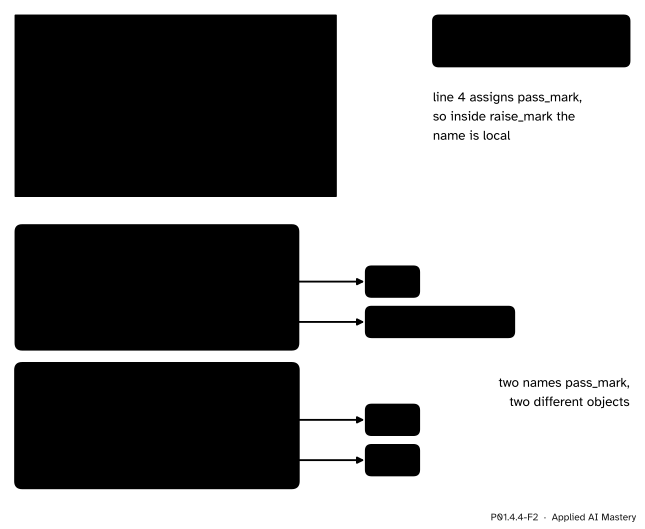
The four places a name can live, from the innermost outwards. Looking up pass_mark inside passed, Python finds it in the enclosing function at 50 and never reaches the global 70.
The picture shows the worked example: passed is written inside pass_rate, and the file has a global pass_mark too. The search starts in the innermost box and stops at the first box that has the name.
Build it up
Step 1. Local names first. A function’s parameters, and every name its body assigns, are local to it. That is why hours inside predict is the parameter: the local hours is found first, and the global list is never reached.
Step 2. Global names next. A function may read a name that the file assigns at its top level:
pass_mark is not local to passed, so the search goes on and finds the global name: passed(55) is True and passed(40) is False.
Step 3. Built-in names last.print, len, sum, max, min, round and range are not defined anywhere in your file. They live in a place of their own that is searched last, which is why they work everywhere.
Step 4. Enclosing functions, in between. A def may sit inside another function. The inner function can then read the outer function’s names:
def pass_rate(values, pass_mark=50):def passed(score):return score >= pass_mark count =0for v in values:if passed(v): count = count +1return count /len(values)
Inside passed, the name pass_mark is not local, so Python looks in the enclosing function, pass_rate, where it is a parameter. Enclosing means written inside, not called from: what counts is where the def sits in the file.
Step 5. An assignment decides what is local. Before a function runs, Python reads its whole body and makes a list of the names that are assigned in it, such as the parameters, the targets of =, the names of for loops and the names of any def inside. Those names are local everywhere in the body, even on the lines before the assignment. So assigning to a name inside a function never changes a global name of the same spelling; it makes a new local name.
P01.4.4-F2
Assigning inside a function makes a new local name. raise_mark compares against its own pass_mark, 70, so 60 fails; the global pass_mark still refers to 50 afterwards.
The formal statement
NoteDefinitions: namespace, scope
A namespace is a table from names to objects: the frame of a call, the global names of a file, or the built-in names. The scope of a name is the part of the program in which it can be used by its bare name.
Lookup. When code uses a name, Python searches the local namespace, then the namespaces of the enclosing functions from the nearest outwards, then the global namespace, then the built-in one, and takes the first match. Code at the top level of a file has no local or enclosing places of its own, so its search starts with the global names.
Binding. A name that is assigned anywhere in a function’s body is local in all of that body. Python decides this from the text of the function, before it runs.
Two errors follow from these rules, both of the NameError family.
A name found nowhere raises NameError, “name … is not defined”.
A local name used before the line that assigns it raises UnboundLocalError: the search stops in the local namespace, where the name is listed but has no object yet.
The global statement.global total at the start of a function makes every use of total in it mean the global name, so an assignment changes the global one. It works, but it hides an input and an output inside the function.
def is an assignment. A def at the top level binds a global name, so it obeys the same rules: mean = 60.0 after def mean(...) replaces the function with a number, and a global name spelt like a built-in, such as sum or list, hides the built-in from then on.
Go deeper: changing a name of the enclosing function: nonlocal
global reaches the top level of the file. Its partner, nonlocal, reaches the nearest enclosing function: inside a nested function, nonlocal count makes count = count + 1 change the enclosing function’s count instead of making a local one. It is rare in data code: a value that a function needs is better passed in, and a value it makes is better returned.
Worked example
Find where Python finds each name, and what the program prints.
Start with the first call, pass_rate(scores). scores is used at the top level, so its search starts with the global names and finds the list. Inside pass_rate, the parameter pass_mark takes its default, 50.
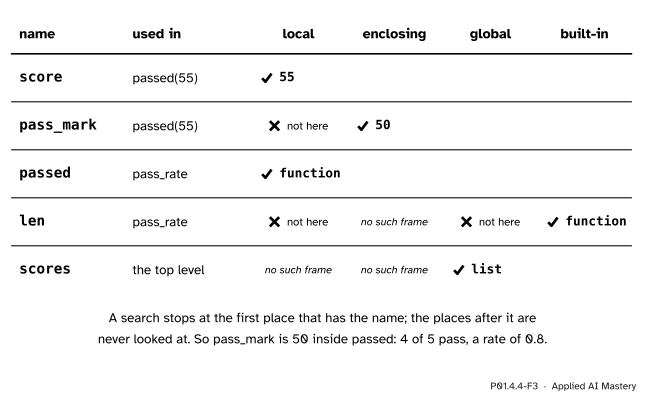
The loop calls passed(55). Inside it, score is local: it is the parameter, bound to 55. pass_mark is not local to passed; the enclosing function pass_rate has it, bound to 50, so the search stops there and the global 70 is never reached. So 55 ≥ 50 is True.
Back in pass_rate, passed and count are local, because def and = assign them. len is neither local nor global, and pass_rate has no enclosing function, so the search ends in the built-ins.
P01.4.4-F3
The worked example as a search table. Each search starts where the name is used and stops at the first place that has it; blank cells are places never looked at.
The scores 55, 65, 80 and 60 pass and 40 fails, so count is 4 and the first call returns 4 / 5 = 0.8. The second call passes the global pass_mark in as an argument: the argument is the global’s object, 70, so inside passed the enclosing pass_mark is 70, only 80 passes, and the call returns 1 / 5 = 0.2. The program prints 0.8 0.2.
A function that reads a global gives a different answer whenever the global changes, even though its call does not:
pass_mark =50def passed(score):return score >= pass_markprint(passed(60))pass_mark =70# a later cell of a notebook, perhapsprint(passed(60))
True
False
A function that assigns to a global name instead makes a local one. Saved as running_total.py and run with Python 3.15 (the wording varies a little between versions):
total =0def add_score(score): total = total + scorereturn totaladd_score(55)
Traceback (most recent call last):
  File "running_total.py", line 7, in <module>
    add_score(55)
    ~~~~~~~~~^^^^
  File "running_total.py", line 4, in add_score
    total = total + score
            ^^^^^
UnboundLocalError: cannot access local variable 'total' where it is not associated with a value
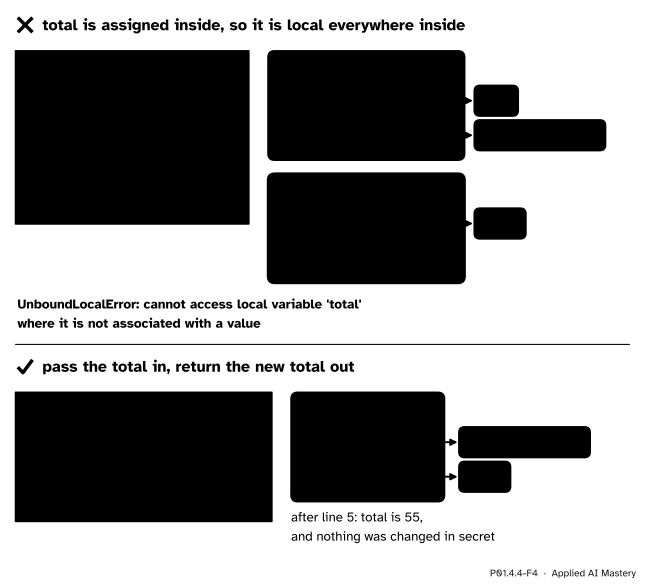
Line 4 assigns total, so it is local in all of add_score, and the right side of the = finds a local name with no object yet. The global statement makes it work:
total =0def add_score_global(score):global total total = total + scorefor s in scores: add_score_global(s)print(total)
300
The better way passes the total in and returns the new total out, so every input and output is in the call:
def add_score(total, score):return total + scoretotal =0for s in scores: total = add_score(total, s)print(total)
300
Last, the bug of the hook. As a file, running_sum.py, it fails on its last line:
scores = [55, 65, 80, 40, 60]sum=0for s in scores:sum=sum+ sprint(sum)print(sum(scores))
300
Traceback (most recent call last):
  File "running_sum.py", line 6, in <module>
    print(sum(scores))
          ~~~^^^^^^^^
TypeError: 'int' object is not callable
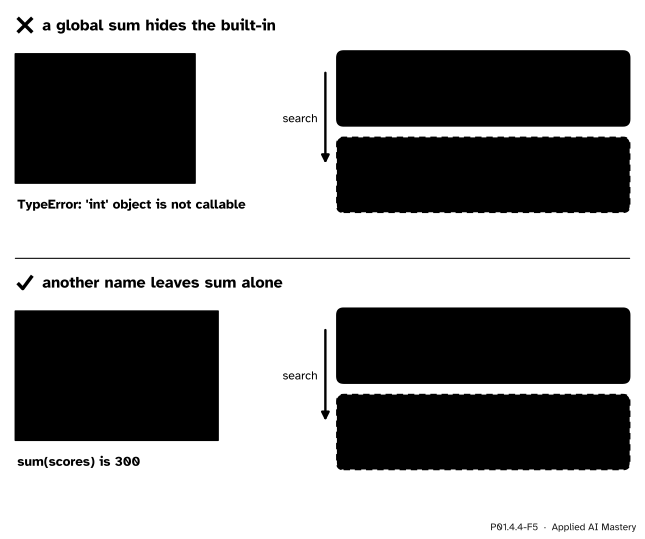
The global name sum refers to the int 300, and the search for sum stops there. In a notebook, del sum removes the global name, and the built-in shows through again:
sum=0for s in scores:sum=sum+ sprint(sum)delsum# remove the global name sumprint(sum(scores)) # found among the built-ins again
300
300
Explore
This module’s interactive, the call-stack stepper, lives in lesson P01.4.3. Step through squared_error(2, 55) with this lesson’s rule in mind: each name a line uses is looked up in the newest frame first, then among the global names, and last among the built-ins, which is where line 9 finds print.
Pitfalls
P01.4.4-F4
Wrong beside right. Assigning to total inside the function makes it local, so it cannot be read first; taking the total in and returning it out needs no global name at all.
“A function can update a global name by assigning to it.”
Assigning inside a function makes a new local name; it never touches the global one. If the body also reads the name before assigning it, as total = total + score does, the call fails with UnboundLocalError. The global statement would allow the change, but then the function has an input and an output that its call does not show. Pass the value in and return the new value out.
“Reading a global inside a function is harmless.”
It works, which is the danger. passed(60) gave True, then False after a later line changed pass_mark, though the call never changed. In a notebook, where cells run in any order, such a function answers according to which cells ran last: the classic notebook bug of P02.9. Make the value a parameter with a default, as pass_rate(values, pass_mark=50) does.
P01.4.4-F5
A global name spelt like a built-in hides it. With another name for the running total, the search for sum passes the global names and reaches the built-in function.
“Any name will do for a variable.”
A global name spelt like a built-in, such as sum, list, max or round, hides it for the rest of the file, and the error appears far from its cause. Choose names that say what the value is, such as total; in a notebook where it has already happened, del the name.
Check yourself
Recall
1. In what order does Python look for a name used inside a function?
Show answer
Local (the running function’s frame), then enclosing functions from the nearest outwards, then global (the top level of the file), then built-in: LEGB.
2. What makes a name local to a function?
Show answer
Being assigned anywhere in the function’s body, as a parameter, by =, by a for loop or by a def. It is then local in all of the body, even before the line that assigns it.
3. Why does total = total + score inside a function raise UnboundLocalError when there is a global total?
Show answer
The assignment makes total local everywhere in the function, so reading it on the right finds the local name before it has an object; the global total is never consulted.
4. What is better than the global statement for a function that updates a running total?
Show answer
Passing the total in as a parameter and returning the new total, as in total = add_score(total, s).
5. Why does sum(scores) fail after sum = 0 at the top level?
Show answer
The global name sum now refers to an int. The search finds it before reaching the built-in function, and an int cannot be called.
Exercises
1.★ For each name used inside bonus, say whether Python finds it among the local, enclosing, global or built-in names. Then work out bonus(60) and bonus(80).
score is local (a parameter) and extra is local (assigned on the first line of the body). rate is not assigned in bonus and there is no enclosing function, so it is global. min is found only among the built-ins.
bonus(60): extra is 60 × 0.5 = 30.0, and min(90.0, 100) is 90.0. bonus(80): extra is 40.0, and min(120.0, 100) is 100, so the bonus never takes a score past 100.
2.★★ Predict what each program prints, or the error it raises. (a) A global count = 0, then def add_one(): with the body count = count + 1, then the call add_one(). (b) A global count = 0, then def show(): with the body print(count), then show(). (c) The program below.
(a) UnboundLocalError. count is assigned in add_one, so it is local there, and the right side reads it before it has an object.
(b) It prints 0. show only reads count, so the name is not local; the search finds the global.
(c) It prints inside. label is not local to inner, so Python looks in the enclosing function, outer, where it is bound to 'inside'.
3.★★★ The count_passes of the exercises of P01.4.1 has the pass mark 50 written into passed. Rewrite it as count_passes(values, pass_mark=50), with passed inside it, so that it reads no global name of yours. What are count_passes(scores) and count_passes(scores, 70), and does a global pass_mark = 70 change the first answer?
Show solution
def count_passes(values, pass_mark=50):def passed(score):return score >= pass_mark count =0for v in values:if passed(v): count = count +1return count
count_passes(scores) is 4 (55, 65, 80 and 60 reach 50) and count_passes(scores, 70) is 1 (only 80). A global pass_mark = 70 changes nothing: inside passed, the search for pass_mark stops in the enclosing function, whose parameter is 50 unless the call says otherwise. Every input is now in the call, so the answer depends on the call alone.
Summary card
Python looks for a name in four places, in order, and takes the first it finds.
P01.4.4-F1
Local, enclosing, global, built-in.
Lookup: local, then enclosing, then global, then built-in (LEGB); the first match wins.
Binding: a name assigned anywhere in a function is local in all of it; reading it before then is an UnboundLocalError.
Prefer passing values in and returning results out to global.
Never reuse a built-in name such as sum or list; def binds a name like = does.
Sources and next steps
Sources. Each was opened and checked against this lesson on 12 November 2026.
Python Software Foundation, The Python Language Reference, section 4.2, Naming and binding. 4.2.1 lists the constructs that bind a name (parameters, function definitions, assignment, the for header) and says a name bound in a block is local to it. 4.2.2 gives the resolution of names by the nearest enclosing scope, NameError and UnboundLocalError (a subclass of NameError), the rule that a binding anywhere in a block makes every use in the block local, and the global statement, with the global namespace searched before the built-in one.
Python Software Foundation, The Python Tutorial, section 9.2, Python Scopes and Namespaces: the three or four nested scopes searched in order, local, enclosing functions, the module’s global names and the built-in names, and “scopes are determined textually”. Section 4.8, Defining Functions gives the same order for variable references in a function.
Python Software Foundation, Programming FAQ, Why am I getting an UnboundLocalError when the variable has a value? and the entry after it on the rules for local and global variables: a name only referenced inside a function is global, an assigned one is local unless declared global, and requiring global for assignment is “a bar against unintended side-effects”.
Next. P01.5 Modules, packages and environments: a module is a file with global names of its own, found by a search much like this one.