record = ('Ama', 2, 55)
print(record[0], record[-1], record[1:], len(record), type(record))
Ama 55 (2, 55) 3 <class 'tuple'>Before this lesson
P01.6.1 Lists: ordered and changeable
After this lesson you can
In review. The maths and code on this page are checked by automated tests on every change, but an independent reader has not signed it off yet. Spot a mistake or a confusing step? Tell us.
Ama’s row of the study table is three values that belong together: her name, her hours and her score. Which container keeps them together and safe from accidental change? And how do you walk the hours and the scores side by side, to measure how far the rule predict(hours) = 9 * hours + 33 lands from every real score?
From the last lesson
1. What is scores[1:4] for scores = [55, 65, 80, 40, 60], and why is the item at position 4 not in it?
[65, 80, 40]. A slice stops before its stop position, so it holds positions 1, 2 and 3: \({4 - 1 = 3}\) items.
2. What does sorted(scores) give, and what happens to scores?
A new list, [40, 55, 60, 65, 80]. The list scores is not changed; scores.sort() is the one that changes it, and it gives back None.
A tuple is a row of values, like a list, that cannot be changed once it is made. You write it with commas, usually inside round brackets: record = ('Ama', 2, 55). It is the natural shape for a record, a few values that describe one thing and belong together in a fixed order.
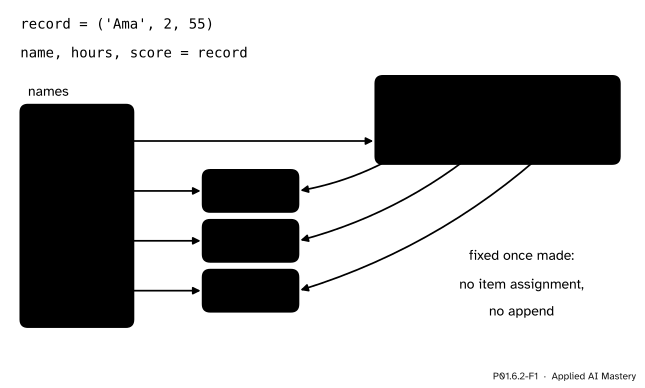
A tuple and its unpacking. Each slot of the tuple holds an arrow to an object, and name, hours, score = record points one new name at each of the same three objects.
This time the picture draws what a slot really holds: an arrow to an object. Slot 0 of the tuple points to the string 'Ama', slot 1 to the number 2 and slot 2 to the number 55. The second line, name, hours, score = record, is an unpacking: it takes the tuple apart and binds one name to each item, in order. Afterwards name and slot 0 point to one and the same string.
Why have a row that cannot change? Because a record should not change by accident. If a function is handed Ama’s row, it cannot quietly alter her score. And because a tuple never changes, Python lets it do things a list cannot, such as serve as a key of a dictionary in the next lesson.
Pairs are everywhere in machine learning: an input and its target, a prediction and the truth. This lesson’s second half walks two lists in step, pair by pair, and uses the pairs to score a model.
Step 1. Reading a tuple. A tuple is indexed and sliced exactly like a list, and len works on it too.
record = ('Ama', 2, 55)
print(record[0], record[-1], record[1:], len(record), type(record))Ama 55 (2, 55) 3 <class 'tuple'>The slice record[1:] is a new tuple, (2, 55), just as a slice of a list is a new list.
Step 2. It cannot be changed. Item assignment stops the program:
record = ('Ama', 2, 55)
record[2] = 60
Traceback (most recent call last):
File "record.py", line 2, in <module>
record[2] = 60
~~~~~~^^^
TypeError: 'tuple' object does not support item assignmentThe message is copied from Python 3.15; wording varies a little between versions. A tuple has no append, insert, pop or remove either: record.append(70) fails with AttributeError: 'tuple' object has no attribute 'append'. To record a new score, build a new tuple and bind the name to it: record = ('Ama', 2, 60).
Step 3. The comma makes the tuple. Writing values with commas between them packs them into a tuple, and the round brackets are optional: record = 'Ama', 2, 55 makes the same tuple. So a tuple with one item needs its comma, (55,), because (55) is just the number 55 in brackets.
Step 4. Unpacking. Several names on the left of =, separated by commas, take the items of the tuple on the right one by one:
name, hours, score = record
print(name, hours, score)
Ama 2 55The counts must match. name, hours = record gives two names three items and stops with ValueError: too many values to unpack (expected 2, got 3); Python 3.12 leaves out the got 3.
Step 5. Swapping two names. a, b = b, a swaps two names in one line. The right side is worked out first: it packs the objects that b and a name into a new tuple. Only then are the names on the left bound to its two items.
Step 6. Returning two values. A function returns one object, but that object can be a tuple, and the caller can unpack it at once:
def lowest_and_highest(values):
    return min(values), max(values)

scores = [55, 65, 80, 40, 60]
low, high = lowest_and_highest(scores)
print(low, high, lowest_and_highest(scores))
40 80 (40, 80)Step 7. Looping in pairs. A for loop can unpack as it goes. Two built-in functions hand it pairs. enumerate pairs each item with its position: enumerate(scores) gives (0, 55), (1, 65) and so on. zip pairs the items at the same position of two lists: zip(hours, scores) gives (2, 55), (4, 65), (5, 80), (1, 40) and (3, 60).
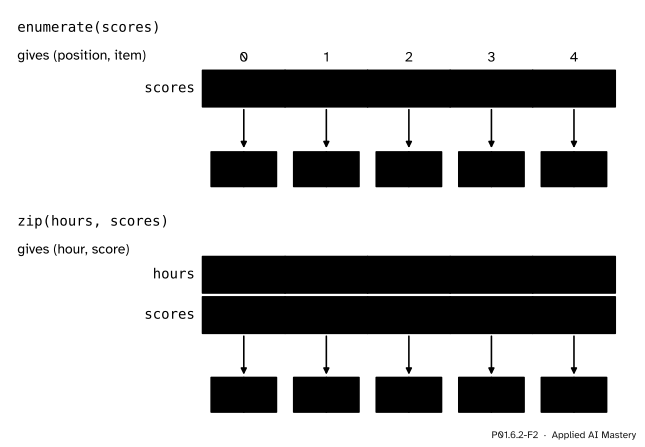
Top: enumerate pairs each item with its position. Bottom: zip walks two lists in step and pairs the items at the same position.
The mean squared error. Number the students \({i = 1, \dots, n}\), with hours \(\cdata{x_i}\) and score \(\cdata{y_i}\). The rule predicts \({\cmodel{\hat{y}_i} = 9x_i + 33}\), and the error of student \(i\) is the score minus the prediction:
\[ \closs{e_i} = \cdata{y_i} - \cmodel{\hat{y}_i} . \]
Squaring turns every error into an amount that is never negative, and makes large errors count far more than small ones. The mean squared error is the mean of the squares:
\[ \closs{\text{MSE}} = \frac{\closs{e_1}^2 + \closs{e_2}^2 + \cdots + \closs{e_n}^2}{n} . \]
Each error needs an \(x_i\) and a \(y_i\) from the same student, which is exactly what one pass of zip(hours, scores) hands over. Machine learning uses this number to say how good a model is: ML01.4 finds the line that makes it smallest.
The mean squared error of predict, by hand. The program walks the two lists with zip and adds up the squared errors:
total = 0
for h, s in zip(hours, scores):
    total = total + (s - predict(h)) ** 2
mse = total / len(hours)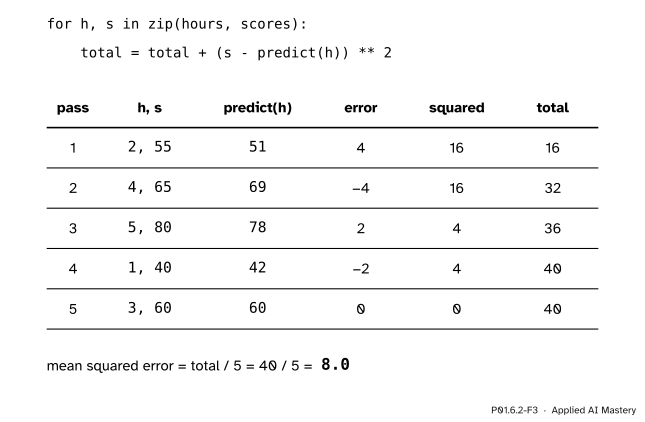
The worked example as a trace table: one row per pass of the zip loop, with the pair it receives, the prediction, the error, its square and the running total.
Pass 1. zip hands over the pair (2, 55), unpacked into h = 2 and s = 55. The prediction is \({9 \times 2 + 33 = 51}\), the error \({55 - 51 = 4}\) and its square 16, so total becomes 16.
Pass 2. The pair is (4, 65). The prediction is \({9 \times 4 + 33 = 69}\) and the error \({65 - 69 = -4}\). Its square is 16 again, because squaring forgets the sign: total is 32.
Passes 3 to 5. For (5, 80) the prediction is \({9 \times 5 + 33 = 78}\) and the error \({80 - 78 = 2}\), so 4 is added and total is 36. For (1, 40) it is \({9 \times 1 + 33 = 42}\) and \({40 - 42 = -2}\), so 4 more makes 40. For (3, 60) it is \({9 \times 3 + 33 = 60}\), the error is 0 and nothing is added. The total ends at 40.
After the loop. There were 5 students, so the mean squared error is \({40 / 5 = 8.0}\). It prints as 8.0, a float, because / always gives a float (P01.2.3). For comparison, always predicting the mean score, 60, scores 170.0 (exercise 2): the rule is far better than a constant guess.
From scratch first: before zip, the only way to walk two lists in step is by position.
def predict(hours):
    return 9 * hours + 33

hours = [2, 4, 5, 1, 3]
scores = [55, 65, 80, 40, 60]

total = 0
for i in range(len(hours)):
    error = scores[i] - predict(hours[i])
    total = total + error ** 2
print('by position:', total / len(hours))

total = 0
for h, s in zip(hours, scores):
    error = s - predict(h)
    total = total + error ** 2
print('with zip:', total / len(hours))
by position: 8.0
with zip: 8.0The zip version names what it uses, h and s, instead of reaching into both lists with i. The same idea for positions: a counter kept by hand, then enumerate, which keeps it for you. list(...) collects all the pairs into a list, so that print can show them.
names = ['Ama', 'Ben', 'Chen', 'Dina', 'Eli']

pairs = []
position = 0
for name in names:
    pairs.append((position, name))
    position = position + 1
print(pairs[:2])
print(list(enumerate(names))[:2], list(enumerate(names, start=1))[:2])
[(0, 'Ama'), (1, 'Ben')]
[(0, 'Ama'), (1, 'Ben')] [(1, 'Ama'), (2, 'Ben')]Finally a function that returns two values, the errors and their mean square, unpacked by the caller:
def errors_and_mse(hours, scores):
    errors = []
    for h, s in zip(hours, scores):
        errors.append(s - predict(h))
    total = 0
    for e in errors:
        total = total + e ** 2
    return errors, total / len(errors)

errors, mse = errors_and_mse(hours, scores)
print(errors, mse)
[4, -4, 2, -2, 0] 8.0This module’s interactive, the box-diagram workbench, lives in lesson P01.6.4. It works on a list, because a tuple could not be changed at all: try its buttons there once you have read about sharing.
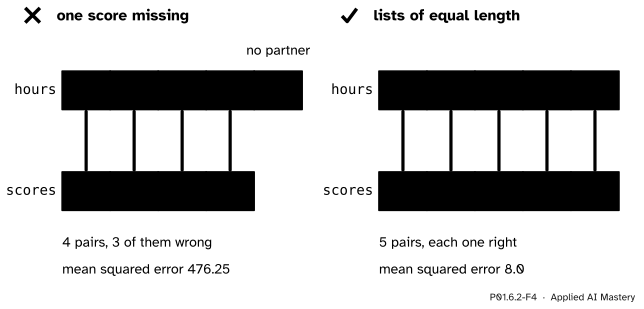
Wrong beside right. Left: one missing score shifts every pair after it, and zip drops the last student without a word; the error jumps from 8.0 to 476.25. Right: lists of equal length, five correct pairs.
“zip will tell me if the two lists do not match.”
It will not. zip stops at the shorter list and says nothing. If Ben’s score is missing, every later score is paired with the wrong hours and Eli disappears, as in the figure. Hours and scores are features and labels in machine learning, and a silent shift like this ruins a model without a single error message. Check len(hours) == len(scores) first, or ask for zip(hours, scores, strict=True) (Python 3.10 and later), which raises ValueError: zip() argument 2 is shorter than argument 1.
“(55) is a tuple with one item.”
Brackets alone only group: (55) is the number 55. The comma makes a tuple, so a one-item tuple is written (55,), or just 55,.
“a = b, then b = a, swaps them.”
After a = b both names point to the same object, and the object a named before is lost, so b = a changes nothing. Write a, b = b, a, which builds the pair on the right before either name moves.
“A function can return two separate values.”
It returns one tuple. result = lowest_and_highest(scores) binds result to (40, 80), and only unpacking, low, high = ..., splits it into two names.
1. How do you write a tuple whose only item is 55?
(55,), or 55,. The comma makes the tuple; (55) is just 55.
2. What does name, hours, score = ('Ama', 2, 55) do?
It unpacks the tuple: name is bound to 'Ama', hours to 2 and score to 55.
3. After a, b = 1, 2 and then a, b = b, a, what are a and b?
a is 2 and b is 1. The right side (b, a) is built first, as (2, 1), then unpacked.
4. Which pairs does enumerate(['Ama', 'Ben']) produce?
(0, 'Ama') and (1, 'Ben'): each item with its position, counted from 0.
5. What does zip do when one list is shorter than the other?
It stops when the shorter list runs out, so the extra items of the longer list are dropped without any error.
1. ★ Let t = (2, 4, 5, 1, 3). Predict t[2], t[-1], t[1:3] and len(t), and say what t[0] = 9 does.
t[2] is 5, t[-1] is 3, t[1:3] is the new tuple (4, 5) and len(t) is 5. t[0] = 9 stops with TypeError: 'tuple' object does not support item assignment.
2. ★★ Write mse(predictions, scores) with zip. Use it to find the mean squared error of always predicting the mean score 60, and of the predictions of predict, [51, 69, 78, 42, 60].
def mse(predictions, scores):
    total = 0
    for p, s in zip(predictions, scores):
        total = total + (s - p) ** 2
    return total / len(scores)
For the constant 60 pass [60, 60, 60, 60, 60]. The errors are −5, 5, 20, −20 and 0, the squares 25, 25, 400, 400 and 0, which add to 850, and \({850 / 5 = 170.0}\). For predict the errors are 4, −4, 2, −2 and 0, the squares add to 40, and \({40 / 5 = 8.0}\).
3. ★★★ Write best_and_worst(names, scores), which returns two values: the name with the highest score and the name with the lowest. Use zip, not max or min. What does it give for the study table?
Keep the best and the worst seen so far, as in the best-so-far pattern of P01.3.4, and update them pair by pair.
def best_and_worst(names, scores):
    best_name, best = names[0], scores[0]
    worst_name, worst = names[0], scores[0]
    for name, score in zip(names, scores):
        if score > best:
            best_name, best = name, score
        if score < worst:
            worst_name, worst = name, score
    return best_name, worst_name
For the study table it returns ('Chen', 'Dina'): Chen scored the highest, 80, and Dina the lowest, 40.
A tuple is a fixed record; unpacking and zip hand its items to names.
A tuple, and one name per item.
('Ama', 2, 55); indexed and sliced like a list, but never changed. One item: (55,).name, hours, score = record; the counts must match. Swap with a, b = b, a.enumerate(seq) gives (position, item); zip(xs, ys) gives (x, y) and stops at the shorter list.predict.Sources. Each was opened and checked against this lesson on 12 November 2026.
t = 12345, 54321, 'hello!' is tuple packing, sequence unpacking needs as many names as items, and a one-item tuple needs a trailing comma. Section 5.6, Looping Techniques: enumerate and zip in a for loop.zip stops when the shortest iterable is exhausted and ignores the rest of the longer ones, and with strict=True (added in version 3.10) raises ValueError; enumerate returns pairs of a count, from start, which defaults to 0, and an item.TypeError), 11.3 (tuple assignment and the swap), 11.4 (tuples as return values) and 11.6 (zip, and enumerate’s pairs of an index from 0 and an element). Free under CC BY-NC-SA 4.0.Next. P01.6.3 Dictionaries and sets finds a value by a name instead of a position, and counts the bands of the five scores.
This lesson unlocks