A function is an object, so it can be handed to another function: sorted and max with key=, lambda, and map and filter as lazy stages, with islice to stop early. Ends with study.csv read as one pipeline, one row in memory at a time, to the mean of the passing scores, 65.0.
Pass a function to another function, and use key= with sorted and max to sort the students by score and find the highest scorer.
Write a lambda for a function of one expression, and say when a def is better.
Use map, filter and itertools.islice as lazy stages, and write the generator expression each one stands for.
Read study.csv as one lazy pipeline, from lines to rows to passing scores to their mean, 65.0, with one row in memory at a time.
In review. The maths and code on this page are checked by automated tests on every change, but an independent reader has not signed it off yet. Spot a mistake or a confusing step? Tell us.
The question
Who scored highest? max(scores) says 80, but not whose score it was. max(rows) on the rows of the study table answers ('Eli', 3, 60), which is wrong. And the real study.csv of a large course might have a hundred million lines. How do you tell max what “highest” means, and how do you read a file that does not fit in memory?
From the last lesson
1. What does calling a generator function return, and how much of its body runs?
Show answer
A generator object; none of the body runs until the first next.
2. What is the difference between [x * x for x in scores] and (x * x for x in scores)?
Show answer
The first is a list comprehension: it builds a list of all five squares at once. The second is a generator expression: it makes a generator that works out one square each time it is asked.
Intuition
Two ideas meet in this lesson.
The first: a function is an object, like a number or a list. It can be bound to a name, put in a list (P01.8.4 did this for tests) and handed to another function as an argument. Then the receiving function can call it. That is how you tell max what to compare.
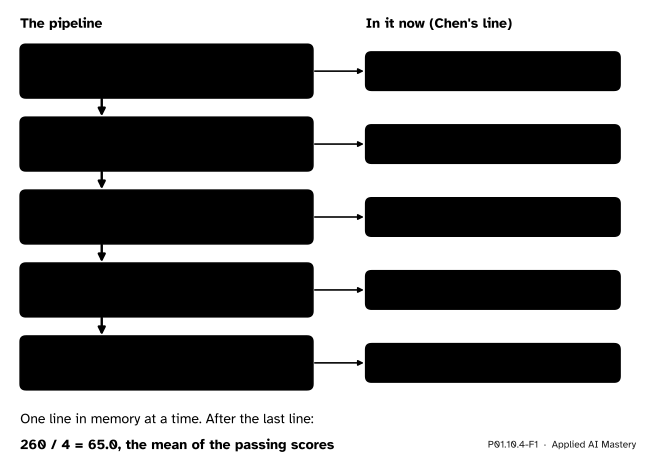
The second: iterators can be chained. Each stage asks the stage before it for one item, does its job, and hands the item on. Such a chain is a pipeline. Built from iterators, it is lazy: one item moves through the whole chain before the next one is read.
P01.10.4-F1
A lazy pipeline. Each stage hands one item to the next; the picture is caught while Chen’s line is on its way down.
Some stages need a small function to do their job: filter needs the test, sorted needs to know what to sort by. So the two ideas belong together.
Build it up
Step 1. A function is an object. Writing predict without brackets names the function; with brackets, it calls it. A function can be passed to another function and called there.
apply_to_all does not know or care which function it is given. Here it calls predict five times.
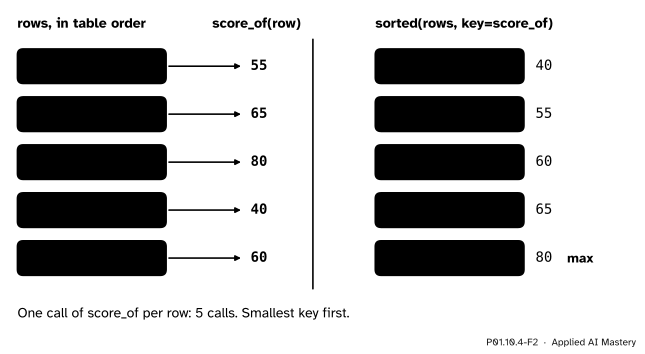
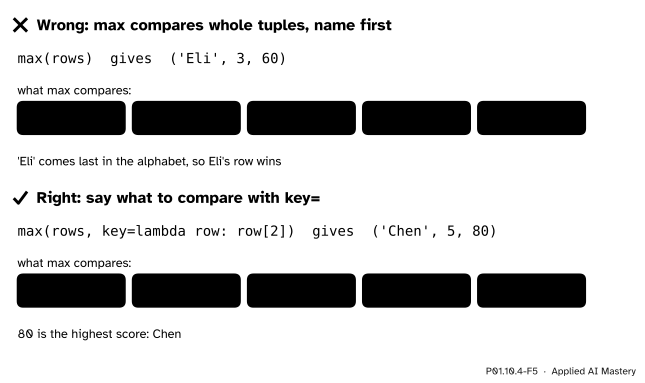
Step 2. Sort by a key.sorted and max compare items directly unless told otherwise. A row is a tuple, and tuples compare by their first item, the name, so max(rows) gives the row whose name comes last in the alphabet: Eli. The argument key= takes a function of one item, and the comparison is made on what it returns.
key= works out one number for each row, once, and the rows are put in the order of those numbers. The row with the largest key is the one max returns.
Step 3. A function without a name. A lambda is a function written as one expression: lambda row: row[2] takes row and returns row[2]. It is handy for a key that is used once.
print(max(rows, key=lambda row: row[2]))by_score =sorted(rows, key=lambda row: row[2], reverse=True)print([name for name, h, s in by_score])
Step 4. Stages that take a function.map(f, items) hands over f(x) for each item, and filter(f, items) hands over the items for which f(x) is True. Both are lazy iterators, like a generator expression: they do nothing until asked.
predictions =map(predict, hours)print(next(predictions))print(list(predictions))print(list(filter(lambda s: s >=50, scores)))
51
[69, 78, 42, 60]
[55, 65, 80, 60]
The first next takes 51, so list gets the four predictions that are left.
Step 5. Stop early.itertools.islice(items, n) hands over at most the first n items and then stops, without asking for more. zip and enumerate are iterators too (P01.10.2).
from itertools import isliceprint(list(islice(map(predict, hours), 2)))pairs =zip(names, scores)print(next(pairs))print(list(islice(enumerate(names), 3)))
A key function is a function of one item that returns the value to compare. sorted(items, key=f), min(items, key=f) and max(items, key=f) compare f(x) instead of x.
A lambda is a function of one expression: lambda parameters: expression.
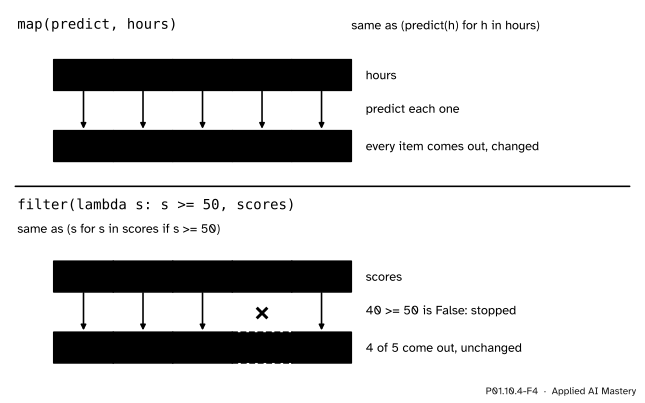
map(f, items) is an iterator that hands over f(x) for each x; it is the same as the generator expression (f(x) for x in items).
filter(f, items) is an iterator that hands over each x for which f(x) is True; it is the same as (x for x in items if f(x)).
islice(items, n), from itertools, hands over at most the first n items and stops.
Three facts from the documentation make these tools predictable.
The key function “is called exactly once for each input record” (Sorting Techniques), so five rows mean five calls of score_of, however the sort goes.
Sorts are stable: “when multiple records have the same key, their original order is preserved”. In the same way, if several items are largest, max “returns the first one encountered”.
filter(function, iterable) “is equivalent to the generator expression (item for item in iterable if function(item))”, in the words of the Built-in Functions page.
P01.10.4-F4
map transforms each item; filter keeps some of them. Each is a generator expression with a function plugged in.
Stability is easy to see with the bands as the key. Sorted by band, alphabetically, Chen’s 'distinction' comes first and Dina’s 'fail' next; the three passes follow in the order of the table, Ama, Ben and Eli, because their keys are equal.
def band_of(score):if score >=70:return'distinction'elif score >=50:return'pass'else:return'fail'print([name for name, h, s insorted(rows, key=lambda row: band_of(row[2]))])
['Chen', 'Dina', 'Ama', 'Ben', 'Eli']
Worked example
Now study.csv, as one pipeline. The file object hands over one line at a time (P01.7.3). Four stages follow, each a lazy iterator, and a loop at the end pulls the lines through.
next(f) # skip the header linefields = (line.strip().split(',') for line in f)marks = (int(row[2]) for row in fields)passing =filter(lambda s: s >=50, marks)for s in passing: total += s count +=1
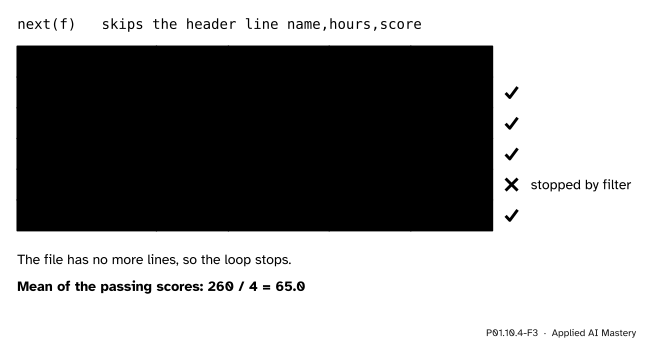
Trace it by hand. Each pass of the loop pulls one line all the way through.
P01.10.4-F3
The trace of the pipeline. Dina’s score is pulled through int but stopped by the filter, so the total and the count do not change on her line.
Before the loop.next(f) reads the header line name,hours,score and throws it away. Making fields, marks and passing reads nothing.
Pass 1. The loop asks passing for an item; it asks marks, which asks fields, which reads Ama,2,55. The row is ['Ama', '2', '55'], the score is 55, the test is True. Total 55, count 1.
Passes 2 and 3. Ben and Chen bring the total to 120 and then 200, the count to 2 and 3.
Dina. Her score, 40, fails the test, so filter asks marks for the next one at once: Eli’s 60. Total 260, count 4.
The end. The file has no more lines, so the loop stops.
The mean of the passing scores is \({260 / 4} = 65.0\). At no moment did the pipeline hold more than one line of the file. (Behind the scenes the file object reads ahead in blocks, but the size of a block is fixed: it does not grow with the file.)
Code
The pipeline, run on study.csv written to a temporary folder as in P01.7.3.
import pathlibimport tempfileLINES = ['name,hours,score', 'Ama,2,55', 'Ben,4,65', 'Chen,5,80', 'Dina,1,40', 'Eli,3,60']TEXT ='\n'.join(LINES) +'\n'with tempfile.TemporaryDirectory() as folder: path = pathlib.Path(folder) /'study.csv' path.write_text(TEXT, encoding='utf-8')withopen(path, encoding='utf-8') as f:next(f) # skip the header line fields = (line.strip().split(',') for line in f) marks = (int(row[2]) for row in fields) passing =filter(lambda s: s >=50, marks) total =0 count =0for s in passing: total += s count +=1print(total, count, total / count)
260 4 65.0
The loop must run inside the with block: the stages read from the file, and the file is closed when the block ends. Nothing in the pipeline depends on the length of the file, so the same code reads five lines or a hundred million.
islice stops a pipeline early. Here it takes the first two rows and reads no further.
with tempfile.TemporaryDirectory() as folder: path = pathlib.Path(folder) /'study.csv' path.write_text(TEXT, encoding='utf-8')withopen(path, encoding='utf-8') as f:next(f) fields = (line.strip().split(',') for line in f)print(list(islice(fields, 2)))print(f.readline().strip())
After two rows, the next line still waiting in the file is Chen’s: islice did not read a third.
The interactive’s pipeline, written with these tools, counts its own calls.
calls = []def is_even(x): calls.append('is_even')return x %2==0def square(x): calls.append('square')return x * xprint(list(islice(map(square, filter(is_even, range(1, 11))), 3)), len(calls), 'calls')
[4, 16, 36] 9 calls
Read it from the inside out: filter keeps the even numbers, map squares them, islice stops after three. The result is [4, 16, 36] after 9 calls, as in the lazy mode of the interactive.
Explore
This module’s interactive, the lazy and eager pipeline, lives in P01.10.3. Its lazy mode is the line above: islice(map(square, filter(is_even, range(1, 11))), 3) behaves step for step like its generator expressions. Set the consumer to keep 5 and see the lazy pipeline lose its advantage in calls but not in memory.
Pitfalls
P01.10.4-F5
Wrong beside right. Without a key, max compares names; with key=, it compares what you mean.
“max(rows) finds the best row.”
It finds the largest tuple, and tuples compare by their first item, so it finds the name that comes last in the alphabet. Say what “largest” means with key=: max(rows, key=lambda row: row[2]) is Chen.
“key=score_of() passes my function.”
The brackets call it, with no row, and that raises TypeError before sorted even starts. Pass the function itself, without brackets: key=score_of. The same holds for map(predict, hours).
“A lambda can hold any function.”
It holds one expression: no statements, no if blocks, no loops. A key that needs more than that, or that is used in more than one place, deserves a def and a name that a reader can search for.
Check yourself
Recall
1. What does key= do in sorted(rows, key=score_of), and how many times is score_of called?
Show answer
It makes sorted compare score_of(row) instead of the rows themselves; it is called once for each row, five times.
2. Write lambda row: row[2] as a def.
Show answer
def score_of(row): with the body return row[2].
3. Which generator expression does filter(f, items) stand for, and which one map(f, items)?
Show answer
(x for x in items if f(x)) and (f(x) for x in items).
4. What does islice(items, n) do that makes it useful in a lazy pipeline?
Show answer
It hands over at most the first n items and then stops, without asking the stages before it for any more.
5. In the study.csv pipeline, why must the loop run inside the with block?
Show answer
The stages are lazy and read from the file only when the loop asks; the file is closed when the with block ends, so after it nothing can be read.
Exercises
1.★ Use min with a key to find the student who studied the fewest hours, and sorted with a key to list the names from most hours to fewest.
Show solution
min(rows, key=lambda row: row[1]) is ('Dina', 1, 40). Sorting with sorted(rows, key=lambda row: row[1], reverse=True) orders the hours 5, 4, 3, 2, 1, so the names are Chen, Ben, Eli, Ama, Dina.
2.★★ Write list(map(lambda h: 9 * h + 33, hours)) as a list comprehension, give its value, and then find the errors s - predict(h) with map and zip.
Show solution
[9 * h + 33 for h in hours] is [51, 69, 78, 42, 60]. For the errors, list(map(lambda pair: pair[1] - predict(pair[0]), zip(hours, scores))) gives [4, -4, 2, -2, 0]; the comprehension [s - predict(h) for h, s in zip(hours, scores)] says the same more clearly.
3.★★★ Change the study.csv pipeline to find the mean number of hours of the students who passed. Trace it by hand.
Show solution
Keep the rows that pass, then take their hours:
fields = (line.strip().split(',') for line in f)passed =filter(lambda row: int(row[2]) >=50, fields)hours_of_passes = (int(row[1]) for row in passed)
Then sum and count in one loop. By hand: Ama 2, Ben 4, Chen 5 and Eli 3 pass, and Dina is dropped, so the total is 14, the count 4, and the mean \({14 / 4} = 3.5\) hours.
Summary card
Hand functions to functions; chain iterators into lazy pipelines.
P01.10.4-F1
A lazy pipeline, one row at a time.
Key:sorted(rows, key=f), max(rows, key=f) compare f(row); stable; one call per item.
lambda:lambda row: row[2], one expression, no name.
Lazy stages:map(f, xs) is (f(x) for x in xs); filter(f, xs) is (x for x in xs if f(x)); islice(xs, n) stops after n.
Pipelines read one item at a time, so they work on files of any size.
Sources and next steps
Sources. Each was opened and checked against this lesson on 12 November 2026.
Python Software Foundation, Sorting Techniques, sections “Key Functions” (the key function “is called exactly once for each input record”, with a lambda that sorts tuples by their third item) and “Sort Stability” (“their original order is preserved”).
Python Software Foundation, Built-in Functions: map returns an iterator; filter(function, iterable) “is equivalent to the generator expression”; max with key, and “If multiple items are maximal, the function returns the first one encountered”; sorted is “guaranteed to be stable”.
Python Software Foundation, itertools.islice: “Make an iterator that returns selected elements from the iterable”, which “stops at the specified position”.
Python Software Foundation, Glossary, entries “lambda” (“An anonymous inline function consisting of a single expression”) and “key function”.
Python Software Foundation, Functional Programming HOWTO, section “Built-in functions”: map and filter, with a predicate is_even.
Next. Course P02 starts with NumPy arrays, which do whole-array arithmetic without any loop; lesson ML01.5.4 feeds a model the mini-batches of P01.10.3.