import statistics


def median(values):
    middle = len(values) // 2
    return values[middle]


scores = [55, 65, 80, 40, 60]
print(median(scores), statistics.median(scores))
80 60Before this lesson
P01.8.2 Handling exceptions: try, except and raise
After this lesson you can
In review. The maths and code on this page are checked by automated tests on every change, but an independent reader has not signed it off yet. Spot a mistake or a confusing step? Tell us.
statistics.median says the middle score of the study table is 60. The median you wrote yourself says 80. There is no traceback: the program ran to the end and printed a wrong number. Where do you even start looking, and how do you know when you have found it?
From the last lesson
1. When does the else block of a try statement run?
Only when the try block raised no exception.
2. Why is a bare except: a bad idea?
It catches every exception, including those caused by real bugs such as a typo, so the bugs are hidden instead of reported.
A bug is a mistake in a program. Debugging is finding and removing it. Staring at the code and hoping is the slow way. The fast way is an experiment, repeated: make a prediction about the program, look at what it really does, and use the difference to rule out part of the code.
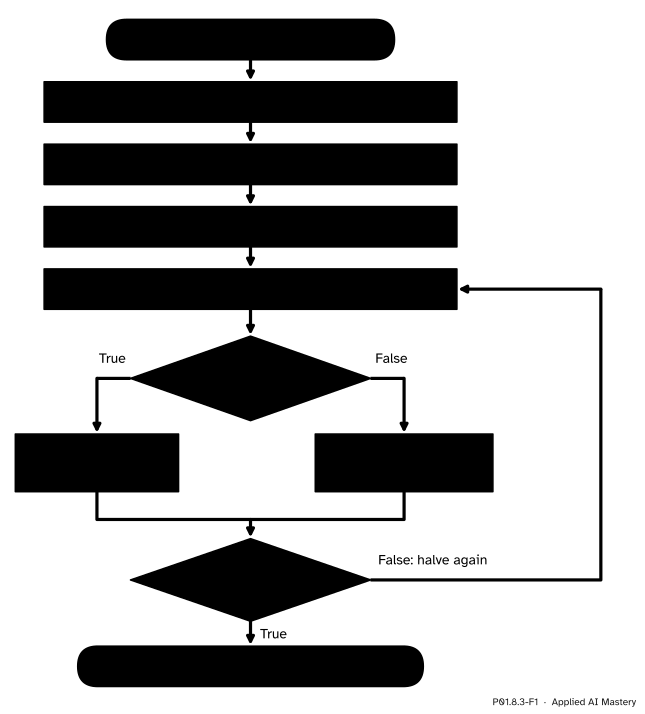
Debugging as an experiment repeated. Each look at the halfway point rules out half of the lines still under suspicion.
The loop has one idea at its heart. Before you look, you must know what you expect to see. A printed value means nothing until you have predicted it. Where the prediction and the fact first part company, the bug is close.
Here is a median with a bug in it. It runs without an error.
import statistics
def median(values):
middle = len(values) // 2
return values[middle]
scores = [55, 65, 80, 40, 60]
print(median(scores), statistics.median(scores))80 60Step 1. Reproduce it. Find an input that makes the program fail every time, and write it down. Here it is easy: the scores give 80 on every run, and the right answer is 60. A failure that comes and goes, perhaps because of random numbers, is first made steady, for example with a fixed random.seed (P01.5.1).
Step 2. Shrink the input. The fewer values, the less there is to follow. Three scores are enough to show the bug: the median of 80, 40 and 60 is 60, the middle one once they are in order.
print(median([80, 40, 60]))40Step 3. Predict. Before running anything, write down what each line should give for [80, 40, 60]. Line 2: middle is \({3 // 2} = 1\). Line 3: the median is the value at position 1, counting from 0, of the sorted list [40, 60, 80], which is 60.
Step 4. Look. Now look at what the program really does, with one of three tools.
print that shows the values at a chosen line, removed once the bug is found. Think Python calls such code scaffolding.def median(values):
middle = len(values) // 2
print(' values:', values, ' middle:', middle) # temporary
print(' values[middle]:', values[middle]) # temporary
return values[middle]
print(median([80, 40, 60])) values: [80, 40, 60] middle: 1
values[middle]: 40
40Line 2 agrees with the prediction: middle is 1. Line 3 does not: it gives 40, not 60. The fact that parts from the prediction is plain to see in the print: values is not in order. The bug is on line 3, which takes the middle of the list as it was given.
Step 5. Halve. In a function of three lines, one look is enough. In a program of hundreds of lines, you choose where to look: halfway through the lines still under suspicion.
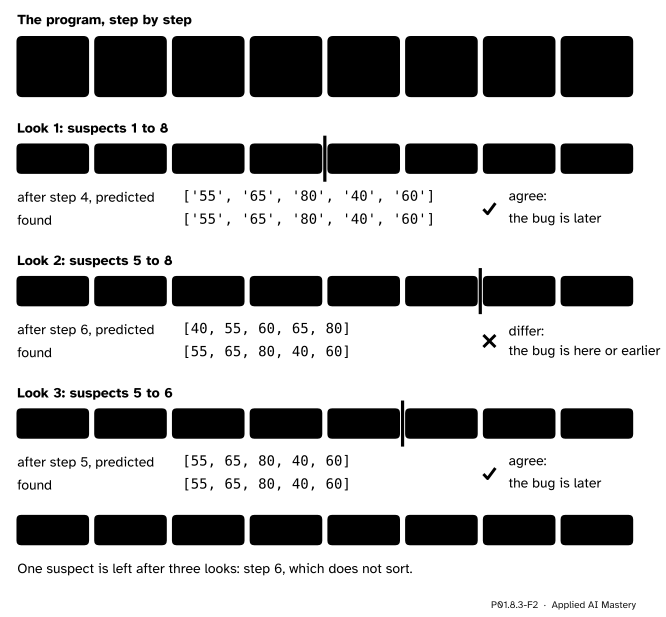
Halving the suspects. Eight steps need only three looks: 8, then 4, then 2, then 1. The bug is in step 6, which does not sort.
If the values agree with the prediction at the halfway line, everything before it is cleared, and the bug is in the second half. If they disagree, the bug is at that line or before it. Either way, half the suspects are gone.
How many looks? Each look keeps at most half of the suspects, rounded up. Starting from \(n\) suspect lines, after \(k\) looks at most
\[ \frac{n}{2^k}\ \text{(rounded up)} \]
remain. One suspect is left once \({2^k \ge n}\), so the number of looks is the smallest \(k\) with \({2^k \ge n}\).
Reading 1,000 lines one by one would take up to 1,000 looks. MIT’s 6.100L gives the same advice for print statements: “use bisection method”, with a print halfway through the code and the values deciding which half the bug may be in.
The debugger. Put the call breakpoint() in a program and run it. When Python reaches that line it pauses and shows the prompt (Pdb), the debugger of the module pdb. Each command is one word.
next (or n) runs the current line and stops at the next line of the same function.step (or s) does the same, but stops inside a function that the line calls.p expression prints the value of any expression, such as p middle.continue (or c) runs on until the next breakpoint or the end; quit (or q) stops the program (Python 3.14 and later first ask you to confirm with y).Here is a session with the buggy median. The arrow -> marks the line that is about to run.
median_bug.py
def median(values):
    middle = len(values) // 2
    return values[middle]


scores = [55, 65, 80, 40, 60]
breakpoint()
result = median(scores)
print('median', result)
python median_bug.py> median_bug.py(7)<module>()
-> breakpoint()
(Pdb) next
> median_bug.py(8)<module>()
-> result = median(scores)
(Pdb) step
--Call--
> median_bug.py(1)median()
-> def median(values):
(Pdb) next
> median_bug.py(2)median()
-> middle = len(values) // 2
(Pdb) next
> median_bug.py(3)median()
-> return values[middle]
(Pdb) p middle
2
(Pdb) p values[middle]
80
(Pdb) p sorted(values)
[40, 55, 60, 65, 80]
(Pdb) continue
median 80The session was copied from Python 3.15, with the folder cut from the file name. Python 3.12 pauses one line later, on the line after breakpoint(), so there the first next is not needed; from then on the session is the same. The debugger needs a keyboard, so this page shows it rather than runs it.
The median above has two planted bugs. Here is the whole hunt.
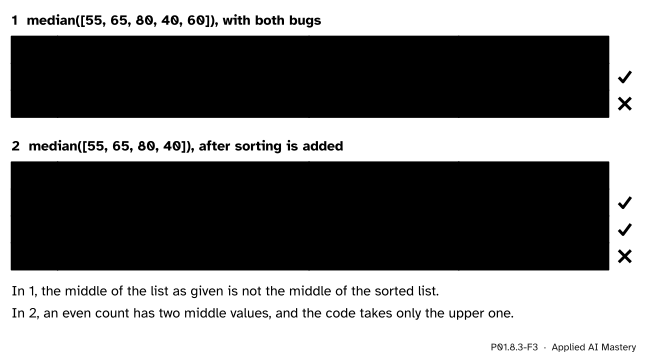
The trace of each run, predicted beside found. In each part the first row where the two part company holds the bug.
Bug 1: it forgets to sort. On the five scores, middle is \({5 // 2} = 2\), as predicted. But values[2] is 80, the third score as given, not the middle of the sorted list. The repair is one line, ordered = sorted(values), and taking the middle of ordered instead.
def median(values):
    ordered = sorted(values)
    middle = len(ordered) // 2
    return ordered[middle]


print(median(scores))
print(median(scores[:4]))
60
65The first number is now 60, right. One passing case is not a proof, so try another kind of case: an even count, the first four scores.
Bug 2: it takes the upper middle of an even count. By hand, the sorted four are 40, 55, 65 and 80. There are two middle values, 55 and 65, and the median is their mean, \({(55 + 65) / 2} = 60.0\). The code gives 65.
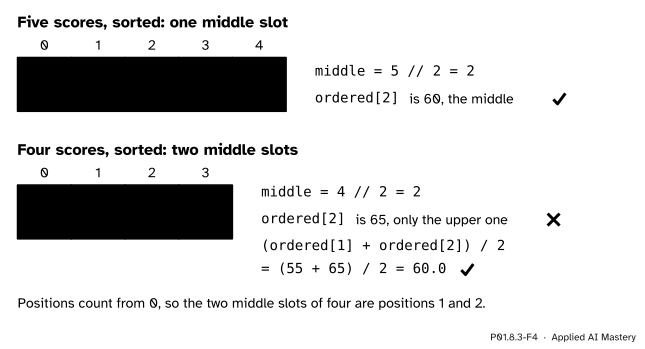
An odd count has one middle slot. An even count has two, at positions middle - 1 and middle, and the median is their mean.
The repair handles the even case on its own path, with % from P01.2.3. Then compare it with the library, statistics.median, on both lists.
def median(values):
    if len(values) == 0:
        raise ValueError('median of an empty list')
    ordered = sorted(values)
    middle = len(ordered) // 2
    if len(ordered) % 2 == 1:
        return ordered[middle]
    lower = ordered[middle - 1]
    upper = ordered[middle]
    return (lower + upper) / 2


print(median(scores), statistics.median(scores))
print(median(scores[:4]), statistics.median(scores[:4]))
60 60
60.0 60.0Both agree. The guard on an empty list was added on the way, with the same clear message as mean in P01.8.2. The library also refuses an empty list: it raises StatisticsError, which is a kind of ValueError.
One more experiment makes the repair trustworthy: compare it with the library on a thousand random lists of random lengths, odd and even. The seed makes every run the same.
import random

random.seed(8)
disagree = 0
for trial in range(1000):
    size = random.randint(1, 9)
    values = []
    for k in range(size):
        values.append(random.randint(0, 100))
    if median(values) != statistics.median(values):
        disagree += 1
print('lists where the two medians disagree:', disagree)
lists where the two medians disagree: 0The repaired median now joins mean in stats_tools.py, the module begun in P01.5.2, where P01.8.4 will test both.
stats_tools.py
"""Small statistics for the study table."""


def mean(values):
    if len(values) == 0:
        raise ValueError('mean of an empty list')
    return sum(values) / len(values)


def median(values):
    if len(values) == 0:
        raise ValueError('median of an empty list')
    ordered = sorted(values)
    middle = len(ordered) // 2
    if len(ordered) % 2 == 1:
        return ordered[middle]
    lower = ordered[middle - 1]
    upper = ordered[middle]
    return (lower + upper) / 2


def predict(hours, slope=9, intercept=33):
    return slope * hours + intercept
from stats_tools import mean, median
print(mean(scores), median(scores), median(scores[:4]))60.0 60 60.0This module’s interactive, the traceback explorer, lives in P01.8.1. Use it as a debugger you cannot break: before each press of Step, predict the line that will light up and the names in the newest frame, then look.
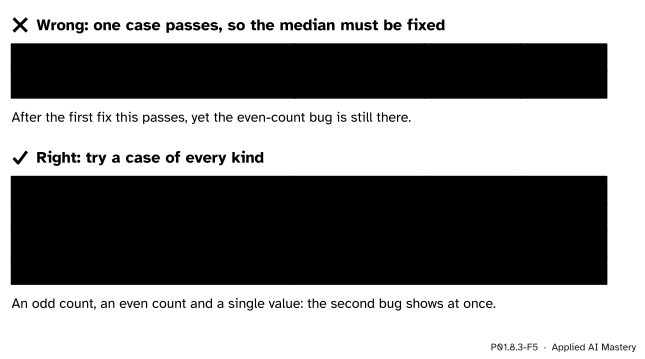
Wrong beside right. One passing case after a fix proves little. A case of every kind (an odd count, an even count, a single value) shows the second bug straight away.
“It works on my example, so it is fixed.”
After the first fix, the five scores give 60 and the median looks repaired. It is not: an even count still gives the wrong answer. After every fix, rerun every kind of case, not only the one that failed. The next lesson makes the computer do this for you.
“Change things until the output looks right.”
Editing at random, several things at once, can make one output right by accident and break another. Change one thing at a time, for a reason you can state, and rerun the same input after each change. Software Carpentry puts it as “change one thing at a time, for a reason”.
“Prints and breakpoints can stay; they do no harm.”
A forgotten print fills the output of every later run, and a forgotten breakpoint() stops the program and waits for a keyboard that a server running your training job does not have. Remove scaffolding as soon as the bug is found.
1. What are the steps of the debugging method, in order?
Reproduce the failure, shrink the input, predict what each line should give, look at the line halfway through the suspects, halve the region where prediction and fact part, and repeat; then fix and rerun every case.
2. Why must you predict a value before you look at it?
Without a prediction, a printed value cannot be called right or wrong, so it rules nothing out.
3. In the debugger, what is the difference between next and step?
Both run the current line. step stops inside a function that the line calls; next runs the call through and stops at the next line of the same function.
4. How many looks does halving need to find one bad line among 1,000?
Ten, because \({2^{10} = 1024}\) is the first power of 2 that reaches 1,000.
5. What were the two bugs of the planted median?
It did not sort the values before taking the middle one, and for an even count it returned the upper of the two middle values instead of their mean.
1. ★ By hand, what does the buggy median (no sorting, upper middle) return for [3, 9, 1, 5], and what is the true median?
middle is \({4 // 2} = 2\) and values[2] is 1, so it returns 1. Sorted, the list is 1, 3, 5, 9; the two middle values are 3 and 5, so the true median is \({(3 + 5) / 2} = 4.0\). Both bugs show up at once.
2. ★★ A program of 64 lines prints a wrong total. You print the total after line 32 and it agrees with your prediction; after line 48 it does not; after line 40 it agrees. Which lines are still suspects, and how many more looks do you need at most?
Agreement after 32 clears lines 1 to 32. Disagreement after 48 puts the bug in 33 to 48. Agreement after 40 clears 33 to 40. So lines 41 to 48 are left: 8 suspects, which need at most 3 more looks (8, then 4, then 2, then 1). In all, \({2^6 = 64}\), so six looks always suffice.
3. ★★★ This function should return the largest score but returns the smallest for [55, 65, 80, 40, 60]. Use predict-and-look on paper to find the bug.
def largest(values):
    best = values[0]
    for value in values:
        if value < best:
            best = value
return bestPredict best after each pass: 55, 65, 80, 80, 80. Look, by tracing the code: the first pass compares 55 with 55 and keeps 55; the second asks whether 65 < 55, which is False, so best stays 55, while the prediction says 65. Prediction and fact part at the first pass that should change best, so the bug is in the comparison. It should be value > best. With that change the passes give 55, 65, 80, 80, 80 and the function returns 80. The trace as written gives 55, 55, 55, 40, 40 and returns 40, the smallest.
Predict, look, and halve the region where prediction and fact part.
Debugging as an experiment.
breakpoint() with next, step, p and continue.Sources. Each was opened and checked against this lesson on 12 November 2026.
breakpoint(), the (Pdb) prompt, and the commands step, next, p, continue and quit; and statistics.median: the middle value for an odd count, the mean of the two middle values for an even count, and StatisticsError, a subclass of ValueError, for empty data.breakpoint() now enters the debugger at once instead of on the next line; and What’s New in Python 3.14, pdb: quitting a debugger started this way first shows a confirmation prompt.Next. P01.8.4 First tests turns the cases of this lesson into tests that rerun themselves.
This lesson unlocks