print(type(55))
print(type('Ama'))
print(type([55, 65]))
<class 'int'>
<class 'str'>
<class 'list'>__init__, see what self is, and draw each instance as a small table of its own attributes.
Before this lesson
P01.8 Errors, debugging and first tests P01.5.1 Modules and import P01.6.3 Dictionaries and sets
After this lesson you can
__init__ method that gives every new instance its own attributes through self.In review. The maths and code on this page are checked by automated tests on every change, but an independent reader has not signed it off yet. Spot a mistake or a confusing step? Tell us.
So far a student of the study table has been a tuple, ('Ama', 2, 55), or a dictionary, {'name': 'Ama', 'hours': 2, 'score': 55}. In the tuple you must remember that the score sits at position 2, counting from 0; in the dictionary a typing slip such as row['scroe'] is found only when that line runs. Every value you have met, 55, 'Ama' or a list, is an object of some type, and its type decides what it can do. Can you make a type of your own, Student, so that ama.score says what it means?
From the last lesson
1. What does assert condition do when the condition is true, and when it is false?
When it is true, nothing. When it is false, it raises AssertionError.
2. Why should the expected value of a test be worked out by hand?
If it is copied from the code’s own output, the test checks the code against itself and passes on the bug.
A class is a type that you make. Calling it makes a new object of that type, an instance of the class. Each instance holds a small table of names of its own, its attributes, and each name refers to an object, exactly like the names of a module in P01.5.1.
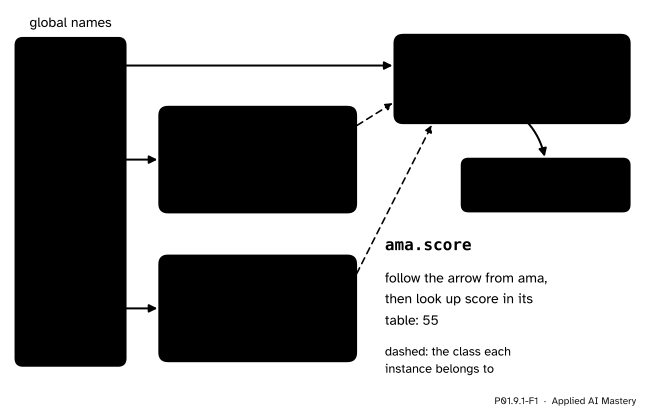
One class object and two instances. Each instance is its own small table of attribute names, and each points back to its class. ama.score follows the arrow from ama and reads score in that table.
Three things in the picture carry the whole lesson.
Student exists once. Every call Student(...) makes a new instance.ama and ben have the same attribute names but their own values, so changing ben.score leaves ama alone.ama.score means: follow ama to its object, then look up score there. It is the same dot as in math.sqrt.Step 1. Every value already has a type. The built-in type tells you which. The type is itself an object, a class, which is why Python prints the word class.
print(type(55))
print(type('Ama'))
print(type([55, 65]))<class 'int'>
<class 'str'>
<class 'list'>int, str and list are classes that come with Python. A class statement makes one more.
Step 2. The smallest class. The body of a class may be just pass, a statement that does nothing. Calling the class makes an empty instance, and an assignment with a dot gives it an attribute. The built-in vars shows an object’s table of attributes as a dictionary.
class Student:
    pass


ama = Student()
print(vars(ama))
ama.name = 'Ama'
ama.score = 55
print(vars(ama))
print(ama.score)
{}
{'name': 'Ama', 'score': 55}
55Attributes “spring into existence when they are first assigned to”, as the Python Tutorial puts it (9.3.3), just as a name does with =. But filling every student in by hand, line by line, is slow and easy to get wrong: forget one line and that student has no score.
Step 3. __init__ fills in every new instance the same way. A function written inside a class is a method. A method named __init__ (two underscores on each side) is special: when you call the class, Python first makes a new, empty instance, then calls __init__ with that instance as the first argument. By convention the first parameter is called self, so inside __init__, self is the new object being filled in.
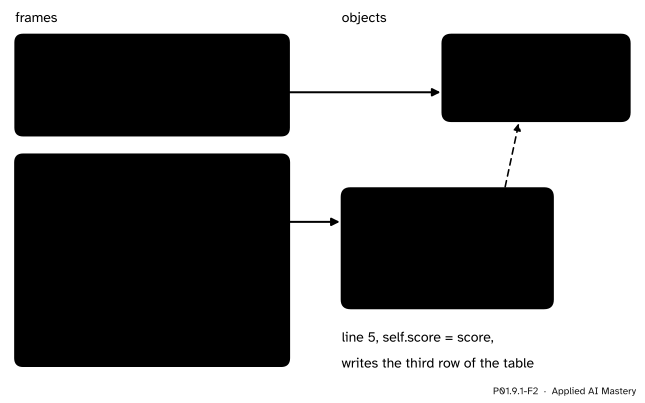
Inside __init__, self is the new object. Each line self.<name> = <value> writes one row of its table; here line 5 writes score.
class Student:
    def __init__(self, name, hours, score):
        self.name = name
        self.hours = hours
        self.score = score


ama = Student('Ama', 2, 55)
print(ama.name, ama.hours, ama.score)
print(vars(ama))
Ama 2 55
{'name': 'Ama', 'hours': 2, 'score': 55}You pass three arguments, but __init__ has four parameters: Python passes the new object to self for you. self.name = name reads the parameter name on the right and writes the attribute name of the new object on the left. The two share a spelling, which is usual, but they are different names in different places: one in the frame of the call, one in the object’s table.
Step 4. Each instance keeps its own data. Make a second student and change one attribute.
ben = Student('Ben', 4, 65)
ben.score = 70
print(ama.score, ben.score)
55 70What class Student: does. Like def, it runs once and binds a name. Python runs the indented body, which here defines the function __init__, collects the names it defined into a new class object, and binds Student to that object (Tutorial, 9.3.1).
What Student('Ama', 2, 55) does, in four steps.
Student.__init__ with that object first and the arguments after it: self is bound to the new object, name to 'Ama', hours to 2, score to 55.self.<attribute> = ... adds a row to the object’s table. __init__ returns None.ama = ... then binds to ama.Reading an attribute. To work out ama.score, Python evaluates ama to an object and looks up score among that object’s attributes. If the name is not there (or, as the next lesson shows, in its class), Python raises AttributeError. Setting an attribute, ama.score = 60, binds the name score in the object’s table, adding the row if it was not there.
Looking inside. Three built-ins describe an object:
vars(ama) returns the object’s table of attributes as a dictionary.type(ama) returns the class the object was made from, so type(ama) is Student is True.isinstance(ama, Student) asks whether ama is an instance of Student.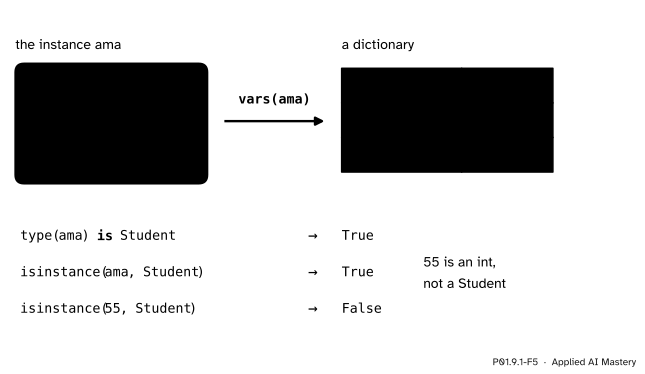
vars shows the instance’s table as a dictionary; type and isinstance ask which class an object belongs to.
Trace this program line by line. The line numbers are those of the listing in the figure.
class Student:
    def __init__(self, name, hours, score):
        self.name = name
        self.hours = hours
        self.score = score

ama = Student('Ama', 2, 55)
ben = Student('Ben', 4, 65)
ben.score = 70
print(ama.score, ben.score)
55 70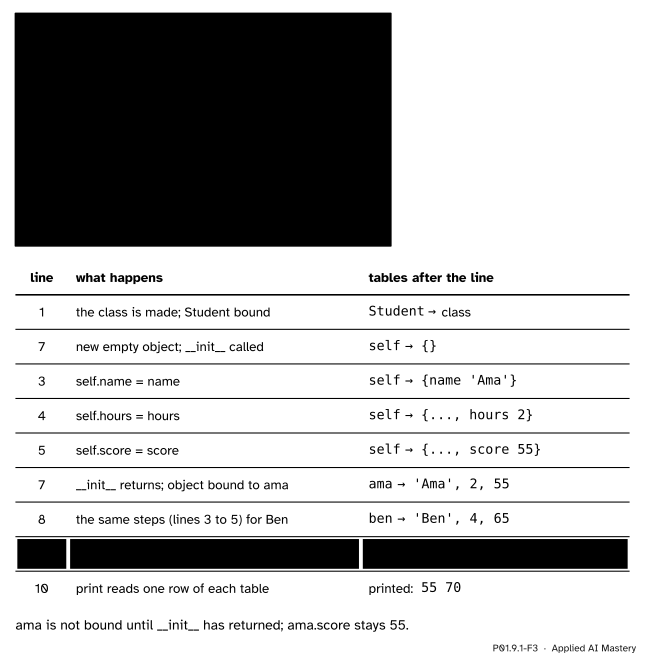
The trace of the worked example: one row per line run. The rows for Ben’s __init__ are folded into one, because they repeat Ama’s.
Reading the trace:
__init__ with self bound to it. Lines 3 to 5 add three rows to its table. Only when __init__ returns does ama get bound, so during lines 3 to 5 the name ama does not exist yet.ama.score is still 55, and line 10 prints 55 70.Now the whole study table. Walk the three lists together with zip (P01.6.2), make one Student for each row, and keep them in a list. Then use the attributes in the loop patterns of P01.3.4.
names = ['Ama', 'Ben', 'Chen', 'Dina', 'Eli']
hours = [2, 4, 5, 1, 3]
scores = [55, 65, 80, 40, 60]

students = []
for name, h, s in zip(names, hours, scores):
    students.append(Student(name, h, s))

total = 0
passes = 0
for student in students:
    total += student.score
    if student.score >= 50:
        passes += 1
print(len(students), 'students, mean score', total / len(students), 'and', passes, 'passes')
5 students, mean score 60.0 and 4 passesBy hand: \({55 + 65 + 80 + 40 + 60} = 300\), so the mean is \({300 / 5} = 60.0\), and every score but Dina’s 40 reaches 50, so there are 4 passes. Each row now travels as one object, and the code says student.score where it once said row[2].
The study table usually arrives as a file. csv.DictReader (P01.7.4) gives each row as a dictionary of text; the class turns it into a Student with whole numbers.
import csv
import pathlib
import tempfile

with tempfile.TemporaryDirectory() as folder:
    path = pathlib.Path(folder, 'study.csv')
    path.write_text('name,hours,score\nAma,2,55\nBen,4,65\nChen,5,80\nDina,1,40\nEli,3,60\n',
                    encoding='utf-8')
    with open(path, encoding='utf-8') as file:
        rows = list(csv.DictReader(file))

students = []
for row in rows:
    students.append(Student(row['name'], int(row['hours']), int(row['score'])))

chen = students[2]
print(rows[2])
print(vars(chen))
print(type(chen) is Student, isinstance(chen, Student), isinstance(rows[2], Student))
print(type(chen).__name__, type(rows[2]).__name__)
{'name': 'Chen', 'hours': '5', 'score': '80'}
{'name': 'Chen', 'hours': 5, 'score': 80}
True True False
Student dictThe dictionary from the file and the instance hold the same facts, and vars shows that an instance’s attributes really are kept in a dictionary. What the class adds is a type of its own: isinstance can tell a Student from any other dictionary, and the next lessons give the class methods that work on its data. (type(chen).__name__ gives the class’s name alone; printing type(chen) would also show where the class was defined, which depends on how the code is run.)
This module’s interactive, the instance workbench, lives in P01.9.2. It draws one class, RunningMean, and two instances, a and b, in the same way as this lesson’s anchor figure. Before you open it, predict: if you change an attribute of a, what happens to b?
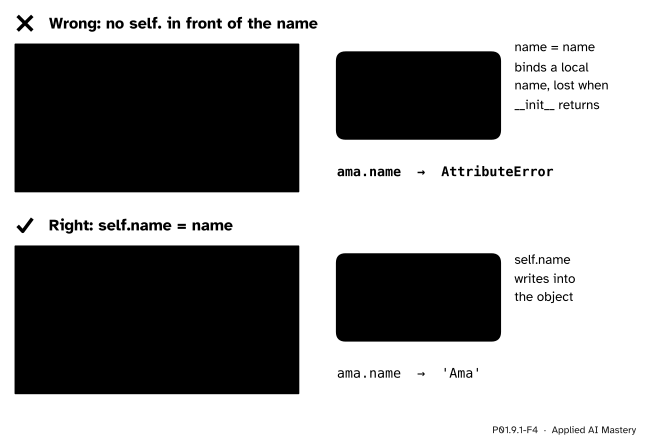
Wrong beside right. Without self., the assignment binds a local name of the call, which vanishes when __init__ returns. With self., it writes into the new object.
“Inside __init__, name = name stores the name.”
It binds a local name in the frame of __init__ (P01.4.4), and that frame is thrown away when the call returns. The object’s table stays empty, and ama.name later raises AttributeError. Every attribute is written with self. in front.
“I can leave self out of the parameters, since I never pass it.”
Python always passes the new object as the first argument, so def __init__(name, hours, score) receives four arguments for three parameters, and Student('Ama', 2, 55) stops with TypeError: Student.__init__() takes 3 positional arguments but 4 were given (Python 3.15; the wording varies a little between versions).
“ama = Student makes a student.”
Without the brackets, nothing is called: ama becomes a second name for the class itself. Then ama.score = 55 gives the class an attribute, and no student has been made at all. Call the class to make an instance: Student('Ama', 2, 55).
“Two instances of one class share their data.”
They share the class, not the table. In machine learning this is the everyday case: two models made from one class, say two LinearRegression() objects of scikit-learn (P01.9.4), each learn and keep their own numbers, which is why one can be trained on one dataset and the other on another.
1. What is the difference between a class and an instance?
A class is a type you define, made once by the class statement. An instance is one object made by calling the class; there can be many.
2. What is self inside __init__?
The new instance that is being filled in. Python passes it as the first argument when the class is called.
3. Name the four steps of Student('Ama', 2, 55).
Make a new empty object of class Student; call __init__ with it as self and the three arguments; run the body, which writes the attributes; give back the new object as the value of the call.
4. What does vars(ama) return?
A dictionary of the instance’s attributes, here {'name': 'Ama', 'hours': 2, 'score': 55}.
5. After ben.score = 70, why is ama.score still 55?
ama and ben are two objects, each with its own table. The assignment rebinds score in Ben’s table only.
1. ★ Write a class Course whose __init__ takes a code and a title and stores both. Make p01 = Course('P01', 'Python from Zero') and print its title.
class Course:
    def __init__(self, code, title):
        self.code = code
        self.title = title


p01 = Course('P01', 'Python from Zero')
print(p01.title)          # Python from Zero
vars(p01) is {'code': 'P01', 'title': 'Python from Zero'}.
2. ★★ Predict what this prints, and draw the memory diagram at the end.
dina = Student('Dina', 1, 40)
eli = Student('Eli', 3, 60)
dina.score = dina.score + 10
eli.hours = dina.hours
print(dina.score, eli.score, eli.hours)It prints 50 60 1. Line 3 reads Dina’s score, 40, adds 10 and writes 50 back into Dina’s table. Line 4 reads Dina’s hours, 1, and binds hours in Eli’s table to it. Eli’s score is untouched. In the diagram, dina points to a Student object with name 'Dina', hours 1, score 50; eli to another with name 'Eli', hours 1, score 60; both point to the one class Student.
3. ★★★ Using the list students of the worked example, write a loop that finds the student with the highest score (best so far, P01.3.4) and the mean of the hours. Work out both by hand first.
By hand: the highest score is Chen’s 80, and the hours add up to \({2 + 4 + 5 + 1 + 3} = 15\), so the mean is \({15 / 5} = 3.0\).
best = students[0]
hours_total = 0
for student in students:
    if student.score > best.score:
        best = student
    hours_total += student.hours
print(best.name, hours_total / len(students))     # Chen 3.0
best holds the whole object, not just the score, so its name comes along for free.
A class is a type you make; each instance holds its own table of attributes.
One class, two instances.
class Student: with def __init__(self, ...): and self.name = name.ama = Student('Ama', 2, 55) makes an object, runs __init__ on it, returns it.ama.score reads an attribute, ama.score = 60 sets one.vars(ama), type(ama) is Student, isinstance(ama, Student).Sources. Each was opened and checked against this lesson on 12 November 2026.
__init__() for the newly created class instance”; 9.3.3, that data attributes “spring into existence when they are first assigned to”; and 9.4, that the name self is “nothing more than a convention”.vars returns the __dict__ attribute of an instance, type with one argument returns the type of an object, and isinstance returns True if the object is an instance of the class or of a subclass.Next. P01.9.2 gives a class methods of its own: functions that live once in the class and work on whichever instance calls them.
This lesson unlocks