A function gives a name to a block of code with inputs and an output. Write one with def and return, follow a call through its four steps, tell returning a value from printing it, and document a function with a docstring that help can read.
Write a function with def, a parameter and return, and call it with an argument.
Trace a call through its four steps: evaluate the arguments, bind them to the parameters, run the body, and put the returned value where the call was.
Tell returning a value from printing it, and predict when a call gives back None.
Write a docstring for a function and read it back with help.
In review. The maths and code on this page are checked by automated tests on every change, but an independent reader has not signed it off yet. Spot a mistake or a confusing step? Tell us.
The question
In P01.3.4 a loop added up the five quiz scores and divided by five: the mean is 60.0. Now you want the mean of the hours studied as well, and next week the mean of a new set of scores. Copying the loop each time copies its mistakes too. How do you write the loop once, give it a name, and use it on any list you like?
Intuition
You have used functions already. len(scores) gives back 5, sum(scores) gives back 300, and print('mean', 60.0) shows a line on the screen. Each time you wrote a name, then brackets with something inside, and Python did a job.
A function is a named piece of code that takes inputs and gives back an output. With def you can make your own. Here is the course’s running model, a rule that predicts a quiz score from the hours a student studied:
def predict(hours):return9* hours +33
P01.4.1-F1
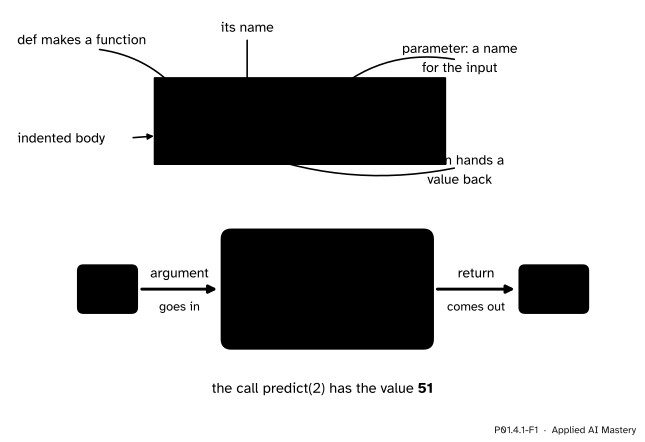
A function definition with its parts named (top), and the call predict(2) as a machine (bottom): the argument goes in, the body runs with hours standing for 2, and the returned value 51 comes out.
Name the parts before using them. def says that a function definition starts. predict is the function’s name. hours, in brackets, is a parameter: a name that will stand for the input. The colon ends the header line, and the indented lines under it are the body. The return statement hands a value back.
Using the function is a call. You write its name and put an argument, the actual input, in brackets. The call predict(2) runs the body with hours standing for 2, works out 9 * 2 + 33, and hands back 51. A call is an expression, so it has a value, just as 1 + 1 has one: the value of predict(2) is 51.
Think of a machine: a number goes in, a number comes out, and the machine does the same job every time. This machine is also a model in the sense of ML01.1: hours in, predicted score out. Its two numbers, 9 and 33, are the slope and the intercept of the line that fits the study table best. ML01.4 shows where they come from; here they are simply given.
Build it up
Step 1. def makes the function; it does not run it. When Python reaches a def line, it creates a function object and binds the name predict to it, the same way x = 5 binds x to an object (P01.2.2). The body is stored for later. Nothing is worked out and nothing is printed yet.
Step 2. A call runs the body.predict(2) jumps into the body with hours bound to 2. The body works out 9 * hours + 33, and return hands 51 back to the place of the call.
Step 3. The call becomes its value. Wherever a call appears, its returned value takes its place. So predict(2) + predict(4) becomes 51 + 69, which is 120, and print(predict(5)) prints 78. A call can sit anywhere a value can.
Step 4. A body can be several lines long, with names of its own. Here is the mean of P01.3.4 as a function:
def mean(values): total =0for v in values: total = total + vreturn total /len(values)
values is the parameter. total and v are names that the body makes for its own use. Now mean(scores) gives 60.0, and mean([2, 4, 5, 1, 3]), the mean of the hours, gives 3.0. One definition serves any list.
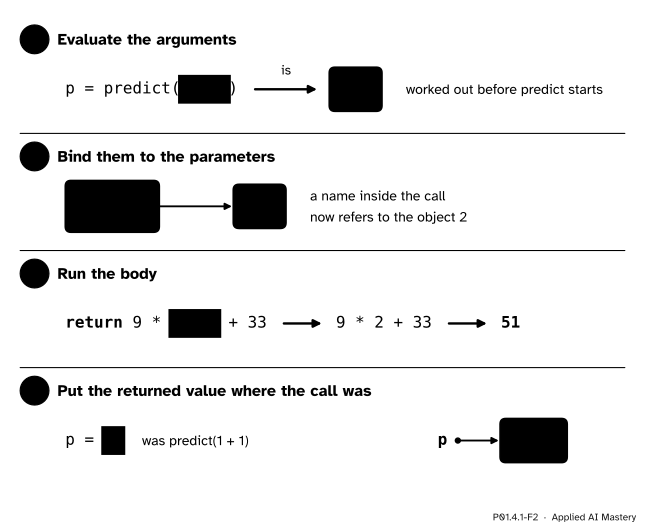
The figure below takes the call in p = predict(1 + 1) apart into the four things that happen in every call.
P01.4.1-F2
The four steps of a call. The argument is worked out first, the parameter is bound to it, the body runs, and the returned value replaces the call.
The formal statement
NoteDefinition: function, parameter, argument, return value
A function definition has this shape:
def name(parameter_1, parameter_2):"""One line that says what the function does.""" bodyreturn expression
Running it binds name to a new function object. The names in brackets are its parameters. A callname(a, b) passes the argumentsa and b, and the call’s value is the function’s return value.
Every call happens in the same four steps.
Evaluate the arguments. Each argument is worked out, from left to right, before the body starts. In predict(1 + 1) that gives 2.
Bind them to the parameters. A fresh set of names is made for this call, and each parameter is bound to its argument’s object. These names belong to the call alone.
Run the body from its first line, until a return statement runs or the last line is done.
Put the returned value where the call was. The value after return replaces the call in the line that made it. If the body ends without a return, or with return and nothing after it, the value is None.
Three consequences follow, and later lessons lean on each of them.
return ends the call at once. Lines after it in the same block do not run in that call.
A call is an expression, so a call can be an argument. In print(predict(2)) the inner call is step 1 of the outer one: it runs first, and print receives 51.
The names made in step 2, and the names the body makes, exist only during the call. Lesson P01.4.3 draws where they live, and P01.4.4 explains why code outside cannot see them.
Docstrings. If the first line of the body is a string, that string is the function’s docstring, the place where a function describes itself. Three quotation marks at each end let it run over several lines.
def predict(hours):"""Return the predicted quiz score for the given hours of study."""return9* hours +33
The built-in function help prints it. Here it is at the interactive prompt of P01.1.3:
>>> help(predict)
Help on function predict in module __main__:

predict(hours)
    Return the predicted quiz score for the given hours of study.
The first line says where the function was defined: __main__ is Python’s name for the code you run or type yourself. The second line repeats the header, so help also tells you what to pass. Python’s own functions carry docstrings too, which is why help(len) explains len.
Go deeper: a function is an object, so it can have two names
Step 1 said that def binds a name to a function object. That name behaves like any other. After f = predict, the two names refer to one function object, just as y = x made two names for one object in P01.2.2, and f(2) is 51. Writing a function’s name without brackets does not call it. print(predict) shows something like <function predict at 0x104a6fe20>, where the number is a memory address that differs between machines and between runs. P01.10.4 hands functions to other functions on purpose.
Worked example
Trace this program by hand, one executed line at a time.
def mean(values): total =sum(values)return total /len(values)scores = [55, 65, 80, 40, 60]m = mean(scores)print('mean', m)
This mean uses the built-ins sum and len of P01.3.4, so that the trace can follow the call rather than the loop.
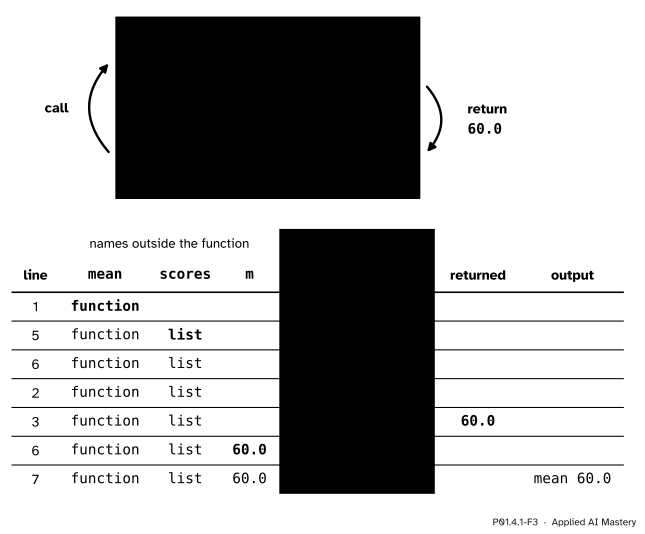
Line 1 runs first, but only as a definition: the name mean is bound to a function object, and lines 2 and 3 are skipped. Line 5 binds scores to the list.
Line 6 holds a call, so the four steps happen.
Step 1. The argument scores is evaluated. That gives the list.
Step 2. The parameter values is bound to that same list. There is still only one list, now with two names.
Step 3. The body runs. Line 2 works out sum(values), which is 55 + 65 + 80 + 40 + 60 = 300, and binds total to it. Line 3 works out total / len(values), which is 300 / 5 = 60.0. The operator / always gives a float (P01.2.3). return hands 60.0 back.
Step 4. Back on line 6 the call is replaced by its value, so the line now reads m = 60.0, and m is bound to 60.0. The names values and total are gone.
Line 7 prints mean 60.0.
P01.4.1-F3
The trace of m = mean(scores). The line numbers run 1, 5, 6, 2, 3, 6, 7: the jump from 6 to 2 is the call, and the jump from 3 back to 6 is the return. The names in the shaded columns exist only while the call runs.
Then the model, for each student. By hand, predict(2) is 9 × 2 + 33 = 18 + 33 = 51. In the same way predict(4) is 36 + 33 = 69, predict(5) is 45 + 33 = 78, predict(1) is 9 + 33 = 42 and predict(3) is 27 + 33 = 60. Set beside the real scores 55, 65, 80, 40 and 60, the model is off by 4, −4, 2, −2 and 0. Lesson P01.4.3 squares one of these errors with a second function.
Code
First from scratch: the mean as a loop inside a function, called on two different lists.
def mean(values):"""Return the mean of a list of numbers.""" total =0for v in values: total = total + vreturn total /len(values)scores = [55, 65, 80, 40, 60]print('mean score', mean(scores))print('mean hours', mean([2, 4, 5, 1, 3]))
mean score 60.0
mean hours 3.0
Then the same job with the built-ins of P01.3.4. Python’s own statistics.mean arrives with the first import, in P01.5.1.
def mean_builtin(values):"""The same mean, with the built-in functions sum and len."""returnsum(values) /len(values)print(mean_builtin(scores), mean_builtin([2, 4, 5, 1, 3]))
60.0 3.0
The model, called once for each student. A list written in square brackets may hold calls, and each call is worked out in turn, from left to right.
def predict(hours):"""Return the predicted quiz score for the given hours of study."""return9* hours +33predictions = [predict(2), predict(4), predict(5), predict(1), predict(3)]print('predictions', predictions)print('their mean', mean(predictions))
predictions [51, 69, 78, 42, 60]
their mean 60.0
The mean of the predictions is 60.0, the same as the mean of the scores. That is no accident: ML01.4 shows that a least-squares line always gets the mean right.
Last, a function that prints its answer instead of returning it:
The call printed mean 60.0 while it ran, and then handed back None, because its body has no return. Using that result as a number fails. Saved as a file and run with python show_mean.py, this program prints the line and then stops. The message below was copied from a run of Python 3.15, as are the other messages in this module; the wording varies a little between versions.
mean 60.0
Traceback (most recent call last):
  File "show_mean.py", line 5, in <module>
    print(result + 1)
          ~~~~~~~^~~
TypeError: unsupported operand type(s) for +: 'NoneType' and 'int'
Read it from the last line up, as in P01.1.3: a TypeError, because + cannot add None and an int, on line 5 of the file.
Explore
This module’s interactive, the call-stack stepper, lives in lesson P01.4.3, where the place that holds a call’s names gets its proper name. You can use it now: choose the program in which squared_error calls predict, press Step, and watch arguments go into each call and returned values come back out, one line at a time.
If you have met the function machine of M01.3.1, it is the same idea seen from mathematics; it is not needed here.
Pitfalls
P01.4.1-F4
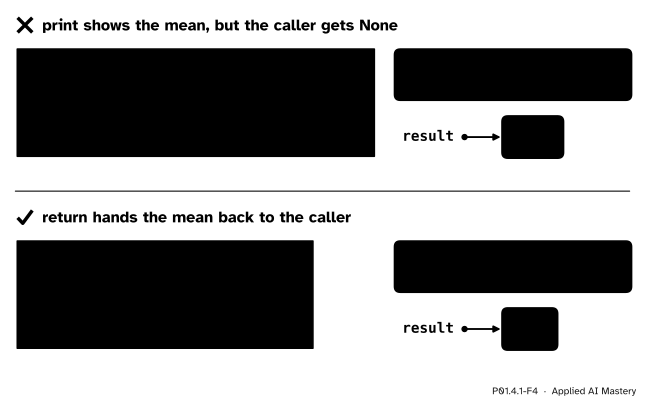
Wrong beside right. Printing shows the mean to a person but leaves the caller with None; returning hands the mean to the program.
“My function prints the right answer, so it works.”
Printing shows a value to a person; return hands it to the program. show_mean prints mean 60.0 and then gives back None, so any line that uses its result fails or goes wrong. Make a function return what it computes, and let the caller decide whether to print it. Every model in ML01 returns its predictions, because a loss is computed from them, and a printed number cannot be computed with.
“The return can go inside the loop.”
Indented one step too far, return runs on the first pass of the loop, and the call ends after one item:
def mean_wrong(values): total =0for v in values: total = total + vreturn total /len(values)
mean_wrong(scores) is 55 / 5 = 11.0, and no error message warns you. Lines after a return in the same block never run, so check which block each return sits in.
“Writing the function’s name runs it.”
Neither def nor the bare name runs the body. def only stores it, and m = mean makes m a second name for the function itself; nothing is computed. Only brackets make a call: mean(scores).
Check yourself
Recall
1. What are the four steps of a call?
Show answer
Evaluate the arguments, bind them to the parameters, run the body, and put the returned value where the call was.
2. In def predict(hours): and the call predict(2), which is the parameter and which is the argument?
Show answer
hours is the parameter, a name in the definition. 2 is the argument, the value passed in the call.
3. What does a call give back when the function’s body has no return statement?
Show answer
None.
4. What happens when Python runs def mean(values): and the body under it?
Show answer
It creates a function object and binds the name mean to it. The body is stored and does not run until the function is called.
5. Where does help(predict) find the sentence that it prints?
Show answer
In the docstring: the string on the first line of the body of predict.
Exercises
1.★ Write a function passed(score) that returns True when the score is at least the pass mark of 50, and False otherwise. What do passed(55) and passed(40) give?
Show solution
A comparison already has the value True or False (P01.2.4), so the body can return it directly:
def passed(score):"""Return True when the score reaches the pass mark of 50."""return score >=50
passed(55) works out 55 >= 50, which is True. passed(40) works out 40 >= 50, which is False.
2.★★ Write count_passes(values), which returns how many scores in a list pass, by calling passed inside a loop. What is count_passes(scores) for the study table?
Show solution
It is the counting pattern of P01.3.4, with the test handed to passed:
def count_passes(values): count =0for v in values:if passed(v): count = count +1return count
One function may call another. The loop calls passed five times: 55, 65 and 80 pass, 40 does not, and 60 passes. So count_passes(scores) is 4.
3.★★★ Without running it, write down everything this program prints, in order, and explain each line.
def double(x):print('in double', x)return x *2print('never printed')y = double(double(3))print(y)
Show solution
It prints three lines: in double 3, then in double 6, then 12.
The outer call needs its argument first (step 1), and that argument is the inner call double(3). The inner call binds x to 3, prints in double 3 and returns 6. Now the outer call binds its own x to 6, prints in double 6 and returns 12. The line after each return never runs, so never printed is never printed. Finally y is bound to 12 and the last line prints it.
Summary card
A function is a named block of code: arguments go in, one returned value comes out.
P01.4.1-F1
Name, parameter, body, return.
Define:def name(parameters):, an indented body, and return value.
Call: evaluate the arguments, bind them to the parameters, run the body, and put the returned value where the call was.
No return means the call’s value is None. print shows a value; return hands it back.
Docstring: a string on the first line of the body, printed by help(name).
Sources and next steps
Sources. Each was opened and checked against this lesson on 12 November 2026.
Python Software Foundation, The Python Tutorial, section 4.8, Defining Functions. The keyword def followed by the name and the bracketed parameters, the indented body, the docstring as the optional first statement of the body, a new table of local names for each call, and None as the value of a call that ends without return (“falling off the end of a function also returns None”).
Python Software Foundation, The Python Language Reference, section 8.7, Function definitions: a function definition is an executable statement that binds the function’s name to a function object and does not run the body. And section 6.3.3, Calls: all argument expressions are evaluated before the call, the parameters are bound first, and a call that reaches the end of the body without return gives None.
Allen B. Downey, Think Python, 3rd edition, free under CC BY-NC-SA 4.0: chapter 3, Functions, and chapter 6, Return Values, whose sections 6.1 and 6.2 set functions that return a value beside functions that return None.
Python Software Foundation, Built-in Functions: help, which generates a help page for any object it is given.
Next.P01.4.2 Parameters and arguments gives predict a slope and an intercept that you can change, with values to fall back on when you do not.