print(type(55))
print(type(60.0))
print(type('Ama'))
print(type(True))
print(type(None))<class 'int'>
<class 'float'>
<class 'str'>
<class 'bool'>
<class 'NoneType'>Before this lesson
P01.1 How computers run programs
After this lesson you can
In review. The maths and code on this page are checked by automated tests on every change, but an independent reader has not signed it off yet. Spot a mistake or a confusing step? Tell us.
In the course’s study file, Ama’s quiz score is stored as the two characters 5 and 5. Python works out '55' + '10' as '5510', refuses '55' + 10 with a TypeError, and gives 55 + 10 as 65. Why does the same + join, refuse and add? And why does it say that 0.1 + 0.2 is 0.30000000000000004?
A value is one piece of data that a program works with: the number 55, the text 'Ama', the answer True. Every value has a type, which says what kind of value it is. The type matters because it decides what an operator does. Before Python carries out +, it looks at the types of the two values on either side.
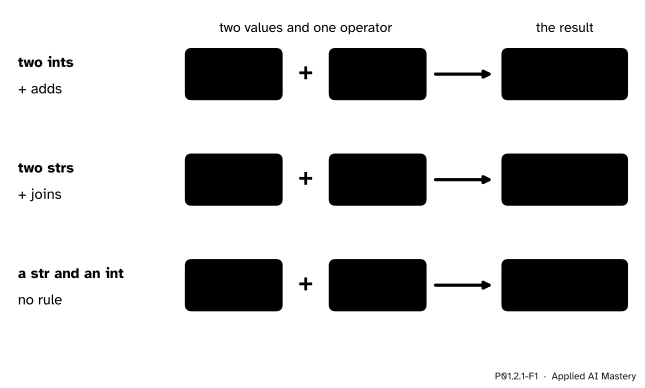
The same + does three different things. Two ints are added, two strs are joined, and a str with an int is an error, because Python has no rule for adding text to a number.
Two numbers are added. Two pieces of text are joined end to end. For a piece of text and a number there is no rule, so Python stops with an error rather than guess what you meant. It never turns '2' into 2 by itself.
This matters for machine learning from the first day. Data almost always arrives as text: a file of numbers is, to the computer, a file of characters until a program converts them. A model can only compute with numbers, so every data pipeline starts by turning text into numbers of the right type.
Step 1. Five types to start with. Here are the five types this module uses, how their values are written, and what each could hold in the study table.

Each type has its own written form. The quotes make a str, the point makes a float, and True, False and None are written with a capital letter and no quotes.
An int (integer) is a whole number, written without a point: 55, -3. A float is a number written with a point, such as 60.0 or 0.5; the name comes from floating point, the way the computer stores it. A str (string) is text: any characters between single or double quotes, so 'Ama' and "55" are both strs. A bool is one of the two answers True and False. None is a value that means “no value here”, such as a score that was never entered; its type is called NoneType.
Step 2. Ask Python with type(). The function type names the type of a value, so type(55) gives <class 'int'> and type('55') gives <class 'str'>. Python calls a type a class; lesson P01.9.1 shows how to make classes of your own.
Step 3. The type decides what an operator does. + adds numbers and joins strs. * multiplies numbers and repeats a str, so 3 * 'ab' is 'ababab'. When an int meets a float, the int is turned into a float first, so 2 + 0.5 is 2.5 and 2 * 3.0 is 6.0: a float, even though the answer is whole.
Step 4. Convert on purpose. Three functions build a value of one type from a value of another. int('55') is the int 55, float('3.9') is the float 3.9, and str(55) is the str '55'. Given a float, int keeps only the whole-number part and throws the rest away: int(3.9) is 3, and int(-3.9) is −3. Given text, int accepts only text that is written like a whole number, so int('3.9') fails. Go through float first: int(float('3.9')) is 3.
Step 5. Why this matters: data arrives as text. This is the study file, study.csv, that the course uses throughout:
name,hours,score
Ama,2,55
Ben,4,65
Chen,5,80
Dina,1,40
Eli,3,60
When a program reads it (lesson P01.7.3 shows how), every field arrives as a str: Ama’s hours are the text '2' and her score is '55'. Nothing can be computed from them until they are converted.
Exact and approximate numbers. The two number types are stored in different ways, and the difference shows.
An int is exact at any size. Python gives a large whole number as much memory as it needs, so 12345678901234567890 * 98765432109876543210 comes out to all 40 digits, with nothing rounded.
A float is stored in a fixed 64 bits, the bits of lesson P01.1.4. One bit holds the sign, eleven hold a power of two that places the point, and fifty-two hold the digits. A leading 1 is understood without being stored, so a float carries 53 binary digits. How many decimal digits is that worth? Compare 2 to the power 53 with powers of ten:
\[ \begin{aligned} 10^{15} &= 1\,000\,000\,000\,000\,000 \\ 2^{53} &= 9\,007\,199\,254\,740\,992 \\ 10^{16} &= 10\,000\,000\,000\,000\,000 \end{aligned} \]
So \(2^{53}\) lies between \(10^{15}\) and \(10^{16}\): 53 binary digits hold every whole number of up to 15 decimal digits exactly, and some of 16. That is what “about 16 significant digits” means. Counting up from 0, the first whole number that a float cannot hold is \({2^{53} + 1}\), which is 9007199254740993: turned into a float, it becomes 9007199254740992.0.
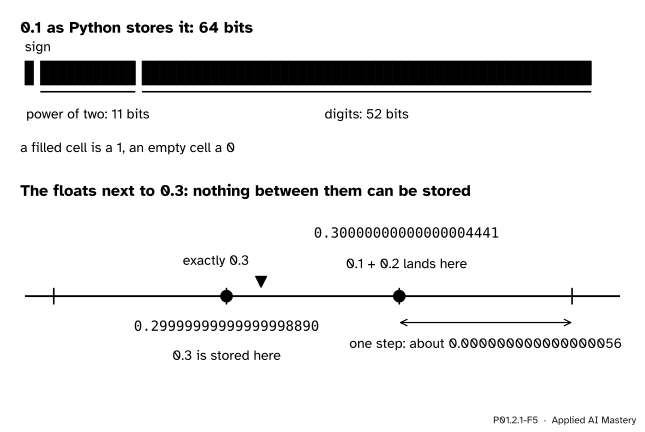
Top: 0.1 as it is stored, in 64 bits. Bottom: near 0.3 the floats sit one small step apart, and no number between two neighbours can be stored. 0.3 itself is stored as the float just below it; the sum 0.1 + 0.2 lands on the float just above it.
Now the puzzle of the question. In binary, 1/10 has no exact form: its digits repeat for ever, as 1/3 = 0.333… does in decimal. So Python stores the nearest float, which is a little more than 0.1: 0.1000000000000000055511151231257827021181583404541015625. The same happens to 0.2. Their sum is a little more than 0.3, and rounded to a float it lands on the float just above 0.3. But 0.3 typed on its own is stored as the float just below 0.3. Python prints each float with the fewest digits that pick it out from its neighbours, so the lower one prints as 0.3 and the upper one as 0.30000000000000004. Nothing is broken: any language that adds 64-bit floats gets exactly the same float.
A binary fraction with \(n\) digits after the point is a whole number divided by \(2^n\). Suppose 1/10 could be written that way, as \({1/10 = k/2^n}\) for some whole number \(k\). Multiplying both sides by \({10 \cdot 2^n}\) gives \({2^n = 10k}\). The right-hand side is a multiple of 5, but \(2^n\) is a product of 2s only, so it is never a multiple of 5. The supposition is impossible, so the binary digits of 1/10 never stop. The same argument works for any fraction whose denominator, in lowest terms, has a factor other than 2: 1/5, 3/10 and 1/3 all repeat in binary, while 1/2, 1/4 and 3/8 do not.
Ama’s row of the study file is Ama,2,55. Her hours and her score arrive as the text '2' and '55'. Work out her predicted score with the course’s rule, 9 × hours + 33, and her error, score minus prediction.
The rule is a given for now; module ML01.4 derives it from the table.
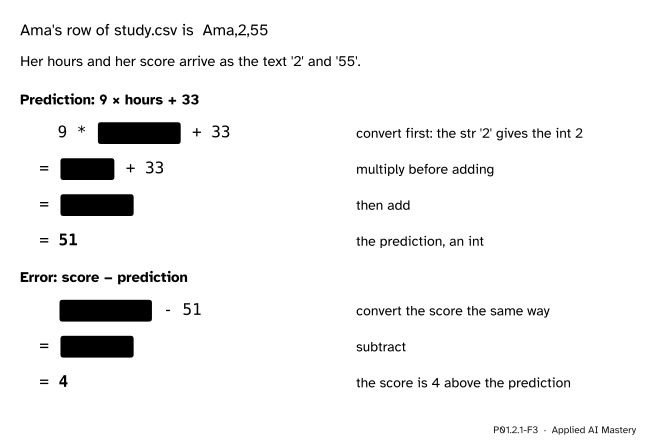
The worked example one step at a time. The highlight marks the part worked out next; every value after the first conversion is an int.
int('2') turns the str '2' into the int 2.9 * 2 is 18. Both values are ints, so the result is an int.18 + 33 is 51, Ama’s predicted score.int('55') is 55.55 - 51 is 4. Ama scored 4 points more than the rule predicted.Leave out the conversion and step 2 goes wrong in a surprising way, shown in the pitfalls below.
First, type on one value of each kind.
print(type(55))
print(type(60.0))
print(type('Ama'))
print(type(True))
print(type(None))
<class 'int'>
<class 'float'>
<class 'str'>
<class 'bool'>
<class 'NoneType'>Now the same operators on different types. print shows the characters of a str without their quotes, so the joined '23' appears as 23.
# + adds two ints and joins two strs
print(2 + 3)
print('2' + '3')
# * multiplies two numbers and repeats a str
print(9 * 2)
print(9 * '2')
# an int meets a float: the int becomes a float first
print(2 + 0.5, 2 * 3.0)
5
23
18
222222222
2.5 6.0A str and an int cannot be added. A line that tries cannot be run in this page, because it stops the program, so here it is as a file, join.py:
print('2' + 3)Run with python join.py, it stops with this message (copied from a run with Python 3.15; other versions word some messages a little differently, so yours may not match it letter for letter):
Traceback (most recent call last):
  File "join.py", line 1, in <module>
    print('2' + 3)
          ~~~~^~~
TypeError: can only concatenate str (not "int") to str
Read it from the last line up, as lesson P01.1.3 showed: a TypeError, because “concatenate” (join) works only between two strs. Next, the conversions, including Ama’s row from the worked example.
print(int('55') + 10)
print(float('3.9'), str(55) + '%')
print(int(3.9), int(-3.9), int(float('3.9')))
# Ama's row: prediction, then error
print(9 * int('2') + 33)
print(int('55') - (9 * int('2') + 33))
65
3.9 55%
3 -3 3
51
4Text that is not written as a whole number cannot become an int. print(int('3.9')) stops with (Python 3.15):
Traceback (most recent call last):
  File "convert.py", line 1, in <module>
    print(int('3.9'))
          ~~~^^^^^^^
ValueError: invalid literal for int() with base 10: '3.9'
A ValueError means the type was right (a str) but this particular value cannot be converted. Last, the two kinds of number side by side:
print(0.1 + 0.2)
print(12345678901234567890 * 98765432109876543210)
print(9007199254740993, float(9007199254740993))
0.30000000000000004
1219326311370217952237463801111263526900
9007199254740993 9007199254740992.0The int product keeps all 40 digits. The float cannot hold 9007199254740993 and stores its neighbour 9007199254740992.0 instead, exactly as the formal statement predicted.
This module’s interactive, the memory-diagram builder, lives in lesson P01.2.2. Each value you create there is drawn as a box that shows its type, the same box as in the figures of this lesson.
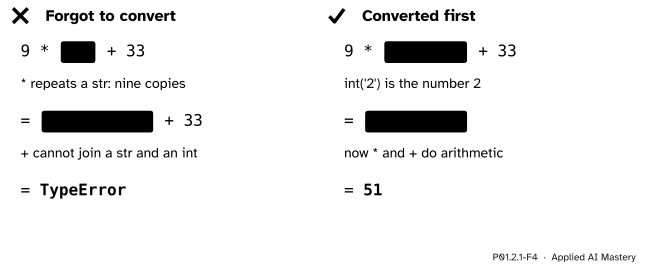
Wrong beside right. Without the conversion, * repeats the text nine times and + then fails. With it, the same line gives Ama’s prediction, 51.
“'55' looks like a number, so Python will treat it as one.”
The quotes make it text, and Python goes by the type, not by the look. 9 * '2' is '222222222', nine copies of the text, and '55' + '10' is '5510'. Convert first with int or float. A whole column of numbers that is still text is one of the most common bugs in a first data project.
“int rounds to the nearest whole number.”
It cuts off the fractional part and keeps the whole-number part: int(3.9) is 3, not 4, and int(-3.9) is −3. This is called truncating, and it always moves towards zero. If you want rounding, the built-in round does it: round(3.9) is 4.
“int turns any number written as text into a number.”
Only text written like a whole number. int('3.9') is a ValueError; float('3.9') works, and int(float('3.9')) gives 3. The text 'n/a', which a file uses for a missing value, cannot become a number at all; lesson P01.8.2 shows how a program can skip such a value and carry on.
“0.1 + 0.2 printing 0.30000000000000004 means Python cannot add.”
The addition is as good as 64 bits allow. Neither 0.1 nor 0.2 can be stored exactly, and the rounded sum lands one float above the float that stands for 0.3. Any language that adds 64-bit floats gets the same float. Lesson P01.2.4 shows how to compare such results safely.
1. Name the type of each value: 55, 55.0, '55', True, None.
int, float, str, bool and NoneType.
2. What does '4' + '2' give, and what does 4 + 2 give?
'42', the two pieces of text joined, and 6, the two numbers added.
3. Why does '4' + 2 fail, and what is the error called?
Python has no rule for adding text to a number, and it does not convert either one by itself. The error is a TypeError.
4. What are int(7.8), int(-7.8) and float('7.8')?
7, −7 and 7.8. int cuts off the fractional part, moving towards zero; float reads the text as a number with a point.
5. About how many significant digits does a float keep, and why does 0.1 + 0.2 print 0.30000000000000004?
About 16, because it keeps 53 binary digits. Neither 0.1 nor 0.2 can be stored exactly; their sum rounds to the float just above 0.3, while 0.3 itself is stored as the float just below.
1. ★ Give the type and the value of each: 7 + 2, 7 + 2.0, '7' + '2', 3 * 'ab' and int('7') + 2.
7 + 2 is the int 9. 7 + 2.0 is the float 9.0, because the int is turned into a float first. '7' + '2' is the str '72'. 3 * 'ab' is the str 'ababab'. int('7') + 2 is the int 9: the conversion happens first, then two ints are added.
2. ★★ Ben’s row of the study file is Ben,4,65. Write one expression that gives his predicted score from the text '4', and one that gives his error from the text '65'. Work each out step by step.
Prediction: 9 * int('4') + 33. Step by step, int('4') is 4, then 9 * 4 is 36, then 36 + 33 is 69.
Error: int('65') - 69. int('65') is 65, and 65 - 69 is −4: Ben scored 4 points less than the rule predicted.
3. ★★★ 0.5 + 0.25 prints exactly 0.75, while 0.1 + 0.2 does not print 0.3. Explain the difference.
0.5 is 1/2 and 0.25 is 1/4, and their denominators are powers of two. In binary they are 0.1 and 0.01, short and exact, so both are stored with no error at all. Their sum is 0.11 in binary, which is 3/4 = 0.75, also exact, so nothing is rounded anywhere.
0.1 is 1/10, and 10 has the factor 5. As the deeper note in the formal statement shows, such a fraction has binary digits that never stop, so 0.1 is stored rounded, and so is 0.2. The two small rounding errors carry into the sum, which then rounds to the float above 0.3 instead of the one that 0.3 is stored as.
Every value has a type, and the type decides what an operator does with it.
One +, three outcomes.
55), float (60.0), str ('Ama'), bool (True) and None.+ adds numbers and joins strs; a str plus an int is a TypeError.int('55') is 55, float('3.9') is 3.9, str(55) is '55'; int(3.9) is 3, int('3.9') fails.Sources. Each was opened and checked against this lesson on 12 November 2026.
+ and repeated with *.0.1 + 0.1 + 0.1 == 0.3, which is False. It says that since version 3.1 Python displays the shortest decimal that stands for a stored float, and that the rounding is in the nature of binary floating point, not a bug in Python.int truncates a float towards zero, float reads a string that holds a decimal number, and type with one argument returns the type of an object. Built-in Types, Numeric Types: “Integers have unlimited precision”, and floats are usually C doubles.type(), and “Type conversions (casting)” shows int(3.9) truncating to 3.+ joining strings and * making copies; Section 1.5 says that every value has a type and that type tells you which.Next. P01.2.2 Names and assignment gives values names, and draws what happens in memory when it does.
This lesson unlocks