Every call gets a frame of its own that holds its local names, pushed when the call starts and popped when it returns. Trace the stack for squared_error and predict, watch factorial call itself four frames deep, and see why a missing base case ends in RecursionError.
Draw the call stack at any moment of a program: one frame per active call, the global frame at the top and the newest call at the bottom.
Explain why two calls that use the same parameter name do not interfere.
Trace a recursive function such as factorial by hand, frame by frame, down to its base case and back.
Explain why a recursive function without a base case ends in RecursionError, and match the entries of a traceback to the frames of the stack.
In review. The maths and code on this page are checked by automated tests on every change, but an independent reader has not signed it off yet. Spot a mistake or a confusing step? Tell us.
The question
squared_error(2, 55) measures how far the model’s prediction for Ama is from her real score, and calls predict(2) half-way through one of its own lines. Both functions have a parameter called hours. While predict runs, how does Python remember where to come back to, and keep the two hours apart? The same machinery lets a function call itself.
From the last lesson
1. With def predict(hours, slope=9, intercept=33), what is predict(2, slope=10)?
Show answer
53: hours is 2 by position, slope is 10 by keyword, intercept keeps its default 33, and 10 × 2 + 33 = 53.
2. Why does predict(2, hours=3) fail?
Show answer
The 2 fills hours by position, and then hours=3 tries to fill the same slot: a TypeError, “got multiple values for argument ‘hours’”.
Intuition
Here is the program. The squared error of one prediction is the building block of the mean squared error that ML01 minimises.
Every call needs somewhere to keep its own names. Python gives each call a frame: a table of the names that belong to that call alone, made when the call starts. The names written at the top level of the file live in one more frame, the global frame, which lasts as long as the program. The frames of the calls that have started and not yet returned form the call stack.
P01.4.3-F1
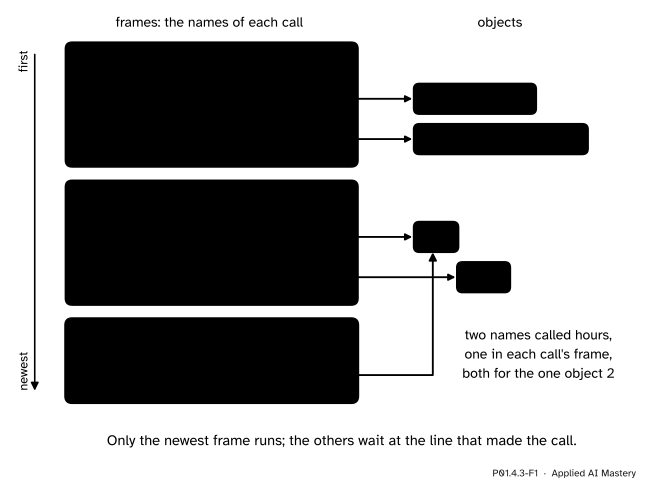
The call stack while predict(2) runs inside squared_error(2, 55). Each call has a frame of its own names; the newest frame, at the bottom, is the only one running.
Read the picture from the top. The global frame holds the two names that def made. Below it is the frame of squared_error(2, 55), with hours and score, and at the bottom the frame of predict(2), with its own hours. The two hours are different names in different frames, so neither can disturb the other. Both refer to the one object 2, because a call binds the parameter to the argument’s object (P01.4.1).
Only the newest frame runs. squared_error is paused in the middle of line 5, waiting for the value of predict(hours), and the global frame is paused on line 8, waiting for squared_error.
Build it up
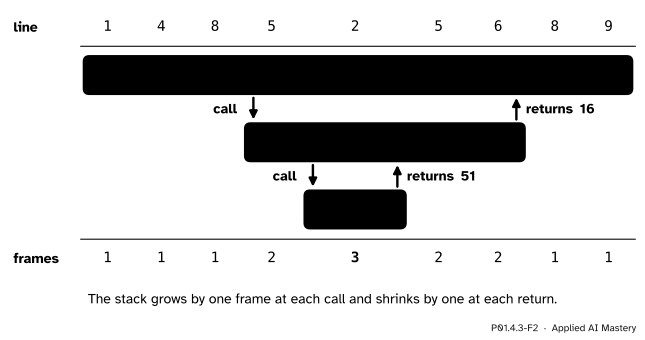
Step 1. One frame. Lines 1 and 4 bind predict and squared_error in the global frame. The stack holds one frame.
Step 2. A call pushes a frame. Line 8 evaluates the arguments 2 and 55, then pushes a new frame for squared_error, with hours bound to 2 and score bound to 55. The global frame waits at line 8. Two frames.
Step 3. A call inside a call pushes another. Line 5 needs predict(hours). Python looks up hours in the running frame, gets 2, and pushes a frame for predict(2) with its own hours. squared_error waits half-way through line 5, because score - predict(hours) is not finished. Three frames.
Step 4. A return pops the frame. Line 2 returns 9 × 2 + 33 = 51. The frame of predict is popped: its name hours is gone. The value 51 replaces the call on line 5, which finishes: error is 55 − 51 = 4. Two frames again.
Step 5. Back to one frame. Line 6 returns 4 ** 2 = 16, the frame of squared_error is popped, and line 8 binds loss to 16 in the global frame. Line 9 prints 16.
P01.4.3-F2
The stack over time. Each call pushes a frame below the frame that made it, and each return pops that frame and carries its value back up. The bottom row counts the frames while each line runs.
The formal statement
NoteDefinitions: frame, call stack, push and pop
A frame holds the names of one call: its parameters and every name its body assigns. The call stack is the list of frames of the calls that have started and not yet returned, with the global frame first. Starting a call pushes a frame; returning pops it.
Four rules describe everything the pictures show.
A call pushes a new frame, in which the parameters are bound to the arguments’ objects (P01.4.1). Every name the body assigns goes into this frame too.
Only the newest frame runs. Every other frame waits at the line where it made its call.
return pops the newest frame. Its names are gone, and the returned value goes to the waiting line in the frame that called, which carries on from where it stopped.
The global frame stays until the program ends.
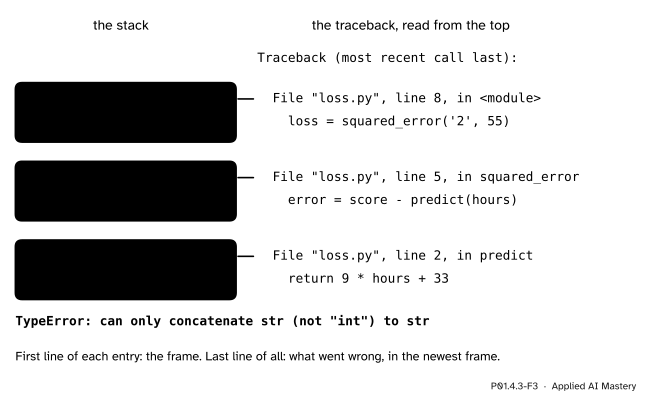
This course draws the newest frame at the bottom. Programmers often say that a call goes “on top of the stack”; it is the same stack, drawn the other way up. The order in the picture is the order of a traceback, the report that Python prints when an error stops a program: it lists the frames from the global one down to the newest, “most recent call last”. Suppose the hours arrive as text, as data read from a file does (P01.2.1), so that line 8 reads loss = squared_error('2', 55). Saved as loss.py and run with Python 3.15, the program stops with this message (the wording varies a little between versions):
Traceback (most recent call last):
  File "loss.py", line 8, in <module>
    loss = squared_error('2', 55)
  File "loss.py", line 5, in squared_error
    error = score - predict(hours)
                    ~~~~~~~^^^^^^^
  File "loss.py", line 2, in predict
    return 9 * hours + 33
           ~~~~~~~~~~^~~~
TypeError: can only concatenate str (not "int") to str
P01.4.3-F3
A traceback is the call stack written out, in the same order as the picture: one entry per frame, <module> being Python’s name for the global frame. (The marker lines are left out here.)
Recursion. Nothing stops a function from calling itself. Such a function is recursive, and each of its calls gets a frame of its own, exactly as different functions do. A recursive function needs a base case, an input it answers without calling itself, and a recursive case that calls itself on an input closer to the base case. The factorial is the classic example: the product of the whole numbers from 1 up to n, with 0! = 1, so that n! = n × (n − 1)! for n of 1 or more.
def factorial(n):if n ==0:return1return n * factorial(n -1)result = factorial(3)print(result)
Line 2 tests for the base case; line 4 is the recursive case. Unfolded, the calls give
Each call passes n - 1, so starting from a whole number n of 0 or more, the argument reaches 0 after n calls, and the base case ends the descent. factorial(n) therefore makes n + 1 calls, all alive at the deepest moment, in n + 1 frames below the global one.
Go deeper: is recursion just a loop in disguise?
For the factorial, yes: the loop in the Code section computes the same numbers in one frame. Recursion is clearest when the data itself nests, such as folders inside folders, or a decision tree (ML02.1), grown by applying the same splitting rule to each branch in turn. Because Python keeps a frame for every pending call and stops at a fixed limit, it suits problems a few hundred calls deep, not millions.
Worked example
Trace result = factorial(3) by hand: every push, every pop and every returned value.
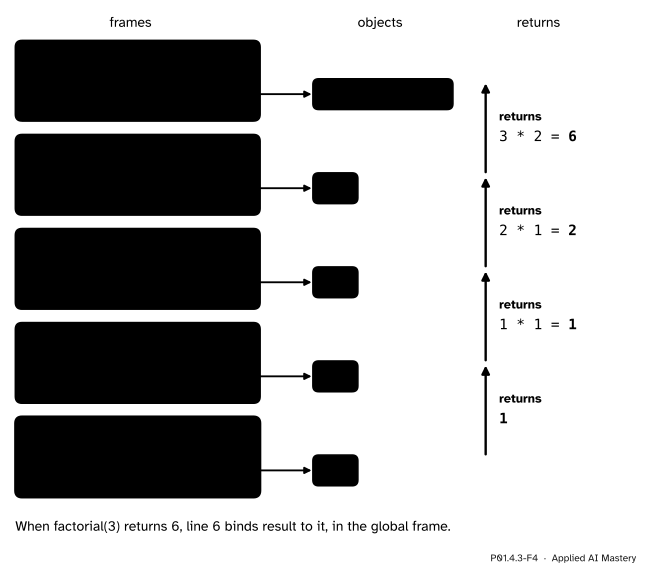
Line 6 calls factorial(3). A frame is pushed with n bound to 3. The test n == 0 is false, so line 4 needs factorial(2): this frame waits at line 4.
A second frame of the same function is pushed, with its own n bound to 2. Again the test fails, and it waits at line 4 for factorial(1). A third frame, n bound to 1, waits for factorial(0).
The fourth frame has n bound to 0. Now the test is true: this is the base case. Line 3 returns 1 without any further call. The stack is at its deepest: four frames of factorial, five frames in all.
P01.4.3-F4
factorial(3) at its deepest. Four frames of one function are alive at once, each with its own n. The values travel back up as the frames are popped, from the base case to the first call.
Now the frames are popped in reverse order. factorial(0) returns 1 to the frame with n = 1, whose line 4 finishes as 1 × 1 = 1 and returns 1. The frame with n = 2 finishes as 2 × 1 = 2 and returns 2. The frame with n = 3 finishes as 3 × 2 = 6 and returns 6 to line 6, where result is bound to 6. Four pushes, four pops, and the answer is 3! = 6.
Code
The program of the Intuition, and the same function called once for each student, to add up the squared errors of the model on the whole study table:
def predict(hours):return9* hours +33def squared_error(hours, score): error = score - predict(hours)return error **2loss = squared_error(2, 55)print(loss)# Inside brackets, a long expression may carry on to the next line.total = (squared_error(2, 55) + squared_error(4, 65) + squared_error(5, 80)+ squared_error(1, 40) + squared_error(3, 60))print('total', total, 'mean', total /5)
16
total 40 mean 8.0
The mean of the squared errors is 8.0, the mean squared error of the course’s line (P01.6.2 computes it with a loop).
The factorial, from scratch, for n from 0 to 5:
def factorial(n):if n ==0:return1return n * factorial(n -1)for n inrange(6):print(n, factorial(n))
0 1
1 1
2 2
3 6
4 24
5 120
A version that prints as it goes makes the stack visible. Each line is indented by one '| ' per frame above it: '| ' * depth repeats the text depth times, as + joins two texts.
def factorial_shown(n, depth):print('| '* depth +'factorial('+str(n) +') starts')if n ==0: result =1else: result = n * factorial_shown(n -1, depth +1)print('| '* depth +'factorial('+str(n) +') returns '+str(result))return resultanswer = factorial_shown(3, 0)
Each call has its own n and result, and the returns come back in the reverse order of the calls. A loop (P01.3.3) gives the same numbers in a single frame; Python’s own math.factorial waits for the first import, in P01.5.1.
def factorial_loop(n): product =1for k inrange(1, n +1): product = product * kreturn productfor n inrange(6):print(n, factorial_loop(n), factorial(n))
0 1 1
1 1 1
2 2 2
3 6 6
4 24 24
5 120 120
Without its base case the function never stops calling itself. This file, no_base_case.py, run with Python 3.15, shows how it ends:
def factorial(n):return n * factorial(n -1)print(factorial(3))
Traceback (most recent call last):
  File "no_base_case.py", line 4, in <module>
    print(factorial(3))
          ~~~~~~~~~^^^
  File "no_base_case.py", line 2, in factorial
    return n * factorial(n - 1)
               ~~~~~~~~~^^^^^^^
  File "no_base_case.py", line 2, in factorial
    return n * factorial(n - 1)
               ~~~~~~~~~^^^^^^^
  File "no_base_case.py", line 2, in factorial
    return n * factorial(n - 1)
               ~~~~~~~~~^^^^^^^
  [Previous line repeated 996 more times]
RecursionError: maximum recursion depth exceeded
Three entries for factorial are shown and 996 more are summarised: 999 frames of factorial, which with the global frame make 1000, the limit that a standard installation of Python sets.
Explore
P01.4-X1
Call-stack stepper
Step through squared_error(2, 55) and watch frames being pushed with their own names, values travelling back, and frames being popped. Then switch to factorial(n), choose n from 0 to 5, and see the stack grow one frame per call down to the base case before it unwinds.
Pitfalls
P01.4.3-F5
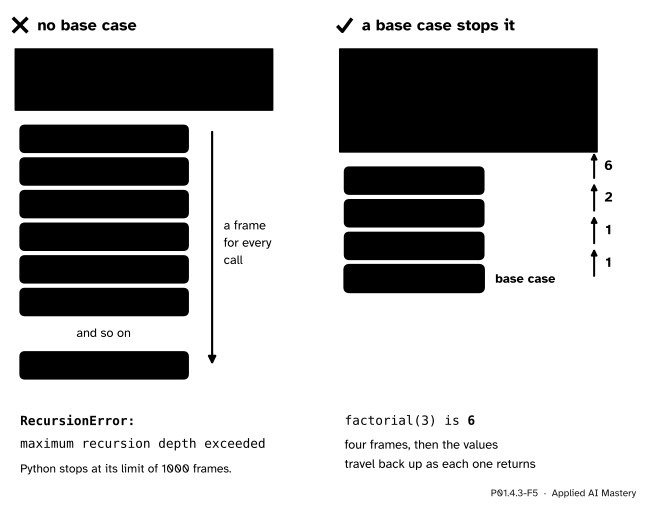
Wrong beside right. Without a base case the frames pile up until Python stops the program; with one, the stack stops growing at n == 0 and the values travel back up.
“A recursive call starts the function again and wipes out n.”
The new call gets a new frame with a new n; the old frame keeps its own n, waits at line 4 and carries on when the value comes back. That is why n * factorial(n - 1) still knows its n after the inner call returns.
“Without a base case it would just stop at 0.”
Nothing in return n * factorial(n - 1) says stop: n runs on through −1, −2 and below, a frame each time, until RecursionError. A base case that the input can jump past is no better: factorial(-1) with the base case n == 0 never meets 0 and fails the same way. Call it only with whole numbers from 0 up; P01.8.2 shows how to refuse other inputs with a clear message.
“A function can read the names of the function that called it.”
While predict runs, the name score exists only in the frame of squared_error, so a line print(score) inside predict stops with NameError: name 'score' is not defined. Pass the value in as an argument instead. P01.4.4 gives the exact rule for where Python looks.
Check yourself
Recall
1. What is a frame, and when is one pushed and popped?
Show answer
The table of names that belongs to one call: its parameters and the names its body assigns. It is pushed when the call starts and popped when the call returns.
2. In this course’s picture of the call stack, where are the global frame and the newest call?
Show answer
The global frame is at the top and the newest call at the bottom, the order in which a traceback lists them.
3. While predict(2) runs inside squared_error(2, 55), how many frames are on the stack, and which of them is running?
Show answer
Three: the global frame, the frame of squared_error and the frame of predict. Only the newest, predict, runs; the others wait.
4. What are the base case and the recursive case of factorial?
Show answer
The base case is n == 0, which returns 1 without calling again. The recursive case returns n * factorial(n - 1), a call on a smaller input.
5. Why does a recursive function without a base case end in RecursionError?
Show answer
It calls itself for ever, pushing a frame every time, until the stack reaches Python’s limit (1000 frames on a standard installation) and Python stops it.
Exercises
1.★ List the frames, from top to bottom, with their names, at the moment predict(4) is running inside squared_error(4, 65). What does squared_error(4, 65) return?
Show solution
The global frame, holding predict and squared_error. Then the frame of squared_error(4, 65), with hours bound to 4 and score bound to 65. At the bottom, the running frame of predict(4), with its own hours bound to the same 4. predict(4) returns 9 × 4 + 33 = 69, so error is 65 − 69 = −4, and the call returns (−4) ** 2 = 16.
2.★★ Using five calls of squared_error, one per student, work out the total and the mean of the squared errors of predict on the study table. How many frames does the stack hold at its deepest during this?
Show solution
The predictions are 51, 69, 78, 42 and 60 (P01.4.1), so the errors are 4, −4, 2, −2 and 0 and their squares 16, 16, 4, 4 and 0. The total is 40 and the mean is 40 / 5 = 8.0, the mean squared error of the course’s line. Each call of squared_error calls predict once and the calls run one after another, so the stack never holds more than three frames: global, squared_error and predict.
3.★★★ Write a recursive sum_to(n) that returns 0 + 1 + 2 + … + n, with the base case sum_to(0) returning 0. What is sum_to(4), and how many frames does the stack hold at its deepest, counting the global frame?
Show solution
The recursive case adds n to the sum of everything below it:
def sum_to(n):if n ==0:return0return n + sum_to(n -1)
sum_to(4) calls sum_to(3), sum_to(2), sum_to(1) and sum_to(0). The base case returns 0, and the values come back as 1 + 0 = 1, 2 + 1 = 3, 3 + 3 = 6 and 4 + 6 = 10. So sum_to(4) is 10. At the deepest moment the frames of sum_to(4) down to sum_to(0) are alive, five of them, and with the global frame the stack holds six.
Summary card
Every call gets its own frame of names; the newest frame runs and the others wait.
P01.4.3-F1
One frame per call, newest at the bottom.
Push and pop: a call pushes a frame holding its parameters; return pops it and sends the value back to the waiting line.
Same name, different frames: names in one frame cannot disturb names in another.
Recursion: a base case that answers directly, and a recursive case on a smaller input. factorial(3) = 3 × 2 × 1 × 1 = 6, four frames deep.
No base case: frames pile up until RecursionError.
Sources and next steps
Sources. Each was opened and checked against this lesson on 12 November 2026.
Allen B. Downey, Think Python, 3rd edition, free under CC BY-NC-SA 4.0. Chapter 3: variables made inside a function are local (3.5), frames arranged in a stack diagram with the main frame at the top (3.6), and a traceback that lists the functions “in the same order as the frames in the stack diagram” (3.7). Chapter 5: recursion (5.8), several frames of one function with the base case at the bottom of the stack (5.9), and infinite recursion ending in RecursionError (5.10). Section 6.6 builds the factorial recursively.
Ana Bell, MIT OpenCourseWare 6.100L, Fall 2022, lecture 15, Recursion: the base case and the recursive step, the factorial, and “each recursive call to a function creates its own scope/environment”, with flow of control passing back when a call returns.