print("Study table")
print(55 + 65 + 80 + 40 + 60)
print(9 * 2 + 33)
print("Done")Study table
300
51
DoneBefore this lesson
P01.1.1 A program is a list of instructions
After this lesson you can
In review. The maths and code on this page are checked by automated tests on every change, but an independent reader has not signed it off yet. Spot a mistake or a confusing step? Tell us.
Two copies of the four-line program from the last lesson each carry one small mistake. In the first, the last line has lost its closing bracket; in the second, line 3 says prnt instead of print. The first prints nothing at all, not even its three good lines, while the second prints two lines and stops. Why do two small mistakes stop a program at such different points?
From the last lesson
1. In what order does Python carry out the lines of a program?
One at a time, from the top line down, each one completely before the next, in the order in which they are written.
2. What does print("9 * 2") show, and what does print(9 * 2) show?
The first shows the text 9 * 2, exactly as written. The second shows 18, because Python works out the product first.
The processor of the last lesson cannot read Python. It understands only its own machine instructions: tiny steps such as “add these two numbers” or “copy this value”, each stored as a pattern of 0s and 1s (P01.1.4). To the processor, a line such as print(9 * 2 + 33) is not an instruction at all, only a row of characters.
So Python needs a translator. The translator is itself a program, the interpreter: the program you install when you install Python. When you ask it to run a file, it works in two stages.
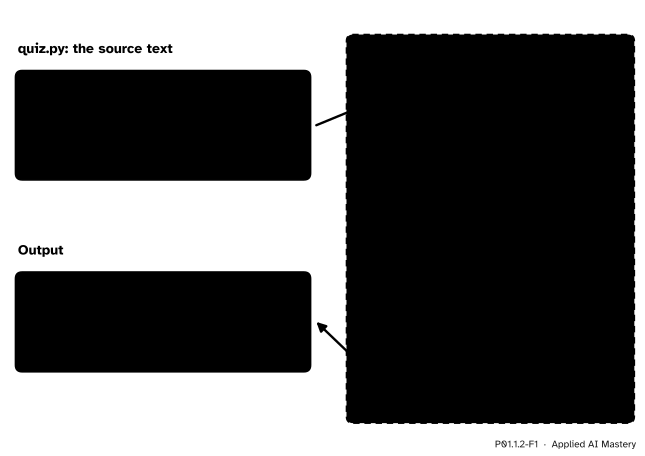
How Python runs a file. Stage 1 compiles the whole source text into bytecode; stage 2, the virtual machine, carries the bytecode out one step at a time. The bytecode shown is line 1 as Python 3.15 lists it.
The virtual machine is not a second machine in the box. It is part of the interpreter, a program made of machine instructions, which the real processor carries out.
The two stages explain the two broken files. A missing bracket breaks the rules of how Python is written, so the compile stage cannot finish. No bytecode is made, and nothing runs. A misspelt name is written correctly, so the file compiles. The mistake shows only when the virtual machine reaches that line and finds nothing called prnt.
Step 1. Compiled languages translate once, ahead of time. A laptop and a phone often have processors with different machine instructions, so machine code runs only on the family of processor it was made for. In a compiled language such as C, a program called a compiler translates the source text into machine code once and saves it as a file of its own, which then runs directly, and fast. The price: the file suits one family of processor, and every change must be compiled again.
Step 2. Python translates every time. In an interpreted language such as Python, you hand the source text itself to the interpreter, which translates and runs it in one go, every time. You can change a line and run it again at once, and the same text runs on any computer that has Python. The price is speed: a program generally runs more slowly than the same work in machine code.
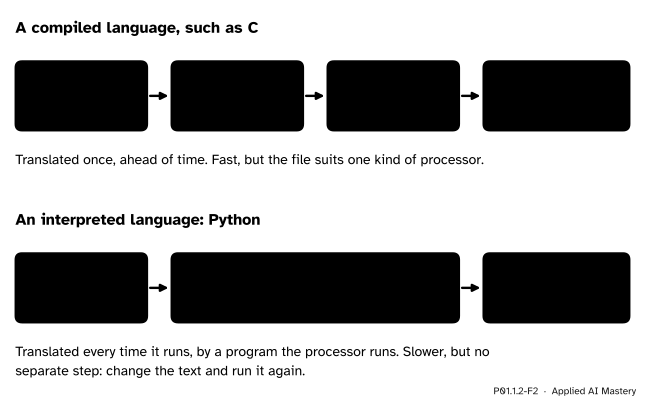
Two ways to get from source text to a running program. A compiled language makes a file of machine code once; Python translates the text each time it runs.
That is why the libraries machine learning uses for heavy arithmetic, such as NumPy (P02), do the hard work in compiled code and are called from Python: Python’s convenience, machine code’s speed.
Step 3. Bytecode sits in between. Python’s translation stops halfway, at bytecode. The Python glossary calls Python interpreted, “though the distinction can be blurry because of the presence of the bytecode compiler”.
Step 4. Two stages, two kinds of mistake. Compiling checks the syntax of the whole file: whether each line follows the rules of how Python is written, such as every opening bracket having a closing one. A line that breaks a rule is a syntax error, and the file cannot be translated. Every other problem waits for the run, such as a name that does not exist, like prnt: a NameError.
Python’s tool dis lists the bytecode of a program (modules such as dis come in P01.5). For line 1, Python 3.15 lists (with its wide spacing shortened):
1  LOAD_NAME   0 (print)
   PUSH_NULL
   LOAD_CONST  0 ('Study table')
   CALL        1
   POP_TOP
In words: look up the name print, prepare the call, take the text ‘Study table’, call print with that one value, and drop print’s own result. The other lines take the same five steps, and the listing of line 4 ends with one or two more, which end the program. One surprise: the steps for line 2 load the number 300 directly, because the compiler saw a sum of fixed numbers and worked it out in advance. The output is the same. Bytecode may change between versions, as the documentation of dis warns: Python 3.12 lists the first two steps of line 1 the other way round.
So in a four-line file with the mistake in line \(k\), a syntax error lets none of the lines run, whatever \(k\) is, and a misspelt name lets the \({k - 1}\) lines above it run.
Why can the compiler not catch a misspelt name? The compile stage checks only the shape of each line. prnt(9 * 2 + 33) has the same shape as print(9 * 2 + 33): a name, then brackets with a sum inside. Whether a name stands for anything can only be known when the line runs, because a program can make new names as it goes (P01.2.2). So that check waits for the run.
How far does each broken file get?
File A, quiz_a.py, is the program of the last lesson with the closing bracket of line 4 missing:
print("Study table")
print(55 + 65 + 80 + 40 + 60)
print(9 * 2 + 33)
print("Done"
Stage 1, compile. The interpreter reads all four lines. Lines 1 to 3 are fine. Line 4 opens a bracket and never closes it, which breaks a rule of Python’s syntax. Compiling stops with a syntax error.
Stage 2, run. It never starts: there is no bytecode to run. Not one line runs, not even line 1. The screen shows only the error report, copied here from Python 3.15 (the wording varies a little between versions, and on your computer the file name includes its folder):
  File "quiz_a.py", line 4
    print("Done"
         ^
SyntaxError: '(' was never closed
File B, quiz_b.py, has all its brackets, but line 3 misspells print:
print("Study table")
print(55 + 65 + 80 + 40 + 60)
prnt(9 * 2 + 33)
print("Done")
Stage 1, compile. Every line has the shape of a correct line of Python, a name followed by brackets, so the whole file compiles to bytecode.
Stage 2, run. Line 1 runs and prints Study table. Line 2 runs and prints 300. Line 3 asks for the name prnt, which Python does not have, so the program stops with a NameError. Line 4 never runs. The screen shows (Python 3.15 again):
Study table
300
Traceback (most recent call last):
  File "quiz_b.py", line 3, in <module>
    prnt(9 * 2 + 33)
    ^^^^
NameError: name 'prnt' is not defined. Did you mean: 'print'?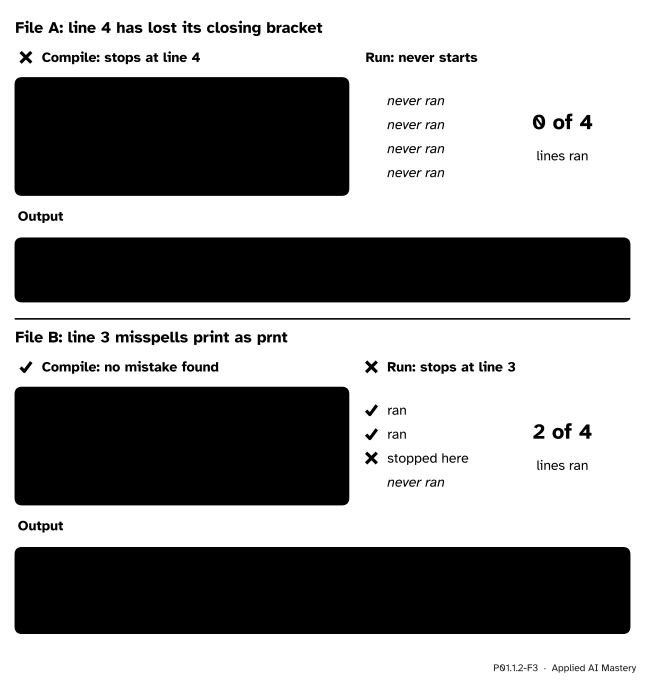
How far each broken file gets. A syntax error stops the compile stage, so 0 of 4 lines run; a misspelt name stops the run at line 3, after 2 of 4 lines have run.
A cell that stopped with an error would stop this page from being built, so the broken files above appear as plain text with their real messages. The good program runs:
print("Study table")
print(55 + 65 + 80 + 40 + 60)
print(9 * 2 + 33)
print("Done")
Study table
300
51
DonePython checks the spelling of names, not of text inside quotes. A string is shown exactly as written, mistakes and all, with no message:
print("Dnoe")DnoeTwo built-in functions do the interpreter’s two stages separately: compile turns source text into bytecode, and exec runs it.
exec(compile("print(9 * 2 + 33)", "quiz.py", "exec"))51Given print(9 * 2 + 33, compile stops with a syntax error. Given prnt(9 * 2 + 33), it compiles without complaint, and only exec stops, with a NameError.
Line-by-line stepper
Press Step: the first press compiles the whole file, and each press after that runs one line and adds its output. Move a line and watch the output reorder, or plant a missing bracket or a misspelt name in any line and see how far the program gets.
Predict first, then check: with a missing bracket in line 1, how many lines run? With a misspelt name in line 1, or in line 4?
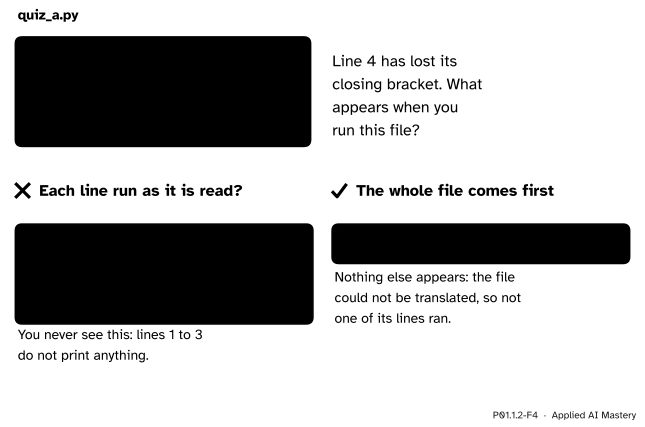
Wrong beside right. If Python ran each line as it read it, the first three lines would print before the error. It compiles the whole file first, so only the error appears.
“Python reads a line, runs it, then reads the next.”
Not when it runs a file. The whole file is compiled first, so a syntax error even in the last line stops everything, and the good lines above it never print. The belief comes from the interactive prompt of the next lesson, which does take one line at a time.
“The program ran without an error message, so it is right.”
Python checks the syntax, and while running it checks that names exist. It never checks that the program does what you meant: print("Dnoe"), or the swapped lines of P01.1.1, run without complaint. Only comparing the output with a result worked out by hand catches them. In machine learning this is the dangerous kind: a model trained on wrongly prepared data runs smoothly and answers worse (P01.8).
“Python is interpreted, so it never compiles.”
It compiles every file to bytecode before running it; it just does not make machine code. The two words say where a language’s usual translation stops, not whether there is one.
1. Why can a processor not run a line of Python directly?
A processor understands only its own machine instructions. A line of Python must first be translated, which is the interpreter’s job.
2. Name the two stages the interpreter goes through when it runs a file, and say what each does.
Compile: it reads the whole file, checks its syntax and translates it to bytecode. Run: its virtual machine carries out the bytecode one step at a time, from the top.
3. What is bytecode, and what carries it out?
The list of small steps that Python compiles a program into. The interpreter’s virtual machine carries it out.
4. A four-line file has a syntax error in line 4. How many of its lines run, and why?
None. The syntax error stops the compile stage, so no bytecode is made and the run stage never starts, even for the three good lines above it.
5. A four-line file misspells a name in line 3. How many lines run, and why did compiling not catch it?
Two, lines 1 and 2. The misspelt line has the right shape, so the file compiles; the unknown name is found only when line 3 runs, and the program stops there.
1. ★ For each line, say whether Python stops while compiling, stops while running, or does not stop at all, and what the line shows if it runs. (a) print("Done" (b) prnt("Done") (c) print("Dnoe") (d) print(9 * 2 + )
(a) It stops while compiling: the bracket is never closed, a syntax error.
(b) It compiles, then stops while running, with a NameError: Python has no name prnt.
(c) It does not stop. It shows Dnoe: Python does not check spelling inside quotes.
(d) It stops while compiling: a plus sign with nothing after it is a syntax error (Python 3.15 reports SyntaxError: invalid syntax).
2. ★★ A file has ten lines, print(1), print(2) and so on up to print(10). What appears on the screen if line 7 becomes prnt(7)? And if it becomes print(7, its bracket lost?
With prnt(7) the file compiles. Lines 1 to 6 run and print the numbers 1 to 6, one per line: \({7 - 1 = 6}\) lines. Line 7 stops the run with a NameError; lines 8 to 10 never run.
With print(7 the file does not compile, so nothing runs: the screen shows only the syntax error message, which names line 7.
3. ★★★ This five-line file has two mistakes. What appears when you run it, and which mistake does Python report? You fix that one and run the file again: what appears now?
print("Study table")
prnt(55 + 65 + 80 + 40 + 60)
print(9 * 2 + 33)
print("Done")
print("End"Compiling reads the whole file first and stops at the syntax error in line 5, a bracket never closed. Nothing runs, so the screen shows only that error. The misspelt name in line 2 is never reached, so Python says nothing about it.
With the bracket fixed, the file compiles. Line 1 prints Study table, then line 2 stops the run with a NameError. A syntax error is always reported before any mistake found while running, because it stops the earlier stage.
Python compiles the whole file to bytecode, then runs the bytecode one step at a time.
Compile, then run.
Sources. Each was opened and checked against this lesson on 12 November 2026.
Next. P01.1.3 Running Python yourself installs Python and runs it both ways: line by line at its prompt, and as a whole file.
This lesson unlocks
P01.1.3 Running Python yourself