a = [55, 65, 80]
b = a
b.append(40)
print(a, b, a is b)
[55, 65, 80, 40] [55, 65, 80, 40] TrueBefore this lesson
After this lesson you can
In review. The maths and code on this page are checked by automated tests on every change, but an independent reader has not signed it off yet. Spot a mistake or a confusing step? Tell us.
You keep the scores in a, write b = a to keep a backup, add a bonus through b, and find that a has changed too. Python did nothing wrong. What did b = a really do, and how do you make a backup that stays put? The same question decides whether a function that cleans a dataset quietly changes the original as well.
From the last lesson
1. What does score_of.get('Femi', 0) give?
0, the default, because 'Femi' is not a key. score_of['Femi'] would raise KeyError instead.
2. Why is 80 in score_of False?
in on a dictionary checks the keys, and 80 is a value. 80 in score_of.values() is True.
Lesson P01.2.2 drew assignment as an arrow from a name to an object: y = x points a second name at the object x names, and copies nothing. A list is an object like any other, so b = a does exactly the same. There is still one list, now with two names. Two names for one object are called aliases.
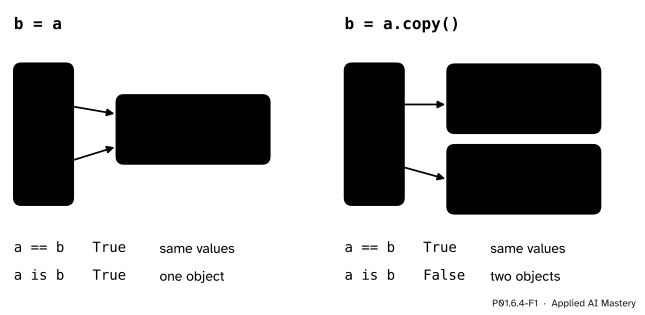
Left: b = a gives one list two names. Right: b = a.copy() makes a second list with the same values. == asks whether the values are equal; is asks whether there is only one object.
On the left, a change made through b is a change to the only list there is, so a shows it too. On the right there are two lists, and a change to one leaves the other alone. Both pictures pass the test a == b, because the values are equal. Only the left one passes a is b, which asks whether the two names point to one and the same object.
The sharing is only ever visible for objects that can change. An int or a string cannot be changed in place, so two names for one number never surprise you. Lists, dictionaries and sets can, and that is where this lesson lives.
Step 1. A change through one name. b.append(40) changes the list that b names, which is the list that a names:
a = [55, 65, 80]
b = a
b.append(40)
print(a, b, a is b)[55, 65, 80, 40] [55, 65, 80, 40] TrueStep 2. A copy. a.copy() makes a new list with the same items, and so do list(a) and the slice a[:]. Afterwards the two lists are equal but not identical: == is True and is is False. A change to one leaves the other as it was.
c = a.copy()
print(c == a, c is a)
c.append(60)
print(a, c)
True False
[55, 65, 80, 40] [55, 65, 80, 40, 60]Step 3. Equality against identity. x == y compares values, item by item for lists. x is y compares identities: each object has one, fixed for its lifetime, and id(x) shows it as a number. Use is only to ask “one object or two?”, as here, and never to compare numbers or strings: whether two equal numbers are one object or two is an accident of the interpreter.
Step 4. Passing a list to a function. A call binds each parameter to the object its argument names (P01.4.1). So inside the function the parameter is one more name for the caller’s list:
def add_bonus(values, bonus):
    for i in range(len(values)):
        values[i] = values[i] + bonus

scores = [55, 65, 80, 40, 60]
add_bonus(scores, 5)
print(scores)
[60, 70, 85, 45, 65]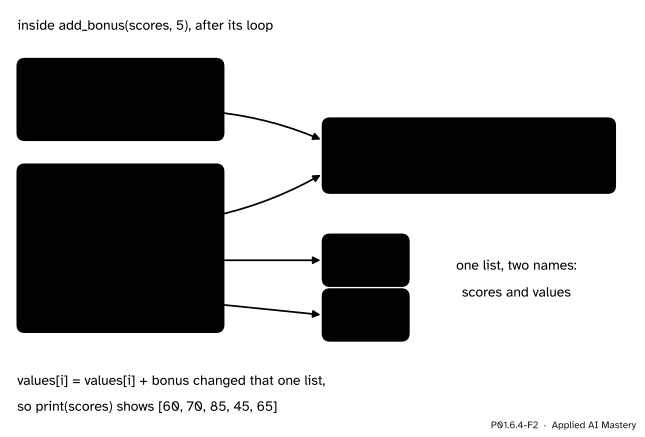
Inside the call the frame of add_bonus sits below the global frame, as in P01.4.3. Its name values points to the very list that scores names, so the loop changes the caller’s list.
Sometimes that is what you want. When it is not, build and return a new list, and leave the argument alone; the Code section does both.
Step 5. A default that is shared. A default value is worked out once, when def runs, not at every call. A default written as [] is therefore one list that every call shares:
def add_score(score, book=[]):
    book.append(score)
    return book

print(add_score(55))
print(add_score(65))
The second call prints [55, 65], not [65]: both calls appended to the same default list.
Step 6. Nesting. A container can hold containers. The study table as a list of dictionaries has one dictionary per row, and two steps of indexing reach one value: table[2] is Chen’s row and table[2]['score'] is 80. A copy of table made by table.copy() is a new outer list, but its slots point to the same five row dictionaries. The second pitfall below shows what that costs.
Two facts follow. When two names share one list, a is b is True and so is a == b, since both names show the same slots; but equal values never prove one object. And for a container of immutable objects, such as a list of numbers, a shallow copy is as safe as a deep one, because the shared items can never change.
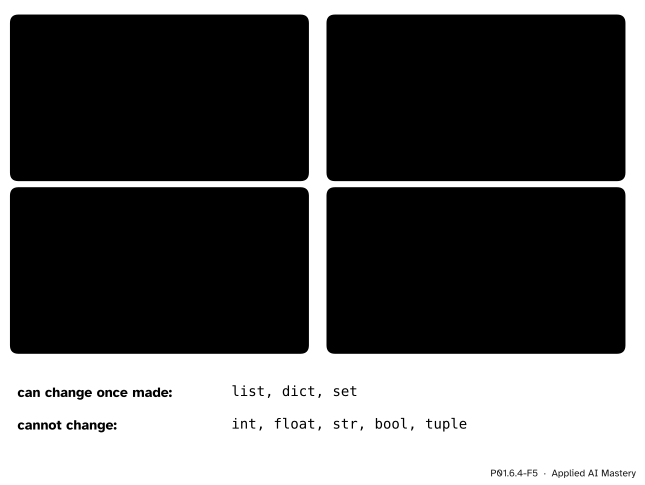
The four containers of this module side by side, and which types can change once made.
A tuple cannot change which objects it holds, but an object it holds may change. After t = ([55, 65], 'Ama'), the line t[0].append(80) works and t becomes ([55, 65, 80], 'Ama'), while t[0] = [1] is still a TypeError. The Python Language Reference puts it exactly: the value of an immutable container can change when a mutable object inside it changes, yet the container is still called immutable, because the collection of objects it holds cannot change. Such a tuple is also not hashable, so it cannot be a dictionary key.
Three names, two lists. Trace this program, drawing the memory diagram after lines 3 and 5.
a = [55, 65, 80]
b = a
c = a.copy()
print(a == b, a is b, a == c, a is c)
b.append(40)
print(a, c)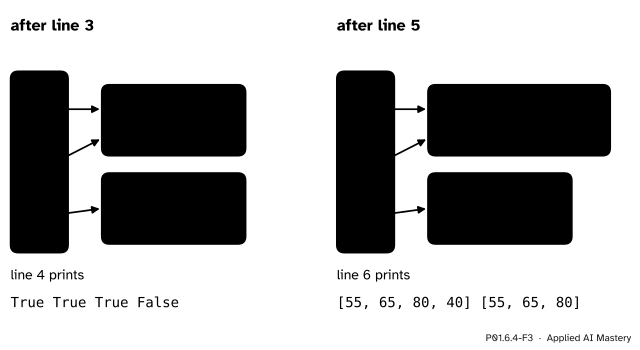
The worked example as memory diagrams after line 3 and after line 5. The change made through b lands in the list that a names; c names a separate list.
Line 1 makes a list and points a at it. Line 2 points b at the same list; nothing is copied. Line 3 makes a second list with the same three values and points c at it.
Line 4 prints True True True False. a == b and a is b are both True: one list. a == c is True because the values are equal, but a is c is False: two lists.
Line 5 appends 40 to the list that b names. That is the list a names too, and nothing happens to the list of c.
Line 6 prints [55, 65, 80, 40] [55, 65, 80]. Now a == c would be False as well.
The worked example, run:
a = [55, 65, 80]
b = a
c = a.copy()
print(a == b, a is b, a == c, a is c)
b.append(40)
print(a, c)
True True True False
[55, 65, 80, 40] [55, 65, 80]When a function should not change its argument, it builds a new list and returns it. The caller then decides which name gets the result:
def with_bonus(values, bonus):
    result = []
    for v in values:
        result.append(v + bonus)
    return result

scores = [55, 65, 80, 40, 60]
curved = with_bonus(scores, 5)
print(scores, curved, curved is scores)
[55, 65, 80, 40, 60] [60, 70, 85, 45, 65] FalseThe shared default, and the usual repair: default to None, the single “nothing” object, and make a fresh list inside the call.
def add_score(score, book=[]):
    book.append(score)
    return book

def add_score_safely(score, book=None):
    if book is None:
        book = []
    book.append(score)
    return book

print(add_score(55), add_score(65))
print(add_score_safely(55), add_score_safely(65))
[55, 65] [55, 65]
[55] [65]The first line prints [55, 65] [55, 65]: both calls returned the one default list, and print shows it after both appends. The nested study table, built with zip, which walks any number of lists in step:
import copy

names = ['Ama', 'Ben', 'Chen', 'Dina', 'Eli']
hours = [2, 4, 5, 1, 3]
table = []
for name, h, s in zip(names, hours, scores):
    table.append({'name': name, 'hours': h, 'score': s})
print(table[2], table[2]['score'])

shallow = table.copy()
deep = copy.deepcopy(table)
shallow[0]['score'] = 99
print(table[0]['score'], deep[0]['score'])
print(shallow is table, shallow[0] is table[0], deep[0] is table[0])
{'name': 'Chen', 'hours': 5, 'score': 80} 80
99 55
False True FalseThe shallow copy is a new outer list, but its row 0 is table’s row 0, so the change shows through table. The deep copy made its own rows and still says 55.
Box-diagram workbench
Change the list with the buttons, then make b with b = a and change the list again through either name: whose slots move? Then press b = a.copy() and repeat. The read-out gives a == b and a is b after every step.
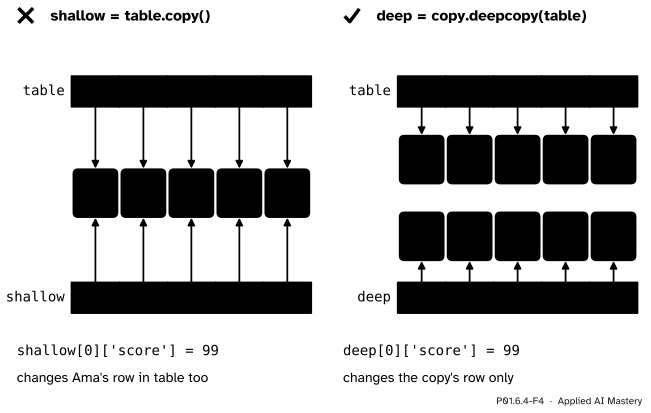
Wrong beside right. Left: a shallow copy is a new outer list whose slots reach the same rows, so a change to a row shows through both. Right: a deep copy has rows of its own.
“b = a makes a backup of a.”
It makes a second name for the same list, so the “backup” changes whenever the list does. Make a copy: b = a.copy(), list(a) or a[:].
“table.copy() copies everything inside it.”
It copies one level only. The new outer list holds arrows to the same row dictionaries, so changing a row through the copy changes the table, as on the left of the figure. When the items can change, use copy.deepcopy. In machine learning this is how a “copy” of a dataset made before cleaning ends up cleaned as well.
“a == b, so a and b are the same list.”
== only says the values are equal. Two separate lists can be equal now and differ after the next append. Whether they are one list is the question a is b answers.
“A default of [] gives every call a fresh empty list.”
The default is made once, when def runs, and every call that leaves out the argument shares it. Write book=None and make the list inside the function, as in the Code section.
“I can remove items from a list while I loop over it.”
The loop keeps its own count of positions, and every removal moves the later items one place to the left, so the loop skips an item. With values = [40, 45, 70], removing every item below 50 inside for v in values: leaves [45, 70]. Loop over a copy instead, for v in values.copy():, or build a new list of the items to keep.
1. After a = [1, 2], b = a and b.append(3), what is a?
[1, 2, 3]. a and b are two names for one list.
2. After a = [1, 2] and c = a.copy(), what are a == c and a is c?
a == c is True (equal values) and a is c is False (two lists).
3. Which of list, tuple, dict, set and str can change once made?
list, dict and set. A tuple and a str cannot.
4. Why does a function def add(x, book=[]) keep items from earlier calls?
The default list is made once, when def runs, and every call that leaves out book appends to that same list.
5. What is the difference between table.copy() and copy.deepcopy(table) for a list of dictionaries?
table.copy() is a new outer list whose slots point to the same row dictionaries. deepcopy also copies every row, so nothing is shared.
1. ★ Predict the output, then draw the memory diagram.
a = [55, 65]
b = a
c = a[:]
a.append(80)
print(a, b, c)
print(a == b, a is b, a == c, a is c)b is a second name for the list of a, and c is a new list made by the slice. The append changes the one list that a and b share. The first print shows [55, 65, 80] [55, 65, 80] [55, 65] and the second shows True True False False.
2. ★★ This function is meant to return the scores of at least 50 and leave its argument unchanged. Find both bugs and repair it.
def passes(values):
    for v in values:
        if v < 50:
            values.remove(v)
return valuesIt changes the caller’s list, because values is a second name for it, and it removes items while looping over the same list, which skips items: passes([40, 45, 70]) returns [45, 70]. Build a new list instead:
def passes(values):
    kept = []
    for v in values:
        if v >= 50:
            kept.append(v)
    return kept
Now passes([40, 45, 70]) is [70], passes([55, 65, 80, 40, 60]) is [55, 65, 80, 60], and the argument is unchanged.
3. ★★★ Predict rows and shallow at the end, then repeat with copy.deepcopy(rows) in place of rows.copy().
rows = [[55, 65], [80, 40]]
shallow = rows.copy()
shallow[0][0] = 99
shallow.append([60])shallow is a new outer list whose two slots point to the same inner lists as rows. So shallow[0][0] = 99 changes the inner list both share, while append changes only the new outer list. At the end rows is [[99, 65], [80, 40]] and shallow is [[99, 65], [80, 40], [60]].
With copy.deepcopy(rows) the inner lists are copied too, so the change to [0][0] lands in the copy only: rows stays [[55, 65], [80, 40]] and the copy is [[99, 65], [80, 40], [60]].
Names point to objects; only a copy makes a second object.
One list with two names, or two lists.
b = a shares; a.copy(), list(a) and a[:] copy one level; copy.deepcopy(a) copies all the way down.a == b asks about values; a is b asks about one object.list, dict, set. Cannot: int, float, str, bool, tuple.Sources. Each was opened and checked against this lesson on 12 November 2026.
is compares identities; mutable and immutable objects, with lists and dictionaries mutable and numbers, strings and tuples immutable; and the note on an immutable container that holds a mutable object. After c = []; d = [] the two names are guaranteed to refer to two different lists.f(a, L=[]) and the repair L=None.copy: Shallow and deep copy operations: assignment creates bindings, not copies; a shallow copy inserts references to the objects of the original and a deep copy inserts copies of them, recursively.is operator), 9.10 (aliasing) and 9.11 (list arguments: a function given a list gets a reference to it). Free under CC BY-NC-SA 4.0.L[:] copies the top level only), slides 13 to 18 (removing items while looping over the same list, and looping over a clone), slide 26 (= makes an alias, not a clone), slide 28 (passing a list to a function makes an alias) and slides 31 to 39 (shallow and deep copies with copy.copy and copy.deepcopy).Next. P01.7, Strings and files, listed on the course page, treats text as a sequence that indexes and slices like a list but, like a tuple, can never change.
This lesson unlocks