When Python stops on an error it prints a traceback: the call stack at the moment of failure, oldest call first. Learn the three kinds of mistake, read a traceback from the bottom up, and meet the nine exceptions you will see most.
Tell apart the three kinds of mistake: a syntax error, an exception raised while the program runs, and a wrong answer with no message.
Read a traceback from the bottom up: the exception’s type and message first, then the frames from the newest call back to the oldest.
Match each entry of a traceback to a frame of the call stack, and find both the line that failed and the call that led to it.
Name nine common exceptions from their messages and say what usually causes each.
In review. The maths and code on this page are checked by automated tests on every change, but an independent reader has not signed it off yet. Spot a mistake or a confusing step? Tell us.
The question
Your program stops, and the screen fills with lines that begin Traceback (most recent call last). Most beginners read the first line, find nothing useful in it, and go back to staring at their code. Everything you need is in those lines, in a fixed order. Which line do you read first, and how do you get from it to the mistake?
Intuition
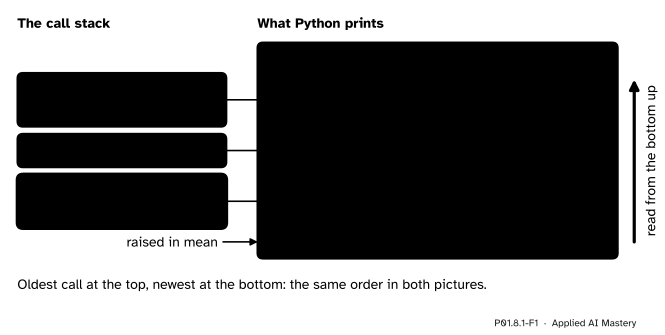
In P01.4.3 you drew the call stack: one frame for each call that has started and not yet finished, the global frame at the top and the newest call at the bottom. When a line cannot be carried out, for example because it divides by zero, Python stops the program and prints that stack, frame by frame. That printout is a traceback.
P01.8.1-F1
A traceback is the call stack written out at the moment of the error. Each entry names a frame and the line it was running, oldest first. The last line says what went wrong, so you read from the bottom up.
Three things in the picture are the whole idea.
The entries are the frames. Each File line names one frame and the line that frame was running. They come in the order of the stack: the global frame first, the newest call last. That is what “most recent call last” means.
The last line is the error. It names the kind of error and gives a message.
So read from the bottom up. First what went wrong, then where it happened, then the calls that led there.
Build it up
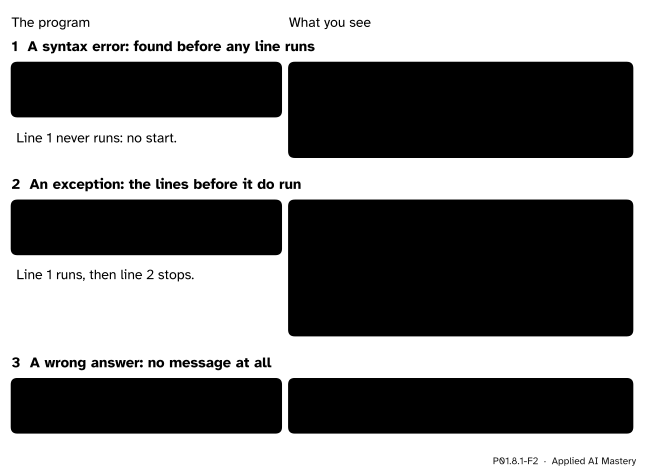
Step 1. Three kinds of mistake. Before reading a traceback, know when you will get one. A program can go wrong in three ways, and only two of them print anything.
P01.8.1-F2
The three kinds of mistake, each as a program and what it prints. Only the third says nothing at all, and it is the most dangerous.
A syntax error is a mistake in the writing itself, such as a bracket that is never closed. Python finds it while reading the file, before it runs anything (P01.1.2), so not even the first line runs.
An exception is an error found while the program runs: a line that is fine to read but cannot be carried out with the values it meets, such as 300 / 0. The lines before it have already run, so start is printed first.
A wrong answer gives no message at all. Python divided 65 by 2 before adding, as the rules of P01.2.3 say, so the program printed 87.5 and stopped normally. Only a reader who knows that \({(55 + 65) / 2} = 60.0\) can tell.
Step 2. The last line. The last line of a traceback has two parts: the type of the exception, here ZeroDivisionError, then a colon and a message, division by zero. The type is the name of the kind of error. The message gives the details of this one.
Step 3. The entries above it. Each entry is two lines, sometimes three. The first says File "...", line N, in name: the file, the line number and the frame. The second shows that line of code. A third line of ^ and ~ marks may point at the part of the line that was running. Python has printed these marks since version 3.11.
Step 4. Read from the bottom up. The entry just above the last line is the frame where the error happened. The entry above that is the frame that called it, and so on up to the global frame. In a long traceback the top entries are often lines you trust; the bottom few are where to look.
The formal statement
NoteDefinitions: exception and traceback
An exception is an error found while a program runs. Python raises it at the line that failed. The exception is a value with a type, such as ValueError, and a message.
If nothing handles the exception (the next lesson shows how to), the program stops and Python prints a traceback: one entry for each frame on the call stack, oldest first, and then the type and message of the exception.
Every traceback has this shape. The entry in the middle is repeated for each frame, oldest first.
Traceback (most recent call last): File "<file>", line <number>, in <frame> <the line of code> ...<ExceptionType>: <message>
A syntax error has no Traceback heading and only one place to show, because no frame was ever started. It still ends the same way, with the type and a message.
The reading recipe.
Read the last line. Its type names the kind of error, and its message gives the details.
Read the entry just above it: the file, the line and the frame where the error happened.
Read upwards, one entry at a time: each is the call that led to the one below it.
Stop at the first entry, reading upwards, that is in your own code and holds a value you did not expect. That is usually where to fix.
A field guide to nine exceptions. The examples run on the study table: scores = [55, 65, 80, 40, 60] and row = {'name': 'Ama', 'score': 55}.
NameError: a name that was never bound, very often a typo. print(scroes) gives name 'scroes' is not defined. Did you mean: 'scores'?
TypeError: an operation applied to a value of the wrong type. '55' + 65 gives can only concatenate str (not "int") to str. Data read from a file arrives as text.
ValueError: the right type, but a value that cannot be used. int('n/a') gives invalid literal for int() with base 10: 'n/a'.
IndexError: a position that does not exist. scores[5] gives list index out of range, because the positions of five items run from 0 to 4.
KeyError: a key that is not in the dictionary. row['grade'] gives 'grade', the missing key itself.
ZeroDivisionError: dividing by zero. 300 / 0 gives division by zero.
AttributeError: a name after a dot that the value does not have. scores.mean() gives 'list' object has no attribute 'mean'. A list has no mean method, though a NumPy array does.
FileNotFoundError: a path that leads to no file. open('stdy.csv') gives [Errno 2] No such file or directory: 'stdy.csv'.
ModuleNotFoundError, met in P01.5: import stats_tool gives No module named 'stats_tool'.
The messages were copied from Python 3.15. The types never change, but the wording of messages is improved now and then, so yours may differ slightly. Python 3.15 also prints the marks ^ and ~ under slightly different parts of a line than 3.12 does.
Worked example
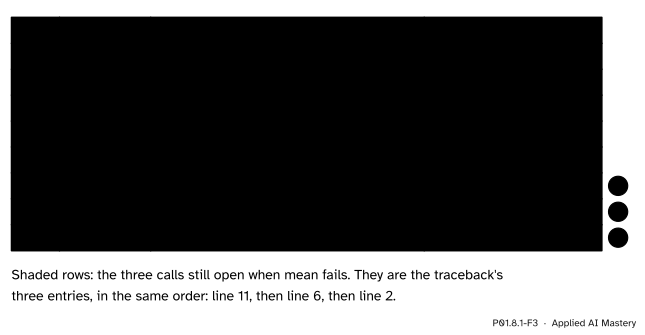
This small program asks for the mean of no scores at all, two calls deep.
mean 60.0Traceback (most recent call last): File "scores.py", line 11, in <module> report([]) ~~~~~~^^^^ File "scores.py", line 6, in report m = mean(scores) File "scores.py", line 2, in mean return sum(values) / len(values) ~~~~~~~~~~~~^~~~~~~~~~~~~ZeroDivisionError: division by zero
(The traceback was copied from Python 3.15. The folder in front of scores.py has been cut.)
Follow the program line by line first.
P01.8.1-F3
The trace of scores.py. The first call to report finishes and leaves no trace. The three shaded calls are still open when mean fails, and they are exactly the traceback’s three entries.
The first call, report([55, 65, 80, 40, 60]), runs to the end and prints mean 60.0. Its frames are pushed and popped, so they are gone before the error happens. The second call pushes the frames again, now with scores bound to an empty list. Inside mean, sum([]) is 0 and len([]) is 0, so line 2 asks for 0 / 0.
Now read the traceback with the recipe.
The last line:ZeroDivisionError: division by zero. Something was divided by zero.
The entry above it: line 2, in mean: return sum(values) / len(values). The divisor is len(values), so values must be empty.
Upwards: line 6, in report, passed scores on to mean. So scores was empty too.
The first entry: line 11, in <module>, called report([]). That is where the empty list was written.
The error happened in mean, but the empty list came from line 11. Either line 11 is the bug, or mean should refuse an empty list with a clearer message; the next lesson shows how.
Code
A traceback is plain text, so you can read one with the string methods of P01.7.2. Here is the recipe written from scratch. line.startswith('File ') is True when the line begins with those characters.
TRACEBACK ='''Traceback (most recent call last): File "scores.py", line 11, in <module> report([]) ~~~~~~^^^^ File "scores.py", line 6, in report m = mean(scores) File "scores.py", line 2, in mean return sum(values) / len(values) ~~~~~~~~~~~~^~~~~~~~~~~~~ZeroDivisionError: division by zero'''def read_traceback(text):"""Return the last line of a traceback, and its frames newest first.""" lines = text.strip().splitlines() frames = []for line in lines: line = line.strip()if line.startswith('File '): parts = line.split(', ') # 'File "scores.py"', 'line 6', 'in report' number =int(parts[1].split()[1]) name = parts[2].split()[1] frames.append((number, name)) frames.reverse() # newest first: the order to read them inreturn lines[-1], frameslast, frames = read_traceback(TRACEBACK)print('what went wrong:', last)for number, name in frames:print(' line', number, 'in', name)
what went wrong: ZeroDivisionError: division by zero
  line 2 in mean
  line 6 in report
  line 11 in <module>
The last line was built from a value. An exception is an object like any other: it has a type, and it holds its message. You can make one without raising it, and the library module traceback writes its last line for you.
import tracebackerror =ZeroDivisionError('division by zero') # made, but not raisedprint(type(error).__name__)print(error)print(traceback.format_exception_only(error))
ZeroDivisionError
division by zero
['ZeroDivisionError: division by zero\n']
Explore
P01.8-X1
Traceback explorer
Choose an input for a three-function program and press Step to run it one line at a time. Watch the call stack grow; when a line fails, the traceback appears. Press one of its entries to light up the frame and the line it reports. Then turn on the try switch, a preview of the next lesson, and see which frames are thrown away.
Pitfalls
P01.8.1-F4
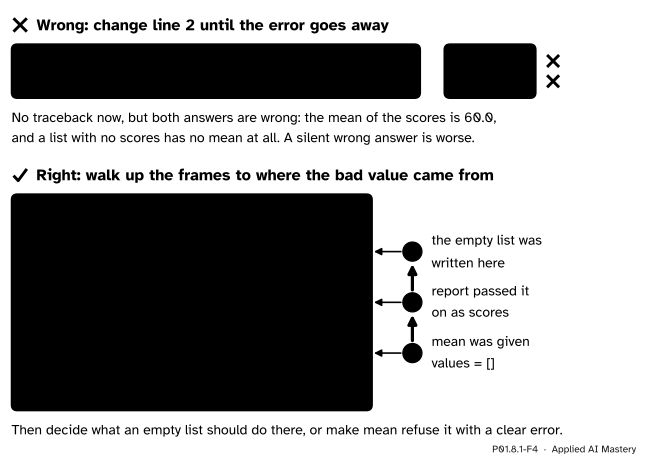
Wrong beside right. Changing the line that failed until the error goes away gives two wrong answers and no message. Walking up the frames finds where the bad value came from.
“The first lines of the traceback show where it went wrong.”
The first entry is the oldest call, usually a line you trust. The error is at the bottom: read the last line first, then the entry just above it. “Most recent call last” says exactly this.
“I fix the line the traceback points to.”
That line is where the error was noticed, not always where the mistake was made. In scores.py, dividing by len(values) + 1 makes the traceback go away and the mean of the scores 50.0 instead of 60.0. Walk up the frames to where the bad value came from.
“The last entry is inside a library, so the library is broken.”
statistics.mean([]) stops with an entry inside the file statistics.py, where the error was raised. The library is right to complain: there is no mean of nothing. Walk up to the last entry in your own code. When a NumPy or scikit-learn call fails ten frames deep, the bad value almost always came from your own call above them.
“No traceback, so no bug.”
The third kind of mistake prints nothing. A model can train for hours on a column read as the wrong numbers and report a plausible loss. Only a check against a value worked out by hand will catch it, which is what tests are for (P01.8.4).
Check yourself
Recall
1. What are the three kinds of mistake, and which of them prints nothing?
Show answer
A syntax error (found before any line runs), an exception (raised while the program runs) and a wrong answer. The wrong answer prints no message at all.
2. Which line of a traceback should you read first, and what does it tell you?
Show answer
The last line. It gives the type of the exception, such as ZeroDivisionError, and a message with the details.
3. What does “most recent call last” mean?
Show answer
The entries are listed oldest first, so the newest call, the frame where the error happened, is the last entry, just above the error line.
4. How does a traceback relate to the call stack?
Show answer
It is the call stack at the moment of the error: one entry for each frame that was still open, in the same order, the global frame first.
5. Which exception do you get from int('n/a'), and which from scores[5] when scores holds five items?
Show answer
ValueError from int('n/a'): a string, but not one that spells a whole number. IndexError from scores[5]: the positions run from 0 to 4.
Exercises
1.★ Name the exception that each line raises, and say why. (a) print(totl) when only total is bound; (b) row['hours'] when row = {'name': 'Ama'}; (c) len(5); (d) float('sixty').
Show solution
(a) NameError: no name totl was ever bound; it is a typo for total.
(b) KeyError: 'hours': the dictionary has no key 'hours'.
(c) TypeError: a whole number has no length, so len cannot be applied to it.
(d) ValueError: float accepts a string, but not one that spells a number.
2.★★ A program prints the traceback below. Which line failed, in which function, and with what value of parts? Which line of the program should you look at next?
Traceback (most recent call last): File "load.py", line 18, in <module> rows = load_rows(text) File "load.py", line 12, in load_rows rows.append(parse_line(line)) ~~~~~~~~~~^^^^^^ File "load.py", line 4, in parse_line row['hours'] = int(parts[1]) ~~~^^^^^^^^^^ValueError: invalid literal for int() with base 10: 'four'
Show solution
Read from the bottom. The error is a ValueError: int was given the text 'four'. It happened at line 4, in parse_line, in int(parts[1]), so parts[1] was 'four'. The hours of one row were written as a word. Next, read upwards: line 12 of load_rows passed in the line, and line 18 called load_rows with the text of the file. So the place to look is the data file itself, for the line whose second field is four.
3.★★★ In scores.py, change line 11 to report(['55']) and predict the traceback: its entries, in order, and its last line. Which exception do you expect, and from which line?
Show solution
The frames are the same as before: line 11 in <module>, line 6 in report, line 2 in mean. Inside mean, sum(['55']) starts from 0 and tries 0 + '55', which mixes a number with a string. So the last line is a TypeError: unsupported operand type(s) for +: 'int' and 'str'. The entries are
File "scores.py", line 11, in <module> File "scores.py", line 6, in report File "scores.py", line 2, in meanTypeError: unsupported operand type(s) for +: 'int' and 'str'
The value '55' is text, as a value read from a file is; it needs int before it can be added.
Summary card
A traceback is the call stack at the moment of the error. Read it from the bottom up.
P01.8.1-F1
Entries are frames, oldest first.
Three kinds of mistake: a syntax error (nothing runs), an exception (a traceback), a wrong answer (no message at all).
The last line: the type of the exception, a colon, and a message.
Each entry:File "...", line N, in frame, then that line of code.
The recipe: the last line, then the entry above it, then upwards to your own code.
Sources and next steps
Sources. Each was opened and checked against this lesson on 12 November 2026.
Python Software Foundation, The Python Tutorial, chapter 8: Errors and Exceptions. Section 8.1 shows that the parser marks where it found a syntax error, which “is not always the place that needs to be fixed”; section 8.2 calls errors found during execution exceptions, says “the last line of the error message indicates what happened” and that the part before it shows the context “in the form of a stack traceback”.
Python Software Foundation, Built-in Exceptions. The one-line description of each exception in the field guide, such as “Raised when a sequence subscript is out of range” for IndexError, and the hierarchy that puts ModuleNotFoundError under ImportError.
Allen B. Downey, Think Python, 3rd edition, chapter 3. Section 3.6 draws the main frame at the top of a stack diagram; section 3.7 says the order of the functions in a traceback is the order of the frames in the stack diagram, with the running function at the bottom.