for ch in 'Ama':
print(ch)
for score in [55, 65, 80, 40, 60]:
print(score)
print('after the loop score is', score)A
m
a
55
65
80
40
60
after the loop score is 60Before this lesson
After this lesson you can
In review. The maths and code on this page are checked by automated tests on every change, but an independent reader has not signed it off yet. Spot a mistake or a confusing step? Tell us.
The halving loop of the last lesson needed three things set up by hand: a start, a test and an update. Forget the update and it never ends. Yet most loops do something simpler: they visit every item of a collection once, in order, such as each of the five scores. Is there a loop that does the bookkeeping for you?
From the last lesson
1. Name the start, the test and the update of the halving loop.
Start: n = 13 (and digits = ''). Test: n > 0. Update: n = n // 2.
2. How many times is the halving loop’s test made when n starts at 13?
5 times: before each of the 4 passes, and once more when it is False.
A for loop names a sequence of items and runs its block once for each of them. Before each pass it binds the loop’s name to the next item, exactly as an assignment would. After the last item there is nothing left to bind, and the loop ends. No test to write, no update to forget.
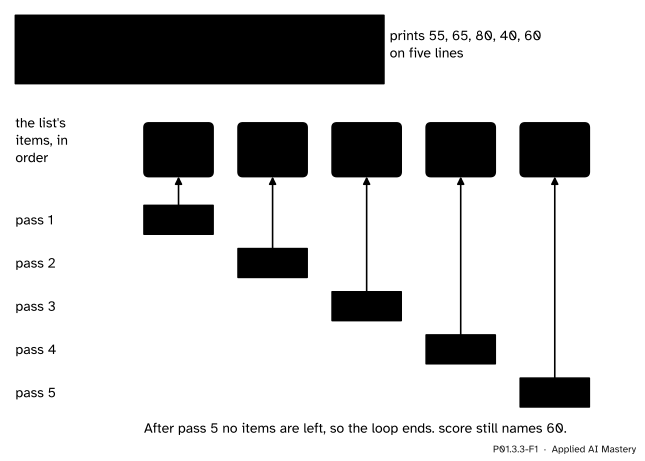
A for loop binds its name to each item in turn, one item per pass. The name is drawn again in every pass with one arrow, because at any moment a name is bound to one object.
Each pass of this loop is the same two steps: bind score to the next item, then run the body, here a single print. The items are visited in the order they appear, and every one exactly once.
Step 1. The characters of a string. A string is a sequence of characters, so a for loop can walk through it. for ch in 'Ama': binds ch to 'A', then 'm', then 'a': three passes.
Step 2. The numbers of a range. range(5) gives the numbers 0, 1, 2, 3 and 4: five numbers, starting at 0 and stopping before 5. range(2, 6) starts at 2 instead and gives 2, 3, 4, 5. A third number is the step: range(2, 10, 3) gives 2, 5, 8, and a negative step counts down, so range(5, 0, -1) gives 5, 4, 3, 2, 1. The number written as the stop is never given.
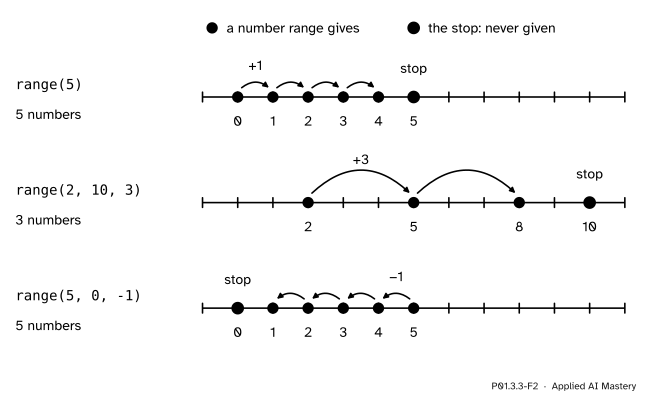
What range gives: it starts at the start, moves by the step, and stops before it reaches the stop.
Step 3. A list, a first look. Square brackets with items between commas make a list: [55, 65, 80, 40, 60] is the course’s five scores as one value. For now a list is simply something to loop over; P01.6.1 shows how to reach its items one at a time.
Step 4. The same loop, written with while. A for loop over a range is a while loop whose start, test and update are done for you.
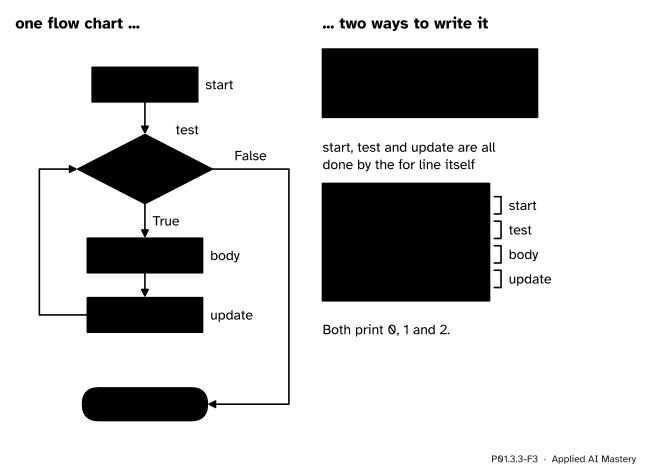
One flow chart, two ways to write it. In the for loop the start, the test and the update are all hidden in the line for i in range(3):.
How many numbers? With a step of 1, range(start, stop) gives start, start + 1, and so on up to \({\text{stop} - 1}\). Counting them, with the first and the last both included:
\[ \begin{aligned} &(\text{stop} - 1) - \text{start} + 1 \\ &\quad = \text{stop} - \text{start}. \end{aligned} \]
So range(2, 6) gives \({6 - 2 = 4}\) numbers, and range(n) gives exactly \(n\) numbers, 0 to \({n - 1}\). That is why the stop is left out: a range of \(n\) numbers starts at 0 and ends at \({n - 1}\), which are the positions of \(n\) items counted from 0, and range(0, 5) followed by range(5, 10) covers 0 to 9 with no number missed and none repeated.
Loops inside loops. The body of a loop can hold another loop. If the outer loop makes \(p\) passes and the inner loop makes \(q\) passes each time it runs, the inner body runs \({p \times q}\) times. The inner loop starts again from its first item on every pass of the outer loop.
For a step \({s > 0}\) and \({\text{stop} > \text{start}}\), the numbers are \({\text{start} + s \times i}\) for \({i = 0, 1, 2, \ldots}\) while they stay below the stop. Write \({d = \text{stop} - \text{start}}\). The count is the number of whole numbers \(i\) with \({s \times i < d}\), which is \(d\) divided by \(s\) rounded up. In Python, (d + s - 1) // s rounds up. For range(2, 10, 3), \({d = 8}\), and (8 + 3 - 1) // 3 is 10 // 3, which is 3: the three numbers 2, 5 and 8. With \({s = 1}\) the formula gives back \({d = \text{stop} - \text{start}}\).
Trace a loop inside a loop over a grid of 2 rows and 3 columns.
for row in range(2):
    for col in range(3):
        print(row, col)
Outer pass 1: row is bound to 0. The inner loop now runs in full: col is 0, 1 and then 2, and each inner pass prints a line: 0 0, 0 1, 0 2. The inner loop has run out of numbers, so control returns to the outer loop.
Outer pass 2: row is bound to 1. The inner loop starts again from the beginning, so col is 0 again, then 1, then 2, printing 1 0, 1 1, 1 2. Now range(2) has no numbers left, and the outer loop ends.
That is \({2 \times 3 = 6}\) lines in all, visiting the grid row by row and, along each row, column by column.
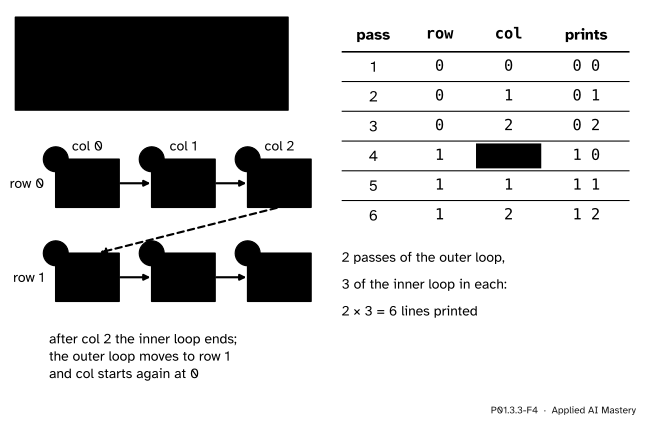
The nested loop as a trace. The inner loop runs in full on every pass of the outer loop; the highlight marks col starting again at 0.
This is how a program visits the entries of a table, or the pixels of a grey image stored as a grid of numbers (P01.1.4): one loop over the rows, and inside it one loop over the columns.
A for loop over the characters of a string, then over a list.
for ch in 'Ama':
    print(ch)
for score in [55, 65, 80, 40, 60]:
    print(score)
print('after the loop score is', score)
A
m
a
55
65
80
40
60
after the loop score is 60To see every number a range gives at once, hand it to list, which collects them into a list that print can show.
print(list(range(5)))
print(list(range(2, 6)))
print(list(range(2, 10, 3)))
print(list(range(5, 0, -1)))
[0, 1, 2, 3, 4]
[2, 3, 4, 5]
[2, 5, 8]
[5, 4, 3, 2, 1]The for loop and its while twin print the same numbers. One small difference shows after the loops: the for loop leaves i on the last number it gave, while the while loop goes one step further, to the value that made its test False.
for i in range(3):
    print(i)
print('after the for loop i is', i)

i = 0
while i < 3:
    print(i)
    i = i + 1
print('after the while loop i is', i)
0
1
2
after the for loop i is 2
0
1
2
after the while loop i is 3Finally the worked example, the loop inside a loop.
for row in range(2):
    for col in range(3):
        print(row, col)
0 0
0 1
0 2
1 0
1 1
1 2Flow-chart tracer
Choose a program: the if, elif, else that bands a score, the while loop that halves a number, or this lesson’s for loop that totals the scores. Set its input with the slider and press Step: the line of code and its box in the flow chart light up together, the arrow just taken turns green, and the names, the output and the count of passes update. Try n = 0 and a list of 0 scores, two loops whose body never runs.
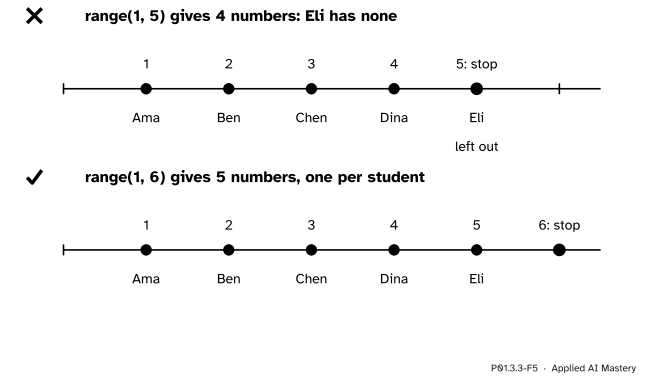
Wrong beside right. To number five students from 1, the stop must be 6, one past the last number wanted.
“range(1, 5) counts from 1 to 5.”
It counts from 1 to 4. The stop is never given, so range(1, 5) holds \({5 - 1 = 4}\) numbers and the fifth student is left out. To get the numbers 1 to 5, write range(1, 6): the stop is one past the last number you want.
“for i in 5 repeats five times.”
A for loop needs a sequence to take items from, and a single number is not one:
for i in 5:
    print(i)
Traceback (most recent call last):
File "loop.py", line 1, in <module>
for i in 5:
^
TypeError: 'int' object is not iterableThis message was copied from a run with Python 3.15; the wording and the ^ markers vary a little between versions. Write for i in range(5): instead.
“Changing the loop’s name inside the body changes the next pass.”
In a for loop it does not. At the start of every pass the for line binds the name to the next item, whatever the body did to it:
for i in range(3):
    print(i)
    i = 10
0
1
2This prints 0, 1 and 2 all the same. In a while loop, by contrast, the body’s update is the only thing that moves the loop on.
“The inner loop carries on where it stopped.”
It starts again. Each pass of the outer loop runs the whole inner loop from its first item, which is why the grid above shows col back at 0 for row 1.
1. Which numbers does range(4) give?
0, 1, 2 and 3: four numbers, starting at 0 and stopping before 4.
2. Which numbers does range(2, 10, 3) give?
2, 5 and 8. The next one, 11, is not below the stop 10.
3. In for score in [55, 65, 80, 40, 60]:, what is score bound to in the third pass, and after the loop?
80 in the third pass. After the loop it is still bound to the last item, 60.
4. A loop over range(2) holds a loop over range(3). How many times does the inner body run?
\({2 \times 3 = 6}\) times: the inner loop runs in full, 3 passes, on each of the 2 outer passes.
5. Where are the start, the test and the update of for i in range(3):?
All in the for line itself: the range starts at 0, the loop ends when the range has no numbers left, and each pass binds i to the next number.
1. ★ Write out the numbers that range(3), range(1, 4), range(0, 10, 4) and range(3, 0, -1) give.
range(3): 0, 1, 2. range(1, 4): 1, 2, 3. range(0, 10, 4): 0, 4, 8, since 12 is not below 10. range(3, 0, -1): 3, 2, 1, since the stop 0 is never given.
2. ★★ Rewrite for i in range(2, 10, 3): print(i) as a while loop. What is i after each version has finished?
i = 2
while i < 10:
    print(i)
    i = i + 3
Both print 2, 5 and 8. After the for loop i is 8, the last number the range gave. After the while loop i is 11: the update ran once more after printing 8, and \({11 < 10}\) is the test that came out False.
3. ★★★ A grey image has 3 rows and 4 columns, and two nested loops visit its pixels, rows in the outer loop and columns in the inner one, printing row, col each time. How many lines are printed, and which pair is printed sixth? Which pair is sixth if the two loops are swapped, so that the columns are in the outer loop?
\({3 \times 4 = 12}\) lines. With rows outside, the order is (0, 0), (0, 1), (0, 2), (0, 3), then (1, 0), (1, 1), so the sixth pair is row 1, column 1. With columns outside, column 0 is visited down all three rows first: (0, 0), (1, 0), (2, 0), then (0, 1), (1, 1), (2, 1). The sixth pair is row 2, column 1. The same pixels are visited, in a different order.
A for loop binds its name to each item in turn and runs its body once per item.
One item per pass, in order.
for name in sequence: binds the name to each item and runs the body; it ends when no items are left.range(start, stop, step) starts at start, moves by step and never gives stop; range(n) gives \(n\) numbers, 0 to \({n - 1}\).Sources. Each was opened and checked against this lesson on 12 November 2026.
range is never part of the sequence, and range(10) gives 10 values.r[i] = start + step*i while r[i] < stop; start defaults to 0 and step to 1.range(start, stop, step), going up to but not including the stop.Next. P01.3.4 Loop patterns: accumulate, count, search uses for loops over the scores to turn a whole list into one answer: a total, a count, the largest, or the first match.
This lesson unlocks
P01.3.4 Loop patterns: accumulate, count, search