Turn study.csv into a list of dictionaries, first by hand with split and int, then with csv.DictReader, which also copes with a comma inside quotes. Then save nested data as JSON and see what a round trip through JSON text changes.
Parse a CSV file from scratch into a list of dictionaries, converting the number columns with int.
Read the same file with csv.DictReader, and explain why it copes with a quoted comma where split does not.
Explain why every field read from a CSV file arrives as text, and convert it before doing arithmetic.
Save nested data with json.dumps, read it back with json.loads, and predict what the round trip changes.
In review. The maths and code on this page are checked by automated tests on every change, but an independent reader has not signed it off yet. Spot a mistake or a confusing step? Tell us.
The question
study.csv holds the course’s five students as six lines of text. How does a program turn those lines into rows it can compute with, and what goes wrong when a name has a comma in it?
From the last lesson
1. Which mode adds lines to the end of a file that already exists?
Show answer
"a", for append. Mode "w" would empty the file first.
2. In UTF-8, how many characters and how many bytes is "é"?
Show answer
One character, two bytes: 195 and 169.
Intuition
A CSV file (comma-separated values) is a table written as plain text: one line per row, and commas between the fields of a row. Its first line is usually a header that names the columns. study.csv is the course’s study table in this form:
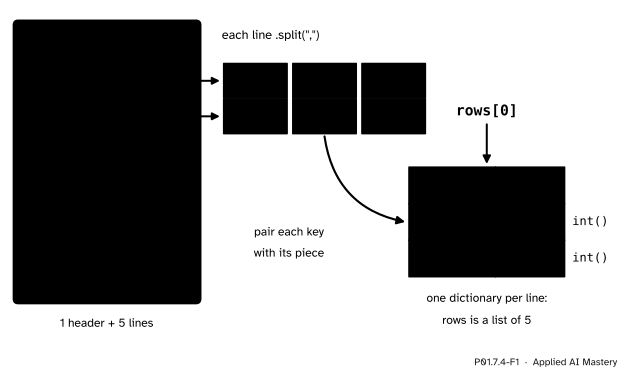
To compute with it, a program turns each line into a dictionary (P01.6.3) whose keys are the column names, and keeps the five dictionaries in a list.
P01.7.4-F1
Each line becomes one dictionary. The header line gives the keys, the line gives the values, and int turns the two numbers from text into numbers.
CSV is a common way to share a table of training data: any program can write it, and a person can read it. Results, settings and nested data are often kept as JSON instead, the second format of this lesson.
Build it up
Step 1. Lines. Read the file’s text and split it at "\n". Strip it first, so that the new line at the very end does not make an empty last line: six lines.
Step 2. Keys. Split the header line at its commas: ['name', 'hours', 'score'].
Step 3. Rows. For each of the other lines, split at commas, convert the hours and the score with int, and pair each key with its piece in a dictionary. Append the dictionary to a list.
Step 4. Compute. The rows hold numbers now, so the total score is a loop away: 300, a mean of 60.0.
Step 5. The library.csv.DictReader does steps 1 to 3 for you, with one difference: it has no way of knowing which columns are numbers, so every value it gives is a string.
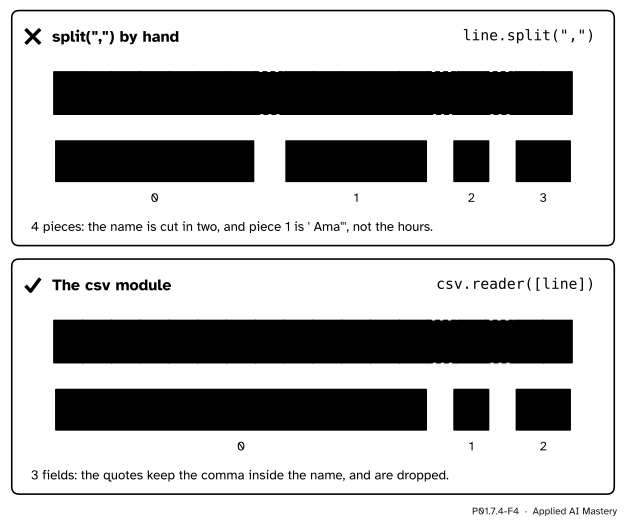
Step 6. Quotes. A field that contains a comma is written inside double quotes, as in "Mensah, Ama",2,55. The csv module reads the quotes and keeps the comma inside the field; splitting at every comma does not.
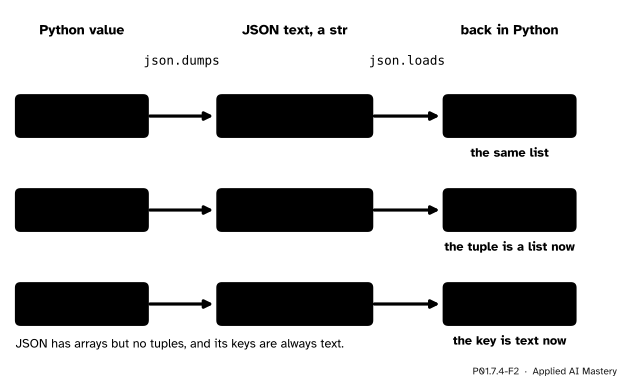
Step 7. JSON. For data that is nested, such as a dictionary that holds a list, json.dumps turns a Python value into JSON text and json.loads turns the text back into a Python value.
P01.7.4-F2
A round trip through JSON. Lists, text and numbers come back as they went in; a tuple comes back as a list, and a number used as a key comes back as text.
The formal statement
NoteDefinition: CSV and JSON
A CSV file holds one record per line, with fields separated by commas, and may start with a header line of field names. A field that contains a comma, a double quote or a line break is enclosed in double quotes, and a double quote inside such a field is written twice.
csv.reader(f) gives each record as a list of strings, and csv.DictReader(f) gives each as a dictionary keyed by the header. Neither converts types: every value is a str. A file for the csv module is opened with newline="".
JSON is a text format with four simple types, strings, numbers, true/false and null, and two structures: objects, {"key": value}, whose keys are always strings, and arrays, [value, ...].
json.dumps(value) returns the JSON text of a Python value, and json.loads(text) returns the Python value of a JSON text.
The conversions, one type at a time:
Python
JSON
back in Python
dict
object
dict
list or tuple
array
list
str
string
str
int, float
number
int, float
True, False, None
true, false, null
True, False, None
Fact 1: when a round trip gives back what went in. Suppose a value is built only from dictionaries with string keys, lists, strings, numbers, True, False and None. Each of these has a row in the table whose last column is the type it started as. dumps and loads work through the nesting one value at a time, so every part comes back as itself, and json.loads(json.dumps(x)) == x. (The one exception is a special float, nan, met in P02, which is not equal even to itself.) Put in a tuple, and the second row turns it into a list. Put in a number as a key, and it comes back as a string, because JSON keys are always strings. Either way the round trip no longer gives back an equal value.
Fact 2: why splitting by hand breaks on quotes.split(",") cuts at every comma, and it cannot tell a comma inside quotes from one between fields. Each comma inside a quoted field adds one piece too many. "Mensah, Ama",2,55 has three commas, so it splits into four pieces instead of three fields, and every field after the name moves one place to the right.
Worked example
Parse study.csv by hand, then find the total and the mean of the scores.
P01.7.4-F3
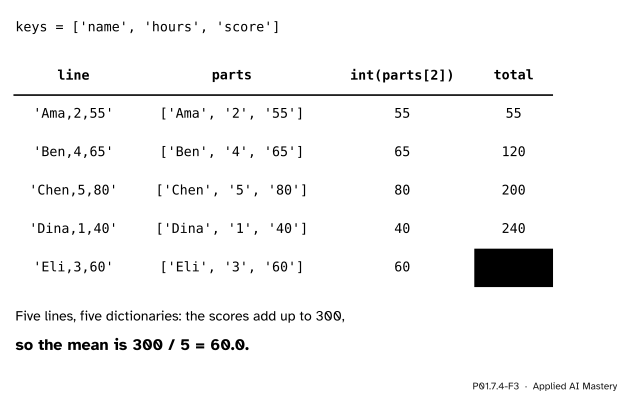
The trace of the hand-made parser, one row per line of the file, with a running total of the scores.
The header splits into ['name', 'hours', 'score'], the three keys. Then the loop starts at the second line. 'Ama,2,55' splits into ['Ama', '2', '55']; int('2') is 2 and int('55') is 55, so the first dictionary is {'name': 'Ama', 'hours': 2, 'score': 55}, and the total is 55. Ben adds 65 (total 120), Chen 80 (200), Dina 40 (240) and Eli 60 (300). Five lines give five dictionaries.
The mean is the total divided by the number of rows: 300 / 5 = 60.0, a float because / always gives one (P01.2.3). The scores of at least 50 are 55, 65, 80 and 60: four passes, whose mean is 260 / 4 = 65.0.
Code
Write study.csv into a folder of our own, then read it back.
The parser from scratch, and the numbers of the worked example.
def parse_study(text):"""One dictionary per line of study.csv.""" lines = text.strip().split("\n")# the header gives the keys keys = lines[0].split(",") rows = []# every line after the headerfor line in lines[1:]: parts = line.split(",") row = {} row[keys[0]] = parts[0] row[keys[1]] =int(parts[1]) row[keys[2]] =int(parts[2]) rows.append(row)return rowsrows = parse_study(text)print(len(rows), rows[0])total =0passes = []for row in rows: total += row["score"]if row["score"] >=50: passes.append(row["score"])print(total, total /len(rows))print(passes, sum(passes) /len(passes))
JSON: a round trip that gives back an equal value, and one that does not. indent=2 lays the text out over several lines, which is easier to read in a file.
In P02.5.1 a single call, pandas.read_csv, reads a file like this one into a whole table and turns the number columns into numbers by itself. What it does underneath is what this lesson did by hand.
Explore
This module’s interactive, the string slicer, lives in P01.7.1. Choose the line Chen,5,80, switch to Split with the separator ,, and read the three pieces off as the three fields of one row.
Pitfalls
P01.7.4-F4
Wrong beside right. A comma inside quotes belongs to the field. Splitting by hand cuts there anyway; the csv module does not.
“Splitting at commas always finds the fields.”
Not when a field holds a comma. The hand-made parser takes parts[1] as the hours, and for "Mensah, Ama",2,55 that piece is ' Ama"':
Traceback (most recent call last):
  File "quoted.py", line 3, in <module>
    hours = int(parts[1])
            ^^^^^^^^^^^^^
ValueError: invalid literal for int() with base 10: ' Ama"'
This message was copied from a run on Python 3.12 of a file quoted.py that splits that line and converts parts[1]; the marks under the code vary between versions, and later ones may leave them out. Real files are written by many programs, so read them with the csv module.
“The csv module gives me numbers.”
It gives text, and + on text joins: '55' + '65' is '5565'. Convert each field you compute with: int('55') + int('65') is 120.
“Every line of the file is a row of data.”
The header is a line too. A loop that does not skip it calls int('hours') and stops with a ValueError. Start the loop at lines[1:], or let DictReader use the header as the keys.
“A JSON round trip gives back exactly what went in.”
Only for dictionaries with string keys, lists, strings, numbers, booleans and None. A tuple comes back as a list, and the key 2 comes back as '2', so round_trip == summary was False.
Check yourself
Recall
1. What type is every value that csv.DictReader gives?
Show answer
str. The csv module does not convert types, so numbers arrive as text.
2. What is '55' + '65', and how do you get 120 instead?
Show answer
'5565', because + joins strings. int('55') + int('65') is 120.
3. Why does '"Mensah, Ama",2,55'.split(",") give four pieces?
Show answer
split cuts at every comma, including the one inside the quotes, so the three commas make four pieces.
4. What does json.loads(json.dumps(("Chen", 80))) give?
Show answer
The list ['Chen', 80]. JSON has arrays but no tuples.
5. After a round trip through JSON, what is the key of {2: 55}?
Show answer
The string '2': the keys of a JSON object are always strings.
Exercises
1.★ From rows, count the students in each band with cut-offs 70 and 50: a distinction for a score of at least 70, a pass for at least 50, and a fail below that.
Chen’s 80 is the one distinction; Ama’s 55, Ben’s 65 and Eli’s 60 are three passes; Dina’s 40 is the one fail. So bands is {'distinction': 1, 'pass': 3, 'fail': 1}.
2.★★ Write to_csv(rows), which turns the list of dictionaries back into the text of study.csv, header first and with a new line after every line. Check that parse_study(to_csv(rows)) gives back rows.
Show solution
def to_csv(rows): text ="name,hours,score\n"for r in rows: h, s = r["hours"], r["score"] text +=f"{r['name']},{h},{s}\n"return text
Every line, the header included, ends with its own new line, so the text is exactly the 64 characters of the file we wrote. Parsing it gives five dictionaries equal to rows: a round trip through CSV text, which works here because no field holds a comma.
3.★★★ Write split_csv_line(line), which splits a line at commas but not at commas inside double quotes, and drops the quotes. Walk through the characters with a flag inside that flips at every ". Check it on '"Mensah, Ama",2,55' against csv.reader.
Show solution
def split_csv_line(line): fields = [] field ="" inside =Falsefor ch in line:if ch =='"': inside =not insideelif ch ==","andnot inside: fields.append(field) field =""else: field = field + ch fields.append(field)return fields
For '"Mensah, Ama",2,55' the first " sets inside to True, so the comma after Mensah is kept in the field; the second " sets it back to False, and the next two commas cut. The result is ['Mensah, Ama', '2', '55'], the same as csv.reader. It is still not a full CSV reader: a quote written twice inside a quoted field, "", should stand for one quote, and this version drops both. The csv module handles that case too.
Summary card
A CSV line becomes a dictionary; every field arrives as text; JSON keeps nesting.
P01.7.4-F1
One line, one dictionary.
By hand: text.strip().split("\n"), skip the header, line.split(","), int the numbers.
csv.DictReader(f) with newline="": keys from the header, quotes handled, values all str.
json.dumps and json.loads: a tuple comes back as a list, and every key as a string.
Sources and next steps
Sources. Each was opened and checked against this lesson on 12 November 2026.
Python Software Foundation, csv: CSV File Reading and Writing. DictReader takes its keys from the first row when no field names are given; reader returns each row as a list of strings with no automatic type conversion; a csvfile may be a file object or a list; a file object should be opened with newline=''; the default quote character is ".
Python Software Foundation, json: JSON encoder and decoder: dumps and loads, the conversion tables (list and tuple become an array, an array becomes a list), the note that keys are converted to strings so that loads(dumps(x)) != x when x has keys that are not strings, and indent.
Y. Shafranovich, RFC 4180: Common Format and MIME Type for Comma-Separated Values (CSV) Files, October 2005, section 2: one record per line, an optional header line, fields separated by commas, fields holding commas, quotes or line breaks enclosed in double quotes, and a quote inside such a field written twice.
Next. This closes the module. In P01.8, Errors, debugging and first tests, listed on the course page, this parser meets a dirty copy of the file, with the lines Femi,3,n/a and Gus,4, and learns to skip what it cannot read. In P02.5, listed on the P02 course page, files are read with pandas.read_csv.