Two projects that pin different versions of one package cannot share one installation. Give each its own virtual environment with python -m venv, activate it on Windows, macOS or Linux, check which Python is running, and rebuild it from requirements.txt so that others can repeat your results.
Explain why two projects that pin different versions of one package need separate environments.
Create an environment with python -m venv .venv, activate it on Windows and on macOS or Linux, and leave it with deactivate.
Check which Python is running with sys.executable, and whether it runs in an environment with sys.prefix != sys.base_prefix.
Rebuild a project’s environment from its requirements.txt, so that others can repeat a result.
In review. The maths and code on this page are checked by automated tests on every change, but an independent reader has not signed it off yet. Spot a mistake or a confusing step? Tell us.
The question
Your new project pins numpy==2.5.4. A project from two years ago pins numpy==1.26.4, and its code still writes np.NaN, a name that NumPy 2.0 removed. One Python has one site-packages, and one site-packages holds one numpy. Which project do you break?
From the last lesson
1. Where does python -m pip install put a package?
Show answer
Into the site-packages folder of the python that ran pip.
2. What does the line numpy==1.26.4 in a requirements file ask for?
Show answer
Exactly version 1.26.4 of numpy, and no other.
Intuition
Neither. Give each project its own site-packages. A virtual environment is a folder, usually called .venv inside the project, that holds a site-packages of its own and a python command that uses it. It shares the standard library of the Python that made it, but none of that Python’s installed packages. Two projects, two environments, two numpys, side by side. Every later course works this way: a model’s accuracy can be repeated only with the same versions of NumPy, pandas and scikit-learn that produced it.
P01.5.4-F1
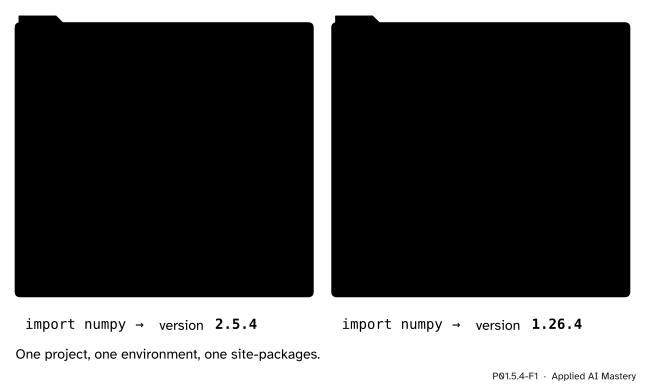
Each project gets a site-packages of its own, so the same line, import numpy, finds a different version in each.
Build it up
Step 1. One installation cannot serve both. A site-packages holds one version of a package. Whichever numpy it holds, one of the two pins is broken; the Code section checks this.
Step 2. Make an environment. In the project’s folder, in a terminal:
$ python -m venv .venv
-m venv runs the standard library’s module venv as a program (P01.5.3), and .venv is the name of the folder it makes. The dot at the start hides the folder in most file listings.
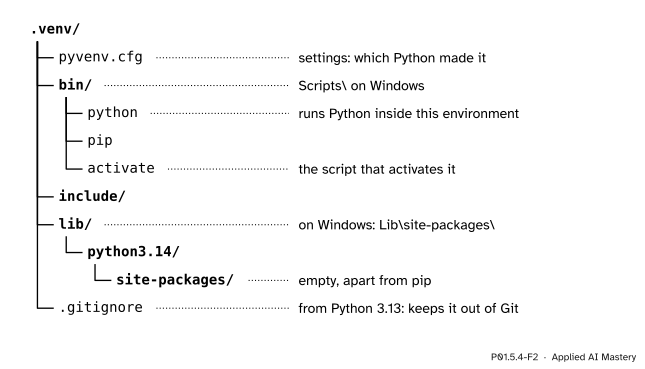
P01.5.4-F2
What python -m venv .venv makes, here with Python 3.14 on macOS or Linux.
Step 3. Activate it. Activating makes the word python mean the environment’s python:
macOS or Linux: $ source .venv/bin/activateWindows: > .venv\Scripts\activate
The prompt then starts with (.venv), to remind you. Activation puts the environment’s bin folder (Scripts on Windows) at the front of the list of folders where the terminal looks for commands. Typing deactivate undoes it.
Step 4. Install into it. With the environment active, pip installs into its site-packages:
Three lines brought nine packages: the three pins, and the packages that they need in turn, their dependencies.
Step 5. Check which Python is running. In Python, sys.executable is the path of the running python, and sys.prefix is the folder it treats as its home: inside an environment, the environment’s folder. sys.base_prefix is always the home of the Python that made it. At the prompt, with made-up paths:
Outside any environment, sys.prefix and sys.base_prefix are the same folder, and the test gives False.
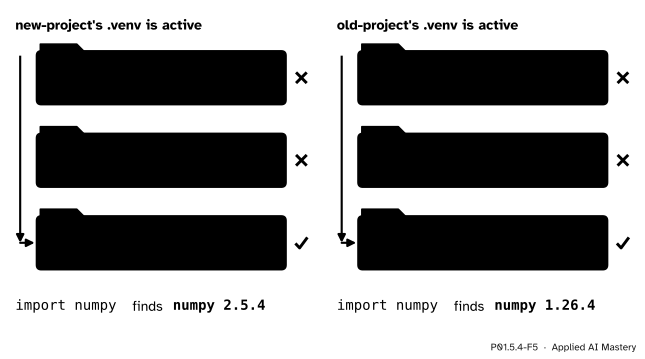
Step 6. The search path inside an environment. Inside an environment, sys.path keeps the script’s folder and the standard library, and its last folder is the environment’s own site-packages. That is the whole trick.
P01.5.4-F5
The same line, import numpy, with each environment active. The search reaches the active environment’s site-packages and finds its numpy.
The formal statement
NoteDefinition: virtual environment
A virtual environment is a folder that holds a site-packages of its own, programs in bin (Scripts on Windows) that run Python inside it, and a file pyvenv.cfg that names the Python installation it was made from. A Python running inside it has sys.prefix equal to the environment’s folder and sys.base_prefix equal to the installation’s, so
sys.prefix != sys.base_prefix
is True exactly when Python runs inside an environment.
Three facts complete the picture.
Activation is a convenience. Running .venv/bin/python report.py uses the environment without activating it; the venv documentation says so in as many words.
The environment keeps out the installation’s packages.pyvenv.cfg holds the line include-system-site-packages = false, so only the environment’s own site-packages is searched.
An environment is tied to one Python. It uses the standard library of the Python that made it, and pyvenv.cfg records that Python’s version.
Worked example
Give new-project its own environment, and follow every command. The project holds report.py and the three-line requirements.txt of P01.5.3.
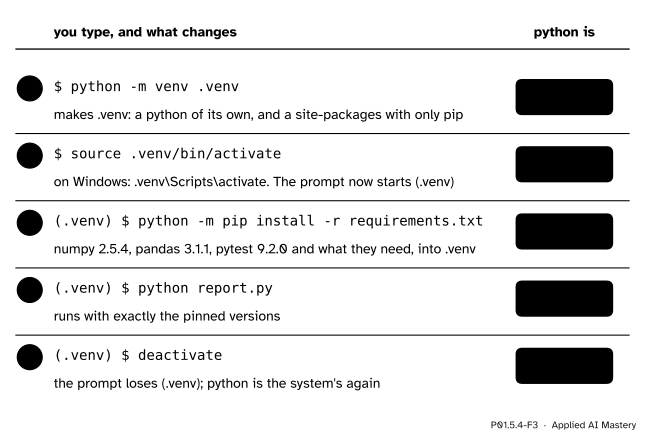
P01.5.4-F3
The recipe, one command per row, and which python the word python means after each.
After step 1 the word python still means the system’s Python; the new folder simply exists. Step 2 changes what the word means. Step 3 therefore installs into .venv, and step 4 runs the report with exactly the pinned versions. Step 5 restores the system’s Python.
For old-project the recipe is the same with one change: NumPy 1.26.4 was made for Pythons 3.9 to 3.12 only, so its environment is made by Python 3.12, with python3.12 -m venv .venv on macOS or Linux, or py -3.12 -m venv .venv on Windows. The requirements.txt that it then installs has the single line numpy==1.26.4. This is the recipe that lets someone else repeat your result: a new environment, then python -m pip install -r requirements.txt.
Code
Step 1 from scratch: a pin is met only by exactly its version. Try each numpy that a single shared site-packages could hold.
def pin_met(installed, pinned):"""True when the installed version is exactly the pinned one."""return installed == pinnedfor installed in ['1.26.4', '2.5.4']:print('one numpy', installed, '-> new project:', pin_met(installed, '2.5.4'),' old project:', pin_met(installed, '1.26.4'))
one numpy 1.26.4 -> new project: False  old project: True
one numpy 2.5.4 -> new project: True  old project: False
Each row has a False: no single numpy meets both pins. Two environments do.
Then the test of Step 5, written as a function and tried on made-up folders, because the real values of sys.prefix depend on the machine that runs this page:
def in_environment(prefix, base_prefix):"""True when Python runs inside a virtual environment."""return prefix != base_prefixvenv_home ='/home/ama/new-project/.venv'system ='/usr/local'print(in_environment(venv_home, system))print(in_environment(system, system))
True
False
A hidden check on this page goes further: it makes a real environment in a temporary folder, finds pyvenv.cfg, the bin folder and the lib folder in it, runs the environment’s python, and confirms that inside it the test gives True and the last folder of sys.path is the environment’s site-packages.
Explore
P01.5-X1
Import resolver
Choose a module and an environment, then press Step to try one folder at a time, or Run to watch the whole search. Import pandas with the old environment active, and put a random.py of your own in the project folder before you import random. The resolver leaves out the zip file and lib-dynload, which hold none of these modules, so its three folders are numbered 1 to 3.
Pitfalls
P01.5.4-F4
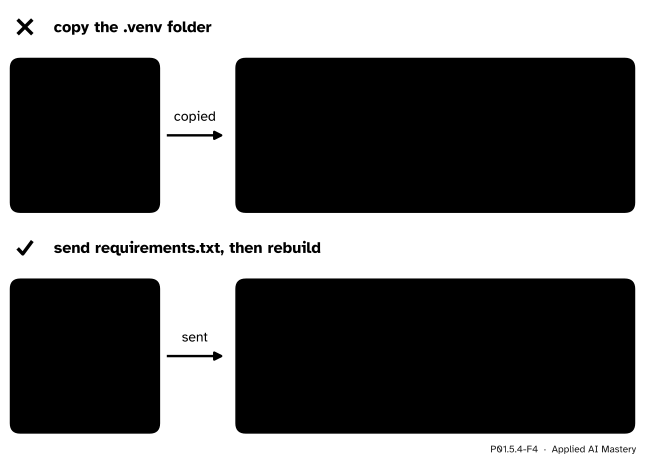
Wrong beside right. An environment is rebuilt, not copied.
“To share my environment, I copy the .venv folder.”
The files inside it name the folders of the machine they were made on: on macOS or Linux the first line of .venv/bin/pip is the full path of the environment’s python. Copied to another machine, or even moved to another folder, such a script stops with bad interpreter. The venv documentation says that environments are not movable or copyable, are not put into version control (from Python 3.13 the folder even holds a .gitignore that keeps Git away), and are meant to be thrown away and rebuilt. Share requirements.txt instead.
“I installed it, but my project cannot import it.”
Usually pip ran while no environment was active, so the package went into another Python. Look for (.venv) at the start of the prompt, or ask Python, as in Step 5, which python is running. Then activate the environment and install again; or skip activation and run the environment’s own python, as in .venv/bin/python -m pip install numpy.
“Pinning three packages pins the whole environment.”
Only the three pinned packages are fixed. The six dependencies of Step 4 arrived at the newest versions that pip could find on the day of the install, so a rebuild next year may differ. Files that pin every package, called lock files, and containers that also fix the system around Python are the subject of P06.6.
Check yourself
Recall
1. Why can one Python installation not serve a project that pins numpy==2.5.4 and one that pins numpy==1.26.4?
Show answer
One site-packages holds one version of numpy, so whichever version it holds breaks one of the two pins.
2. Which command makes a virtual environment in a folder called .venv?
Show answer
python -m venv .venv, typed in the project’s folder.
3. What does activating an environment change?
Show answer
The word python, and pip, now mean the environment’s own programs, so pip installs into its site-packages and scripts run with its packages. The prompt starts with (.venv).
4. What is sys.prefix != sys.base_prefix inside an environment, and outside one?
Show answer
True inside an environment, False outside.
5. How does someone else repeat your result on their machine?
Show answer
They make a new environment with python -m venv .venv, activate it, and run python -m pip install -r requirements.txt with your requirements file.
Exercises
1.★ Write the commands, in order, that give old-project its own environment on your system, install its one pin, and check that Python runs inside the environment.
On Windows the first two commands are py -3.12 -m venv .venv and .venv\Scripts\activate. Python 3.12 is used because NumPy 1.26.4 was made for Pythons 3.9 to 3.12.
2.★★ For each pair of values, say whether Python runs inside an environment and, if so, which numpy import numpy finds. First: sys.prefix is /home/ama/old-project/.venv and sys.base_prefix is /usr/local/python3.12. Second: both are /usr/local, on a machine whose own site-packages holds no numpy.
Show solution
First: the two differ, so Python runs inside old-project’s environment, and import numpy finds numpy 1.26.4 in that environment’s site-packages.
Second: the two are equal, so this is not an environment. The search reaches the installation’s own site-packages, finds no numpy there, and ends in ModuleNotFoundError.
3.★★★ Inside old-project’s environment, someone types python -m pip install pandas==3.1.1. What happens to numpy, and what goes wrong next? What would you do instead?
Show solution
pandas 3.1.1 needs numpy 2.0.2 or newer (P01.5.3), and the environment holds 1.26.4. So pip replaces numpy 1.26.4 with a numpy 2 version, to meet the new requirement. The environment no longer matches numpy==1.26.4, and analysis.py, which writes np.NaN, now fails, because NumPy 2.0 removed that name.
Instead, keep the old project’s pins together: use a version of pandas made for NumPy 1, or update the old code first (write np.nan), then move its pins to NumPy 2 and pandas 3, in a new environment built from the new requirements.txt.
Summary card
One project, one environment, one site-packages.
P01.5.4-F1
Each project, its own numpy.
Make:python -m venv .venv. Activate:source .venv/bin/activate, or .venv\Scripts\activate on Windows. Leave:deactivate.
Check:sys.executable names the running python; sys.prefix != sys.base_prefix is True inside an environment.
Sharerequirements.txt, never the .venv folder: rebuild it on the other machine.
Sources and next steps
Sources. Each was opened and checked against this lesson on 12 November 2026.
Python Software Foundation, The Python Tutorial, chapter 12, Virtual Environments and Packages. Section 12.1: if application A needs version 1.0 of a module and application B needs version 2.0, one installation cannot serve both, and a virtual environment is the solution. Section 12.2: python -m venv, the common folder name .venv, activation with Scripts\activate on Windows and source .../bin/activate on Unix or macOS, and deactivate. Section 12.3: python -m pip install -r requirements.txt.
Python Software Foundation, venv, Creation of virtual environments: an environment is not checked into source control, is disposable, and is “not considered as movable or copyable”; pyvenv.cfg with its home key and include-system-site-packages; the bin (or Scripts) folder; lib/pythonX.Y/site-packages, or Lib\site-packages on Windows; activation prepends the bin folder to PATH, and is not required; “It is sufficient to check sys.prefix != sys.base_prefix”; and, from Python 3.13, a .gitignore in the folder.
Python Software Foundation, sys.executable, sys.prefix and sys.base_prefix: in a virtual environment prefix points to the environment and base_prefix to the base installation.
Python Software Foundation, Using Python on Windows: the py command selects a version with -V:3.12, and V: may be left out for official releases, as in py -3.12.