import stats_tools
import stats_tools
print(stats_tools.mean([55, 65, 80, 40, 60]))
print(stats_tools.predict(2))
print(stats_tools.__name__)loading stats_tools
60.0
51
stats_toolsBefore this lesson
After this lesson you can
In review. The maths and code on this page are checked by automated tests on every change, but an independent reader has not signed it off yet. Spot a mistake or a confusing step? Tell us.
Your mean and predict of P01.4 live inside one program. A second program needs them too, and copying them means two copies to keep in step: fix a mistake in one, and the other still has it. statistics has no such problem, because any program can import it. How do you make a file of your own importable in the same way, and how does Python find it?
From the last lesson
1. What three things does import statistics do?
It finds the module, runs its file once from top to bottom, and binds the name statistics to the module object.
2. After from statistics import mean, what has happened to a mean you defined earlier?
It has lost the name: mean now refers to the function inside statistics.
Any file of Python code is a module. Save mean and predict in a file called stats_tools.py, put a script called report.py in the same folder, and the line import stats_tools in the script works exactly like import statistics: find, run once, bind. The module’s name is the file name without .py.
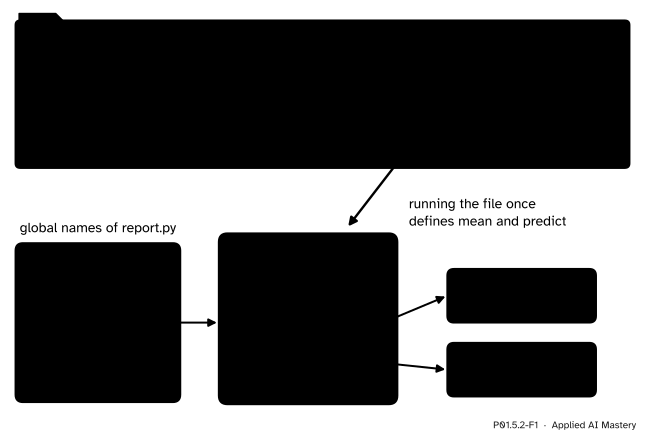
A file of your own is a module. report.py imports stats_tools.py from its own folder, and the name stats_tools then refers to a module that holds mean and predict.
Python found the file because the first place it looks is the folder of the script you ran. This lesson follows that search, one folder at a time, and ends with a trap that catches almost everyone once.
Step 1. The module and the script. Here are the two files, then the command that runs the script, and what it printed. They are shown rather than run on this page; a hidden check writes the same files to a temporary folder and runs the same command.
stats_tools.py
print('loading stats_tools')


def mean(values):
    """Return the mean of a list of numbers."""
    return sum(values) / len(values)


def predict(hours):
    """Return the predicted quiz score for the given hours of study."""
    return 9 * hours + 33
report.py
import stats_tools
import stats_tools

scores = [55, 65, 80, 40, 60]
print('mean score:', stats_tools.mean(scores))
print('predicted for 2 hours:', stats_tools.predict(2))
$ python report.py
loading stats_tools
mean score: 60.0
predicted for 2 hours: 51loading stats_tools appears once, although report.py imports the module twice. The second import found the module already made, and only bound the name again.
Step 2. Where Python looks. The module sys holds sys.path, a list of folders. Import tries them in order and stops at the first one that holds the module. A for loop prints them. The output below is from an imaginary Linux machine with Python 3.14 installed in /usr/local; yours will show other folders.
import sys
for folder in sys.path:
print(folder)/home/ama/project
/usr/local/lib/python314.zip
/usr/local/lib/python3.14
/usr/local/lib/python3.14/lib-dynload
/usr/local/lib/python3.14/site-packagesFrom the top: the folder of the script that was run (at the interactive prompt, the current folder, written as an empty string); a zip file of the standard library, listed even when it does not exist; the standard library itself, where statistics.py and random.py live; its compiled modules; and site-packages, where installed packages go (P01.5.3). Before any folder, Python checks the few modules that are built into the interpreter itself, sys among them.
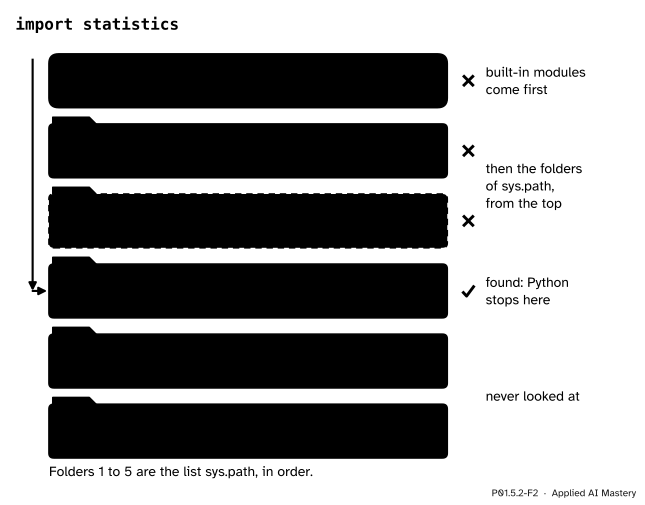
The search for statistics. It passes the built-in modules and two folders, stops at the third, and never looks at the last two.
Step 3. A file that is both a script and a module. Every module has a global name __name__, with two underscores on each side. Python sets it to '__main__' in the file it was asked to run, and to the module’s own name in a file that is imported. An if at the end of stats_tools.py uses that to run a short demo only when the file itself is run:
end of stats_tools.py
if __name__ == '__main__':
print('demo: the mean of the scores is', mean([55, 65, 80, 40, 60]))$ python stats_tools.py
loading stats_tools
demo: the mean of the scores is 60.0
$ python report.py
loading stats_tools
mean score: 60.0
predicted for 2 hours: 51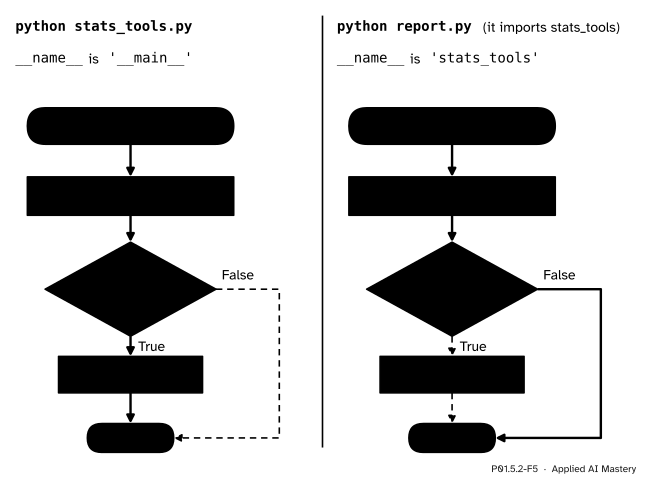
One file, two ways to run it. Run as a script, the demo runs; imported, it is skipped.
Step 4. A package: a folder of modules. A package is a folder of modules with a file called __init__.py, which may be empty. Here the same stats_tools.py moves into a folder study:
project/
    report.py
    study/
        __init__.py
        stats_tools.py
report.py, using the package
import study.stats_tools

scores = [55, 65, 80, 40, 60]
print('mean score:', study.stats_tools.mean(scores))
$ python report.py
loading stats_tools
mean score: 60.0import study.stats_tools binds one name, study, to the package. The module is reached through it with a second dot. Large libraries such as NumPy and scikit-learn are packages of this kind, with packages inside packages.
Two consequences follow.
sys.path beats every folder below it, even one that holds a better match.Leave out __init__.py and import study.stats_tools still works: a plain folder can be imported as a namespace package, which the Tutorial calls a relatively advanced feature. Write __init__.py anyway. It says that the folder is a package on purpose, and the Tutorial (section 6.4) gives the reason the rule exists: it stops a folder with a common name, such as string, from hiding a real module further down the search path.
Walk the search by hand for three imports, using the folders of Step 2 and the files in them: import stats_tools, import statistics, and import stats_tool, with a letter missing.
stats_tools: not built in. Folder 1 holds stats_tools.py, so the search stops there.statistics: not built in, not in folder 1, and folder 2 does not exist. Folder 3 holds statistics.py, so the search stops there; folders 4 and 5 are never tried.stats_tool: not built in, and no folder holds stats_tool.py. The search runs out of folders.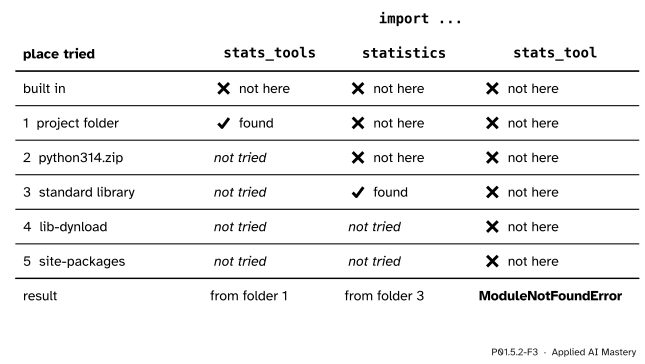
The search walked by hand. A search stops at its first match; the misspelt name is tried everywhere and found nowhere.
The third import, run as line 1 of report.py, ends like this (Python 3.15.2, which also suggests the right name; Python 3.12 prints the same message without the suggestion):
Traceback (most recent call last):
  File "report.py", line 1, in <module>
    import stats_tool
ModuleNotFoundError: No module named 'stats_tool'. Did you mean: 'stats_tools'?
Python prints the full path of each file; in this module it is cut down to the file name.
This page cannot run your files as scripts, but it can import stats_tools: a hidden cell has written the file into a temporary folder and put that folder at the top of sys.path.
import stats_tools
import stats_tools

print(stats_tools.mean([55, 65, 80, 40, 60]))
print(stats_tools.predict(2))
print(stats_tools.__name__)
loading stats_tools
60.0
51
stats_toolsNow the search itself, from scratch. os.path.join puts a folder and a file name together with the right separator, and os.path.exists says whether a file is there. Every module that came from a file keeps that file’s path as its __file__, so the result can be checked against what import found.
import os
import statistics
import sys


def find_file(name):
    """Walk sys.path as import does; return the first name.py found, or None."""
    for folder in sys.path:
        path = os.path.join(folder, name + '.py')
        if os.path.exists(path):
            return path
    return None


print('statistics, same file as import: ', find_file('statistics') == statistics.__file__)
print('stats_tools, same file as import:', find_file('stats_tools') == stats_tools.__file__)
print('stats_tool:', find_file('stats_tool'))
statistics, same file as import: True
stats_tools, same file as import: True
stats_tool: NoneThe real search does more: it finds packages and compiled modules too, and it checks the built-in modules first. sys.builtin_module_names lists those, and a loop can look for one name in it.
def is_built_in(module_name):
    """True when the module is compiled into the interpreter itself."""
    for name in sys.builtin_module_names:
        if name == module_name:
            return True
    return False


print('sys:       ', is_built_in('sys'))
print('statistics:', is_built_in('statistics'))
sys: True
statistics: FalseThis module’s interactive, the import resolver, lives in lesson P01.5.4. Try it now: choose stats_tools, then statistics, and step the search; then switch on the file random.py and import random.
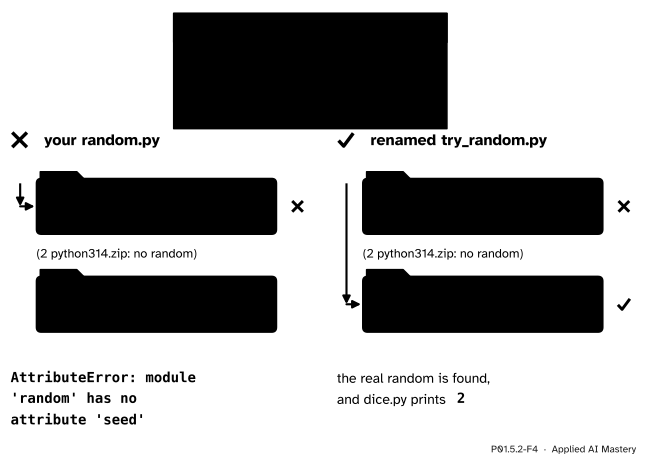
Wrong beside right. Your own random.py, in the folder searched first, stands in front of the real one; renamed, it is passed by.
“A file of mine called random.py is harmless.”
Say you tried out random in a file named random.py, which prints a line when it runs, and then wrote dice.py beside it, the program at the top of the figure. Running dice.py imports your file, because its folder comes first:
$ python dice.py
my own random.py is running
Traceback (most recent call last):
  File "dice.py", line 3, in <module>
    random.seed(1)
    ^^^^^^^^^^^
AttributeError: module 'random' has no attribute 'seed' (consider renaming 'random.py' since it has the same name as the standard library module named 'random' and prevents importing that standard library module)
Python 3.13 added the advice in brackets; Python 3.12 stops after 'seed'. It is the same mistake as naming a function of your own sum, which hides the built-in (P01.4.4). Rename the file, for example to try_random.py, and keep the names of standard modules, such as random, statistics, math and string, for the real ones.
“To import stats_tools.py, write its file name.”
import stats_tools.py asks for a module named py inside a package stats_tools. Python imports stats_tools first, which is why loading stats_tools appears, and then gives up:
loading stats_tools
Traceback (most recent call last):
  File "report.py", line 1, in <module>
    import stats_tools.py
ModuleNotFoundError: No module named 'stats_tools.py'; 'stats_tools' is not a package
Import a module by its name, without .py.
“I edited stats_tools.py, so the next import uses the new code.”
A module runs once per run of Python. A script starts a new run each time, so it sees your edit; a notebook or an open interactive prompt keeps the module it loaded first. Restart it after changing your module. Hidden old state of this kind is the classic notebook bug of P02.9.
1. Where does Python look first for a module that is not built into the interpreter?
In the folder of the script that was run, the first entry of sys.path. At the interactive prompt, it is the current folder.
2. What does a second import stats_tools in the same run do?
It finds the module already made and binds the name again. The file does not run a second time.
3. What is __name__ inside stats_tools.py when you run python stats_tools.py, and when report.py imports it?
'__main__' when it is run as the program; 'stats_tools' when it is imported.
4. What makes the folder study a package, and how do you import stats_tools from it?
The file __init__.py inside it, which may be empty. Write import study.stats_tools.
5. Why does a file named random.py in your project break import random?
The script’s folder comes first in sys.path, so the search finds your file and stops there. The real random in the standard library is never reached.
1. ★ With the five folders of Step 2, where does each import end? import report, import random, import numpy (on a machine where NumPy has been installed, P01.5.3), and import ststistics.
report is found in folder 1, the project folder, as report.py; importing it would run the script. random is found in folder 3, the standard library. numpy is found in folder 5, site-packages, where installed packages go. ststistics is in no folder, so the search ends in ModuleNotFoundError.
2. ★★ Write down everything that python greet.py prints, and then everything that python main.py prints.
greet.py
print('A')


def hello():
    print('B')


if __name__ == '__main__':
    hello()
    print('C')
main.py
import greet
greet.hello()
import greetpython greet.py prints A, B, C. The file is the program, so __name__ is '__main__' and the last two lines run after the top-level print.
python main.py prints A, then B. The first import runs greet.py as a module: it prints A, defines hello, and skips the guarded lines, because there __name__ is 'greet'. Then greet.hello() prints B. The second import does nothing, because the module is already loaded.
3. ★★★ An old copy of stats_tools.py, in which predict returns 10 * hours + 30, sits in a folder that comes later in sys.path than the project folder. Which value does report.py print for stats_tools.predict(2), 51 or 50? How could you check which file was loaded? And does the answer change if you run the script from another folder, as python project/report.py?
It prints 51. The project folder comes first, and the first match wins, so the old copy is never reached. To check, print stats_tools.__file__, the path of the file the module came from.
Running python project/report.py from the folder above changes nothing. For a script, the first entry of sys.path is the folder that holds the script, not the folder you typed the command in, so the project folder still comes first.
Your file is a module; Python finds it by trying the folders of sys.path from the top.
Your own file, imported by name.
.py; a script imports a module from its own folder.sys.path, first match wins; no match means ModuleNotFoundError.if __name__ == '__main__': runs lines only when the file is the program that was run.__init__.py; import study.stats_tools.random.py.Sources. Each was opened and checked against this lesson on 12 November 2026.
python fibo.py, a module’s code runs with __name__ set to "__main__", and a guarded block does not run when the module is imported. Section 6.1.2: Python first looks for a built-in module, then for a file in the folders of sys.path, which starts with the script’s folder; scripts there are loaded instead of library modules of the same name, “an error unless the replacement is intended”. Section 6.4: __init__.py makes a folder a package, may be empty, and keeps folders with common names from hiding real modules.site-packages is added last.__init__.py, which runs when the package is imported; section 5.3, a module found nowhere raises ModuleNotFoundError.Next. P01.5.3 Installing packages with pip fills the last folder, site-packages, with code written by others.
This lesson unlocks
P01.5.3 Installing packages with pip