Arguments reach parameters by position or by keyword, and a parameter may carry a default. Learn the three rules Python uses to match them, the errors it raises when a match fails, and how to read a signature in the documentation, type hints included.
Predict which parameter each argument binds to in a call that mixes positional arguments, keyword arguments and defaults.
Write a function whose parameters have defaults, and call it with only the arguments that differ from them.
Name the error that a missing, a repeated or an unknown argument raises, and repair the call.
Read a signature in the documentation, such as round(number, ndigits=None), and treat type hints as notes that Python does not check.
In review. The maths and code on this page are checked by automated tests on every change, but an independent reader has not signed it off yet. Spot a mistake or a confusing step? Tell us.
The question
predict has its slope, 9, and its intercept, 33, written into its body. To try a steeper line you would have to edit the function, and to compare two lines you would need two functions. Library functions meet this problem many times over: scikit-learn’s LinearRegression has five options, and most of the time you set none of them. How can a function take extra inputs that you mention only when you want something different?
From the last lesson
1. What are the four steps of a call?
Show answer
Evaluate the arguments, bind them to the parameters, run the body, and put the returned value where the call was.
2. What does a call give back when the function has no return statement?
Show answer
None.
Intuition
Here is predict again, with the slope and the intercept turned into parameters:
slope=9 gives the parameter slope a default: the value it takes when a call says nothing about it. The same goes for intercept=33. Only hours must always be given.
Step 2 of a call (P01.4.1) binds each parameter to an argument. With three parameters, Python has to decide which argument goes where. Picture the parameters as three slots, in the order that the definition lists them. An argument fills a slot in one of two ways: by its position in the call, or by naming the slot. A slot that no argument fills takes its default.
P01.4.2-F1
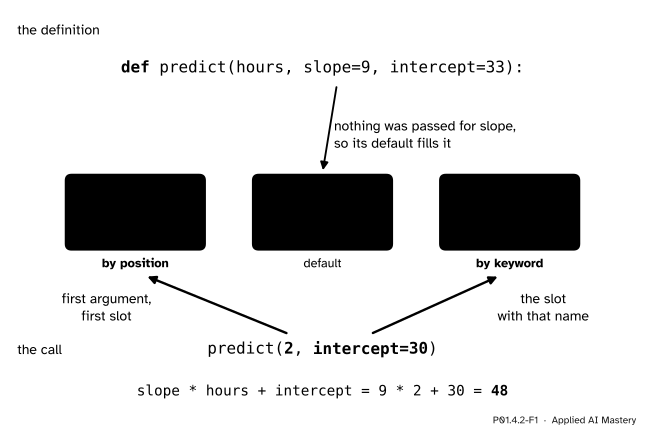
The call predict(2, intercept=30). The 2 fills the first slot because it comes first; 30 fills the slot it names; slope, left empty, takes its default. The body then works out 48.
The 2 comes first, so it fills the first slot, hours: it is a positional argument. intercept=30 names its slot: it is a keyword argument. Nothing was said about slope, so it takes its default, 9. The body works out 9 × 2 + 30 = 48.
Build it up
Step 1. By position. In predict(2, 10, 30) all three arguments are positional, and they fill the slots in order: hours is 2, slope is 10, intercept is 30. The result is 10 × 2 + 30 = 50.
Step 2. By keyword.predict(hours=2, slope=10, intercept=30) gives 50 too, and so does predict(intercept=30, hours=2, slope=10). Each keyword argument names its own slot, so the order of keyword arguments does not matter.
Step 3. Defaults fill the rest.predict(2) fills only hours, so slope and intercept take 9 and 33: the result is 51, the same as the one-parameter predict of P01.4.1. predict(2, slope=10) changes the slope alone and gives 10 × 2 + 33 = 53. Defaults keep the common call short and the unusual call possible.
Step 4. Positional arguments come first. A call may mix the two kinds, as predict(2, intercept=30) does, but every positional argument must come before every keyword argument.
Step 5. Reading a signature. The documentation of a function opens with its signature: the function’s name and its parameters, written just like a def line.
P01.4.2-F2
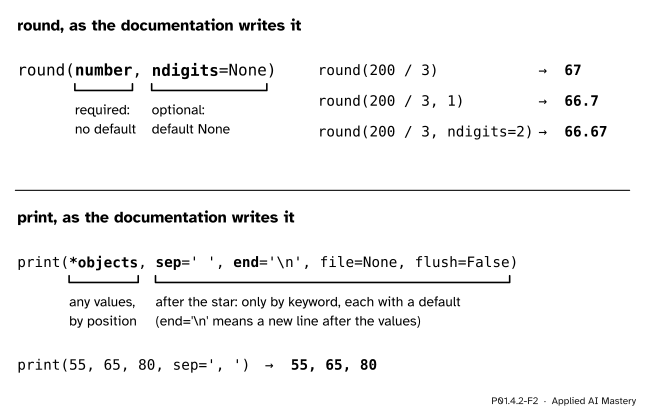
Two signatures read part by part. A parameter without = must be passed; one with = has a default. In print, the star means any number of values, and everything after the star must be given by keyword.
round(number, ndigits=None) says that number has no default, so you must pass it, while ndigits has the default None, which means “round to a whole number”. The mean of the first three scores is 200 / 3, and round(200 / 3) is 67 while round(200 / 3, 1) is 66.7.
print(*objects, sep=' ', end='\n', file=None, flush=False) has a star in front of objects, which means that print takes any number of values by position. Every parameter after the star can be given only by keyword. sep goes between the values and end after the last one; '\n' is how a new line is written inside text, which P01.7.1 explains. So print(55, 65, 80, sep=', ') prints 55, 65, 80, and end=' ' keeps the next print on the same line.
Machine-learning libraries set their options in the same way. The documentation of scikit-learn, the library of P01.9.4, gives this signature:
The star at the front means that every option must be named, and each has a default. So LinearRegression() is the usual call, and LinearRegression(fit_intercept=False) changes one thing and says which.
A positional argument is an argument written without a name, such as the 2 in predict(2). A keyword argument is written name=value, such as slope=10. A parameter written name=value in a def line has a default, which it takes when a call does not fill it.
Python matches arguments to parameters with three rules, applied in this order. Think of the parameters as empty slots.
Positional arguments fill the slots from the left. The first fills the first slot, the second the second, and so on. More positional arguments than slots is a TypeError.
Each keyword argument fills the slot with its name. A name with no slot is a TypeError, and so is a slot that rule 1 has already filled.
Every slot still empty takes its default. A slot still empty that has no default is a TypeError.
When all three rules have run, every parameter has exactly one value, and the body starts.
P01.4.2-F3
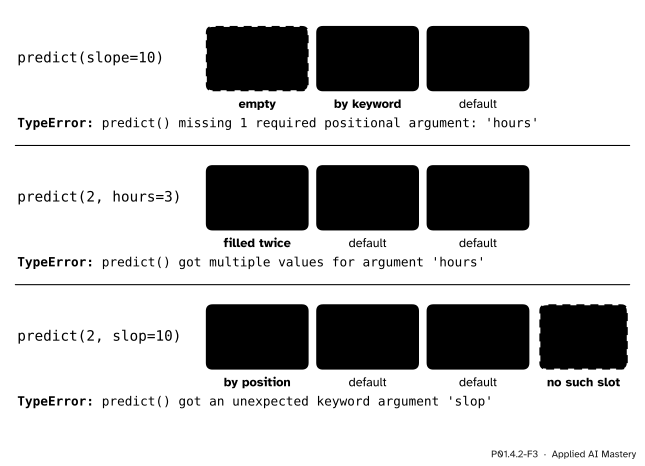
The three ways a match fails, each a TypeError: a slot left empty with no default, a slot filled twice, and a keyword that names no slot.
Two more rules concern the order in the text itself. Python checks them when it reads the file, before any line runs, so breaking them is a SyntaxError: in a call, positional arguments come before keyword arguments, and in a def line, parameters with defaults come after those without.
Type hints. A signature may carry notes on the types it expects, called type hints: a colon and a type after a parameter, and an arrow and a type for the returned value.
Python stores these notes but does not check them when the function runs. Separate checking tools read them and warn before a program runs; the interpreter itself never does.
Go deeper: a default is worked out once, when def runs
The expression after = in a def line is evaluated when the def line runs, not at each call, and every call that leaves the slot empty receives that one object. For a number such as 9 the difference cannot be seen, because a number cannot be changed. For a list it can be seen, because a list can: a default written [] is one list shared by every call. P01.6.4 shows the trap and the usual way round it.
Worked example
With def predict(hours, slope=9, intercept=33), work out by hand which value each parameter takes, and the result, for four calls.
predict(2). Rule 1: the 2 fills hours. Rule 2: there are no keywords. Rule 3: slope and intercept take 9 and 33. The body gives 9 × 2 + 33 = 18 + 33 = 51.
predict(2, 10, 30). Rule 1 fills all three slots, in order, and rules 2 and 3 have nothing left to do. The body gives 10 × 2 + 30 = 20 + 30 = 50.
predict(intercept=30, hours=2). Rule 1 has no positional arguments to place. Rule 2 puts 30 in intercept and 2 in hours. Rule 3 gives slope its default, 9. The body gives 9 × 2 + 30 = 18 + 30 = 48.
P01.4.2-F4
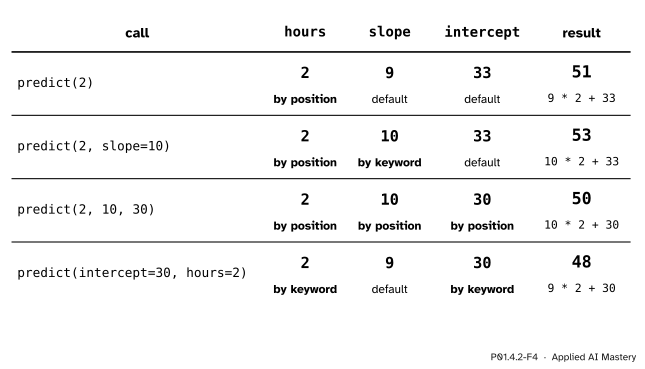
Four calls of one function. Each cell shows the value a parameter ends up with and the rule that gave it; the last column shows the arithmetic of the body and its result.
The last two calls show that position and keyword are just two ways of saying the same thing: predict(2, 10, 30) and predict(hours=2, slope=10, intercept=30) fill the slots identically.
Code
The four calls of the worked example, and the keyword call written in two orders:
The last print(), with no values at all, prints just its end, a new line, which closes the line that the loop left open.
Type hints are notes, not checks. Python runs this call although every argument has the wrong type: 'ha' * 3 repeats the text three times, and + joins on the '!'.
Calls that break the rules stop the program. Here is the full message for a missing argument, from a file calls.py that holds the definition of predict and then the line print(predict(slope=10)). It was copied from a run of Python 3.15; the wording of such messages varies a little between versions.
With print(predict(2, hours=3)), print(predict(2, slop=10)) or print(predict(2, 10, 30, 5)) on line 4 instead, the last line of the message is, in turn:
TypeError: predict() got multiple values for argument 'hours'
TypeError: predict() got an unexpected keyword argument 'slop'. Did you mean 'slope'?
TypeError: predict() takes from 1 to 3 positional arguments but 4 were given
Each names the function, then says which rule failed. Older versions of Python leave out the helpful “Did you mean” at the end.
Explore
This module’s interactive, the call-stack stepper, lives in lesson P01.4.3. It draws every call with its parameters already bound, so you can see that hours in one call and hours in another are separate names.
Pitfalls
P01.4.2-F5
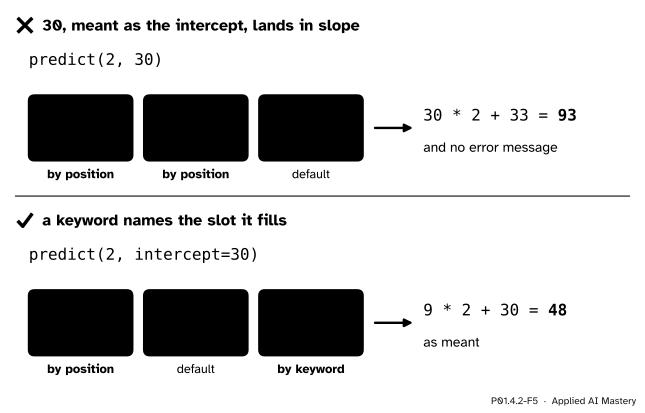
Wrong beside right. A second positional argument always fills the second slot, whatever you meant it for. Naming the slot makes the call say what it means.
“Python will know that the 30 is the intercept.”
Position is the only thing a positional argument has. predict(2, 30) puts 30 in the second slot, slope, and returns 30 × 2 + 33 = 93 without any message, so the mistake can travel a long way before anyone notices. Pass everything after the first argument or two by keyword: predict(2, intercept=30) is 48, as meant. Library calls are written this way for the same reason.
“A keyword argument can go anywhere in the call.”
Positional arguments must come first. predict(slope=10, 2) never runs: Python stops while reading the file, with SyntaxError: positional argument follows keyword argument, and points at the 2. Write predict(2, slope=10).
“The type hints will catch a wrong argument.”
They are notes for people and for checking tools. Python itself ignores them when it runs the call, as predict_hinted('ha', 3, '!') showed. A wrong type is caught, if at all, only when the body tries an operation the value cannot do.
Check yourself
Recall
1. In predict(2, intercept=30), which argument is positional and which is a keyword argument?
Show answer
2 is positional: it fills the first slot, hours. intercept=30 is a keyword argument: it fills the slot named intercept.
2. What value does a parameter take when no argument fills its slot?
Show answer
Its default, if the def line gives one. If it has no default, the call raises a TypeError.
3. In what order does Python apply its three matching rules?
Show answer
Positional arguments fill slots from the left, then keyword arguments fill the slots they name, then defaults fill any slot still empty.
4. With def predict(hours, slope=9, intercept=33), why does predict(2, hours=3) fail?
Show answer
The 2 fills hours by position, then hours=3 tries to fill the same slot again: TypeError, got multiple values for argument hours.
5. Does Python check type hints when a function is called?
Show answer
No. It stores them, but runs the call whatever the types of the arguments.
Exercises
1.★ With def predict(hours, slope=9, intercept=33), work out predict(3), predict(3, intercept=0) and predict(slope=0, hours=3).
Show solution
predict(3) takes both defaults: 9 × 3 + 33 = 27 + 33 = 60. predict(3, intercept=0) keeps the slope 9 and drops the intercept: 9 × 3 + 0 = 27. predict(slope=0, hours=3) fills both slots by keyword and keeps the intercept 33: 0 × 3 + 33 = 33. A slope of 0 makes the prediction the same for every student.
2.★★ Say what happens for each call, and fix the ones that fail. (a) predict() (b) predict(2, 10, hours=2) (c) predict(hours=2, 10) (d) predict(2, intercept=30, slope=10)
Show solution
(a) TypeError: the hours slot is empty and has no default. Pass it: predict(2) is 51.
(b) TypeError: rule 1 puts 2 in hours and 10 in slope, then hours=2 finds hours already filled. Drop the keyword: predict(2, 10) is 53.
(c) SyntaxError, before anything runs: a positional argument follows a keyword argument. Write predict(2, slope=10), or name both, predict(hours=2, slope=10); either gives 53.
(d) It works: 2 fills hours, and the two keywords fill their slots in any order. The result is 10 × 2 + 30 = 50.
3.★★★ Write band(score, distinction=70, pass_mark=50), which returns 'distinction', 'pass' or 'fail' with the cut-offs as parameters (P01.3.1). Work out band(65), band(65, distinction=60) and band(45, pass_mark=40). How many of the five scores get each band with the defaults, and how many with distinction=60?
Show solution
The tests run from the highest cut-off down, so that the first true test wins:
band(65) is 'pass', because 65 is below 70 but at least 50. band(65, distinction=60) is 'distinction'. band(45, pass_mark=40) is 'pass'.
With the defaults, the scores 55, 65, 80, 40 and 60 give pass, pass, distinction, fail and pass: one distinction, three passes and one fail, as in P01.3.1. With distinction=60 they give pass, distinction, distinction, fail and distinction: three distinctions, one pass and one fail. One keyword argument moved two students up a band without touching the function.
Summary card
Arguments fill parameter slots by position or by name; defaults fill the rest.
P01.4.2-F1
Position, keyword, default.
Rules, in order: positional arguments from the left, then keywords by name, then defaults.
Errors: a slot left empty, filled twice or named wrongly is a TypeError; a keyword before a positional argument is a SyntaxError.
Signatures:name=value marks a default; after a *, parameters go by keyword only.
Type hints are notes; Python does not check them.
Sources and next steps
Sources. Each was opened and checked against this lesson on 12 November 2026.
Python Software Foundation, The Python Language Reference, section 6.3.3, Calls. The rules of this lesson: a list of unfilled slots, positional arguments placed in the first slots, each keyword argument placed in the slot of its name with a TypeError if it is already filled, defaults for the slots still unfilled, and a TypeError for an unfilled slot without a default, for too many positional arguments and for an unknown keyword.
Python Software Foundation, The Python Tutorial, section 4.9, More on Defining Functions: 4.9.1 Default Argument Values (the default is evaluated only once), 4.9.2 Keyword Arguments (“keyword arguments must follow positional arguments”, “no argument may receive a value more than once”) and 4.9.8 Function Annotations (optional, with no effect on the rest of the function).
Python Software Foundation, Built-in Functions: the signatures round(number, ndigits=None) and print(*objects, sep=' ', end='\n', file=None, flush=False), with sep, end, file and flush given as keyword arguments. And the typing module: “The Python runtime does not enforce function and variable type annotations.”
scikit-learn 1.9.1 documentation, LinearRegression: the signature quoted in Build it up, every option keyword-only with a default.
Next.P01.4.3 The call stack follows predict when it is called from inside another function, and gives every call a frame of its own.