Three loop patterns turn a list into one answer: a running total (300, so the mean of the scores is 60.0), a count (4 passes) and the best so far (80). Add a search that stops early with break, skip items with continue, and check every answer against sum, len, max and min.
Write and trace the accumulate pattern for a running total, and compute the mean of the five scores as 60.0.
Write the count pattern and the best-so-far pattern, choosing a start value that cannot give a wrong answer.
Explain why a pattern is right by stating what its name holds after every pass.
Use break to stop a search at the first match and continue to skip an item, and say which lines run after each.
Check each pattern against the built-ins sum, len, max and min.
In review. The maths and code on this page are checked by automated tests on every change, but an independent reader has not signed it off yet. Spot a mistake or a confusing step? Tell us.
The question
For the five scores 55, 65, 80, 40 and 60, the mean is 60, four students passed, the top score is 80 and the first score below the pass mark is Dina’s 40, in position 3 counting from 0. Each answer squeezes a whole list into one value. What do the loops behind these answers have in common, and how does a loop stop as soon as it has found what it was looking for?
From the last lesson
1. Which numbers does range(2, 10, 3) give?
Show answer
2, 5 and 8. The stop, 10, is never given.
2. A loop over range(2) holds a loop over range(3). How many times does the inner body run?
Show answer
\({2 \times 3 = 6}\) times.
Intuition
To turn a list into one answer, keep the answer so far in a name. Give it a value before the loop starts, let every pass update it with one item, and read it after the loop ends. This shape is called a loop pattern, and three of them cover a great many everyday questions about data.
P01.3.4-F1
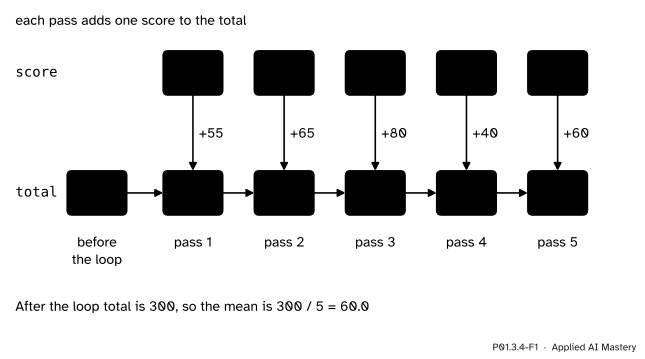
The running total. Before the loop total is 0; each pass adds one score; after the last pass it holds the total of the whole list.
Accumulate. Keep a running total: start at 0, add each item.
Count. Keep a count: start at 0, add 1 for each item that passes a test.
Best so far. Keep the largest item seen yet: start with no answer, and replace it whenever an item beats it.
A fourth shape, the search, looks for the first item that passes a test and stops there.
Build it up
Step 1. Accumulate. The running total of the figure, in code:
total =0for score in [55, 65, 80, 40, 60]: total = total + score
After the loop total is 300. To get the mean, divide by the number of scores, which a second name can count with the same pattern: start n at 0 and add 1 in every pass. Then \({300 / 5 = 60.0}\); / always gives a float (P01.2.3).
Step 2. Count. Put the update under an if, so that only some items change the answer. To count the scores of at least 50, start count at 0 and add 1 when score >= 50. Four scores pass the test; Dina’s 40 leaves count as it was.
Step 3. Best so far. Before the loop no score has been seen, so there is no largest yet. Python writes “no value” as None (P01.2.1). In each pass, if there is no answer yet or the score beats the answer, the score becomes the new answer:
largest =Nonefor score in [55, 65, 80, 40, 60]:if largest isNoneor score > largest: largest = score
largest is None asks whether the name is bound to the one None object; this is the right test for None, while numbers are always compared with ==, < or >. The first score, 55, replaces None; 65 beats 55; 80 beats 65; 40 and 60 do not beat 80. The answer is 80.
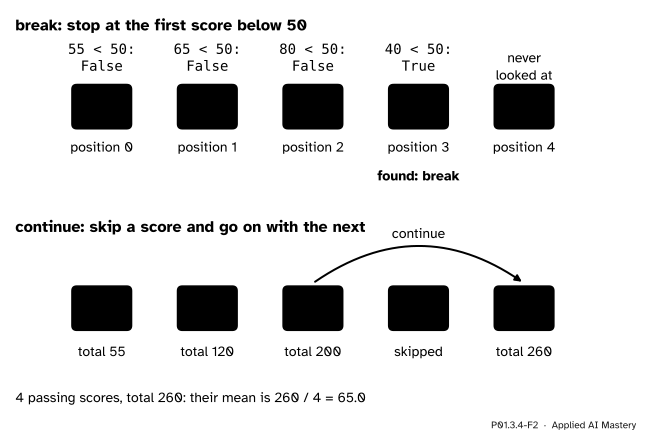
Step 4. Search, and leave early. To find the first score below 50, look at the scores in order and stop at the first match. The statement break ends the loop at once. Since the positions of items are counted from 0, a counter that starts at 0 and goes up by 1 after each miss holds the position of the match when the loop breaks.
Step 5. Skip an item. The statement continue ends the current pass early and goes straight on to the next item. To total only the passing scores, continue whenever a score is below 50.
P01.3.4-F2
Top:break stops the search at the first score below 50, Dina’s 40 in position 3 counting from 0; the last score is never looked at. Bottom:continue skips the 40 and the loop goes on.
The formal statement
NoteThe pattern, and why it works
# before the loop: the answer for no itemsanswer = startfor item in items: answer = update(answer, item)# after the loop: the answer for all items
Invariant. After \(k\) passes, answer holds the answer for the first \(k\) items.
The invariant is what makes a pattern correct, and it can be checked in two steps. Take the running total.
Before the loop, \({k = 0}\): no items have been seen, and total is 0, which is the total of no items.
One more pass. Suppose that after \(k\) passes total is the total of the first \(k\) items. Pass \({k + 1}\) adds item \({k + 1}\), so afterwards total is the total of the first \({k + 1}\) items.
The first step makes the invariant true at the start and the second keeps it true through every pass. So after all 5 passes total is the total of all 5 scores, 300. The same two steps work for the count (the number of passing items among the first \(k\)) and for the best so far (the largest of the first \(k\) items, or None when \({k = 0}\)).
This also says what the start value must be: the answer for no items at all. The total of no scores is 0 and so is their count, but no number is the largest of no scores, which is why largest starts at None.
break and continue.break ends the nearest loop that contains it, at once: the rest of the body and all the remaining items are skipped. continue ends only the current pass: the rest of the body is skipped and the loop goes on with the next item. Both are written inside an if, so that they act only on the items that pass its test.
Worked example
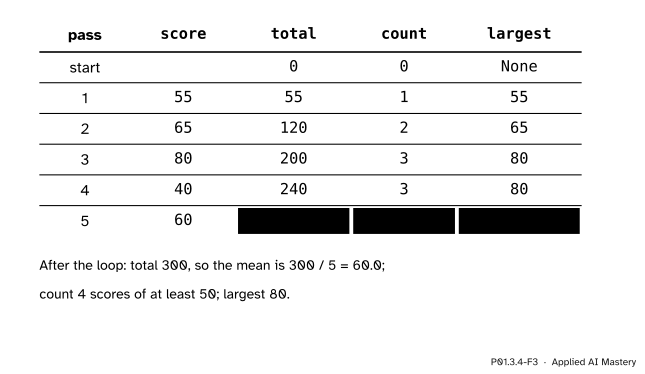
Run all three patterns in one loop over the scores. Before the loop: total is 0, count is 0, largest is None.
Pass 1, score is 55: total\({0 + 55 = 55}\); \({55 \ge 50}\), so count is 1; largest is None, so it becomes 55.
Pass 2, 65: total\({55 + 65 = 120}\); count 2; \({65 > 55}\), so largest is 65.
Pass 3, 80: total\({120 + 80 = 200}\); count 3; \({80 > 65}\), so largest is 80.
Pass 4, 40: total\({200 + 40 = 240}\); \({40 \ge 50}\) is False, so count stays 3; 40 does not beat 80.
Pass 5, 60: total\({240 + 60 = 300}\); count 4; 60 does not beat 80.
P01.3.4-F3
The three patterns traced together. Each row holds the answers for the scores seen so far; the last row holds the answers for the whole list.
After the loop: the total is 300 and the mean \({300 / 5 = 60.0}\); 4 scores are at least 50; the largest is 80. Each row of the trace is the invariant made visible: after pass 3, for example, the row holds the total, the count and the largest of 55, 65 and 80.
Code
The three patterns from scratch, in one loop. n counts every item, to divide by.
scores = [55, 65, 80, 40, 60]total =0n =0count =0largest =Nonefor score in scores: total = total + score n = n +1if score >=50: count = count +1if largest isNoneor score > largest: largest = scoreprint('total', total, 'mean', total / n)print('at least 50:', count, 'largest:', largest)
total 300 mean 60.0
at least 50: 4 largest: 80
The search, with break. found starts at None, so that a list with no score below 50 can be told apart from one where the match is found.
position =0found =Nonefor score in scores:if score <50: found = scorebreak position = position +1print('first score below 50:', found, 'at position', position)
They agree with the loops. Use the built-ins in real work; the patterns are what they do inside, and the shape to reach for when no built-in fits. A model’s loss is computed this way: the mean squared error of ML01 is a running total of squared errors, divided by their number (Exercise 2).
Explore
This module’s interactive, the flow-chart tracer, lives in lesson P01.3.3. Its third program is this lesson’s running total. Set the number of scores in the list from 0 to 5 and run it: the body runs once per item, and with all five scores total ends at 300.
Pitfalls
P01.3.4-F4
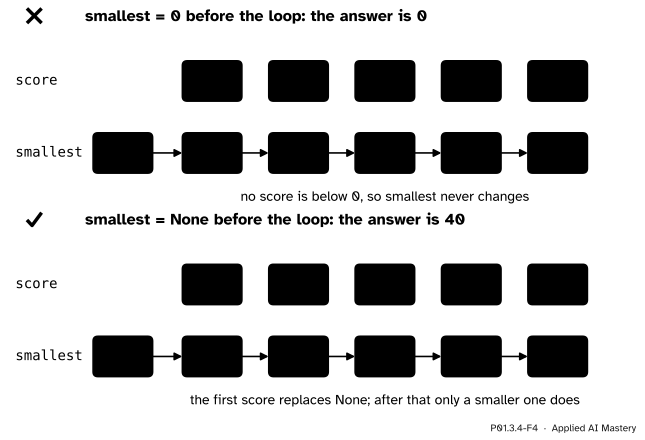
Wrong beside right. A smallest-so-far that starts at 0 is smaller than every score, so it is never replaced and the answer is 0, which is not even a score. Starting at None gives 40.
“Any start value will do.”
The start value must be the answer for no items. For a smallest-so-far, 0 looks harmless, but every score is above it, so smallest stays 0. Start at None and let the first item replace it, as the figure shows: the answer is 40. A largest-so-far that starts at 0 happens to work for these scores, which are never negative, and fails as soon as every item is below 0.
“The start can go inside the loop.”
Then it runs in every pass and wipes out the answer so far:
for score in scores: total =0 total = total + scoreprint(total)
This prints 60, the last score alone, not 300. The start goes before the loop, the update inside it, and the answer is read after it.
“Indenting the print just tidies it.”
Indented under the for, the print joins the body and runs on every pass: it shows the running totals 55, 120, 200, 240 and 300 on five lines instead of the answer once. Which lines repeat is decided by indentation alone.
“The built-ins cope with an empty list.”
sum([]) is 0, the total of nothing, and len([]) is 0. But no number is the largest of no items, so max refuses:
print(max([]))
Traceback (most recent call last):
  File "empty.py", line 1, in <module>
    print(max([]))
          ~~~^^^^
ValueError: max() iterable argument is empty
This message was copied from a run with Python 3.15; the wording and the markers vary a little between versions. The mean of an empty list fails too, because it divides by a length of 0.
Check yourself
Recall
1. What start value does a running total need, and why?
Show answer
0, because it must be the answer for no items, and the total of no numbers is 0.
2. Why is None a safer start for the smallest so far than 0?
Show answer
0 is smaller than every score, so no score would replace it and the answer would be 0, which is not in the list. None means “no answer yet”, and the first item replaces it.
3. What does break do?
Show answer
It ends the loop at once. The rest of the body and every remaining item are skipped, and the line after the loop runs next.
4. What does continue do?
Show answer
It ends the current pass only: the rest of the body is skipped, and the loop goes on with the next item.
5. Which built-ins give the total, the number, the largest and the smallest of a list?
Show answer
sum, len, max and min.
Exercises
1.★ With one loop over the five scores, count the scores of at least 60 and add them up.
Show solution
Start count and total at 0. In each pass, if score >= 60, add 1 to count and add the score to total. 55 fails, 65 passes, 80 passes, 40 fails, 60 passes (\({60 \ge 60}\)). So count is 3 and total is \({65 + 80 + 60 = 205}\).
2.★★ The course’s rule predicts the score \({9 \times \text{hours} + 33}\) from the hours studied. For the five students it gives 51, 69, 78, 42 and 60, so it misses their scores by the errors 4, -4, 2, -2 and 0. Use the accumulate pattern to find the mean squared error: the mean of the squared errors. Then do the same for the errors of always predicting the mean, 60.
Show solution
Start total at 0 and add error * error in each pass. The squares are 16, 16, 4, 4 and 0, so total is 40, and \({40 / 5 = 8.0}\). Always predicting 60 misses by \({55 - 60 = -5}\), then 5, 20, -20 and 0. Their squares are 25, 25, 400, 400 and 0, which add to 850, and \({850 / 5 = 170.0}\). The line’s mean squared error, 8.0, is far below 170.0: this is how ML01 compares models.
total =0for error in [4, -4, 2, -2, 0]: total = total + error * errorprint(total /5)
3.★★★ Write a loop that finds the position, counting from 0, of the largest score. Why must the comparison be > and not >= if, when two scores tie, you want the first of them?
Show solution
Keep the best score and its position, and a counter for the current position:
best =Nonebest_position =Noneposition =0for score in scores:if best isNoneor score > best: best = score best_position = position position = position +1
For the five scores best_position is 2, Chen’s 80. With the scores 55, 80, 65, 80, the test score > best is False for the second 80, which only equals the best, so the answer stays 1. With >= the second 80 would also replace it, and the answer would be 3, the last of the tied scores.
Summary card
A loop pattern keeps the answer so far and updates it with every item.
P01.3.4-F1
The running total of the scores.
Shape. Start with the answer for no items; update it in the body; read it after the loop.
Accumulate, count, best so far. Start at 0, 0 and None. Scores: total 300, mean 60.0, count 4, largest 80.
Search.break ends the loop at the first match: Dina’s 40, position 3 counting from 0. continue skips the rest of one pass.
Built-ins.sum, len, max, min; max and min refuse an empty list.
Sources and next steps
Sources. Each was opened and checked against this lesson on 12 November 2026.
Allen B. Downey, Think Python, 3rd edition, chapter 7 (CC BY-NC-SA 4.0). Section 7.3 calls an assignment whose new value depends on the old one an update, and says a variable must be initialised before it is updated; 7.4 starts a total at 0 before the loop and calls a variable that counts how often something happens a counter; 7.6 calls the pattern that checks items one at a time until it finds what it is looking for a linear search.
Python Software Foundation, Python built-ins reference, Built-in functions. sum adds the items from left to right, len returns the number of items, and max and min raise ValueError for an empty iterable unless a default is given.
Next. Module P01.4, Functions and scope, opens with P01.4.1, Defining and calling a function, which wraps the running total and its mean in a function of its own, mean(values), that returns 60.0 for the scores.