x = 5
y = x
# is asks: do x and y refer to the same object?
print(x is y, id(x) == id(y))
x = x + 1
print(x, y)
print(x is y)True True
6 5
FalseBefore this lesson
P01.2.1 Values and their types
After this lesson you can
In review. The maths and code on this page are checked by automated tests on every change, but an independent reader has not signed it off yet. Spot a mistake or a confusing step? Tell us.
Three lines of Python: x = 5, then y = x, then x = x + 1. What is y now? Many people meeting this for the first time say 6, as if y were tied to x. Python says 5. Which picture of memory makes the right answer obvious, and why will the same picture later explain a list that seems to change by itself?
From the last lesson
1. What does '4' + '2' give, and what does 4 + 2 give?
'42', the two pieces of text joined, and 6, the two numbers added.
2. What are int(7.8), int(-7.8) and float('7.8')?
7, −7 and 7.8. int cuts off the fractional part, moving towards zero.
Lesson P01.1.4 drew memory as a long row of numbered cells. A value lives in some of those cells, together with its type; Python calls it an object. A name (often called a variable) is a label that refers to an object. The name is not the cells and does not hold the value; it is a label with an arrow to the object.
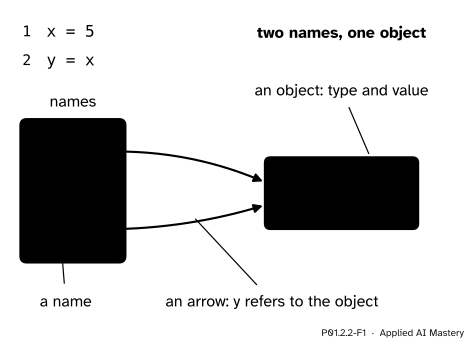
The course’s memory diagram. Names sit on the left in a frame, objects sit on the right as boxes that show type and value, and one arrow runs from each name to its object. After y = x there is still only one 5.
That is the whole idea, and the rest of this lesson draws it carefully. Read x = 5 as “x refers to 5”, or “bind x to 5”, never as “x equals 5”. The same picture explains how Python treats every value later in the course, from lists to the arrays that hold a model’s weights, which two names can share in exactly this way.
Step 1. x = 5 makes an object and a name. Python makes an int object holding 5 and binds the name x to it: one box on the right, one label on the left, one arrow.
Step 2. A name on the right means “the object it refers to now”. In y = x, the right-hand side is the name x, and its value is the object that x refers to. So y is bound to that same object. Nothing is copied: the diagram gains a second arrow, not a second box.
Step 3. Every assignment takes two steps. First Python works out the right-hand side, all of it, until it has one object. Only then does it bind the name on the left to that object.
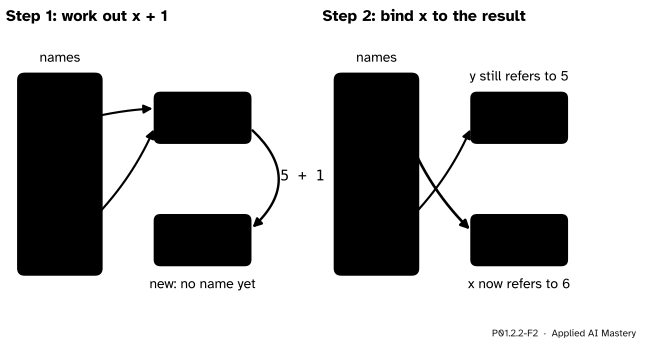
The two steps of x = x + 1. Left: the right-hand side is worked out using the object x refers to now, which makes a new object, 6. Right: the name x is moved to it. The green arrow marks the step just taken.
Step 4. Rebinding moves a label; it does not change an object. In x = x + 1, the object 5 is not turned into 6. A new object 6 is made, and the label x is moved to it. y still refers to 5. An int can never be changed after it is made; lesson P01.6.4 meets the types that can be.
Step 5. An object with no name fades away. After x = 5 and then x = 7, nothing refers to the 5 any more. No line of the program can reach it, so Python is free to reuse its memory.
Step 6. A name has no type; its object does. score = 55 and then score = 'fifty-five' is allowed. type(score) reports the type of the object that score refers to at that moment.
Asking about identity. The built-in id(obj) gives a whole number for an object’s identity, unique among the objects that exist at the same time. In the standard Python from python.org (called CPython) it is the memory address where the object starts: the cell number of lesson P01.1.4. The operator is asks whether two names refer to the same object, so x is y is True exactly when id(x) == id(y). The numbers that id returns change from one run to the next, so this lesson compares them and never prints them.
Choosing names. A name may contain letters, digits and the underscore _, but it cannot start with a digit. Capitals count, so Score and score are two different names. A name cannot be one of Python’s keywords, the words that give a program its structure, such as if, for, class, True and None. By the style guide PEP 8, names of values are lower case with words joined by underscores, a style called snake_case: total_score, mean_hours. Choose a name that says what the value means: score tells a reader more than s.
total_score is allowed: letters joined by _.score2 is allowed: the digit is not the first character.2nd_score is not: it starts with a digit.total score is not: a space splits it into two names.class is not: it is a keyword.A name that breaks a rule stops the program before any line runs, because Python cannot even read it, as lesson P01.1.2 explained. Two examples, each copied from a run with Python 3.15:
  File "names.py", line 1
    2nd_score = 65
    ^
SyntaxError: invalid decimal literal
File "names.py", line 1
total score = 300
^^^^^
SyntaxError: invalid syntaxDraw the memory diagram after each line, and work out what the last line prints.
x = 5
y = x
x = x + 1
print(x, y)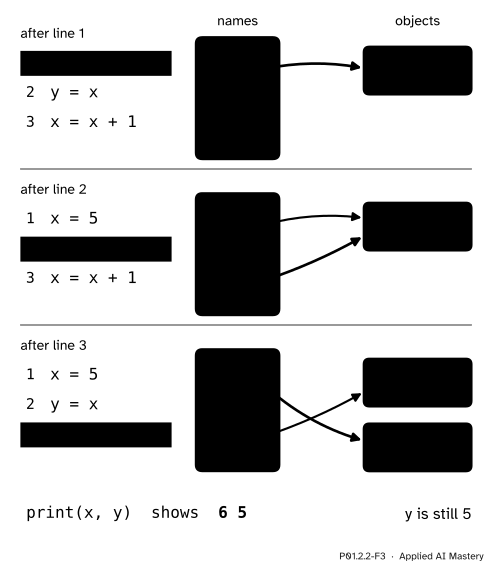
The memory diagram drawn line by line. The yellow line is the one just run, and the green arrow is the binding it made.
Line 1. The right-hand side is the value 5, so Python makes an int object 5 and binds x to it.
Line 2. The right-hand side is the name x, whose object is the 5. Python binds y to that same object. Now two names share one object.
Line 3. Step one: work out x + 1. x refers to 5, so this is 5 + 1, which makes a new int object, 6. Step two: bind x to the 6. The arrow from y is untouched.
Line 4. print looks up each name and prints its object: x gives 6 and y gives 5, so the output is 6 5.
The same run as a trace table, with one row per line:
| line | x refers to |
y refers to |
output |
|---|---|---|---|
| 1 | 5 | ||
| 2 | 5 | 5, the same object | |
| 3 | 6, a new object | 5 | |
| 4 | 6 | 5 | 6 5 |
The worked example, with is asking whether the two names share an object.
x = 5
y = x
# is asks: do x and y refer to the same object?
print(x is y, id(x) == id(y))
x = x + 1
print(x, y)
print(x is y)
True True
6 5
FalseA name can be rebound to an object of a different type, because the type belongs to the object.
score = 55
print(type(score))
score = 'fifty-five'
print(type(score))
<class 'int'>
<class 'str'>Now names that say what they mean, on Ama’s row of the study table. The prediction rule 9 × hours + 33 is the course’s running example.
name = 'Ama'
hours = 2
score = 55
prediction = 9 * hours + 33
error = score - prediction
print(name, prediction, error)
Ama 51 4Using a name before any line has bound it is an error that appears only when that line runs (lesson P01.1.2). The one-line file print(total) stops with (Python 3.15; other versions word some messages a little differently):
Traceback (most recent call last):
  File "before.py", line 1, in <module>
    print(total)
          ^^^^^
NameError: name 'total' is not definedMemory-diagram builder
Run x = 5, y = x and x = x + 1, one button at a time, and watch the arrows. Then run y = 'hi' and see what happens to the 5, and try x = x + 1 once x refers to text.
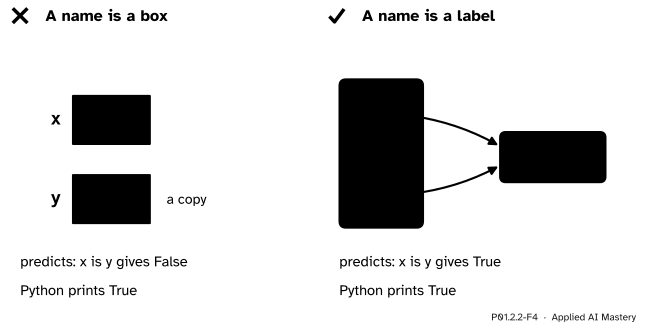
Wrong beside right. If names were boxes, y = x would copy the 5 and x is y would be False. Python prints True: there is one object with two labels.
“y = x makes y a copy of x.”
Nothing is copied: y refers to the very object that x refers to, as x is y shows. With numbers you cannot see the difference in the values, which is why the box picture survives for so long. With lists it changes answers: lesson P01.6.4 changes a list through one name and sees the change through the other.
“x = x + 1 changes the 5 into a 6.”
It makes a new object 6 and moves the label x to it. The 5 is unchanged, and any other name that referred to it, like y, still does.
“= means equals, so x = x + 1 is nonsense.”
As an equation it would be: no number equals itself plus one. In Python, = is an instruction, “bind the name on the left to the value on the right”, worked right side first. The question “are these equal?” is written ==, in lesson P01.2.4.
“is checks that two numbers are equal.”
is asks whether two names refer to one object. Whether Python keeps two equal numbers, or two equal strs, as one object or as two is left to the interpreter, as the Language Reference says. On the computer these lessons were written on, typing a = 300, b = 300 and then a is b at the prompt gave False with Python 3.12 and True with Python 3.15. Compare values with ==; keep is for asking about identity.
1. What are the two steps of an assignment?
Work out the right-hand side until it is one object, then bind the name on the left to that object.
2. After x = 5 and y = x, how many int objects holding 5 does the memory diagram show, and how many arrows point to them?
One object and two arrows: y = x binds y to the object x refers to.
3. After x = 5, y = x and x = x + 1, what are x and y, and what does x is y give?
x is 6 and y is 5, and x is y is False: x now refers to a new object.
4. Which of these names does Python accept: total_score, 2nd_score, score2, class?
total_score and score2. 2nd_score starts with a digit, and class is a keyword.
5. What does is ask, and why must it not be used to compare two numbers?
Whether two names refer to the same object. Whether two equal numbers are one object or two is up to the interpreter and can change between versions, so is can give either answer; == compares the values.
1. ★ Draw the memory diagram after each line of a = 10, b = a, a = 'ten'. What do print(a, b) and print(type(b)) show?
After line 1, a points to an int 10. After line 2, b points to the same int 10. After line 3, Python makes a str object 'ten' and moves a to it; b keeps its arrow to 10. print(a, b) shows ten 10, and print(type(b)) shows <class 'int'>.
2. ★★ Start from x = 1 and y = 2. The lines y = x and then x = y were meant to swap the two values but leave both names on 1. Draw why, then fix the swap with a third name, temp.
y = x moves y to the object 1, and the 2 loses its last name. Then x = y binds x to the object y refers to, which is 1 again. Both names end on 1, and the 2 can no longer be reached.
The fix keeps the 2 reachable by giving the first value a name of its own:
temp = x
x = y
y = temp
After temp = x, temp and x share the 1. After x = y, x refers to 2. After y = temp, y refers to 1. Now x is 2 and y is 1. Lesson P01.6.2 shows the one-line form x, y = y, x.
3. ★★★ Trace this program with a memory diagram after each line. What does it print, which objects have a name at the end, and which object lost its last name along the way?
total = 55
first = total
total = total + 65
total = total + 80
print(first, total)Line 1 binds total to an int 55. Line 2 binds first to the same 55. Line 3 works out 55 + 65, a new object 120, and moves total to it; the 55 keeps the name first. Line 4 works out 120 + 80, a new object 200, and moves total to it. Now nothing refers to the 120: it lost its last name on line 4 and can no longer be reached.
The program prints 55 200. At the end two objects have names: 55 (called first) and 200 (called total).
A name is a label on an object. Assignment works out the right-hand side, then moves the label.
Two names, one object.
x = expression: work out the expression to one object, then bind x to it.y = x adds a second label to the same object; nothing is copied.x = x + 1 makes a new object and moves x; other names keep their objects.is asks “the same object?”. Names use letters, digits and _, never start with a digit, are never a keyword, and are written in snake_case.Sources. Each was opened and checked against this lesson on 12 November 2026.
is compares identities; for CPython id(x) is the memory address; and after a = 1; b = 1 the two names “may or may not refer to the same object”, depending on the implementation.76trombones and class.temp.Next. P01.2.3 Arithmetic and expressions looks inside the right-hand side: how Python works out a line of arithmetic to one object.
This lesson unlocks
P01.2.3 Arithmetic and expressions