# A comment: Python skips everything from the hash to the end of the line.
print("Hello, world")
55 + 65 + 80 + 40 + 60Hello, world300Before this lesson
P01.1.2 From source text to running program
After this lesson you can
In review. The maths and code on this page are checked by automated tests on every change, but an independent reader has not signed it off yet. Spot a mistake or a confusing step? Tell us.
Type 55 + 65 + 80 + 40 + 60 at Python’s prompt and it answers 300 at once. Save the same line in a file, run the file, and nothing appears at all. Same line, same Python: why does one way show the answer while the other stays silent, and which way should you use?
From the last lesson
1. A four-line file has a syntax error in line 4. How many of its lines run, and why?
None. The syntax error stops the compile stage, so no bytecode is made and the run stage never starts, even for the three good lines above it.
2. A four-line file misspells a name in line 3. How many lines run?
Two, lines 1 and 2. The file compiles, and the unknown name is found only when line 3 runs.
You can give Python its instructions in two ways.
At the interactive prompt you type one line, and Python answers it straight away, then waits for the next. It is a conversation. Python works out the value of what you typed and shows it, which is why a sum is answered with 300. Read a line, evaluate it, print the value, loop back for more: this cycle is the read, evaluate, print loop, or REPL.
In a script you write the lines in a file first, then ask Python to run the whole file. It compiles the file and runs it from top to bottom (P01.1.2) without stopping to talk. It shows only what the program sends to the screen with print. A sum on a line of its own is worked out and then dropped, because nothing asked for it to be shown.
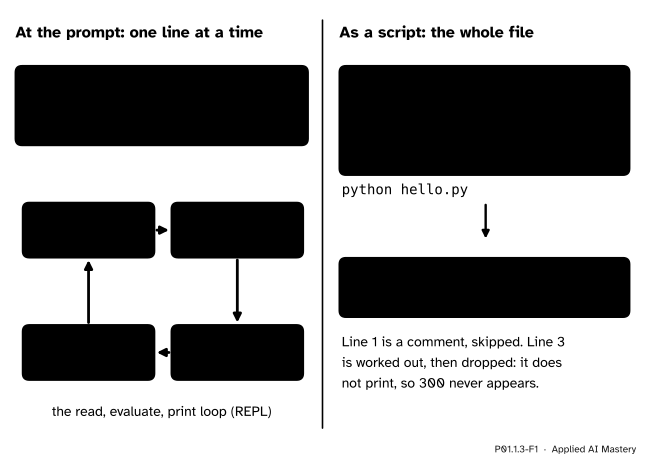
Two ways to run Python. The prompt answers each line you type with its value; a script runs the whole file and shows only what it prints.
Both ways use the same interpreter. The prompt is for trying things: one line, an answer, the next line. A script is for keeping: a program you can run again tomorrow, change and share. Machine-learning work uses both. You try an idea at a prompt, or in a notebook (P02.9), then keep it in a script that can be run again on new data.
Step 1. Install Python and check its version. Python is free from python.org. On Windows, the Python install manager, from python.org or the Microsoft Store, sets it up. On macOS, use the installer from python.org; most Linux systems have Python already. Then open a terminal, the window in which you type commands to the computer (Terminal on macOS and Linux, Terminal or PowerShell on Windows), and type:
python --versionIt answers with the version number, for example:
Python 3.15.2Your numbers may differ; this course needs Python 3.12 or later. On some systems the command has another name: python3 on most Macs and Linux systems, or py on Windows. If python is not found, try those, and use that name wherever this course writes python.
Step 2. Start the prompt. Type python on its own. Python prints two lines of greeting, the first giving its version, then its prompt, >>>. The prompt means Python is waiting for a line of Python. Type a line and press Enter:
>>> 55 + 65 + 80 + 40 + 60
300
>>> 9 * 2 + 33
51
>>> print("Study table")
Study table
>>> "Study table"
'Study table'
Each line is read, evaluated and its value printed. The last two lines show a detail: the prompt shows a piece of text with its quotes, so that you can see it is text, while print shows the text itself. To leave, type exit(), or press Ctrl-D on macOS and Linux, Ctrl-Z then Enter on Windows. The terminal’s own prompt comes back.
Step 3. Write a script. Open a plain-text editor: IDLE, which comes with Python from python.org, a code editor such as VS Code, or any editor that saves plain text, but not a word processor. Type these lines and save them in a file called hello.py:
# hello.py: a first script
print("Hello, world")
55 + 65 + 80 + 40 + 60
print(9 * 2 + 33)
Step 4. Run it. In the terminal, in the folder that holds the file, type:
python hello.pyThe output is:
Hello, world
51
Lines 2 and 4 print. Line 3 is worked out to 300 and dropped, because it does not print.
Step 5. Comments. Line 1 is a comment. It starts with the hash sign, #, and runs to the end of the line, and Python skips it completely. A comment is a note for people who read the code, including you next month. It can also follow code on the same line, here to say what the 2 in the sum stands for:
print(9 * 2 + 33) # 2 hoursWhen a line fails, Python prints an error message. The message from a running program starts with the line Traceback (most recent call last):, and the part that matters most is at the bottom. Read it from the bottom up:
^^^^^, under the part it could not carry out.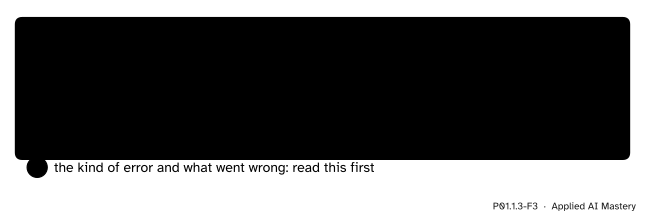
The three parts of an error message, numbered in the order to read them: from the bottom up.
A message from a syntax error has no Traceback line, because nothing was running yet (P01.1.2), but it is read the same way: the kind of error at the bottom, then the line with its marker, then the file and line number.
The same four lines, two ways. Run hello.py as a script, then type its four lines at the prompt one by one, and compare what appears.
As a script, the output is Hello, world and 51, as in step 4. At the prompt, line 1 is a comment, so nothing appears. Line 2 prints Hello, world. Line 3 is an expression, so the prompt shows its value, 300, and line 4 prints 51.
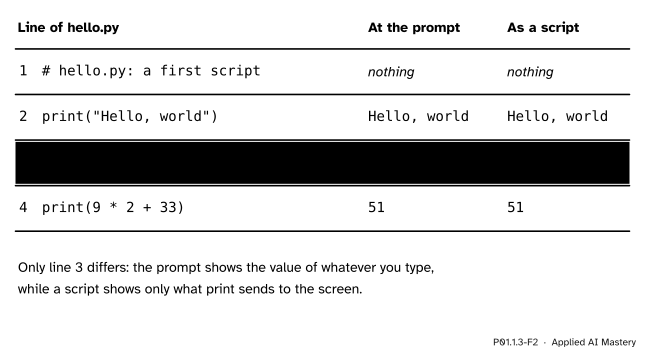
The four lines of hello.py run two ways. Only line 3, the bare sum, behaves differently.
A first error message. Now change line 4 of hello.py to Print(9 * 2 + 33), with a capital P, save the file and run it again. Python 3.15 prints this (the wording varies a little between versions, and on your computer the file name includes its folder):
Hello, world
Traceback (most recent call last):
  File "hello.py", line 4, in <module>
    Print(9 * 2 + 33)
    ^^^^^
NameError: name 'Print' is not defined. Did you mean: 'print'?
Read it from the bottom up.
The last line. A NameError: Python knows no name Print, and it even suggests print.
The line and its marker. The marker sits under Print, the part Python could not carry out.
The file and line. The line is line 4 of hello.py.
The fix is a lower-case p. Notice, too, that Hello, world was printed before the message. That is the rule of P01.1.2: lines 1 to 3 ran before line 4 failed. The top line of the message, the same in every such message, makes sense after the call stack of P01.4.3.
The cells on this page work like a script, with one extra: like the prompt, a cell also shows the value of its last line, if that line is an expression. This is a convenience of notebooks, the tool these pages are built with (P02.9 returns to them).
# A comment: Python skips everything from the hash to the end of the line.
print("Hello, world")
55 + 65 + 80 + 40 + 60
Hello, world300The cell printed Hello, world, then showed 300, the value of its last line. Only the last line gets this treatment, so the value of the first line below is dropped, as in a script:
9 * 2 + 33
55 + 65 + 80 + 40 + 60300This module’s interactive, the line-by-line stepper, lives in lesson P01.1.2. It runs a file the way a script runs: plant a misspelt name and watch the output stop at that line, with the error message below it.
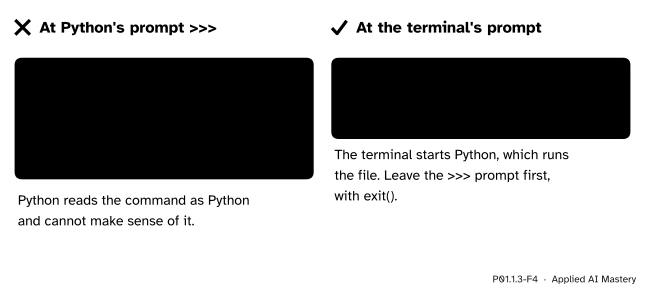
Wrong beside right. python hello.py is a command for the terminal, not a line of Python.
“I typed python hello.py and got a SyntaxError.”
You typed it at Python’s prompt, >>>, which expects Python, not a command. Leave the prompt with exit(), so that the terminal’s own prompt comes back, and type the command there.
“My script ran, but it printed nothing.”
A script shows only what print sends out. A line that only works something out, such as 55 + 65 + 80 + 40 + 60, is computed and dropped. Wrap it in print(...) to see it.
“The top of the error message tells me what went wrong.”
The top line is the same in every message and says nothing about this one. Start at the last line, which names the error, then work upwards. The marker shows where Python noticed the problem, which the Python tutorial warns “is not always the place that needs to be fixed”.
“I wrote my script in a word processor.”
A word processor turns straight quotes into curly ones, which Python cannot read: Python 3.15 stops with SyntaxError: invalid character '“' (U+201C). Use a plain-text or code editor.
1. What command shows which version of Python you have?
python --version, typed in the terminal (or python3 or py on some systems).
2. What do the letters REPL stand for, and what happens at each step?
Read, evaluate, print, loop. Python reads the line you type, works out its value, shows the value, and goes back to wait for the next line.
3. The line 9 * 2 + 33 is typed at the prompt, and the same line is put on its own in a script. What appears in each case?
At the prompt, 51. In the script, nothing: the value is worked out and dropped, because only print sends things to the screen.
4. What does Python do with a comment?
It skips it. A comment runs from # to the end of the line and is there only for human readers.
5. In which order should you read an error message, and what does each part tell you?
From the bottom up. The last line gives the kind of error and what went wrong; above it are the line that failed and a marker under the part at fault; above that, the file and line number.
1. ★ What appears when each line is typed at the prompt? Which of them would show anything if it stood alone in a script? (a) 2 + 4 + 5 + 1 + 3 (b) print(2 + 4 + 5 + 1 + 3) (c) "Hours" (d) # 15
(a) 15, the value of the sum. (b) 15, printed by print. (c) ‘Hours’, with quotes, because the prompt shows text as text. (d) Nothing: a comment is skipped. In a script only (b) shows anything, because only (b) prints.
2. ★★ What does this script print? What appears if its five lines are typed at the prompt instead, one by one?
# scores.py
55 + 65
print(80 + 40)
"Done"
print("End")As a script it prints only the two print lines: 120, then End. At the prompt every line with a value shows it: nothing for the comment, then 120 for 55 + 65, 120 again from print(80 + 40), ‘Done’ with its quotes, and End.
3. ★★★ Two scripts stop with these messages. For each, give the kind of error, the line at fault and how many lines of the script ran, and say how the message itself shows that count.
Hours
15
69
Traceback (most recent call last):
  File "hours.py", line 4, in <module>
    Print("End")
    ^^^^^
NameError: name 'Print' is not defined. Did you mean: 'print'?
File "hours.py", line 2
print(2 + 4 + 5 + 1 + 3
^
SyntaxError: '(' was never closedThe first is a NameError in line 4: Print has a capital P. Three lines ran, which shows twice: three lines of output sit above the message, and a NameError is found only when its line runs, so lines 1 to 3 had run.
The second is a syntax error in line 2: a bracket is never closed. No line ran. There is no output above the message, and no Traceback line, because the file failed at the compile stage, before anything ran.
At the prompt Python answers each line with its value; a script shows only what it prints.
The prompt and the script.
python --version in the terminal (python3 or py on some systems).python alone starts the REPL at >>>; exit() leaves it.python hello.py in the terminal.# to the end of the line, skipped by Python.Sources. Each was opened and checked against this lesson on 12 November 2026.
quit(); section 2.1.2 describes the primary prompt >>>.#, and section 3.1, where the interpreter “acts as a simple calculator” that writes the value of an expression and print omits the enclosing quotes.--version option, running a script with python myscript.py, and interactive mode; section 4.1 on the Windows install manager and its python and py commands.Next. P01.1.4 Bits, bytes and memory opens up the memory that holds the program and its values, and finds only 0s and 1s.
This lesson unlocks
P01.1.4 Bits, bytes and memory