A notebook’s result depends on more than its code: the data file it reads, the path it reads it from, the library versions it runs on and the machine’s last digits. Build paths from the project folder, fingerprint data with SHA-256, record and pin versions, and compare floats with np.allclose.
P02.9.3L1 Core25 minIn review (what this means)
The maths and code on this page are checked by automated tests on every change, but an independent reader has not signed it off yet. Spot a mistake or a confusing step? Tell us.
Build file paths from the project folder with pathlib, and explain why an absolute path from one laptop breaks elsewhere.
Fingerprint a data file with hashlib.sha256 and show why a simple sum of bytes is not enough.
Write session_info() to record the Python, NumPy and pandas versions, and check them against pins written with ==.
Compare floating-point results with np.allclose, and state the rule it applies.
The question
A notebook runs cleanly on your laptop: restart, run all, every number as before. On a colleague’s laptop the first cell fails with FileNotFoundError. Fixed, it runs, but the mean temperature differs in the last decimal place, and a month later it gives a different answer altogether. The code never changed. What else does a result depend on, and how do you pin each thing down?
From the last lesson
1. What are the first four outputs of \(x \to {(5x + 3)} \bmod 16\) from the seed 7?
Show answer
6, 1, 8 and 11.
2. Why is it wrong to create default_rng(0) inside a training loop?
Show answer
Every pass starts from the same state, so every epoch gets the same “random” shuffle. Make one generator before the loop and pass it on.
Intuition
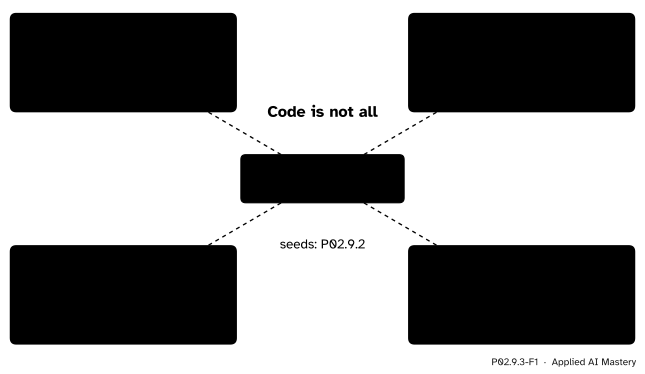
Restart and Run All proves that a notebook’s code rebuilds its results on your machine, with your files. A reader has the code but not the rest. Four things travel badly.
P02.9.3-F1
What a result depends on besides its code, and the tool that pins each one down.
The data. If the file changes, so do the results. A fingerprint notices any change.
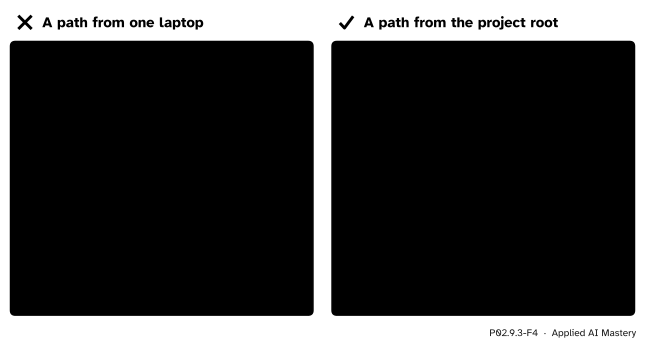
The paths./Users/ama/Desktop/... exists on one laptop only. A path built from the project’s own folder exists wherever the project is copied.
The versions. Libraries change their defaults and their random streams between releases. Record which ones ran, and pin them.
The machine. Floating-point sums can differ in the last digits. Compare with a tolerance, never with ==.
Build it up
Step 1. One folder per project. Keep the notebook, the data and the list of requirements under one project root folder. The file requirements.txt (P01.5.3) sits at the top and marks it.
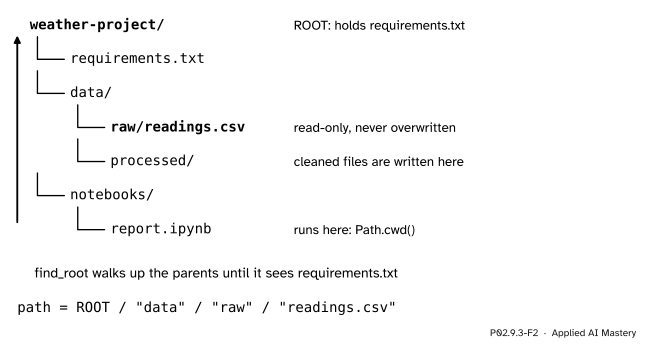
Step 2. Find the root from wherever the notebook runs. When Jupyter runs a notebook, the kernel’s current folder is the notebook’s own folder: Path.cwd(). Walk up its parents until one holds requirements.txt. That folder is ROOT.
Step 3. Build every path from the root. In pathlib the / operator joins parts of a path, so ROOT / "data" / "raw" / "readings.csv" names the same file on every machine the project is copied to, whatever the folders above ROOT are called.
P02.9.3-F2
Up from the notebook to the marker file, then down to the data. Raw data are only ever read; what the notebook makes goes into another folder.
Step 4. Keep raw data read-only. The raw file is the evidence. Clean it into a new file in data/processed, never on top of itself, and on macOS or Linux make it read-only with chmod a-w.
Step 5. Fingerprint the raw file, and record the versions. Store the file’s SHA-256 digest in the notebook and assert it on every run; print the library versions at the top. Writing down the libraries and versions a result needs is what Rule et al. (2019, Rule 5) call recording dependencies.
The formal statement
NoteDefinition: fingerprint
A hash function\(h\) turns any sequence of bytes into a short value of fixed size, its digest. SHA-256 gives 32 bytes, written as 64 hexadecimal digits. A file’s fingerprint is the digest of its bytes.
Two facts make a fingerprint useful. First, \(h\) is a fixed rule: the same bytes always give the same digest, on any machine. So a fingerprint that changed proves the file changed. Second, SHA-256 is built so that a small edit scrambles the whole digest, and so that nobody can find two files with the same digest in practice. Such pairs must exist, since there are far more possible files than the \(2^{256}\) digests, but a changed file that keeps its digest is not a risk worth counting.
Why a simple checksum is not enough. Try the rule “add up the bytes, mod 256”. Addition does not care about order, so any rearrangement of the same bytes gives the same sum. Swapping two digits, 21 for 12, or two rows of a file, leaves the sum unchanged: exactly the edits a tired person makes.
NoteThe rule of np.allclose
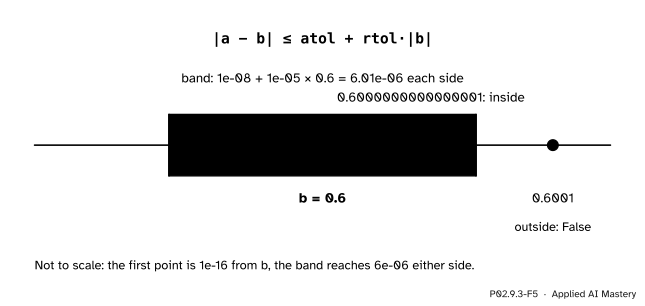
np.allclose(a, b) is true when every pair of entries satisfies
with the defaults \(\texttt{atol} = 10^{-8}\) and \(\texttt{rtol} = 10^{-5}\).
So the tolerance grows with the size of \(b\): about five significant figures for ordinary numbers, and an absolute floor of \(10^{-8}\) near zero. Since only \(\abs{b}\) appears on the right, swapping a and b can, in rare cases, change the answer.
P02.9.3-F5
The tolerance band of np.allclose around \(b = 0.6\). A difference in the last digit is far inside it; a real change of \(10^{-4}\) is far outside.
Worked example
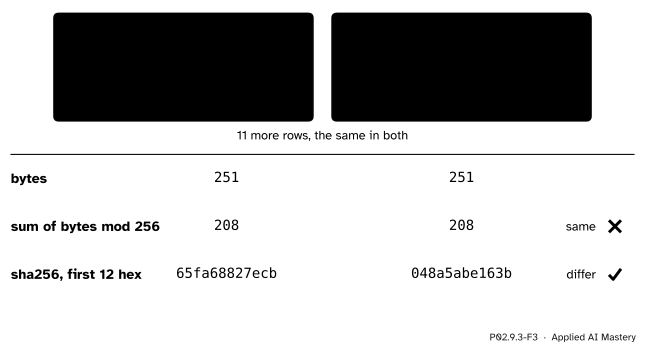
The readings file is edited by mistake: Monday’s coast reading 21 becomes 12. Which check notices?
The file holds a header line and the 12 readings, one per line, 251 bytes in all. Only the second line changes, from mon,coast,21,rain to mon,coast,12,rain.
The toy checksum. The characters 2 and 1 are the bytes 50 and 49. In either order they add to \(50 + 49 = 99\), and every other byte is untouched. So the sum of all 251 bytes is the same, and so is the sum mod 256: 208 for both files. The edit goes unseen.
SHA-256. The original file’s digest starts 65fa68827ecb; the edited file’s starts 048a5abe163b. A single swapped pair changes every visible digit.
P02.9.3-F3
One swapped pair of digits. The sum of the bytes cannot see it; the fingerprint can.
The station mean is what the edit damages. The coast column was 21, 27, 27, 29 with mean \(104 / 4 = 26\); with 12 it is \(95 / 4 = 23.75\). Had the notebook asserted its fingerprint, it would have stopped at the first cell instead of reporting 23.75.
Code
A small project in a temporary folder: a marker file, a raw data file and a notebooks folder.
import hashlibimport tempfilefrom pathlib import Pathimport numpy as npimport pandas as pdCSV ="""day,station,temp,skymon,coast,21,rainmon,hill,19,rainmon,valley,26,cloudytue,coast,27,cleartue,hill,23,cleartue,valley,28,cloudywed,coast,27,clearwed,hill,18,cloudywed,valley,30,clearthu,coast,29,clearthu,hill,20,cloudythu,valley,32,clear"""work = tempfile.TemporaryDirectory()project = Path(work.name) /"weather-project"(project /"data"/"raw").mkdir(parents=True)(project /"data"/"processed").mkdir()(project /"notebooks").mkdir()(project /"requirements.txt").write_text("numpy==2.5.4\npandas==3.1.1\n", encoding="utf-8")(project /"data"/"raw"/"readings.csv").write_bytes(CSV.encode("utf-8"))def find_root(start, marker="requirements.txt"):"""The nearest folder at or above `start` that holds `marker`."""for folder in [start, *start.parents]:if (folder / marker).exists():return folderraiseFileNotFoundError(f"no {marker} in {start} or above")ROOT = find_root(project /"notebooks") # as if the notebook ran therepath = ROOT /"data"/"raw"/"readings.csv"readings = pd.read_csv(path)print(path.relative_to(ROOT).as_posix(), readings.shape)print(readings.groupby("station")["temp"].mean().to_dict())
The file was written with write_bytes, so its bytes are the same on every system. A text file written on Windows can turn each line ending into two bytes, which changes its fingerprint.
Now the two checks of the worked example, on a copy with the edit.
In a real notebook the expected digest is written into the code once, and checked on every run:
EXPECTED ="65fa68827ecb12b2683892b4d577869acf106e94cb552ffd902d001695c7f4b8"assert fingerprint(path) == EXPECTED, "the raw data have changed"print("raw data as expected")
raw data as expected
Next, what ran. session_info() reads the Python version from sys and each library’s version from importlib.metadata (P01.5.3); check_pins compares them with the lines of a requirements file.
import sysfrom importlib.metadata import versiondef session_info(packages=("numpy", "pandas")): info = {"python": ".".join(str(n) for n in sys.version_info[:3])}for name in packages: info[name] = version(name)return infodef check_pins(text):"""Lines 'name==version' whose version differs from the one installed.""" wrong = []for line in text.splitlines():if"=="in line: name, wanted = line.strip().split("==")if version(name) != wanted: wrong.append((name, wanted, version(name)))return wronginfo = session_info()print(info)pins ="".join(f"{name}=={v}\n"for name, v in info.items() if name !="python")print(pins, check_pins(pins), check_pins("numpy==1.0.0"))
The printed versions are the ones that built this page; on your machine they may differ, and then check_pins on the site’s requirements says which.
Last, the machine’s last digits. Floating-point addition rounds after every step, so the order of the additions can change the last digit. A library may add in a different order on another machine or with another number of threads.
a = (0.1+0.2) +0.3b =0.1+ (0.2+0.3)print(a, b, a == b, np.allclose(a, b))print("band:", 1e-08+1e-05*abs(b), " 0.6001 close?", np.allclose(0.6001, b))
This module’s interactive, the run-order sandbox, is in lesson P02.9.1. It shows the one source of difference that this lesson does not remove: the order of the runs. Everything here assumes a notebook that already passes Restart and Run All.
Pitfalls
P02.9.3-F4
Wrong beside right. The absolute path names a folder on one laptop; the path from the root names a place inside the project, wherever the project lives.
“Absolute paths are safer: they always point to the same file.”
They point to the same place on one machine. Copy the project to a colleague’s laptop, a server or the machine that builds a website, and the folders above the project are named differently. A path from the project root survives the copy.
“I clean the raw file in place, so there is only one version to worry about.”
Then the evidence is gone. If the cleaning had a bug, nothing is left to rerun it on, and the fingerprint check can no longer tell a changed source from a changed cleaning step. Read raw, write processed.
“The two results differ in the 16th digit, so one of them is wrong.”
Both can be right. Floating-point addition depends on the order of the additions, and a different library version, processor or number of threads can change that order. Compare with np.allclose, and say in the text how many digits matter. For a model’s accuracy that is a few; for a unit test of a formula it may be many more.
Check yourself
Recall
1. Name four things besides its code that a notebook’s result depends on.
Show answer
The data it reads, the paths it reads them from, the versions of the libraries it runs on, and the machine’s floating-point rounding (with the seeds of P02.9.2 as a fifth).
2. How does find_root find the project folder?
Show answer
It starts at the current folder and walks up its parents until it finds one that holds the marker file, here requirements.txt.
3. Why does a sum of the bytes miss a swapped pair of digits, when SHA-256 does not?
Show answer
Addition ignores order, so the same bytes in another order give the same sum. SHA-256 depends on the order of the bytes, and any change scrambles its digest.
4. What does session_info() record, and where are the versions pinned?
Show answer
The Python version and the installed versions of NumPy and pandas; they are pinned with == in requirements.txt.
5. What inequality does np.allclose(a, b) test, with which defaults?
Show answer
\({\abs{a - b}} \le\)atol + rtol\({\cdot \abs{b}}\), with atol\(= 10^{-8}\) and rtol\(= 10^{-5}\).
Exercises
1.★ A notebook in weather-project/notebooks/ reads ../data/raw/readings.csv. It works in Jupyter. Why may it fail when the same code is moved into a script that is run from the project root, and what is the fix?
Show solution
A relative path is read from the current folder. Run from notebooks/, .. is the project root; run from the root itself, .. is the folder above it, where there is no data. The fix is to find the root once with find_root(Path.cwd()) and build every path from it.
2.★★ Show that the byte sum also misses the swap of two whole rows, then name an edit it does catch.
Show solution
Swapping two rows only reorders the bytes of the file, and a sum does not depend on order, so it is unchanged. It catches an edit that changes a byte’s value without a compensating change, such as 21 becoming 22: the byte 1 (49) becomes 2 (50), and the sum goes up by 1, from 208 to 209. SHA-256 catches both edits.
3.★★★ With the default tolerances, is np.allclose(1e-9, 0) true? Is np.allclose(1e-9, 2e-9) true? Does relative closeness explain both answers?
Show solution
Take \(a = 10^{-9}\). For \(b = 0\) and then for \(b = {2 \times 10^{-9}}\):
Both are true. Yet \({2 \times 10^{-9}}\) is twice \(10^{-9}\), a relative difference of 50%. The absolute floor atol decides both cases. For quantities that are tiny by nature, such as probabilities of rare events, set atol yourself, or atol=0.
Summary card
Pin down the data, the paths, the versions and the tolerance.
Raw data are read, never written; assert its hashlib.sha256 digest.
session_info() prints versions; requirements.txt pins them with ==.
np.allclose: \({\abs{a - b}} \le\)atol + rtol\({\cdot \abs{b}}\), not ==.
Sources and next steps
Sources. Each was opened and checked against this lesson on 15 November 2026.
Python Software Foundation, pathlib: the slash operator creates child paths (Operators); parents and relative_to (Methods and properties); Path.cwd() (Expanding and resolving paths); exists and read_bytes.
Python Software Foundation, hashlib: sha256() creates a SHA-256 hash object (Hash algorithms), and hexdigest() returns the digest as a string of hexadecimal digits of double length (Hash objects), 64 for SHA-256.
Python Software Foundation, importlib.metadata: version() returns an installed distribution’s version as a string (Distribution versions) and raises PackageNotFoundError when it is not installed.
NumPy developers, numpy.allclose, NumPy 2.5 manual: the defaults rtol=1e-05 and atol=1e-08, the inequality in the Notes, and the remark that it is not symmetric in a and b.
Next.P02.9.4 From scratchpad to report puts the pieces together in a notebook that reruns with no one watching. Environments and containers, which pin the whole machine, are P06.6.