Clean hand-typed labels such as ’ Coast’ and ‘HILL’ with a comprehension, then with the vectorised .str methods that pass missing values through. Split codes into columns, and pull the number out of ‘21.5 C’ with a first regular expression.
P02.7.3L1 Core25 minIn review (what this means)
The maths and code on this page are checked by automated tests on every change, but an independent reader has not signed it off yet. Spot a mistake or a confusing step? Tell us.
Clean a column of labels with Python string methods in a comprehension, then with .str.strip().str.lower(), and explain why the .str version survives missing values.
Explain why unclean labels give a group-by, and a model, more groups than there are things.
Use .str.contains, .str.replace and .str.split(expand=True) on a text column, and convert the pieces to numbers.
Read the regular expression (.? part by part and use it with .str.extract to pull the number out of entries such as ‘21.5 C’.
The question
Six readings were typed by hand, and the station column reads ' Coast', 'HILL ', 'valley', 'coast ', 'hill', 'valley'. You can see three stations. A group-by sees five, and so would a model that learns one weight per label. The temperature column has a second problem: it reads '21.5 C', '27 C', 'n/a', '30.1C'. How do you clean a whole column of text in one line, and pull the numbers out?
From the last lesson
1. How does ts.resample("W").mean() label its rows?
Show answer
By the Sunday that closes each week: weekly bins are closed and labelled on the right.
2. How many missing values does ts.rolling(3).mean() have, and where are they?
Show answer
Two, on the first two rows, where the window of 3 rows is not yet full.
Intuition
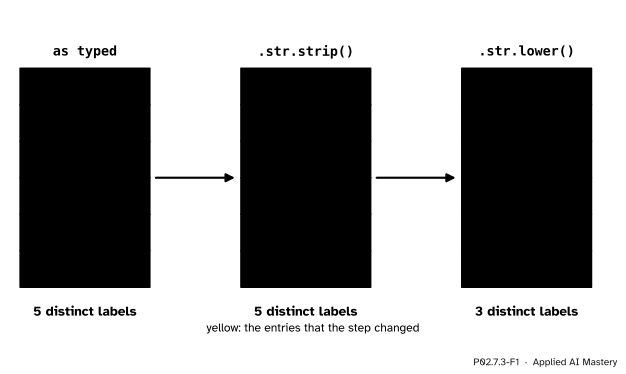
To a computer, two labels are the same only if they are the same characters. ' Coast' has a space in front and a capital C; 'coast ' has a space at the end. So they are different keys. The cure is to put every label into one canonical form before using it: no spaces at either end, all lower case.
P02.7.3-F1
Two steps to one canonical form. Stripping removes the spaces at the ends; lowering removes the capitals. Only then do the six entries name three stations.
Each step is a string method from P01.7, applied to every entry of the column. pandas gives a column of text a .str accessor, a set of string methods that act on every entry at once and return a new column, as .dt did for dates in lesson P02.7.1.
Build it up
Step 1. A comprehension.[s.strip().lower() for s in typed] cleans the list, one string at a time. It is plain Python and it works, until the column holds a missing value. A missing entry is NaN, a float, and NaN.strip() raises AttributeError.
Step 2. The vectorised version.typed.str.strip().str.lower() gives the same six labels and passes a missing value through as NaN. In pandas 3 a column of text has dtype str, and its missing values are NaN.
Step 3. Search and replace..str.contains("ill") gives a boolean column, True where the text contains ill; with dtype str a missing value gives False. .str.replace(" C", "") removes a literal piece of text. Both are masks and fixes you can apply in one line.
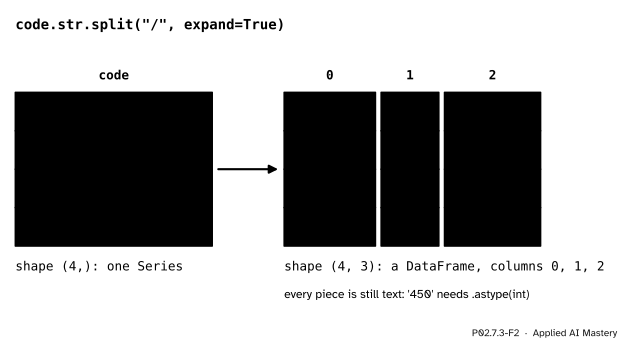
Step 4. Split into columns. The station table of P02.5.4 could have arrived as codes such as 'hill/450/upland'. .str.split("/", expand=True) cuts every entry at its separators and lays the pieces out as the columns of a DataFrame.
P02.7.3-F2
expand=True turns the pieces into columns. Every piece is still text until you convert it.
Step 5. A pattern, not a piece.'21.5 C', '27 C' and '30.1C' have no common separator: the space comes and goes. What they share is a shape: some digits, maybe a dot and more digits. A regular expression describes such a shape, and .str.extract returns the part of each entry that matches it.
The formal statement
NoteDefinition: the str accessor and a regular expression
For a Series s of text, s.str.<method>(...) applies the string method to every entry and returns a new Series. Missing values are skipped: an entry that is NaN gives NaN, or False for a method that returns True or False, such as contains or startswith.
s.str.split(sep, expand=True) returns a DataFrame with one column per piece. s.str.replace(pat, repl) treats pat as literal text unless regex=True is passed.
A regular expression (a regex) is a pattern of text. In it \d matches one digit, \. matches a dot, + means one or more of what comes before, * zero or more, and ? zero or one. Brackets ( ) make a group, the part to keep.
s.str.extract(pattern, expand=False) returns, for each entry, the text matched by the one group in the pattern at its first match, or NaN where nothing matches.
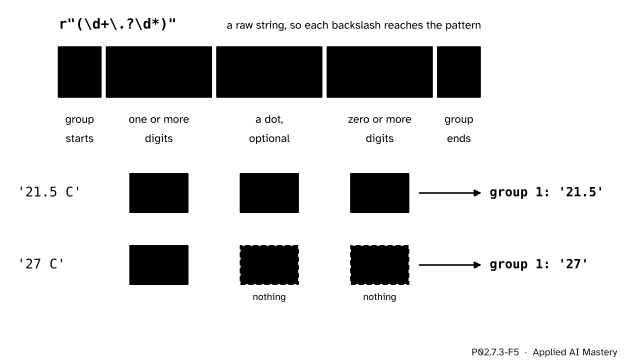
Read the pattern (\d+\.?\d*) from left to right, one part at a time.
P02.7.3-F5
The pattern part by part. The optional dot and the digits after it match .5 in '21.5 C' and nothing at all in '27 C'.
Fact 1: the pattern matches both forms. In '21.5 C', \d+ takes as many digits as it can, 21, and stops at the dot. \.? takes the dot. \d* takes 5 and stops at the space. The group holds '21.5'. In '27 C', \d+ takes 27; \.? finds no dot and, being optional, takes nothing; \d* finds no digit and takes nothing, which * allows. The group holds '27'.
Fact 2: an entry with no digit gives NaN.\d+ needs at least one digit, so 'n/a' has no match anywhere, and extract writes NaN for it.
Fact 3: the result is still text.extract returns the matched characters, '21.5', not the number 21.5. pd.to_numeric turns the column into numbers, and a missing value stays missing.
Write patterns as raw strings, r"(\d+\.?\d*)". In an ordinary string Python itself reads backslashes as escapes, and the Regular Expression HOWTO calls the resulting mess “the backslash plague”.
Worked example
Clean the six station labels and group the temperatures; then turn the logger’s text into numbers.
Labels. Strip: ' Coast' loses its front space and 'HILL ' and 'coast ' lose their end spaces, so three entries change. Lower: 'Coast' becomes 'coast' and 'HILL' becomes 'hill'. The six labels are now coast, hill, valley, coast, hill, valley: three distinct labels. With the temperatures 21, 19, 26, 27, 23, 28, the group means are coast (21 + 27) / 2 = 24, hill (19 + 23) / 2 = 21 and valley (26 + 28) / 2 = 27.
P02.7.3-F3
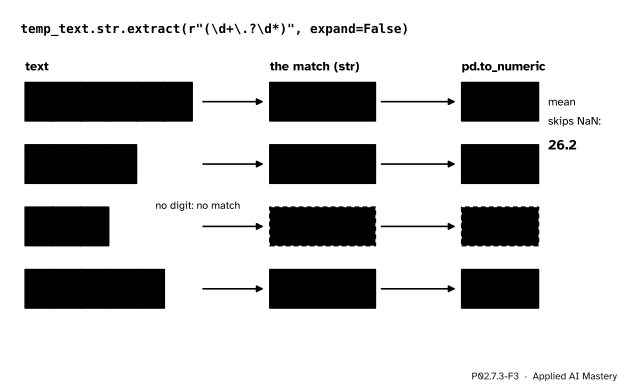
The trace of extract on four logger entries. The match is yellow; no match gives NaN.
Numbers. The pattern finds '21.5', '27', nothing, and '30.1' (with no space before the C, \d* simply stops at the letter). After pd.to_numeric the column is 21.5, 27.0, NaN, 30.1. The pandas mean skips the missing value: (21.5 + 27.0 + 30.1) / 3 = 78.6 / 3 = 26.2. Compare the tool of P02.5.1: pd.to_numeric(errors="coerce") on the raw text turns every one of these four entries into NaN, because none of them is a bare number.
Code
From scratch with a comprehension, then with .str.
import numpy as npimport pandas as pdtyped = pd.Series([" Coast", "HILL ", "valley", "coast ", "hill", "valley"])temps = pd.Series([21, 19, 26, 27, 23, 28])by_hand = [s.strip().lower() for s in typed]clean = typed.str.strip().str.lower()print(by_hand)print(clean.tolist(), clean.dtype)print(typed.nunique(), "->", clean.nunique())print(temps.groupby(clean).mean())
A missing value: the comprehension fails, the accessor passes it through.
with_gap = pd.Series([" Coast", None, "valley"])try: [s.strip().lower() for s in with_gap]exceptAttributeErroras error:print("comprehension:", type(error).__name__)print(with_gap.str.strip().str.lower().tolist())print(with_gap.str.contains("a").tolist())
  station  elevation_m     zone
0   coast            5  lowland
1    hill          450   upland
2  valley          120  lowland
3    lake          300   upland
['str', 'int64', 'str']
['21.5', '27', nan, '30.1']
[21.5, 27.0, nan, 30.1] 26.2
4
Models of text, from spam filters to language models, start with exactly this kind of normalising: lower case, trimmed, with the numbers pulled out, so that one word or one category is one feature and not five.
Explore
This module’s interactive, Resample and roll, lives in lesson P02.7.2. Text has no interactive of its own: try the methods of this lesson on your own messy column, and count nunique() before and after each step.
Pitfalls
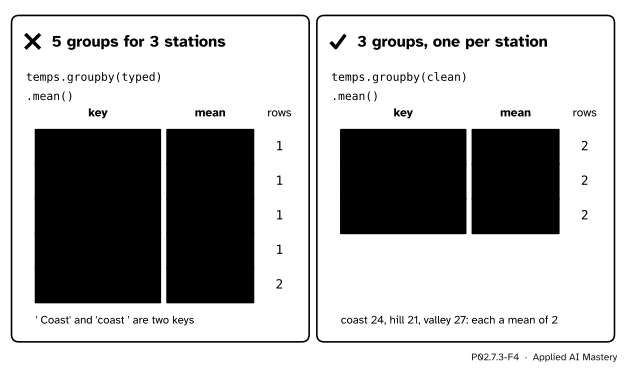
P02.7.3-F4
Wrong beside right. On the labels as typed, each spelling is a group of its own; after cleaning, each station is one group.
“The labels look the same, so they are the same.”
A space or a capital letter makes a different key. A group-by then splits one station into several groups, each with fewer rows and a less reliable mean. A model is hit the same way: the encoding of lesson P02.7.4 would make ' Coast' and 'coast ' two separate features, each learned from half the data. Check nunique() and value_counts() on every text column before you group or encode it.
“(\d+) is enough to find a number.”
It stops at the first character that is not a digit, so '21.5 C' gives '21' and the decimal part is lost without a word. A pattern must describe every form the numbers take: the optional dot and decimals here, and a minus sign if a reading can fall below zero.
“str.replace uses a regular expression.”
Not by default. In pandas 3 regex=False is the default, so .str.replace(".", "") removes literal dots: '21.5 C' becomes '215 C', a wrong number that looks fine. Pass regex=True only when you mean a pattern, and check a few results by eye.
Check yourself
Recall
1. Why does [s.strip() for s in col] fail on a column with a missing value, while col.str.strip() does not?
Show answer
The missing value is NaN, a float, which has no strip method. The .str methods skip missing values and return NaN for them.
2. How many distinct labels do ' Coast', 'HILL ', 'valley', 'coast ', 'hill', 'valley' have before and after .str.strip().str.lower()?
Show answer
Five before (valley appears twice) and three after: coast, hill and valley.
3. What does 'hill/450/upland' become under .str.split("/", expand=True), and what type are the pieces?
Show answer
One row with three columns, 'hill', '450' and 'upland'. All three are text; '450' needs astype(int) to become a number.
4. In a regular expression, what do \d, +, * and ? mean?
Show answer
\d is one digit; + one or more of the thing before; * zero or more; ? zero or one.
5. What does .str.extract(r"(\d+\.?\d*)", expand=False) give for 'n/a', and why?
Show answer
NaN. The pattern needs at least one digit, and 'n/a' has none, so there is no match.
Exercises
1.★ The column sky = pd.Series(["Rain ", "rain", " RAIN"]) is cleaned with sky.str.strip().str.lower(). What does value_counts() show after the cleaning, and what would it show without it?
Show solution
After cleaning, all three entries are 'rain', so value_counts() shows one row: rain, 3. Without it, the three spellings are three different labels, each with count 1.
2.★★ The column ["coast: 5 m", "hill: 450 m", "valley: 120 m"] holds each station’s elevation. Write one line that gives the elevations as integers, and one that gives the station names.
Show solution
Numbers: col.str.extract(r"(\d+)", expand=False).astype(int) gives 5, 450 and 120. Here \d+ is right, since the elevations are whole numbers. Names: col.str.split(":", expand=True)[0] gives 'coast', 'hill' and 'valley'; so does col.str.extract(r"([a-z]+)", expand=False), where [a-z]+ means one or more lower-case letters.
3.★★★ A winter logger writes '-3.5 C'. What does the lesson’s pattern extract, and why is that dangerous? Fix the pattern, and check that the fix still gives the right answers for '21.5 C', '27 C' and 'n/a'.
Show solution
(\d+\.?\d*) cannot match the minus sign, so the search skips it and matches '3.5': the reading flips from −3.5 to 3.5 °C with no error. Add an optional minus at the front of the group: (-?\d+\.?\d*). Now -? takes the minus when there is one and nothing otherwise, so '-3.5 C' gives '-3.5', while '21.5 C' and '27 C' give '21.5' and '27' as before, and 'n/a' still has no digit and gives NaN.
Summary card
Clean text to one canonical form before you group or encode it.
P02.7.3-F1
Strip, lower: five spellings become three stations.
s.str.strip().str.lower(): every entry at once; missing values pass through.
s.str.split(sep, expand=True): one column per piece, still text.
s.str.extract(r"(\d+\.?\d*)", expand=False), then pd.to_numeric.
\d digit, + one or more, * zero or more, ? optional, ( ) the group to keep.
Sources and next steps
Sources. Each was opened and checked against this lesson on 15 November 2026.
pandas developers, Working with text data, pandas 3.1.1 User Guide. Since pandas 3.0 the inferred dtype of a collection of strings is str, with np.nan as its missing value; the string methods exclude missing values automatically, and with this dtype a method with boolean output gives False for a missing value; split with expand=True returns a DataFrame; extract with one group and expand=False returns a Series.
pandas developers, pandas.Series.str.replace, pandas 3.1.1 API reference. The signature has regex=False as the default, and with regex=False the pattern is treated as a literal string.
Python Software Foundation, Regular Expression HOWTO. \d matches any decimal digit; * matches zero or more times, + one or more and ? once or zero times; parentheses make groups, numbered from 1; and raw strings are the cure for “the backslash plague”.