loc picks rows and columns by label, iloc by position. See why a label slice keeps its end, filter rows with a boolean Series, order them with sort_values, and write with one .loc so that copy-on-write never loses the change.
P02.4.3L1 Core25 minIn review (what this means)
The maths and code on this page are checked by automated tests on every change, but an independent reader has not signed it off yet. Spot a mistake or a confusing step? Tell us.
Select single cells, rows, columns and blocks of a DataFrame with loc by label and with iloc by position.
Explain why a label slice includes its end while a position slice leaves its stop out, using get_loc.
Filter rows with a boolean Series, combine conditions with & and |, and order rows with sort_values.
Change values with a single .loc[rows, column] assignment, and recognise chained assignment as a write that copy-on-write loses.
The question
Of the days when the coast was warmer than 25 degrees, which was coolest on the hill? And if the hill logger turns out to have been faulty on exactly those days, how do you change those readings in the table and be sure the change has stuck? Picking rows and columns by a rule, and writing into them, is how every training set is cut out of a larger table.
From the last lesson
1. What does wide.mean(axis=1) return for the weather table?
Show answer
One mean per day, indexed by the days: 22, 26, 25 and 27. The named axis, the columns, disappears.
2. Why does wide.range = spread not add a column?
Show answer
A new name after a dot becomes an ordinary attribute of the object; pandas warns and makes no column. Square brackets, wide['range'] = spread, add one.
Intuition
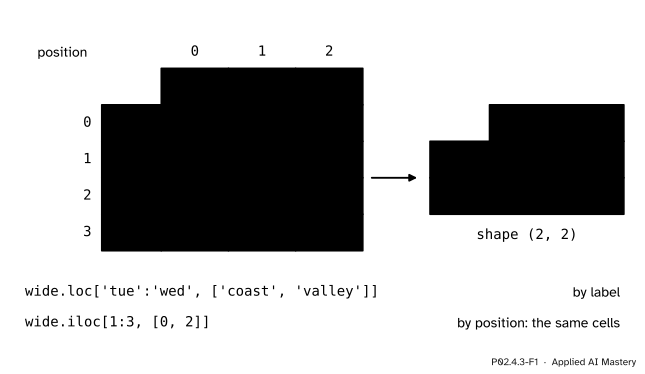
Every cell of a DataFrame has two addresses. One is made of labels: the row label and the column label, ('tue', 'hill'). The other is made of positions: row 1, column 1, as in the array temps. pandas gives each kind of address its own tool. loc selects by label and iloc selects by position, and both take the rows first and the columns second.
P02.4.3-F1
The same four cells, named two ways. loc uses the labels on the edges of the table; iloc uses the positions, counted from 0.
Use loc when you know what you want by name, which is nearly always: “Tuesday to Wednesday, coast and valley” reads like the question. Use iloc when position itself is the point: “the first row”, “the last three columns”.
Build it up
Step 1. One cell. Give a row and a column, separated by a comma, as for a 2-D array.
Step 2. Whole rows and columns. A single label keeps one row or one column and drops that axis, leaving a Series. A colon means “all of them”, and a list of labels keeps several, in the order you list them.
coast     27
hill      23
valley    28
Name: tue, dtype: int64
{'mon': 19, 'tue': 23, 'wed': 18, 'thu': 20}
     valley  coast
thu      32     29
mon      26     21
A row comes out as a Series whose index is the column labels and whose name is the row label, tue. A column comes out indexed by the days.
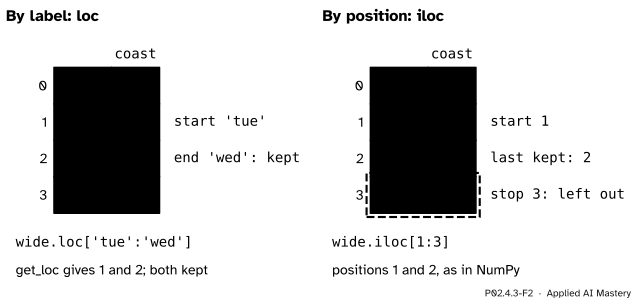
Step 3. Slices: where they stop. A slice of labels runs from the first label to the last and includes both. A slice of positions includes its start and leaves its stop out, as every Python and NumPy slice does.
P02.4.3-F2
A label slice keeps its end; a position slice leaves its stop out. wide.loc['tue':'wed'] and wide.iloc[1:3] are the same two rows.
The reason is in how loc works. It is a label look-up followed by a position look-up: wide.index.get_loc('tue') is 1 and wide.index.get_loc('wed') is 2, and loc then keeps positions 1 to 2 inclusive, which is iloc[1:3]. Labels have no arithmetic, so there is no “label after 'wed'” for you to write as a stop; you name the last label you want instead.
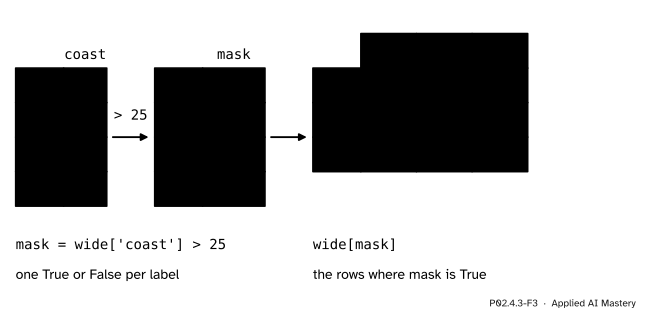
Step 4. Rows that pass a test. A comparison on a column gives a Series of True and False with the same index, one answer per row. Used inside square brackets, it keeps the rows marked True, exactly as a boolean mask did for arrays in P02.3.2.
P02.4.3-F3
A comparison gives one True or False per label; the mask then keeps whole rows.
Conditions combine with & (and), | (or) and ~ (not), each condition in its own brackets: wide[(wide['coast'] > 25) & (wide['hill'] < 20)] keeps only Wednesday.
Step 5. Ordering rows.wide.sort_values('hill') returns the rows in increasing order of the hill column, and ascending=False reverses it. The rows move whole, with their labels, so after sorting the labels and the positions no longer agree: Wednesday is now at position 0.
The formal statement
NoteSelection with loc and iloc
df.loc[rows, cols] selects by label. Each of rows and cols may be one label, a list of labels, a label slice a:b (which includes both a and b), a boolean Series, or : for all. df.iloc[rows, cols] selects by position, with the same forms written in positions; its slices leave the stop out. Leaving out cols means all columns. One label or position on an axis drops that axis; a list or a slice keeps it.
Writing goes through the same addresses: df.loc[rows, cols] = value changes those cells of df itself.
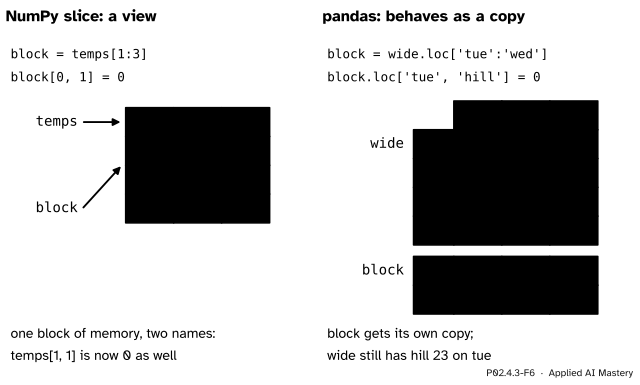
Copy-on-write. In NumPy a slice is a view, a second window onto the same numbers, so writing through the slice changes the original (P02.3.4). pandas 3 has one rule instead: any DataFrame or Series that is derived from another, by loc, iloc, a mask or anything else, behaves as a copy. Writing into it never changes the table it came from. Where it can, as for a slice of rows, pandas still saves memory: the two share their numbers until one of them is written, and only then is a real copy made. This is called copy-on-write. (A mask or a list of labels makes a real copy at once, as it does in NumPy.)
P02.4.3-F6
The same write in NumPy and in pandas. The NumPy slice shares its numbers with temps; the pandas selection behaves as a copy, so wide is untouched.
So the only way to change a table is to write into the table itself, with one loc or iloc on its own name.
Worked example
Of the days with a coast reading above 25, which had the coolest hill, and by how much was the hill cooler than the coast that day?
P02.4.3-F4
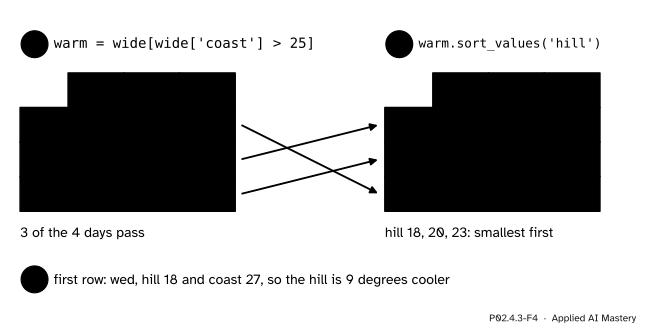
The query in three steps: keep the warm-coast days, order them by the hill reading, read the first row.
1. The test wide['coast'] > 25 is False for Monday (21) and True for Tuesday, Wednesday and Thursday (27, 27, 29). So warm = wide[wide['coast'] > 25] has three rows.
2. Their hill readings are 23, 18 and 20. Sorting by hill puts them in the order 18, 20, 23, which is Wednesday, Thursday, Tuesday.
3. The first row is Wednesday: hill 18, coast 27. The hill was \({27 - 18 = 9}\) degrees cooler.
In pandas the first two steps are one line each, and the answer is read with iloc, because “first” is a position: warm.sort_values('hill').iloc[0] is Wednesday’s row, and .name gives its label.
Code
From scratch first: loc on the plain array temps, with a dictionary for each edge of the table. A label slice turns into the positions from its first label to its last, plus one for the stop.
row_pos = {'mon': 0, 'tue': 1, 'wed': 2, 'thu': 3}col_pos = {'coast': 0, 'hill': 1, 'valley': 2}def loc_block(first_row, last_row, columns): start = row_pos[first_row] stop = row_pos[last_row] +1# the last label is included cols = [col_pos[name] for name in columns]return temps[start:stop][:, cols]print(loc_block('tue', 'wed', ['coast', 'valley']))
[[27 28]
 [27 30]]
Filtering by hand is a loop that keeps the labels whose row passes; pandas does it with a mask.
keep = []for day in days:if wide.loc[day, 'coast'] >25: keep.append(day)warm = wide[wide['coast'] >25]print(keep, list(warm.index))coolest = warm.sort_values('hill').iloc[0]print(coolest.name, coolest['coast'] - coolest['hill'])
['tue', 'wed', 'thu'] ['tue', 'wed', 'thu']
wed 9
Now the write from the question, both ways. warnings.catch_warnings records any warning so that we can print its kind; the copy keeps wide itself unchanged for the next lesson.
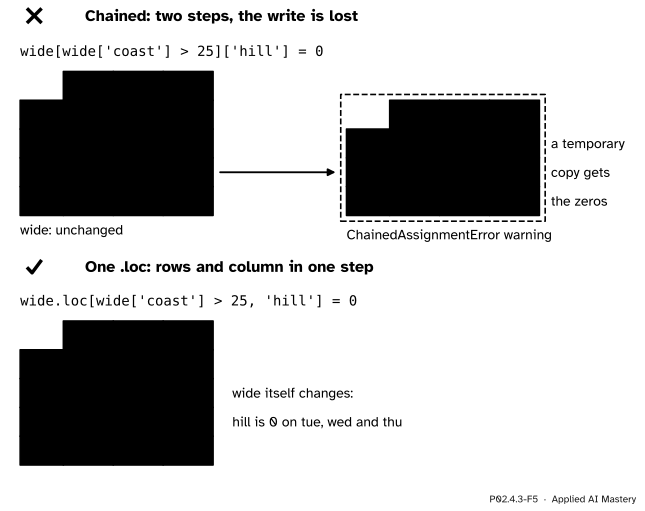
The chained version raised a ChainedAssignmentError warning and left every hill reading as it was. The single .loc changed the three warm days and nothing else.
Explore
This module’s interactive, the label aligner, lives in the next lesson. Labels decide not only what you select but which numbers meet when two Series are added.
Pitfalls
P02.4.3-F5
Wrong beside right. The chained write lands in a temporary copy that is thrown away; one .loc with rows and column together writes into wide.
“df[mask]['hill'] = 0 sets those hill readings to 0.”
It is two operations. df[mask] makes a new, temporary DataFrame; ['hill'] = 0 then writes into that temporary, which is thrown away at once. Under copy-on-write this never changes df, and pandas warns with ChainedAssignmentError. Put the rows and the column into one look-up: df.loc[mask, 'hill'] = 0. In NumPy the chained form temps[1:3][:, 1] = 0does change temps, because both steps are views; that difference is why the habit has to change.
“wide.loc[1] is the second row.”
loc reads labels, and this table has no label 1, so it raises KeyError: 1. For “the second row” write wide.iloc[1]. The reverse mistake, wide.iloc['tue'], raises a TypeError, because iloc accepts only positions.
“I can combine conditions with and.”
(wide['coast'] > 25) and (wide['hill'] < 20) asks Python whether a whole Series is true, which has no single answer, so it raises ValueError: The truth value of a Series is ambiguous. Use &, | and ~, which act row by row, and put each condition in brackets, because & binds more tightly than >.
Check yourself
Recall
1. What do wide.loc['tue', 'hill'] and wide.iloc[1, 1] return, and why are they the same?
Show answer
Both return 23. The label 'tue' is at position 1 and the label 'hill' is at position 1, so the two addresses name the same cell.
2. How many rows does wide.loc['tue':'wed'] have, and how many does wide.iloc[1:2] have?
Show answer
Two and one. A label slice includes its end; a position slice leaves its stop out.
3. What does wide['coast'] > 25 return?
Show answer
A boolean Series with the same index as wide: False for mon and True for tue, wed and thu.
4. Why does wide[mask]['hill'] = 0 leave wide unchanged under pandas 3?
Show answer
wide[mask] is a new object that behaves as a copy (copy-on-write), so the second step writes into that temporary copy. pandas warns with ChainedAssignmentError.
5. After wide.sort_values('hill'), what are .index[0] and .iloc[0]['hill']?
Show answer
'wed' and 18: Wednesday has the lowest hill reading and moves to position 0, taking its label with it.
Exercises
1.★ Write each selection twice, once with loc and once with iloc: (i) Thursday’s valley reading; (ii) the hill column for Monday to Wednesday; (iii) the last two days, all columns.
Show solution
(i) wide.loc['thu', 'valley'] and wide.iloc[3, 2], both 32.
(ii) wide.loc['mon':'wed', 'hill'] and wide.iloc[0:3, 1], both the Series 19, 23, 18. The label slice names Wednesday as its end; the position slice needs the stop 3.
(iii) wide.loc['wed':'thu'] and wide.iloc[-2:].
2.★★ List, in order, the days on which the valley was at least 28 and the hill was below 23, sorted from the warmest valley to the coolest. Give the pandas line too.
Show solution
Valley at least 28: tue (28), wed (30), thu (32). Hill below 23 among those: wed (18) and thu (20); Tuesday’s hill is 23, which is not below 23. Sorted by valley, warmest first: thu, then wed.
3.★★★ The hill logger read 1 degree too low on every day with a coast reading above 25. Write the correction, and explain why each of these two attempts fails: warm = wide[wide['coast'] > 25]; warm['hill'] += 1 and wide['hill'][wide['coast'] > 25] += 1.
Show solution
The correction is one .loc on the table itself: wide.loc[wide['coast'] > 25, 'hill'] += 1, which turns 23, 18, 20 into 24, 19, 21 and leaves Monday’s 19 alone.
The first attempt changes warm, a separate object that behaves as a copy of three rows of wide; wide is untouched, and no warning is given, because warm is a table in its own right. The second attempt is chained assignment: wide['hill'] is a new Series that behaves as a copy, the write goes into it, and pandas warns with ChainedAssignmentError.
Summary card
loc selects by label, iloc by position: rows first, then columns.
P02.4.3-F1
Two addresses for every cell.
loc is get_loc then iloc, so a label slice keeps its end: loc['tue':'wed'] is iloc[1:3].
Filter with a boolean Series: wide[wide['coast'] > 25]; combine with &, |, ~.
Order with sort_values('hill'); labels move with their rows.
Every selection behaves as a copy. Write with one .loc[rows, column] = value, never a chain.
Sources and next steps
Sources. Each was opened and checked against this lesson on 15 November 2026.
pandas development team, Indexing and selecting data, pandas User Guide, version 3.1.1. Selection by label: .loc is primarily label based, and with a slice of labels both the start and the stop are included. Selection by position: .iloc is integer position based and its slices exclude the upper bound. Boolean indexing: the operators |, & and ~ must be grouped with parentheses.
pandas development team, Migration guides, pandas User Guide, version 3.1.1, section Copy-on-Write: it is the default and only mode in pandas 3.0; any DataFrame or Series derived from another behaves as a copy; chained assignment never works and raises a ChainedAssignmentError warning, and loc is the alternative.
Wes McKinney, Python for Data Analysis, chapter 5, 3rd edition, open access, section 5.2: indexing, selection and filtering, and selection on a DataFrame with loc and iloc.