import numpy as np

def fresh():
    """A new copy of the running array, so that each example starts clean."""
    return np.array([[21, 19, 26],
                     [27, 23, 28],
                     [27, 18, 30],
                     [29, 20, 32]])

temps = fresh()Views and copies
A NumPy slice is a view, a second window onto the same memory, so writing through it changes the original, while a mask or a list of positions returns a copy. Build a View class in plain Python, test arrays with np.shares_memory and .base, and avoid scaling a slice of training data in place.
Before this lesson: P02.3.3 Picking and ordering with integer arrays
What you will be able to do
- Say for any index whether NumPy returns a view or a copy, and predict whether a later write changes the original array.
- Build a View class in plain Python that reads and writes a shared list through a start and a step.
- Test two arrays with np.shares_memory and .base, and break the link with .copy().
- Explain why b = a copies nothing and why reshape and .T usually return views.
- Recognise and repair the bug of scaling a slice of the training data in place.
The question
You take the first three rows of a dataset as a training set and centre them in place. Later the full dataset gives strange answers: its first three rows have been centred too. In P01.6.4 a slice of a list was a safe, separate copy. Why is a slice of an array not, which indexes do give a copy, and how can you tell before the damage is done?
From the last lesson
1. What is np.argsort([19, 23, 18, 20])?
Show answer
[2, 0, 3, 1]: the positions of the values in increasing order.
2. What is temps[[0, 1], [2, 0]]?
Show answer
[26, 27], the two entries temps[0, 2] and temps[1, 0]. The lists are paired, not crossed.
Intuition
The running array, the invented noon temperatures of the course, once more:
An array is two things: a block of memory holding its numbers one after another, row after row, and a rule for reading it: where to start, the shape, and how far to jump to reach the next row or the next column. Many arrays can share one block, each with its own rule.
A slice can always be written as such a rule. temps[1:3] starts three numbers into the block and reads six of them as two rows of three. So NumPy does not copy anything: it makes a new array object with a new rule and the same block. That is a view. A mask cannot be written as such a rule, because the kept cells sit at irregular places, so NumPy copies them into a new block: a copy.
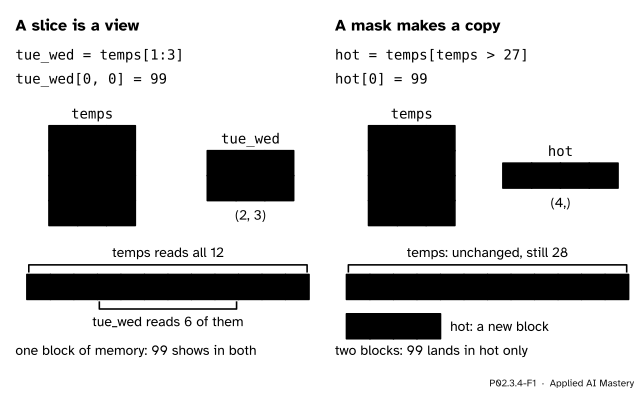
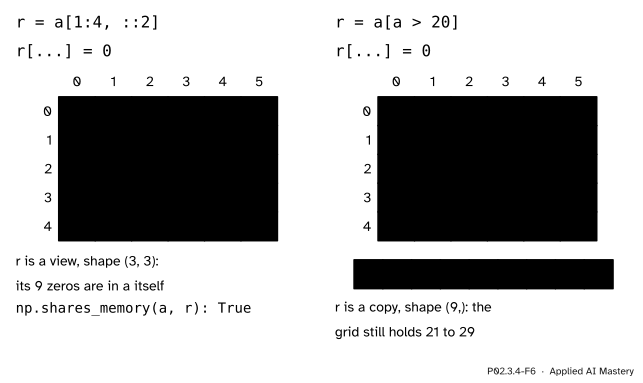
Left: a slice is a second window onto the same memory, so a write through it shows in the original. Right: a mask’s result has memory of its own, so a write to it changes only the copy.
Build it up
Step 1. A view in plain Python. A view holds no numbers of its own. It holds the shared list, a start and a step, and works out where each of its items lives: item \(k\) is at position \({\text{start} + k \cdot \text{step}}\) of the list. Python calls view.__getitem__(k) for view[k] and view.__setitem__(k, v) for view[k] = v, special methods in the sense of P01.9.3, so a class with those two methods can be indexed like a list.
class View:
    """Items start, start + step, ... (stop left out) of a list, read and written in place."""

    def __init__(self, data, start, stop, step=1):
        self.data, self.start, self.stop, self.step = data, start, stop, step

    def __len__(self):
        return len(range(self.start, self.stop, self.step))

    def __getitem__(self, k):
        if not 0 <= k < len(self):
            raise IndexError("view index out of range")
        return self.data[self.start + k * self.step]

    def __setitem__(self, k, value):
        if not 0 <= k < len(self):
            raise IndexError("view index out of range")
        self.data[self.start + k * self.step] = value
Monday’s and Tuesday’s readings, one after the other, make a list of six. With step 3 the view jumps one day at a time, so it reads the coast column:
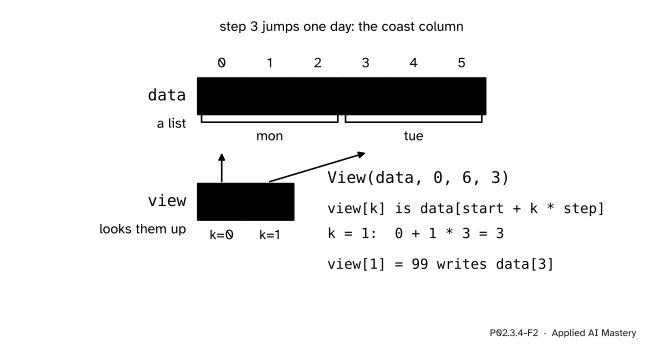
A view is a rule, not a container. Reading view[1] looks up position \({0 + 1 \cdot 3 = 3}\) of the shared list, and writing view[1] changes that same slot.
data = [21, 19, 26, 27, 23, 28]
coast = View(data, 0, 6, 3)
print(len(coast), coast[0], coast[1])
coast[1] = 99
print(data)

piece = data[0:6:3]          # a list slice is a new list
piece[0] = 0
print(piece, data)
2 21 27
[21, 19, 26, 99, 23, 28]
[0, 99] [21, 19, 26, 99, 23, 28]The list slice data[0:6:3] made a new list, so changing it left data alone. The view wrote into data.
Step 2. NumPy slices are views. tue_wed = temps[1:3] behaves like the class: writing tue_wed[0, 0] = 99 changes temps[1, 0].
Step 3. Asking NumPy. np.shares_memory(a, b) answers whether two arrays share any memory. A view also records, in its .base attribute, the array that owns the memory it reads; for an array that owns its memory, .base is None.
Step 4. Breaking the link. .copy() makes a new block holding the same numbers. After safe = temps[1:3].copy(), writing to safe never reaches temps.
Step 5. b = a copies nothing at all. As in P01.2.2, assignment points a second name at the same object. There is one array, not even a view: b is a is True.
Step 6. Reshape and transpose. temps.reshape(3, 4) reads the same twelve numbers with rows of four, and temps.T reads them column by column. Both are new rules over the same block, so both are usually views.
The formal statement
Why every slice can be a view. For temps the strides are 24 bytes along the rows (three numbers of 8 bytes) and 8 along the columns, so the entry at row \(i\), column \(j\) sits
\[ 24\,i + 8\,j \ \text{bytes} \]
from the start of the block. Now take the view v = temps[r::k], which starts at row \(r\) and steps \(k\) rows. Its entry at row \(i\), column \(j\) is temps[r + k*i, j], which sits at
\[ \begin{aligned} &24\,(r + k\,i) + 8\,j \\ &\quad= 24\,r + (24\,k)\,i + 8\,j \end{aligned} \]
bytes. That is again “a fixed start plus row number times one stride plus column number times another”: a start of \({24\,r}\) bytes, a row stride of \({24\,k}\) and a column stride of 8. Every slice, on any axis, keeps this form, so NumPy only has to record the new start and strides.
Why a mask cannot be a view. The readings above 27 sit at flat positions 5, 8, 9 and 11 of the block. The gaps between them are 3, 1 and 2. No single stride walks through exactly those cells, so the only way to make them an array is to copy them out.
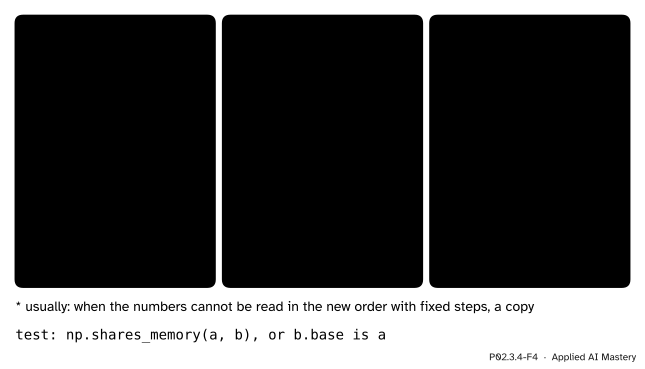
What each operation gives back. Arithmetic such as a + 1 always builds a new array, and so does every method that produces new numbers.
Go deeper: when reshape has to copy
temps.T is a view: it reads the block with the strides swapped, 8 bytes to the next row and 24 to the next column. Now flatten it, temps.T.reshape(12). Reading the transpose row by row visits the memory positions 0, 3, 6, 9, 1, 4, 7, 10, 2, 5, 8, 11: steps of 3, then a jump back of 8. No single stride produces that walk, so this reshape must copy, and np.shares_memory says False. That is the “usually” in the definition. Strides and memory layout are treated properly in P08.5.
Worked example
Trace six lines and say after each one what temps[1] holds.
tue_wed = temps[1:3]                  # 1
hot = temps[temps > 27]               # 2
tue_wed[0, 0] = 99                    # 3
hot[0] = 0                            # 4
safe = temps[1:3].copy()              # 5
safe[0, 0] = 27                       # 6
Line 1 is a slice, so tue_wed is a view of rows 1 and 2. Line 2 is a mask, so hot is a copy, [28, 30, 29, 32] in memory of its own. Line 3 writes through the view: the cell it names is row 1, column 0 of temps, which becomes 99. Line 4 writes into the copy, so hot becomes [0, 30, 29, 32] and temps is untouched; in particular temps[1, 2] is still 28. Line 5 copies rows 1 and 2, including the 99. Line 6 changes the copy only.
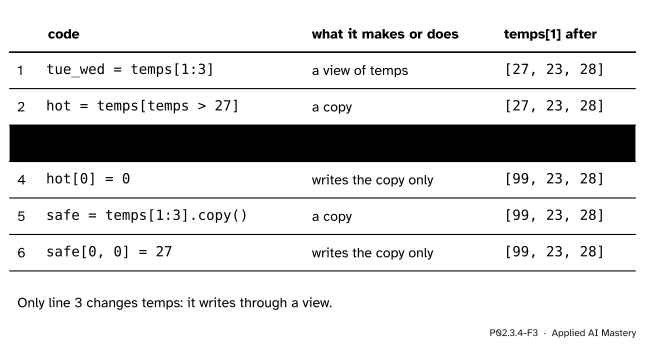
The worked example as a trace. Of the three writes, only the one through a view reaches temps.
So at the end temps[1] is [99, 23, 28]. The only line that changed temps was line 3, and the test for it is np.shares_memory(temps, tue_wed), which is True, while it is False for hot and safe.
Code
The worked example, run and checked:
temps = fresh()
tue_wed = temps[1:3]
hot = temps[temps > 27]
tue_wed[0, 0] = 99
hot[0] = 0
safe = temps[1:3].copy()
safe[0, 0] = 27
print(temps[1], hot, safe[0])
print(np.shares_memory(temps, tue_wed), tue_wed.base is temps)
print(np.shares_memory(temps, hot), hot.base is None, np.shares_memory(temps, safe))
[99 23 28] [ 0 30 29 32] [27 23 28]
True True
False True FalseAssignment, reshape, transpose and the strides:
temps = fresh()
b = temps
print(b is temps)
print(np.shares_memory(temps, temps.reshape(3, 4)), np.shares_memory(temps, temps.T))
print(np.shares_memory(temps, temps.T.reshape(12)))
print(temps.strides, temps[::2].strides, temps.T.strides)
True
True True
False
(24, 8) (48, 8) (8, 24)temps.strides is (24, 8): 24 bytes to the next row, 8 to the next column. temps[::2] steps two rows, so its row stride is 48; the transpose swaps the two strides.
The bug of the question, and two repairs. NumPy’s mean is the plain average, dividing by \(n\):
X = fresh().astype(float)            # astype makes a new float array
X_train = X[:3]                      # a view of the first three rows
X_train -= X_train.mean(axis=0)      # writes into X as well
print(X)

X = fresh().astype(float)
X_train = X[:3].copy()               # repair 1: a copy
X_train -= X_train.mean(axis=0)
X_other = X[:3]
X_other = X_other - X_other.mean(axis=0)   # repair 2: build a new array
print(X[0], X_train[0], X_other[0])
[[-4. -1. -2.]
[ 2. 3. 0.]
[ 2. -2. 2.]
[29. 20. 32.]]
[21. 19. 26.] [-4. -1. -2.] [-4. -1. -2.]The first print shows the first three rows of X centred (the column means of the training rows are 25, 20 and 28) and the fourth row raw. After either repair X keeps its readings. Repair 2 works because X_other - m builds a new array and the name is then pointed at it, while -= writes into the memory the name already points to.
Explore
P02.3-X1
Index explorer
Choose slices for the rows and columns, or a mask, or a list of row positions, and read the shape of the result. Then press the button that writes zeros into the result: after a slice the grid changes, after a mask or a list it does not. Predict which before you press.
Pitfalls
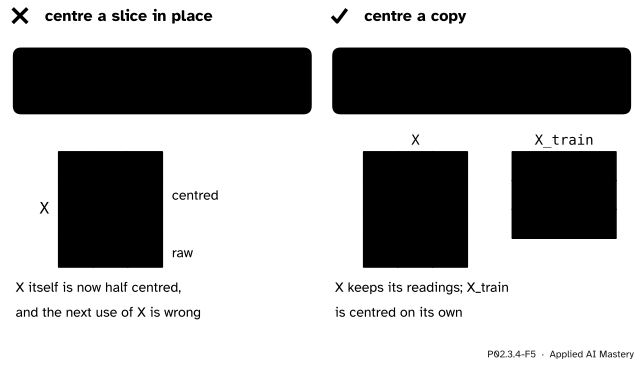
Wrong beside right. X[:3] is a view, so centring it in place centres the first three rows of the whole dataset. A copy, or a new array built with -, leaves X whole.
“A slice is a copy, as it is for lists.”
For lists, yes (P01.6.4). For arrays, a slice is a view, and a write through it changes the original. NumPy chose this so that taking a mini-batch or a column of a large dataset costs nothing: no numbers are copied.
“X_train -= m and X_train = X_train - m do the same thing.”
They give the same numbers in X_train but not the same memory. -= writes into the block X_train already reads, which for a view is the block of X. X_train - m builds a new array, and the assignment points the name at it. In machine learning this is how the full dataset gets changed without a single line that mentions it.
“temps[temps > 27][0] = 0 sets the first hot reading to 0.”
temps[temps > 27] is a copy, and [0] = 0 writes into that copy, which is then thrown away; temps does not change and nothing warns you. Write through the mask in one step, temps[temps > 27] = 0, which assigns into temps. pandas meets the same chained form in P02.4.3, where copy-on-write makes every selection behave as a copy.
“b = a gives me a backup to experiment on.”
It gives a second name for the same array, so every change made through b is a change to a. Use b = a.copy().
Check yourself
Recall
1. Is temps[1:3] a view or a copy?
Show answer
A view: a slice is basic indexing and shares the memory of temps.
2. Is temps[temps > 27] a view or a copy, and why?
Show answer
A copy. The kept cells sit at irregular places in memory, so no start and stride can describe them, and NumPy copies them into a new block.
3. Name two ways to test whether b is a view of a.
Show answer
np.shares_memory(a, b), which is True when they share memory, and, when a owns its memory, b.base is a.
4. After b = temps and b[0, 0] = 0, what is temps[0, 0]?
Show answer
b = tempscopies nothing: both names point to the one array.
5. How do you make a slice that can be changed without touching the original?
Show answer
Call .copy() on it, for example safe = temps[1:3].copy().
Exercises
1. ★ Starting each time from a fresh temps, say whether c is a view or a copy and whether temps changes.
(a) c = temps[:, 0] then c[0] = 0.
(b) c = temps[[0]] then c[0, 0] = 0.
(c) temps[temps < 20] = 20.
Show solution
(a) temps[:, 0] is a slice with an integer, basic indexing, so c is a view; temps[0, 0] becomes 0.
(b) temps[[0]] uses a list of positions, advanced indexing, so c is a copy of shape (1, 3); temps does not change.
(c) There is no c: this is an assignment through a mask, which writes into temps itself. The readings 19 and 18 become 20.
2. ★★ temps.strides is (24, 8). How many bytes from the start of the block is temps[2, 1], and which number of the flat block is it? What are the strides of temps[:, ::2] and of temps.T, and why?
Show solution
\({24 \cdot 2 + 8 \cdot 1 = 56}\) bytes. Each number takes 8 bytes, so that is number \({56 / 8 = 7}\), counting from 0, of the flat block 21, 19, 26, 27, 23, 28, 27, 18, ...: the value 18, Wednesday on the hill.
temps[:, ::2] still moves 24 bytes to the next row but skips every second column, so its strides are (24, 16). temps.T reads the same block with the axes swapped: moving to the next row of the transpose is moving to the next column of temps, 8 bytes, and the next column of the transpose is the next row of temps, 24 bytes, so (8, 24).
3. ★★★ Write standardise(X_train), which returns the columns of X_train centred and divided by their standard deviation (NumPy’s, dividing by \(n\)) and never changes its argument. Test it on X_train = X[:3] with X = temps.astype(float), and give the first column of the result.
Show solution
def standardise(X_train):
    return (X_train - X_train.mean(axis=0)) / X_train.std(axis=0)
Subtraction and division build new arrays, so neither X_train nor the X it is a view of changes; np.shares_memory(X, standardise(X[:3])) is False. The first column of the training rows is 21, 27, 27, with mean 25 and deviations \({-4, 2, 2}\). The variance is \({(16 + 4 + 4)/3 = 8}\), so the standard deviation is \({\sqrt{8} \approx 2.828}\), and the first column of the result is about \({-1.414}\), 0.707, 0.707. Writing it with -= and /= on X_train would have changed X.
Summary card
A slice is a view onto the same memory; a mask or a list of positions is a copy.
One block and two windows, or two blocks.
- Views: slices, integers on some axes,
None,.T, and usuallyreshapeandravel. - Copies: masks, position lists,
.copy(),astype, arithmetic results. a[index] = valways writes intoa;b = acopies nothing.- Test with
np.shares_memory(a, b)orb.base is a; break the link with.copy().
Sources and next steps
Sources. Each was opened and checked against this lesson on 15 November 2026.
- NumPy developers, Copies and views, NumPy user guide: the definitions of a view and a copy; basic indexing always creates views and advanced indexing always creates copies;
reshapecreates a view where possible and a copy otherwise, for example after a transpose;ravelagainstflatten;.baseisNonefor a copy. - NumPy developers, Indexing on ndarrays, NumPy user guide, Slicing and striding: all arrays made by basic slicing are views, unlike the slices of Python lists; Single element indexing: an integer for every axis returns an array scalar; and Advanced indexing: it always returns a copy of the data.
- NumPy developers, numpy.shares_memory, NumPy reference: determines whether two arrays share memory, for example
np.shares_memory(x[::2], x)isTrue. - Jake VanderPlas, Python Data Science Handbook, The Basics of NumPy Arrays, sections Subarrays as no-copy views and Creating copies of arrays: slices return views, unlike list slices, which lets large datasets be processed in pieces without copying the buffer.
Next. P02.4, DataFrames and Series, listed on the course page, puts labels on the rows and columns of an array; its lesson on loc and iloc sets these NumPy views against pandas, where every selection behaves as a copy.
This lesson unlocks
Your progress is saved in this browser only. No account, no tracking.