valley = [26, 28, 30, 32]
coast = [21, 27, 27, 29]

diff = []
for i in range(len(valley)):
    diff.append(valley[i] - coast[i])
print(diff)
[5, 1, 3, 3]Before this lesson: P01.6 Lists, tuples, dictionaries and sets P01.10 Iterators, generators and comprehensions
The valley station read 26, 28, 30 and 32 degrees at noon on four days, and the coast station read 21, 27, 27 and 29. How much warmer was the valley each day? With two Python lists, valley - coast is an error and valley + coast glues eight numbers together. A photo of 1,000 by 1,000 pixels holds three million numbers and a model can hold millions of weights. What container lets arithmetic act on every number at once, and keeps millions of numbers packed tight?
This course uses one small world from start to finish: three weather stations, coast, hill and valley, read at noon on Monday 3 to Thursday 6 March 2025. Every number in it is invented for teaching. The valley readings are [26, 28, 30, 32] and the coast readings [21, 27, 27, 29].
Lesson P01.6.4 drew a list as a row of slots, each holding an arrow to an object that lives somewhere else in memory. That is what makes a list so flexible: a slot can point to a number, a string or another list. It is also what makes a list slow and bulky for numbers. To add two lists of readings, Python must follow two arrows for every position, look at each object to find out what type it is, and make a brand-new object for every answer.
A NumPy array stores the numbers themselves, side by side in one block of memory, and every number in it has the same type. That type is called the array’s dtype (data type). Because every entry has the same type and the same width, the array knows where entry 3 is without following any arrow, and one loop written in fast compiled code can work through the whole block.
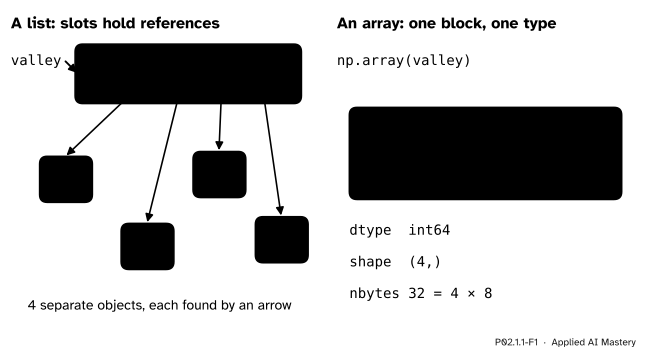
The same four readings as a list and as an array. The list holds four arrows to four objects; the array holds the four numbers in one block, each 8 bytes wide, all of type int64.
Every dataset in machine learning ends up in this form. A table of examples is an array of numbers, an image is an array of pixel values, and the weights of a neural network are arrays. NumPy is the library that provides them, and pandas, scikit-learn and the deep-learning libraries are all built on its arrays or on close copies of them.
Step 1. Element-wise, with a loop. To find how much warmer the valley was, pair the readings by position and subtract: position 0 with position 0, position 1 with position 1, and so on. A loop over the positions does exactly that.
valley = [26, 28, 30, 32]
coast = [21, 27, 27, 29]
diff = []
for i in range(len(valley)):
diff.append(valley[i] - coast[i])
print(diff)[5, 1, 3, 3]An operation done position by position like this is called element-wise. The comprehension [v - c for v, c in zip(valley, coast)] (P01.10) says the same thing in one line.
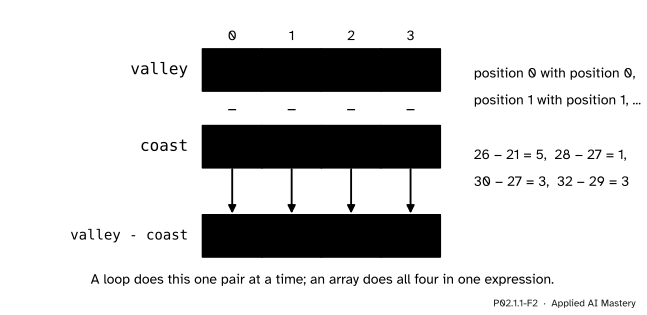
An element-wise difference pairs the entries by position. A loop does it one pair at a time.
Step 2. What the list operators do instead. For lists, + joins two lists end to end and * by a whole number repeats a list. Subtraction has no meaning for lists at all:
print(valley + coast)
print(coast * 2)
try:
    valley - coast
except TypeError:
    print("valley - coast: TypeError")
[26, 28, 30, 32, 21, 27, 27, 29]
[21, 27, 27, 29, 21, 27, 27, 29]
valley - coast: TypeErrorStep 3. The same with arrays. np.array copies the numbers of a list into a new array. On arrays, +, -, * and / are element-wise, and a single number combines with every entry:
import numpy as np

v = np.array(valley)
c = np.array(coast)
print(v - c)
print(c * 2)
# every coast reading in degrees Fahrenheit
print(c * 9 / 5 + 32)
[5 1 3 3]
[42 54 54 58]
[69.8 80.6 80.6 84.2]The loop has not gone away. It has moved inside NumPy, where it runs over numbers of one known type in compiled code, with no Python object made for any of them. Lesson P02.2.1 times the difference.
Step 4. Making arrays without typing every number. Five functions cover most needs.
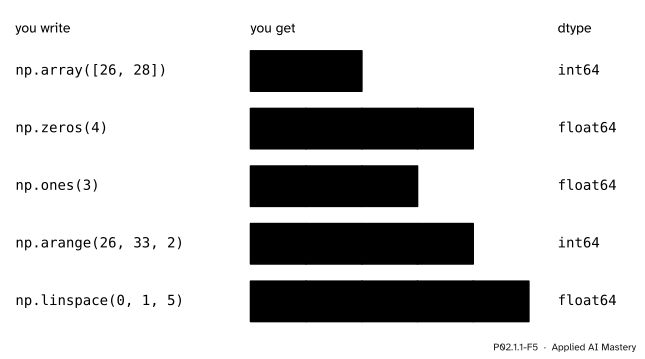
Five ways to make an array. A trailing dot, as in 0., is how NumPy prints a float that happens to be whole.
np.zeros(n) and np.ones(n) give n zeros or n ones, as floats unless you ask otherwise with dtype=int. They are the usual starting point for an array that a loop will fill. np.arange(start, stop, step) works like range: it starts at start, adds step, and stops before stop. np.linspace(a, b, n) gives n evenly spaced values from a to b, with both ends included.
Counting positions from 0, as the code does, for \({i = 0, 1, \dots, n - 1}\):
\[ (\cdata{\vect{a}} + \csecond{\vect{b}})_i = \cdata{a_i} + \csecond{b_i}, \qquad (\cparam{c}\,\cdata{\vect{a}})_i = \cparam{c}\,\cdata{a_i}. \]
The same pattern holds for \({-}\), \(*\), \(/\) and the comparisons. Lesson P02.2.3 extends “the same length” to arrays of different shapes; until then, both operands have the same length.
How many values np.arange gives. With a positive step, np.arange(start, stop, step) returns the values \({\text{start} + k \cdot \text{step}}\) for \({k = 0, 1, 2, \dots}\) for as long as they stay below stop. Write \(s\) for the start, \(e\) for the stop and \(d\) for the step. Value \(k\) is kept exactly when
\[ s + k\,d < e \quad\Longleftrightarrow\quad k < \frac{e - s}{d}. \]
The second form divides both sides of \({k\,d < e - s}\) by \(d\), which keeps the direction of \({<}\) because \({d > 0}\). The whole numbers \({k \ge 0}\) below \({(e - s)/d}\) are \(0, 1, \dots\) up to the last whole number under it, so their count is that number rounded up:
\[ n = \left\lceil \frac{e - s}{d} \right\rceil . \]
Where np.linspace puts its points. np.linspace(a, b, n) divides the gap from \(a\) to \(b\) into \({n - 1}\) equal steps of size \({(b - a)/(n - 1)}\), and point \(k\) is
\[ \begin{aligned} x_k &= a + k \cdot \frac{b - a}{n - 1}, \\ k &= 0, 1, \dots, n - 1. \end{aligned} \]
At \({k = 0}\) this gives \(a\), and at \({k = n - 1}\) the \({n - 1}\) cancels and it gives \(b\). So both ends are always included and you choose the count; with arange you choose the step, and the stop is left out.
Build the valley column with np.arange(26, 33, 2), by hand, then with np.linspace.
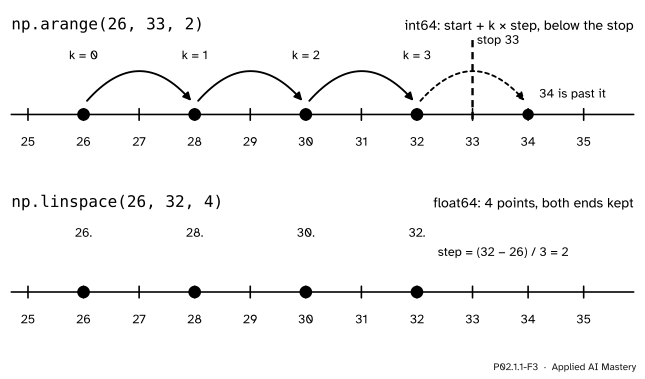
The worked example as a trace. Top: arange takes steps of 2 from 26 and stops before 33. Bottom: linspace is told to make four points from 26 to 32 and works out the step itself.
Here \({s = 26}\), \({e = 33}\) and \({d = 2}\), so the count is
\[ n = \left\lceil \frac{33 - 26}{2} \right\rceil = \lceil 3.5 \rceil = 4 . \]
The four values are \({26 + 0 \cdot 2 = 26}\), \({26 + 1 \cdot 2 = 28}\), \({26 + 2 \cdot 2 = 30}\) and \({26 + 3 \cdot 2 = 32}\). The next one, \({26 + 4 \cdot 2 = 34}\), is not below 33, so it is left out. The stop 33 itself would never have been reached: it is a fence, not a value. All inputs are whole numbers, so the array has dtype int64.
np.linspace(26, 32, 4) reaches the same four values from the other side. The step is \({(32 - 26)/(4 - 1) = 6/3 = 2}\), so the points are \({26 + 0 \cdot 2}\), \({26 + 1 \cdot 2}\), \({26 + 2 \cdot 2}\) and \({26 + 3 \cdot 2}\): 26, 28, 30 and 32 again. This time the stop 32 is included, because linspace always includes both ends, and the dtype is float64, because the step is worked out by division.
Finally, how much warmer was the valley each day? Subtract the coast array: [26, 28, 30, 32] minus [21, 27, 27, 29] is [5, 1, 3, 3], one difference per day, as the hook asked.
First from scratch: an element-wise difference that checks the lengths, and an arange built from a while loop, following the formal statement.
import math

def subtract(a, b):
    """Element-wise a - b for two lists of the same length."""
    if len(a) != len(b):
        raise ValueError("the lists must have the same length")
    return [x - y for x, y in zip(a, b)]

def my_arange(start, stop, step):
    """start, start + step, ... while the value stays below stop (step > 0)."""
    out = []
    k = 0
    while start + k * step < stop:
        out.append(start + k * step)
        k += 1
    return out

print(subtract(valley, coast))
print(my_arange(26, 33, 2), math.ceil((33 - 26) / 2))
[5, 1, 3, 3]
[26, 28, 30, 32] 4Now NumPy. Each array reports its dtype, its shape (here a single length, written (4,)) and how many bytes its numbers take.
a = np.arange(26, 33, 2)
b = np.linspace(26, 32, 4)
print(a, a.dtype)
print(b, b.dtype)
print(np.array_equal(a, b), a.shape, a.nbytes)
print(np.zeros(4), np.ones(3), np.linspace(0, 1, 5))
[26 28 30 32] int64
[26. 28. 30. 32.] float64
True (4,) 32
[0. 0. 0. 0.] [1. 1. 1.] [0. 0.25 0.5 0.75 1. ]np.array_equal compares values, so the integer array and the float array count as equal. a.nbytes is 32: four numbers of 8 bytes each, with nothing else stored per number. Lesson P02.1.4 explains where the 8 comes from.
This module’s interactive, the shape shifter, lives in lesson P02.1.3, once arrays have rows and columns to re-flow.
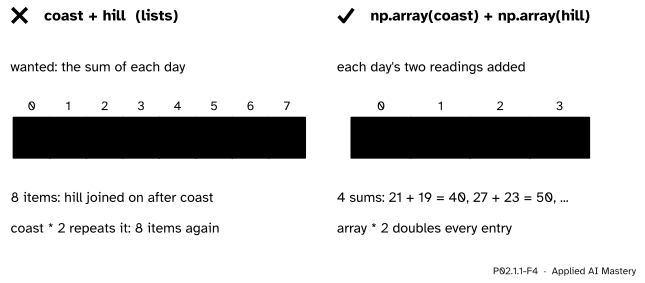
Wrong beside right. Left: + on two lists joins them. Right: + on two arrays adds them entry by entry.
“Adding two lists of numbers adds the numbers.”
+ on lists joins them end to end, and * 2 repeats a list. No error warns you: the result is a longer list, which a later step may quietly treat as data. Convert to arrays first, or write the loop.
“np.zeros(4) gives four integer zeros.”
np.zeros and np.ones give float64 unless told otherwise. That is usually right for an array that will hold averages or weights. When you need whole numbers, say so: np.zeros(4, dtype=int).
“np.arange with a step of 0.1 stops before the stop, like range.”
With a fractional step the count \({\lceil (e - s)/d \rceil}\) is computed in floating point, and tiny rounding errors can push it up by one. np.arange(1, 1.3, 0.1) gives four values, 1.0, 1.1, 1.2 and 1.3, even though 1.3 is the stop, because \({(1.3 - 1)/0.1}\) comes out as 3.0000000000000004 and rounds up to 4. The NumPy guide warns that the stop is sometimes included. When the step is not a whole number, use np.linspace and choose the count.
“np.array accepts any nested list.”
An array is a block of one shape, so every row must have the same length. np.array([[1, 2], [3]]) raises a ValueError in NumPy 2, because no rectangle fits those rows. Lesson P02.1.2 makes the idea of shape exact.
1. What does a slot of a Python list hold, and what does an entry of a NumPy array hold?
A slot of a list holds a reference (an arrow) to a separate object. An entry of an array is the number itself, stored side by side with the others in one block, all of one dtype.
2. What are [1, 2] + [3, 4] and np.array([1, 2]) + np.array([3, 4])?
The lists join: [1, 2, 3, 4]. The arrays add element-wise: array([4, 6]).
3. What dtype does np.zeros(3) have?
float64. Pass dtype=int for integer zeros.
4. Which values does np.arange(26, 33, 2) give, and why is 33 not among them?
26, 28, 30 and 32. arange stops before the stop value, and 33 is not of the form 26 + 2k anyway.
5. How does np.linspace(a, b, n) differ from np.arange?
You choose the number of points n, both ends a and b are included, and the step \({(b - a)/(n - 1)}\) is worked out for you. With arange you choose the step and the stop is left out.
1. ★ The hill readings are [19, 23, 18, 20]. With c = np.array([21, 27, 27, 29]) and h = np.array([19, 23, 18, 20]), what are c - h and (c + h) / 2? What would [21, 27, 27, 29] + [19, 23, 18, 20] give instead?
Position by position, c - h is \({21 - 19 = 2}\), \({27 - 23 = 4}\), \({27 - 18 = 9}\) and \({29 - 20 = 9}\): [2, 4, 9, 9]. The sums are 40, 50, 45 and 49, so (c + h) / 2 is [20.0, 25.0, 22.5, 24.5], a float64 array because / always gives floats. The two lists would join into the eight values [21, 27, 27, 29, 19, 23, 18, 20].
2. ★★ How many values does np.arange(5, 30, 4) give, and what are they? Check your count with the formula.
The count is \({\lceil (30 - 5)/4 \rceil = \lceil 6.25 \rceil = 7}\). The values are \({5 + 4k}\) for \({k = 0, \dots, 6}\): 5, 9, 13, 17, 21, 25 and 29. The next, \({5 + 4 \cdot 7 = 33}\), is not below 30.
3. ★★★ Let \({s < e}\) be whole numbers and let the whole number \({d \ge 1}\) divide \({e - s}\). Show that np.arange(s, e + 1, d) has \({(e - s)/d + 1}\) values, the same values as np.linspace(s, e, (e - s)/d + 1).
Write \({m = (e - s)/d}\), a whole number. By the count formula, np.arange(s, e + 1, d) has
\[ \begin{aligned} \left\lceil \frac{e + 1 - s}{d} \right\rceil &= \left\lceil m + \frac{1}{d} \right\rceil \\ &= m + 1, \end{aligned} \]
because \({0 < 1/d \le 1}\), so \({m + 1/d}\) lies above \(m\) and no higher than \({m + 1}\). Its values are \({s + kd}\) for \({k = 0, \dots, m}\), and the last is \({s + md = e}\). For np.linspace(s, e, m + 1) the step is \({(e - s)/m = d}\), so point \(k\) is \({s + kd}\) for \({k = 0, \dots, m}\): the same values. Only the dtype differs, int64 against float64.
An array is one block of numbers of one type, and its operators act on every entry.
A list points; an array holds.
+ joins and * 2 repeats.np.arange(s, e, d). \({s + kd}\) below \(e\): \({\lceil (e - s)/d \rceil}\) values, stop left out.np.linspace(a, b, n). \(n\) points from \(a\) to \(b\), both ends kept, as floats.Sources. Each was opened and checked against this lesson on 15 November 2026.
dtype; section “How to create a basic array” gives np.zeros, np.ones, np.arange(2, 9, 2) and np.linspace(0, 10, num=5), with floating point as the default dtype.arange is best used with integer arguments because, due to roundoff error, the stop value is sometimes included; linspace guarantees the number of elements and both end points; zeros defaults to float64.Next. P02.1.2 Shape, axes and dimensions puts the three stations side by side and gives the array rows and columns.
This lesson unlocks
P02.1.2 Shape, axes and dimensions